For teachers and instructors of students 13 and older
A jigsaw activity on one shared board: expert groups first, then home groups
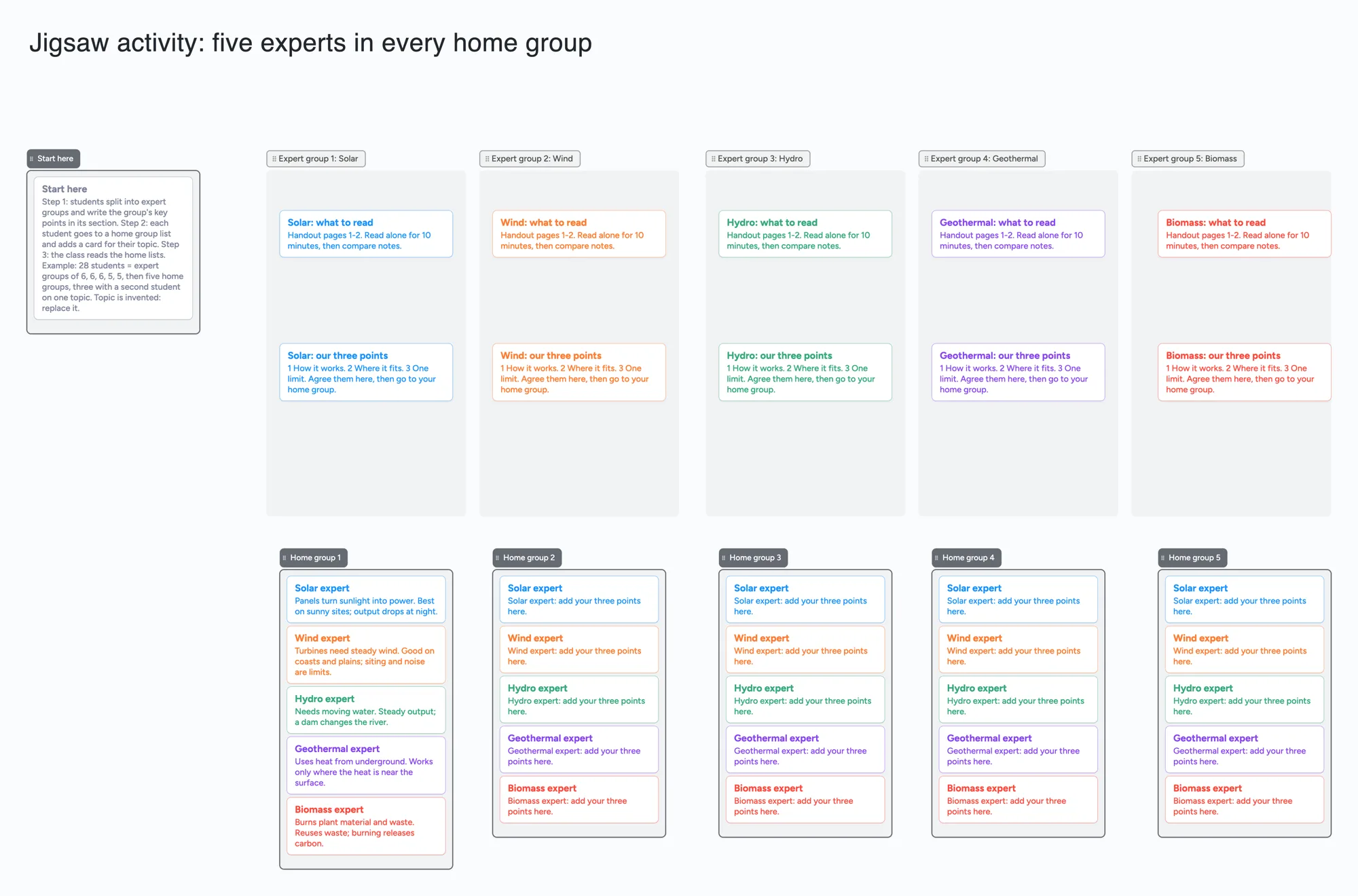
We make Instaboard, a free online board. A jigsaw activity has two group stages: students become experts on one piece of a topic, then regroup so each new group has one expert from every piece. Guides for it are mostly prose pages and printable organizers. This page gives you the activity already laid out on one board: a section for each expert group to agree its key points, and a list for each home group to collect one card from every expert. The topic is invented, five energy sources for a class of 28. The board does not move anyone between groups or keep time for the stages: you, Zoom or your learning system do the regrouping. Written for students 13 and older; check with a parent or your school before using a web tool for coursework.
Opens in your browser. Anyone can view; a free sign-in lets you edit.
Updated
The short answer
- One section per expert group, one list per home group. In the expert section the group writes its agreed points; in a home-group list each student adds a card for the topic they became expert in. Every home list ends up with one card per topic.
- What it is not: it does not assign students to groups, send people to a new group, or give each student a private page. The regroup step happens in the room, in Zoom or Teams breakout rooms, or in your learning system's group tools.
- Count the items before you copy it. The example is 6 lists, 36 cards and the title text box: 43 of your 150 free items. Sections, arrows and pen strokes don't count (our arithmetic).
- Pro lifts the limit: $5 a month billed yearly ($59.99 a year), or $7.99 monthly. The free plan keeps 5 boards, 150 items and 3 pictures per board.
- Anyone with the link can read it; writing takes a free sign-in. New boards start view-only. Set "Anyone with the link can edit" so students can add cards. Each student who opens the board counts it as one of their own 5 free boards.
How this differs from our class and breakout pages
We have two nearby pages. Both start from the same board and group idea; neither holds the second group stage that makes a jigsaw.
| Page | What the board holds | The question it answers |
|---|---|---|
| Jigsaw activity board (this page) | Expert sections, then home-group lists that take one card from each topic | How do students teach each other a topic in two group stages? |
| Whiteboard for Google Classroom | One question, four group lists, an exit question and a teacher checklist; the page is about posting the link in Classroom or Sites | How do I get one board in front of my class? |
| Whiteboard for Zoom and Teams breakout rooms | One board with a section per group; the page is about getting the link into every room | How do I get one board into every breakout room? |
Swipe the table sideways to see every column.
The shapes are those of each page's own text (our reading).
Those pages: whiteboard for Google Classroom and whiteboard for Zoom and Teams breakout rooms. Use them for posting the link and for rooms; this page is for the regroup.
How to run a jigsaw on one board
- Split the topic into pieces, one per expert group. The example has five energy sources. Put each piece's reading in the first card of its section.
- Make the expert groups and give each its section. Students read, compare notes and agree the group's points in the second card. The example asks for three: how it works, where it fits, one limit.
- Regroup. Each new group takes one person from every expert group. On the board these are the home-group lists; each student adds a card named for their topic and writes the points in their own words.
- Read across. A home list now shows every topic on one screen. Students ask each other questions from the cards.
- Close with the whole class. Ask a question that needs two topics at once, and keep the home lists as the notes.
- Share it. In the share menu set "Anyone with the link can edit" (new boards start view-only). Each student signs in free to write live, and the edits appear for others within seconds. Ask students to put their first name on each card, because the board records no per-student work.
The example's arithmetic for a class of 28: five topics make five home groups. Each home group needs one student per topic (25), and the other 3 students double up on three topics, so the expert groups are 6, 6, 6, 5 and 5. That is our arithmetic, not a rule from any guide.
What the jigsaw guides say
Each line is from the page named, read on November 19, 2026. None of these pages shows a date. Group sizes differ by source, so pick yours.
- The Teacher Toolkit: students form home groups of four, move to expert groups to study one piece, then return to teach their home group. It offers elementary and secondary Doc and Docx templates and a variation with an expert-group panel.
- Reading Rockets: home groups of 3 to 5. It links two PDF graphic organizers.
- AdLit: divides a large text into chunks that students work out together and then explain to classmates. It links a fillable PDF template.
- CUNY, "Develop a Jigsaw Activity" (PDF): says the activity works online asynchronously, online live, or in person. It uses expert groups of 3 to 4 (A, B, C), then new groups with one member from each, and suggests a Google doc or Padlet for the groups' conclusions.
- Utah State University Teach: gives step lists for Canvas (a group set for expert groups, then a second group set for jigsaw groups) and for Zoom (breakout rooms for expert groups, close them, then new rooms with one person from each). It says that depending on class length it might be best to spend most of a period in expert groups and do the jigsaw groups another day.
- TCEA's jigsaw site: a seven-step process starting with home groups of four, using a Google Doc to choose groups and Google Slides for the expert groups, then returning to home groups to present.
Which tool for which job
No ranking: these are different jobs.
- Moving students into new groups: Canvas group sets or Zoom breakout rooms, as Utah State's steps describe. This board has no group assignment.
- A printable organizer for each student: the PDFs and Doc templates from Reading Rockets, AdLit and The Teacher Toolkit.
- A slide per group: Google Slides, as TCEA's site and CUNY's examples use.
- A discussion thread per stage in a learning system: the forum approach CUNY describes.
- One visible place where expert points and home-group notes sit together: this board. A student signs in free to edit. It has no roster, no reminders for the stages and no grading.
How many cards fit
On this board the 6 lists and the title text box are 7 items before any card:
- 36 cards (the example): 7 + 36 = 43 of your 150 free items.
- A class of 28: each of the 25 home-group slots already has a placeholder card for the student to write over, and the 3 students who double up on a topic add one card each: 43 + 3 = 46. A student's own cards count toward that student's 150.
- A second topic in the same board (another 5 expert sections, 2 cards each): 43 + 10 = 53 before any home-group cards for it.
- The most the free plan holds: 150 - 7 = 143 cards, with nothing else on the account.
Sections, arrows and pen strokes are free. This is our arithmetic; Pro removes the item limit.
When another tool is the better choice
- You need the regroup done for you. The board can't assign students to groups; use group sets or breakout rooms.
- You need each student's work kept and graded. The board has no roster and records no per-student work.
- Your students are under 13. This page is written for 13 and older.
- You want a printed organizer. A PDF or Doc template is quicker to hand out.
- You need every student to join with no account. Writing on the board takes a free sign-in; reading doesn't.
Limits of the free plan for a jigsaw board
- Items. Each card and each list is 1 of your 150 free items, across all your boards. The example is 36 cards, 6 lists and the title text box, 43 in all. Sections, arrows and pen strokes don't count.
- Boards. The free plan includes 5 boards. Keep the whole activity on one board.
- Photos. 3 images per board. The example has none.
- Writing needs a free sign-in. A student who joins by link or code can add cards, and the board counts as one of their 5 boards. Someone who isn't signed in can read everything but can't change anything.
- Nothing stops a group editing another group's section. Ask each group to stay in its own.
- Offline. Changes made offline are kept and sync when you are back online.
Start from the ready board
It opens in your browser in a few seconds, with nothing to install. Sign in for free when you want to save it and share it.
Questions
Is there a free jigsaw activity template?
Yes, several. The Teacher Toolkit offers Doc and Docx templates, Reading Rockets and AdLit link PDF organizers, and the ready board here has an expert section per topic and a home-group list per group. The board is free within 5 boards and 150 items, and you open it and replace the example topic with yours.
How do I do a jigsaw activity online?
Make expert groups, give each its piece of the topic and a place to write its agreed points, then make new groups with one person from each expert group, and have each person teach their piece. CUNY's guide says the activity works online asynchronously or live, and Utah State's page gives Canvas and Zoom steps for the regrouping. A shared board holds the points and the notes; it does not move students between groups.
What size should jigsaw groups be?
The guides differ. The Teacher Toolkit uses home groups of four, Reading Rockets home groups of 3 to 5, and CUNY expert groups of 3 to 4. The size also follows your number of topics: with five topics, each home group has five students.
What is the difference between expert groups and home groups?
An expert group is the set of students who all study the same piece. A home group is the new group, with one student from each expert group, where each person teaches their piece. CUNY calls the second kind a jigsaw group, which is the same idea under another name.
How many items does a jigsaw board use on the free plan?
Each card and each list is one item of the 150 across all your boards. With 6 lists and the title text box, 36 cards is 43 items, and the most a board holds is 143 cards. That is our arithmetic. Sections and arrows are free.
Sources
- The Teacher Toolkit: Jigsaw (read November 19, 2026; page shows no date)
- Reading Rockets: Jigsaw (read November 19, 2026; page shows no date)
- AdLit: Jigsaw (read November 19, 2026; page shows no date)
- CUNY: Develop a Jigsaw Activity, PDF (read November 19, 2026; document shows no date)
- Utah State University Teach: Jigsaw Activity (read November 19, 2026; page shows no date)
- TCEA: The Jigsaw Method (read November 19, 2026; page shows no date)
Related
Whiteboard for Google Classroom: share one board with your class
Post one shared Instaboard board in Google Classroom or on a Google Sites page as a link. Set it so the class can write; students 13+ sign in free. No grading.
A whiteboard for Zoom and Teams breakout rooms: one board, one section per group
How to use one whiteboard in Zoom or Teams breakout rooms: one board, one section per group, and how to get the link into every room. What Zoom and Microsoft say.
Whiteboard in Canvas LMS: Lucid if you have it, a link to a board if you don't
Canvas LMS has Lucid (Whiteboard) if your school enabled it. If not, link a shared Instaboard board from a module or page. Students 13+ sign in free to write.
How to study from lecture slides: your notes beside each slide
Put your lecture slides beside your own-words notes and a 'can't explain yet' card, then study with a group on one board. Free plan: 3 images per board.