For novelists plotting with the seven-point method
A 7-point story structure board: seven points, planned from the end, scenes under each
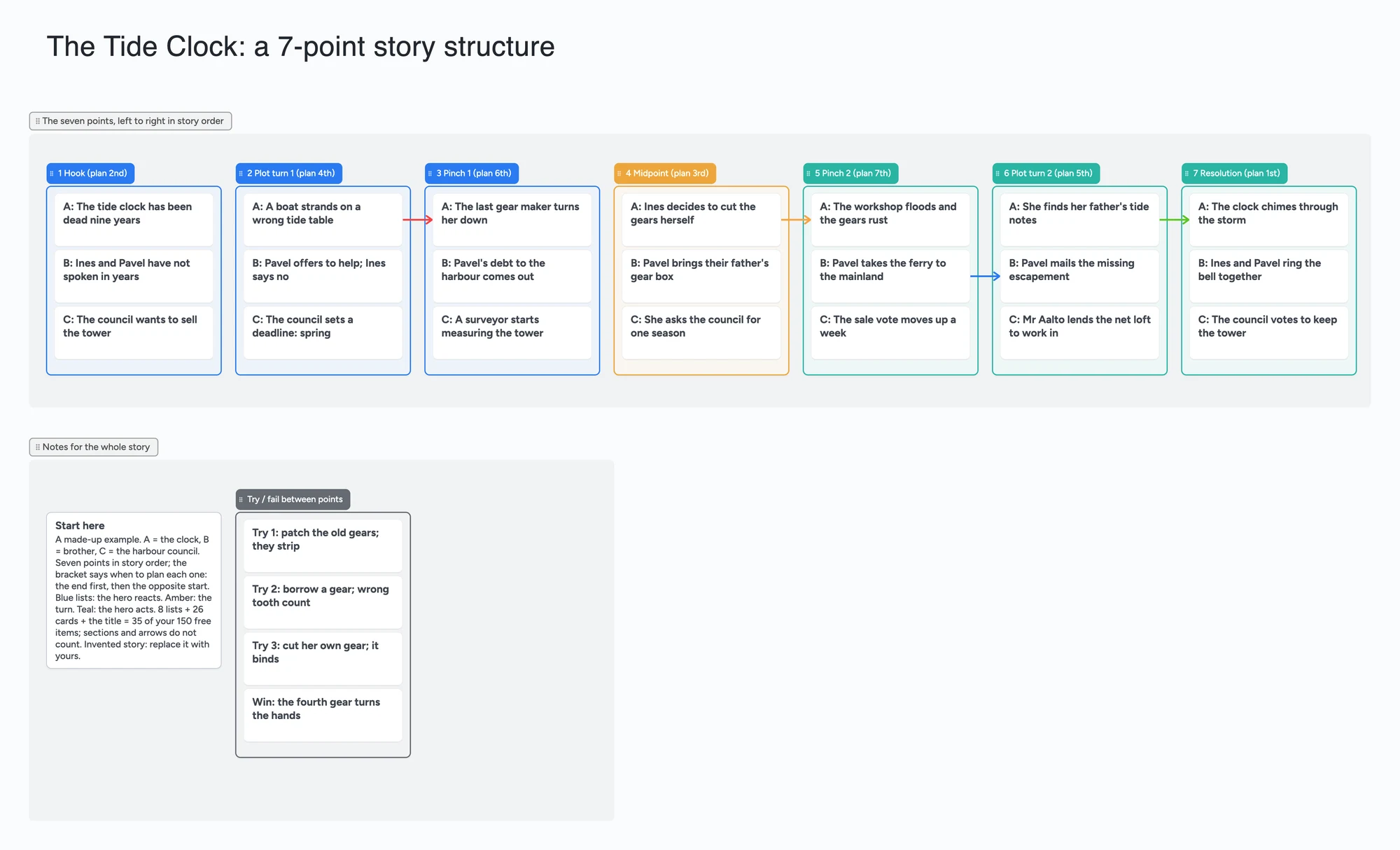
We make Instaboard, a free online board. This page gives you a seven-point story outline already laid out on it: one list for each of the seven points (Hook, Plot Turn 1, Pinch 1, Midpoint, Pinch 2, Plot Turn 2, Resolution) with three scene cards under each, plus a short list for the tries and failures between points. Each list title also says when to plan it, because the method has you start at the end: decide the Resolution first, then the Hook that is its opposite. The story is invented. The method is Dan Wells's seven-point structure and the point names on the board are used only to describe it. Open the board, replace the story with yours, and send one link to a co-writer, a coach or an editor. It does not count words, set page positions or hold a manuscript. Reedsy Studio, Plottr, Dabble and Campfire do more of that, and the sections below say where.
Opens in your browser. Anyone can view; a free sign-in lets you edit.
Updated
The short answer
- Points are lists, scenes are cards. Each of the seven points is a list you can drag. Each scene is a card with a letter in its title (A, B, C) for the thread it belongs to. The list title carries the planning order, so you can fill the board in the order the method asks for and read it in story order.
- Count the items before you copy it. Each list and each card is one item; sections and arrows aren't. Text boxes are. Seven points with three scenes each is 7 lists plus 21 cards. With the Start here card, the try/fail list and its 4 cards, and the title text box, the example is 35 of your 150 free items (our arithmetic). Four boards of 35 is 140. Eight scenes per point is 7 + 56 = 63 for the points alone.
- What it doesn't have: no page positions or percentages, no word counts, no timeline, no manuscript. Nothing checks that your points follow the method.
- Pro lifts the limit: $5 a month billed yearly ($59.99 a year), or $7.99 monthly. The free plan keeps 5 boards, 150 items and 3 pictures per board.
- Anyone with the link can read it; writing takes a free sign-in. New boards start view-only. Set "Anyone with the link can edit" if a co-writer or editor should add cards.
How this differs from the other outline boards
We have other novel outline pages, and this one is a different shape. Which one you want depends on how you plan.
- Seven-point board (this page): seven moments, planned end first, with a few scenes under each. 35 items on the example. Use it when you want a short skeleton before you know the middle, or want to check that the ending and the hook answer each other.
- [Novel beat sheet board](/novel-beat-sheet-board): 15 beats in three act sections, three scene cards under each, 61 items. Use it when you want a finer-grained list of moments.
- [Chapter-by-chapter outline board](/novel-chapter-outline-board): 24 chapters as lists with three beats each, 96 items on its example. Use it when you plan by chapter.
- [Index-card outline](/index-card-outline-for-novels-and-screenplays): four act lists of ten cards each, built on the index-card method. Use it when you think in a run of scenes and want the structure to fall out of the order.
Pick one for a given book rather than keeping two in step.
How to fill in a seven-point board
Reedsy's guide to the seven-point structure tells you to decide the Resolution first and then create a Hook that contrasts with the ending. Dan Wells's own walk-through is on Writing Excuses episode 7.41, where he explains the format and the hosts brainstorm a sample story with it. Sources disagree on when it started: Reedsy says Wells popularized it at the 2013 Life, the Universe, & Everything conference, and Kindlepreneur says it came from Wells around 2010, so this page gives each date with its source and does not pick a year.
- Start at the bottom right. Fill the 7 Resolution list first. The title says plan 1st.
- Then the Hook. Plan it 2nd as the opposite of the Resolution. In the example the clock starts dead and ends chiming.
- Midpoint third, then the two plot turns, then the pinches. The numbers in brackets in each list title give the order. The blue lists are the hero reacting, the amber one is the turn, the teal ones are the hero acting; the colours are ours, not part of the method.
- Put scenes under the point they serve. Start with three. A list with one card is thin; a list with eight is a point carrying too much.
- Use the try/fail list for what happens between points. The example has three attempts that fail and a fourth that works. Move the cards into the points or delete the list if you don't use it.
- Draw an arrow when one scene causes another. An arrow joins a card in one list to a card in another and stays attached when you reorder cards or move a list. The example has four.
- Share it. In the share menu set "Anyone with the link can edit" (new boards start view-only). A co-writer or editor signs in free and writes live. If you each own one thread, you never type in the same card; two people typing in one card merge letter by letter.
Writers disagree on whether the method fits their book. In an r/scrivener thread (April 2024), one poster asked for a Dan Wells seven-point template for Scrivener and one reply suggested exporting Plottr's templates as Scrivener templates during its demo; that is one account, not a measurement. The board suits either view: the lists are just text, so rename, reorder or delete them.
About the method's name
The seven-point structure is Dan Wells's method. This page and board describe it for planning and are not affiliated with or endorsed by Dan Wells, Writing Excuses, Reedsy, Plottr, Dabble or Campfire. The example story, scene cards and list titles are our own.
Seven-point tools, side by side
Each row is from the tool's own pages, read on November 18, 2026. Features and prices change, so check the page before you choose.
| Tool | What its page says | Where it beats a shared board | Where a shared board fits |
|---|---|---|---|
| Instaboard board | Free: 5 boards, 150 items. Pro $5 a month billed yearly ($59.99 a year), or $7.99 monthly | Nothing in this table on templates, positions, timeline or manuscript | Seven lists with scenes under them on one screen, arrows between scenes, a co-writer on the same link after a free sign-in |
| Reedsy Studio | A writing app whose core features are free, including a board for your outline; its seven-point template is three boards and 12 cards with a Hunger Games example, and Reedsy lists a 30-day trial of the Outlining add-on for its full template library (which plan holds this template not checked) | A guided template inside a writing app, with a free core | Our example is a different story, and the board is one shared link rather than a Reedsy account |
| Plottr | Pro $9.99 a month or $99 a year includes the browser app and real-time collaboration; desktop $60 a year (plottr.com/pricing); a seven-point plot template page | Visual outlining software with a timeline, series bible and cloud backup | Free, with a co-writer on a link rather than a paid plan |
| Dabble | Writer plan $15 a month billed annually ($180 a year) includes Plot Grid, co-authoring and manuscript organization; 14-day free trial | Plot grid, manuscript and goals in one app | No subscription; outline only |
| Campfire | Free plan with limited access to every module (for example 3 arcs, 20 timeline events, 25,000 manuscript words); every account can invite unlimited collaborators; Standard $12 a month shown beside $19; a seven-point guide | Modules for timeline, characters, arcs and manuscript | One free board with no module limits except the 150 items |
Swipe the table sideways to see every column.
From each tool's own pages, read November 18, 2026. We did not copy any template's wording onto the board.
When another tool is the better choice
- You want a ready template inside a writing app. Reedsy Studio has a guided one, and its core is free. We make Instaboard; this board is a plain shared page, not a writing app.
- You want to draft where you plot. Dabble and Campfire list a manuscript editor with the outline. This board holds the plan, not the book.
- You want a timeline, a series bible or cloud backup of a long project. Plottr is built for that. The board has none of them.
- You write a very long novel. A scene card for every scene can pass 150. Pro removes the item limit.
- You distrust fixed structures. Use the index-card page and let the structure come from the order of your scenes.
What a seven-point outline costs over three years
Prices from each tool's own page, read on November 19, 2026. The three-year column is our arithmetic from the price shown; sale prices change, so check the page before you buy.
| Tool | Plan, as its page shows it | Over three years |
|---|---|---|
| Instaboard | Free: 5 boards, 150 items. Pro $5 a month billed yearly ($59.99 a year), or $7.99 monthly | $0 on Free, inside the limits. Pro: $59.99 x 3 = $179.97, or $7.99 x 36 = $287.64 |
| Reedsy Studio | Core writing app free with a free Reedsy account (Google sign-in). Craft and Outlining add-ons with a 30-day trial; the free plan limits Boards to card view | $0 for the core. Add-on prices are not shown in the page text we could read: not checked |
| Plottr | $60 a year or $150 once for the desktop app; Pro $99 a year adds the browser app, cloud sync and real-time collaboration | $60 x 3 = $180, or $150 once; Pro $99 x 3 = $297 |
| Campfire | Free: 25,000 manuscript words and limited access to every module (for example 3 arcs, 20 timeline events). Standard $12 a month, struck from $19 (monthly price shown) | Free $0. Standard at the monthly price: $12 x 36 = $432. Annual and lifetime prices not read |
| Dabble | Writer $15 a month billed annually ($180 a year), includes Plot Grid; 14-day free trial | $180 x 3 = $540 |
| Scyn | Free: one novel, up to 100 scenes and 200 links. Pro $6.99 a month or $70 a year | Free $0. Pro: $70 x 3 = $210, or $6.99 x 36 = $251.64 |
| Kindling, novelWriter, bibisco Community | Free desktop apps (Kindling is open source with no account; novelWriter is free and open source; bibisco's Community edition is free, with a Supporters edition listed at $69) | $0 |
Swipe the table sideways to see every column.
Reedsy: studio and pricing pages. Plottr, Campfire, Dabble, Scyn: their pricing pages. Kindling, novelWriter, bibisco: their home and download pages. All read November 19, 2026. Prices exclude tax and currency conversion.
Where each seven-point tool runs
| Tool | Where it runs, as its page says |
|---|---|
| Instaboard | In the browser, plus the iPhone, iPad and Android apps. No Windows or Linux app. Changes made offline sync when you reconnect; it is not an offline-first app |
| Reedsy Studio | In the browser with a free Reedsy account; its template page says Studio works on any device |
| Plottr | Desktop app for Windows and Mac that works offline; the browser app (which its page says works on tablets) is part of Pro |
| Campfire | Browser and desktop apps, plus a free mobile app, CF Creators, that does not have every module |
| Dabble | Its pricing page says access on any device |
| Scyn | Its pricing page does not say: not checked |
| Kindling | Desktop only: macOS, Windows and Linux. Its download page says there is no mobile version yet, and that it works offline |
| novelWriter | Linux and Windows downloads. For macOS its page says the disk images were discontinued with release 2026.1 and gives a Python install instead |
| bibisco Community | Linux, macOS and Windows |
Read November 19, 2026, from each tool's own pages.
Which seven-point tool for which job
No ranking; the tools do different jobs. We make Instaboard, and the last bullet is ours.
- Interactive seven-point cards with a worked example, inside a writing app with a free core: Reedsy Studio's template. Its page describes three boards, 12 cards and a Hunger Games example built from the ending back.
- A template inside a plotting app with a timeline: Plottr. It has a seven-point template page; the desktop app is $60 a year.
- Plotting and drafting in one app: Dabble (Plot Grid with the manuscript) or Campfire (modules for arcs, timeline and manuscript).
- A free web outliner for scenes: Scyn's Free plan, up to 100 scenes in one novel.
- Free on your own computer, with the outline beside the draft: Kindling, novelWriter or bibisco Community. We read Kindling's home and download pages; Kindling's page describes an outline beside the draft, and we did not check whether any of the three has a seven-point template.
- Notes you already keep: a document or note page with seven headings, in the planning order.
- A shared board a co-writer edits with you, seven lists with scene cards under each: Instaboard. The co-writer signs in free to edit; there is no manuscript, word count or timeline.
How many scenes fit on the free plan
Each list and each card is 1 of your 150 free items across all your boards; sections, arrows and pen strokes are free, and a text box counts. Our arithmetic:
- A skeleton: 7 point lists, a head card on each for the point itself, and 6 scene cards per point: 7 + 7 + 42 = 56 items. Add a Start here card and a title text box and it is 58.
- A 90-scene novel: 7 lists + 90 scene cards = 97 items, or 104 with a head card on each point.
- The ceiling: with 7 lists, the most one board holds is 143 cards (7 + 143 = 150). The 150 are shared with every other board you make.
Lists do not line up across plotlines and there is no timeline, so use the letter in each card title (A, B, C) to follow a thread. The seven points are Wells's; the mapping onto three acts (Hook and Plot Turn 1 in Act 1, the Pinches and Midpoint in Act 2, Plot Turn 2 and Resolution in Act 3) is how Reedsy's template describes it, not part of the board.
Limits of the free plan for a seven-point board
- Items. Each card and each list is 1 of your 150 free items, across all your boards. The example is 21 scene cards, 7 point lists, a try/fail list with 4 cards, a Start here card and the title text box: 35 in all. Arrows and sections don't count.
- Boards. The free plan includes 5 boards. Keep the whole outline on one board.
- Photos. 3 images per board. The example has none.
- No page positions or word counts. Nothing adds up where a point lands in your draft.
- Writing needs a free sign-in. A co-writer who joins by link or code can add cards and arrows, and the board counts as one of their 5 boards.
- If you are under 18, check with a parent or your school before you sign up.
Start from the ready board
It opens in your browser in a few seconds, with nothing to install. Sign in for free when you want to save it and share it.
Questions
Is there a free 7-point story structure template?
Yes. Open the board, replace the example story with yours and turn on "Anyone with the link can edit" if a co-writer should write on it. It is a board of lists and cards, not a worksheet, and it is free within 5 boards and 150 items. Reedsy Studio also has a guided seven-point template inside its writing app (its core is free with a Reedsy account), and Plottr has a seven-point template page for its paid app.
What tool can I use for Dan Wells' seven-point outline?
Dan Wells explained the system on Writing Excuses episode 7.41, and any tool that holds seven headed sections will do. Reedsy Studio has a guided interactive template with a free core, Plottr has a template inside its paid app, and Dabble and Campfire put an outline beside a manuscript. An Instaboard board gives you seven lists with scene cards under them that a co-writer can edit on the same link after a free sign-in. It does not hold a manuscript. Instaboard is not affiliated with Dan Wells.
How do I plot a novel with 7 point structure on a board?
Make seven lists from left to right, one for each point. Write the Resolution first, then the Hook as its opposite, then the Midpoint, the two Plot Turns and the two Pinches. Put scene cards under the point each one serves, and draw an arrow when one scene causes another. Move cards until the order holds. A skeleton of 6 scenes per point is 56 items, which fits on the free plan.
What are the seven points?
Hook, Plot Turn 1, Pinch 1, Midpoint, Pinch 2, Plot Turn 2 and Resolution, in story order, as the guides from Reedsy and Plottr list them. The method has you plan the Resolution first. The lists on the board can be renamed or deleted.
Why is the end planned first?
Reedsy's guide says to decide the Resolution first and then create a Hook that contrasts with it, so the story travels from one to the other. The example board puts the planning order in each list title.
How many scenes fit on the free plan?
Each card and each list is one item of the 150 across all your boards. Seven point lists with 8 scene cards each is 63 items before any extras, so two such outlines fit. That is our arithmetic. Arrows and sections are free.
Is this affiliated with Dan Wells?
No. The page and board are not affiliated with or endorsed by Dan Wells, Writing Excuses or any tool named here. The example story and list titles are our own.
Sources
- Reedsy: the seven-point story structure (read November 18, 2026)
- Writing Excuses 7.41: Seven-Point Story Structure (read November 18, 2026)
- Kindlepreneur: 7-point story structure (read November 18, 2026)
- Campfire: Dan Wells's 7-point story structure (read November 18, 2026)
- Plottr: seven point plot structure (read November 18, 2026)
- Plottr: pricing (read November 18, 2026)
- Dabble: pricing (read November 18, 2026)
- Campfire: pricing (read November 18, 2026)
- Reedsy Studio: templates (read November 18, 2026)
- Reedsy Studio: home and pricing (core free; add-ons; read November 19, 2026)
- Reedsy Studio: seven-point story structure template (3 boards, 12 cards; read November 19, 2026)
- Scyn: pricing (read November 19, 2026)
- Kindling: download (read November 19, 2026)
- novelWriter: home (release 2026.2 patch 3, November 14, 2026; read November 19, 2026)
- bibisco: download (Community edition; read November 19, 2026)
- r/scrivener: Dan Wells 7-Point Structure Scrivener template link (April 4, 2024; replies are single accounts)
Related
A novel beat sheet on one shared board: 15 beats, three acts, scenes under each beat
A 15-beat novel outline to open and edit: 3 act sections, a list per beat, scene cards under each. Free-plan item counts and where other tools are better.
24-chapter novel outline board: acts, chapters and beats on one shared board
A filled 24-chapter novel outline to open and edit: four act sections, a list per chapter, three beat cards each. Item counts for the free plan stated, and where other tools are better.
Outline a novel or screenplay with index cards, on a board you can share
Outline a novel or screenplay on digital index cards: one list per act, 40 short cards, subplot arrows, a co-writer on the same board. Free to start; TV pilot too.
A character arc template board: how each character changes, tied to the plot
A shared character arc template: a list per character with want, lie, first change, midpoint shift, low point and end state, tied to your plot beats by arrows. Free to open.