For writers who plot with a partner
A free Plottr alternative for plotting with a partner, and where Plottr is better
Plottr is a strong outlining tool, and live co-plotting in it is a Pro feature: its pricing page says "Each collaborator must have their own Plottr Pro subscription to access and edit shared projects in real time." (plottr.com/pricing, read November 7, 2026). If you and a co-writer want to plot in a browser without both buying a plan, an Instaboard board can be shared by link on the free plan, with a list per plotline. It is a board of cards and lists, not a plotting app: no timeline view, no series bible, no template library, no character or place notebooks, no manuscript sync, and no export to Plottr, Scrivener or Final Draft. If you want a free plotting tool with a timeline-style map or a draft beside the outline, Kindling and Scyn are closer.
Updated
The short answer
- Plottr: the base plan is $60 a year on the desktop. Real-time collaboration, the browser app and cloud sync are on Plottr Pro, $9.99 a month or $99 a year, and each collaborator needs their own Pro (plottr.com/pricing, read November 7, 2026).
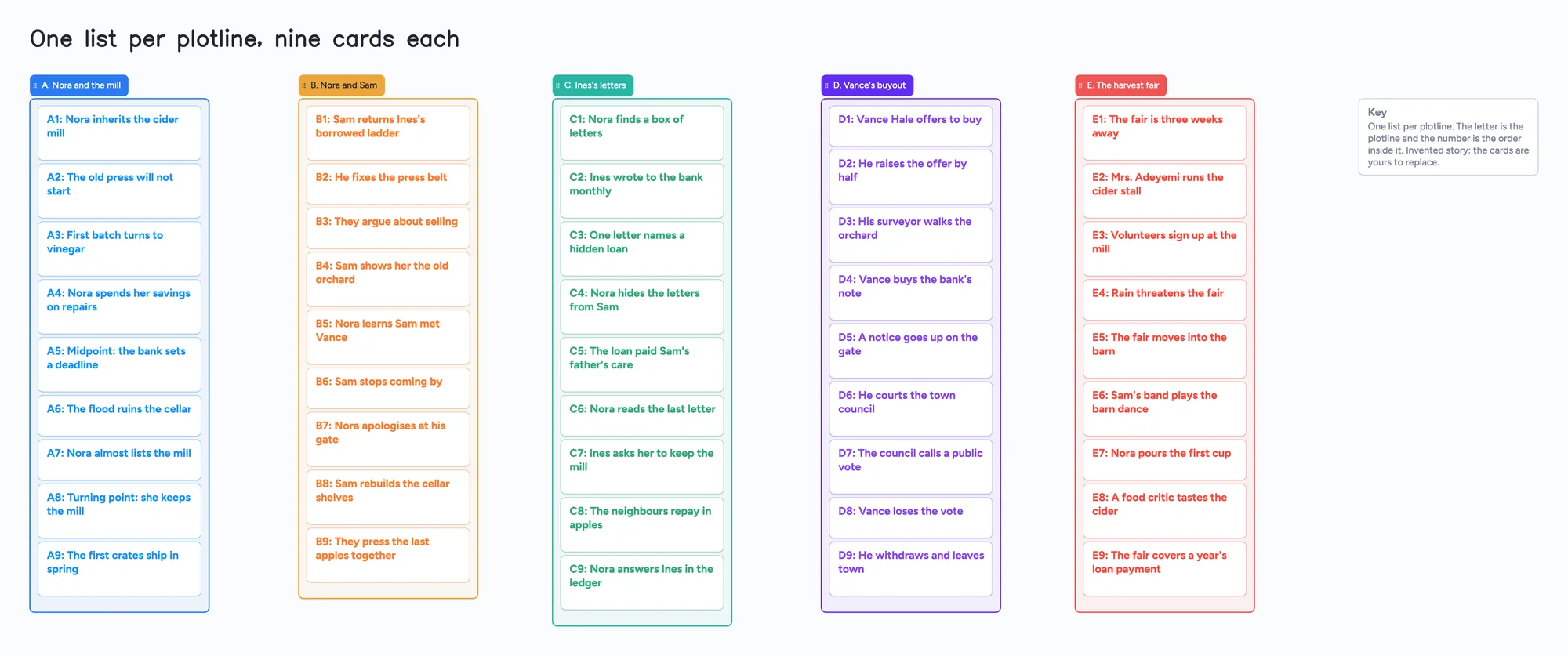
- Instaboard Free: 5 boards and 150 items across your account. Each card and each list is 1 of the 150; pen strokes, sections and arrows don't count. Your partner signs in free to write. The example board uses 51 of the 150 (our arithmetic).
- What you give up: Plottr's timeline, series bible, templates and character and place notebooks. This board holds the plot only, in cards you move by hand, and it can't export to or import from Plottr.
- Closer to Plottr but free: Kindling is a free desktop app that drafts beside your outline and imports Plottr files. Scyn's free plan maps one novel of up to 100 scenes; its drafting mode and sharing are on Pro. Both have their own limits, below.
What this plotting board can't do
- No timeline view. Cards sit in lists. There is no axis for dates, no way to line up plotlines against each other, and no filter by plotline.
- No series bible, template library or notebooks. There are no character or place sheets, no templates for story structures and no search across notes. Plottr's home page lists a visual timeline, 40+ templates and a series bible.
- No manuscript sync or drafting. The cards are the plan. Pages, chapters and word count stay in your writing app.
- No export to, or import from, Plottr, Scrivener or Final Draft. Selected cards and lists can be saved as a PNG. If you move off Plottr, you retype the cards you want.
- 150 items on the free plan, across your account. Each card and each list counts. The example board is 45 cards, 5 lists and a key card, 51 items. A 60-scene novel in five plotline lists is 65, and a 100-scene novel is 105 (our arithmetic), before any notes. A full novel with a story bible passes 150, and Pro removes the limit. Pro is $5 a month billed yearly ($59.99 a year).
- 5 boards and 3 images per board on the free plan. Keep one board per book. The example board has no images.
What Plottr's own pages say about plans and sharing
From Plottr's pricing page (read November 7, 2026): Plottr is $60 a year or $150 once, for Windows and Mac, with files on your device and manual sync between devices. Plottr Pro is $9.99 a month, $99 a year or $599 once. Its feature list adds a browser app that works on tablets, cloud sync, cloud backups and real-time collaboration. Plottr Pro + Community is $14.99 a month, $129 a year or $649 once and adds a private community and an education vault. The page offers a 30-day free trial and says it doesn't give refunds after purchase. It also says "No AI".
Its FAQ answers the question this page is about: "Do all collaborators need their own Plottr Pro subscription to use real-time collaboration?" It says: "Yes. Each collaborator must have their own Plottr Pro subscription to access and edit shared projects in real time." Two people on Pro is $198 a year at the listed annual price (our arithmetic).
The same FAQ says that if a Pro plan expires you can't open your projects without renewing, and recommends exporting everything first. On the base plan you can keep using Plottr after it expires, without updates.
Free ways to plot a novel, side by side
Each row is from the maker's own pages, read on November 7, 2026. Plans change, so check the page before you commit.
| Tool | Free plan | Plotting with a partner | Paid, as listed |
|---|---|---|---|
| Instaboard | 5 boards, 150 items across your account; 3 images per board | Share a link or a 4-digit code; your partner signs in free to write; no limit on collaborators | Pro $5 a month billed yearly ($59.99 a year) |
| Plottr | 30-day free trial, no free plan | Real-time collaboration is on Plottr Pro; each collaborator needs their own Pro | $60 a year (desktop); Pro $9.99 a month or $99 a year |
| Scyn | 1 novel, up to 100 scenes and 200 links, no time limit; PNG export; account needed | Pro lists unlisted share links and up to five collaborators; Free does not | Pro $6.99 a month or $70 a year |
| Kindling | Free and open source; macOS, Windows and Linux; no account | Its download page says no account and no sync; desktop only | Free |
| Reedsy Studio | Core writing is free; Boards limited to card view | Reedsy's Boards FAQ says sharing a Board with a collaborator is not available yet; its Studio page offers inviting a co-author to the draft | Outlining add-on for unlimited Boards |
| Campfire | Limited access to every module, such as 10 characters, 20 timeline events and 2 relationship webs | Its pricing page lists inviting as many collaborators as you want on every account | Standard $12 a month |
| Dabble | 14-day trial, no free plan | Writer plan lists Plot Grid, co-authoring and sharing with a writing group or partner | Writer $15 a month billed annually ($180 a year) |
Swipe the table sideways to see every column.
Sources are listed at the bottom of the page, all read on November 7, 2026. This is the set of tools we checked on that day, not every writing tool. Of them, Plottr, Scyn and Reedsy's Boards put sharing a plot behind a paid plan or leave it unavailable; Campfire's free plan caps how much you can create in each module.
When Plottr is the better choice
- You want a timeline. Plottr's home page lists a visual timeline for scenes, chapters and character arcs. Instaboard has none.
- You write a series. Plottr lists a series bible and character sheets. Instaboard's cards are plain text.
- You want a structure to start from. Plottr lists 40+ outlining templates and lets you make your own. Instaboard has far fewer templates.
- You want your plan on your own machine. The base Plottr plan keeps files on your device and keeps working after it expires, without updates.
- You need to go on to a draft. Kindling puts your outline beside the draft, free, and Scyn's Pro plan lists a drafting mode. On Instaboard the draft lives somewhere else.
When another free tool is the better choice
- You want to draft beside the outline, free, on your computer. Kindling's own pages describe a desktop app for macOS, Windows and Linux that is free, open source, needs no account and imports Plottr, Scrivener, Obsidian Longform, yWriter, novelWriter and Markdown files. It has no mobile version and, by its own page, no sync, so it suits one writer.
- You want a story map of cause and effect. Scyn's free plan is one novel with up to 100 scenes, acts, chapters and colour filters, and its home page maps scenes as cause and effect. Its pricing page puts drafting (Story Mode), unlisted share links and up to five collaborators on Pro.
- You want a timeline and a character list for free, with a co-writer. Campfire's free account lists a timeline (20 events), characters (10) and relationship webs (2), and its pricing page lists inviting as many collaborators as you want on every account. Past those caps you pay. It is a much bigger app than a board.
- You write the book in the same place. Reedsy Studio's core writing is free, and its Studio page offers inviting a co-author to the draft. Its Boards FAQ says sharing a Board with a collaborator is not available yet, and unlimited Boards come with a paid add-on.
- You want plot and draft in one paid app. Dabble's Writer plan lists a Plot Grid, co-authoring and sharing with a writing group or partner, with a 14-day trial.
When Instaboard is the better choice
- Two of you want to move cards around together, and neither wants a subscription yet. Both sign in free, and the board needs no plan until it passes 150 items.
- You think in plotlines side by side. One list per plotline, with the cards you move by hand, shows where the threads meet. The example board numbers each card inside its plotline (A3, B3, C3) so you can talk about them.
- You want to sketch on it. Pen strokes, sections and arrows don't count toward the 150, so you can circle, underline and annotate without using up your limit.
- You want one board to share with a writing group, an editor or a friend. One link opens it, and each person signs in free to write.
How to plot on the board
- Open the ready board and read the Key card.
- Make one list per plotline. Name each with a letter, like "A. Nora and the mill".
- One beat per card, in a few words. Start each title with the plotline letter and a number: "A4: Nora spends her savings on repairs". The number is the order inside that plotline.
- Mark the big beats in the title. The example uses "Midpoint:" and "Turning point:" in the card text, so they can be found by eye.
- Move cards until the plot holds. Drag a card to a new spot, or into another list when a beat belongs to a different plotline. Lists reorder independently of each other, and each card can take its own colour, separate from its list's colour, to mark a turning point.
- Join beats across plotlines with arrows if you want. An arrow between cards in different lists takes a caption and its own colour, and it stays attached when you reorder cards or move a list. The example board has none, and arrows don't count toward the 150.
Plotting with a partner
- In the share menu, set "Anyone with the link can edit".
- Send the link, or the 4-digit join code. The code expires after 2 hours of inactivity, so send the link to someone you'll need later.
- Your partner signs in free (Google, Apple or email) to write. Someone who isn't signed in can open the link and read everything, but can't change anything. Once they're signed in, what they add shows up on your board within a few seconds.
- The board counts as one of their 5 free boards, and the cards they add count toward their own 150. If they're already at 5 boards, they can still open the link and write; the board just isn't added to their boards.
Moving over from Plottr
Instaboard can't open Plottr projects, and Plottr's own pricing page tells Pro users to export their projects before a plan expires. To keep a plot on a board, open the ready board and retype the beats you want, one card each, in a list per plotline. If you'd rather keep the file, Kindling's page says it imports Plottr files.
Plotting a mystery? See the mystery novel outline board. For a screenplay or an act-by-act outline, see the index card outline.
Start from the ready board
It opens in your browser in a few seconds, with nothing to install. Sign in for free when you want to save it and share it.
Questions
Is Plottr free?
No. Plottr's pricing page (read November 7, 2026) lists a 30-day free trial and paid plans: $60 a year for the desktop app, and Plottr Pro at $9.99 a month or $99 a year. It lists lifetime options at $150 and $599.
Does Plottr have real-time collaboration?
On Plottr Pro. The pricing page's FAQ says each collaborator must have their own Plottr Pro subscription to access and edit shared projects in real time.
Is there a free Plottr alternative I can share with a co-writer?
Instaboard's free plan lets you share a board by link, and your co-writer signs in free to write, within 5 boards and 150 items. Campfire's free account also lists inviting collaborators, with caps on what you can create. Scyn's free plan is one novel of up to 100 scenes, and sharing is on its Pro plan.
Does Instaboard have a timeline view like Plottr?
No. There is no timeline, series bible, template library or character notebook. Instaboard holds the plot as cards in lists.
Can I import a Plottr project into Instaboard?
No. You retype the beats you want as cards. Kindling's own page says it imports Plottr files.
Is there a free Plottr alternative that also lets me write the book?
Kindling is free, open source and desktop-only, and its page describes drafting beside your outline. Scyn's free plan maps one novel of up to 100 scenes, and its drafting mode is on Pro. Instaboard holds the plan only.
How many scenes fit on the free plan?
Each card and each list counts toward 150 items across your account. Five plotline lists plus a 100-scene novel is 105 (our arithmetic). A story bible and notes on the same account share the same 150, and Pro removes the limit.
Sources
- Plottr: pricing and FAQ (plans, real-time collaboration, each collaborator needs Pro; read Nov 7, 2026)
- Plottr: home page (visual timeline, 40+ templates, series bible; read Nov 7, 2026)
- Scyn: pricing (Free 1 novel, 100 scenes; Pro share links and up to five collaborators; read Nov 7, 2026)
- Scyn: home page (story map, drafting; read Nov 7, 2026)
- Kindling: home page (free, open source, imports Plottr and Scrivener files, drafts beside the outline; read Nov 7, 2026)
- Kindling: download page (macOS, Windows, Linux; no account, no sync, no mobile; read Nov 7, 2026)
- Reedsy Studio: planning Boards (Boards FAQ: sharing with a collaborator not yet; read Nov 7, 2026)
- Reedsy Studio: pricing (core writing free, Boards limited to card view in Free, Outlining add-on; read Nov 7, 2026)
- Reedsy Studio: home page (invite a co-author to the draft; read Nov 7, 2026)
- Campfire: pricing (free plan limits, unlimited collaborators on every account, Standard $12 a month; read Nov 7, 2026)
- Dabble: pricing (Writer $15 a month billed annually, Plot Grid, co-authoring, sharing with a partner, 14-day trial; read Nov 7, 2026)
Related
Outline a novel or screenplay with index cards, on a board you can share
Outline a novel or screenplay on digital index cards: one list per act, 40 short cards, subplot arrows, a co-writer on the same board. Free to start; TV pilot too.
A mystery novel outline board for suspects, clues and red herrings
Outline a mystery novel on one board: a list per suspect, clues, red herrings and reveal order. A free ready board, and where Plottr and Sheets do more.
Character relationship map: a filled template two people can edit
A filled character relationship map to copy: factions, a card per character and captioned arrows for who wants what. Edit it together with a co-writer. Free plan limits stated.
A digital corkboard for your scene cards, free to start
A digital corkboard for outlining a novel with scene cards: colour by point of view, drafted ticks, subplot arrows. Honest comparison with Cork, Corkulous, Plottr, Scrivener and Milanote.