For biology tutors
How to teach biology online on a whiteboard: an osmosis lesson, step by step
Biology is taught through pictures: a cell, a membrane, a pathway. Online, the question is where you draw them and whether your student draws back. This page walks through one lesson, osmosis and tonicity, and says plainly what Instaboard does for biology: diagrams are hand-drawn ink, and there is no diagram library, no animation and no 3D model.
Updated
The short answer
- Use the board as a drawing page. Draw the diagram, write the reasoning beside it, then let your student draw the next case on the same page.
- Diagrams are hand-drawn ink on Instaboard. There is no diagram library, no labelled-anatomy images, no animation and no 3D. Share your screen for a textbook figure or an animation.
- Make the student draw, not only look. Tutors on r/TutorsHelpingTutors suggest having the student draw a diagram and explain it in their own words, and a 2017 paper on drawing in biology argues that students should create drawings, not only read them.
- Students can view with no account but need a free sign-in to write. Free calls run 60 minutes; Pro ($5 a month billed yearly) has no limit.
What a lesson on the board looks like
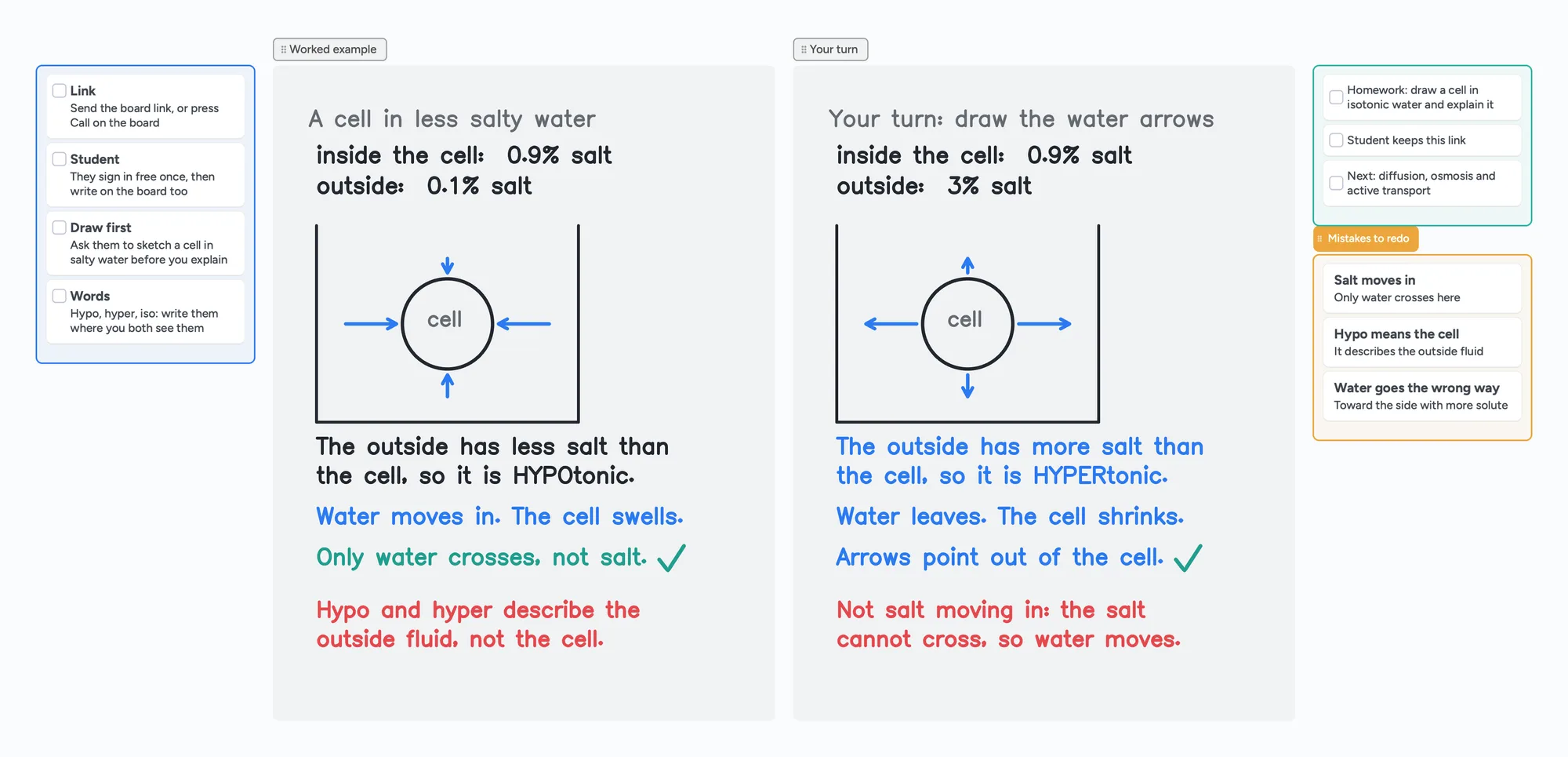
The call sits on top of the board, so you talk and write in the same place. You draw the cell, your student draws the water arrows in their own colour, and you tick it.
What a biology tutor does on a whiteboard
In a January 2026 thread on r/TutorsHelpingTutors, a new tutor teaching Year 11 biology spent about two hours on a Google Slides deck and taught the whole lesson in 35 minutes. The replies are practical. One says to plan one main activity and do any longer explanation on a whiteboard: draw pictures, make a mind map, and keep the student involved, with no more than about a fifth of the session spent talking. A science teacher says they teach from a rough plan, interactive resources and a bank of questions, using a whiteboard. Another says to build a bank of diagrams once and reuse it, and another suggests having the student draw a diagram and explain it in their own words. Those habits turn into four jobs for the board:
- Draw the diagram. A cell, a membrane, a pathway, drawn live so the student sees the order.
- Write the reasoning next to it, one short line at a time.
- Let the student draw the next case in their own colour and explain it.
- Keep a reusable page. Leave the board open as the revision sheet, and copy it for the next student.
A tablet or pen tablet makes diagrams faster than a mouse; see which pen tablet to buy and online tutoring setup. For a concept-map version of biology notes, see the biology concept map.
An osmosis lesson in five steps
OpenStax Biology 2e, section 5.2, defines tonicity as how an extracellular solution can change a cell's volume by affecting osmosis. In a hypotonic situation the extracellular fluid has a lower osmolarity than the cytoplasm and water enters the cell; in a hypertonic one the outside has a higher osmolarity and water leaves. The board above follows that order with our own made-up percentages:
- Ask for a sketch first: before explaining, ask your student to draw a cell in salty water and say what they expect.
- Draw the case: a cell in a beaker, 0.9% salt inside, 0.1% salt outside.
- Name the outside: less salt outside than inside, so the outside fluid is hypotonic. The prefix describes the outside fluid, not the cell.
- Draw the water arrows: water moves in and the cell swells. Only water crosses; the salt cannot.
- Student's turn: 3% salt outside. Your student draws the arrows out of the cell and writes the reasoning in blue.
| Case | Outside fluid | Water moves | Cell |
|---|---|---|---|
| 0.1% salt outside, 0.9% inside | Hypotonic (less solute) | Into the cell | Swells |
| 3% salt outside, 0.9% inside | Hypertonic (more solute) | Out of the cell | Shrinks |
Swipe the table sideways to see every column.
The definitions follow OpenStax Biology 2e, section 5.2 (read November 2, 2026). The percentages are invented for this lesson to show the direction, not measured values.
The common slip is saying salt moves in. The red notes on the board name the two usual ones: hypo and hyper describe the outside fluid, and the solute cannot cross, so water moves.
Drawing biology on Instaboard
On Instaboard you draw diagrams with the pen, like a whiteboard in a room. Here is what that means, so you can decide before the lesson:
- Hand-drawn diagrams. Cells, membranes, arrows and pathways are pen drawings. The cell and arrows on the board above are drawn stroke by stroke.
- Hand-written labels. Names and reasoning are written, not typed. Cards and lists hold typed notes if you want a tidy checklist beside the drawing.
- The worksheet. Import the student's PDF and write on it. Each imported PDF uses one of the 5 free boards.
- A textbook figure. You can add an image to a card, but a free board holds 3 images, and drawing the figure with the student is usually the point.
No diagram library, no animation
Instaboard has no labelled-anatomy images, no biology templates for cells or organs, no animation and no 3D models. If you need a moving or labelled figure, share your screen and use the board for the reasoning.
When screen share or another tool is the better choice
- You need to show a real figure or an animation. Share your screen and use the board for the working, since Instaboard has no figure library or animation.
- Your platform already has a whiteboard you like. A tutor replying in a May 2026 thread on r/Preply says Preply's built-in whiteboard is poor for drawing diagrams and uses a separate whiteboard instead. If your platform's own whiteboard works for you, keep it.
- You want a recording of the lesson. Instaboard does not record.
- You teach a large class. Instaboard has no class mode.
Instaboard fits when you teach by drawing, you want the student to draw the next case, and you want the call, the diagram and the reasoning on one link.
Use the lesson board in five steps
- Open the biology board above and make it yours.
- Send your student the link, or press Call on the board so the lesson runs in one place. They sign in free once to write.
- Swap in your topic. Replace the cell with the diagram you are teaching, such as a membrane, a pathway or a cycle.
- Let the student draw the next case in their own colour and explain it out loud.
- Leave the board open as the revision sheet and start the next lesson from it.
The same pattern works for other subjects: how to teach chemistry online and how to teach math online. For free video lessons on the same topics, see the Boardling biology lessons.
What Instaboard doesn't do for biology
- No diagram library, no animation, no 3D. Diagrams are hand-drawn ink.
- No handwriting reading. Handwritten labels are not searchable.
- Whole-stroke eraser only. You cannot rub out part of a line; erase the stroke and redraw it.
- No recording of the lesson, no class mode, no scheduling.
- Students sign in to write. Anyone with the link can view; writing needs a free sign-in. Free calls run 60 minutes.
- Free covers 5 boards. Each imported PDF uses one of them. Pen strokes do not count toward the 150-item limit; cards and lists do.
- Free boards are shared by link, so use first names only.
Start from the ready board
It opens in your browser in a few seconds, with nothing to install. Sign in for free when you want to save it and share it.
Questions
How do I teach biology on an online whiteboard?
Draw the diagram, write the reasoning beside it, work one case line by line, then let the student draw the next case on the same board. Import the student's worksheet as a PDF so you both write on the real question.
Can I draw cells and pathways on Instaboard?
Only by hand with the pen. There is no diagram library or biology templates, and the board does not check your drawing. A tablet or pen tablet makes drawing faster than a mouse.
Should my student draw too?
It is worth trying. Tutors in the r/TutorsHelpingTutors thread suggest having the student draw a diagram and explain it, and a 2017 paper on drawing in biology encourages instructors to have students create drawings. Students write in their own colour on the same page.
Can I show an animation or a labelled figure?
Not on the board. Share your screen for a figure or animation, and keep the board for the diagram and the reasoning.
Do I need a tablet to teach biology online?
No, but diagrams are slow with a mouse. A touchscreen laptop, an iPad or a pen tablet helps.
Is Instaboard free?
Yes. The free plan includes 5 boards, 150 cards and items across your account (pen strokes, arrows and sections don't count), 3 images and 1 file per board, unlimited collaborators and video calls up to an hour. Pro is $5 a month billed yearly ($59.99 a year), or $7.99 monthly, and the people you invite join free.
Sources
- OpenStax Biology 2e, 5.2 Passive Transport
- r/TutorsHelpingTutors: How to not spend hours preparing for lessons (January 29, 2026)
- Quillin and Thomas, Drawing-to-Learn: A Framework for Using Drawings to Promote Model-Based Reasoning in Biology (CBE-Life Sciences Education, 2017)
- r/Preply: Any Chemistry Tutors? (May 20, 2026)
Related
Make a biology concept map from your own notes
Turn your lecture notes into a biology concept map: concepts on cards, labelled arrows, feedback loops and a recall check. Worked example on the HPA axis, a ready board to copy, and a nursing version.
How to teach chemistry online on a whiteboard: a mole-ratio lesson, step by step
How a chemistry tutor can teach on an online whiteboard: a mole-ratio lesson step by step, what to write by hand, and when a structure editor like Molbrett is the better tool. Ready lesson board included.
How to teach math online: your first lesson, step by step
How to tutor math online as a beginner: what you need, how to run a first lesson on a board your student writes on too, with Zoom, Google Meet or no video app at all, and what to do without a whiteboard.
An online whiteboard for tutoring that works the way you teach
A free whiteboard for online tutoring: paste the worksheet, write with a pen, and your student answers on the same board. Call on it or beside Zoom.
A pen tablet for online tutoring: what to buy and how to set it up
Which pen tablet to buy for online tutoring (Wacom, XP-Pen, Huion, about $40 to $60), how to set it up with pen pressure in the browser, and a whiteboard your student can write on too.
Online tutoring setup: what you need before your first lesson
What you need to start tutoring online: sound, light, camera, internet, a way to write, and a board your student writes on too. A plain checklist with a five-minute test call and a ready board to open.