For adult siblings sharing the care of a parent
A caregiving board for siblings: who owns what for a parent, on one shared page
We make Instaboard, a free online board. This page gives you a board already laid out for two or three adult siblings who share the care of a parent, filled in for one invented family: Nora, Ben and Tess, and their father. It has six lists: Start here, Who owns what, Next visit, Questions for the doctor, Bills and paperwork, and Updates. Every card starts with one first name. Its job is narrow: everyone can see who has which job and what comes next. It is an organizing aid, not medical advice, and it is the wrong place for anything private. Don't put diagnoses, doses, account numbers or passwords on a board that anyone with the link can read. It sends no reminders and no calendar alerts, and we found no record of who changed a card. Lotsa Helping Hands, CaringBridge, Caring Village and a shared calendar do more of that; the table below says where.
Opens in your browser. Anyone can view; a free sign-in lets you edit.
Updated
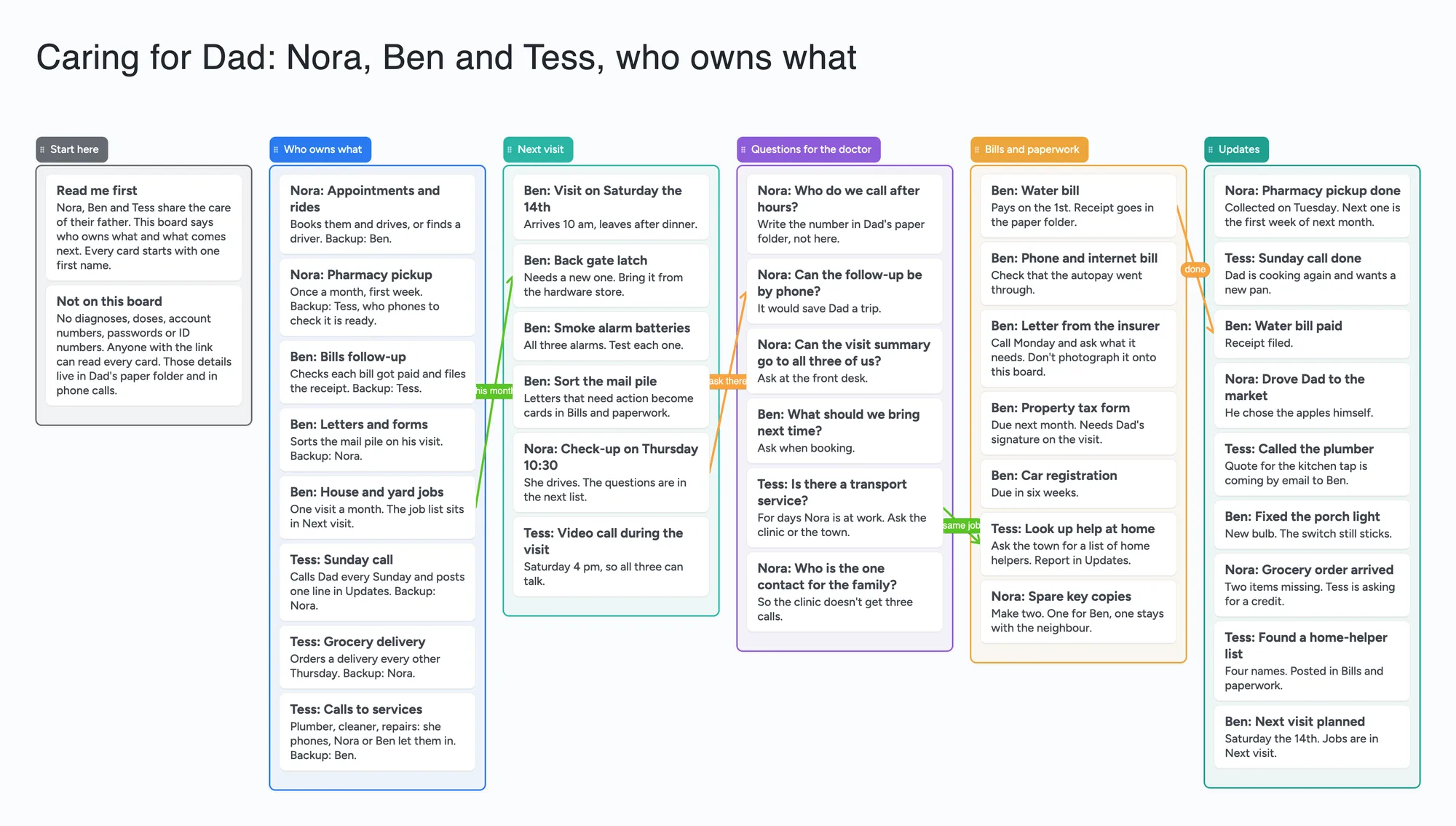
Read this first: what goes on this board and what doesn't
- What it is: one board where each job in a parent's care is a card with one person's first name on it, plus a backup. Who drives to appointments, who collects the pharmacy order, who follows up on the bills, who calls on Sunday. The example family is invented.
- What stays off it: diagnoses, medication names and doses, account or policy numbers, passwords, ID numbers, photos of letters. A free board is opened by a link, and anyone who has the link can read every card. "Pharmacy pickup" is a task name on the example board, not a list of medicines. Keep the private details in a paper folder or a tool built for them.
- What it isn't: no reminders, no calendar alerts, no private notes per person, and no record of who changed a card that we could find (November 21, 2026). Everyone you set to "Anyone who joins can edit" can change anything.
- Free plan: the example is 45 of your 150 free items (38 cards, 6 lists and 1 title text box, our count). Arrows and pen strokes don't count. Writing needs a free sign-in. Pro is $5 a month billed yearly ($59.99 a year), or $7.99 monthly.
Why start with who owns what
Family Caregiver Alliance's fact sheet "Caregiving with Your Siblings" (page read November 21, 2026; it carries a 2011 copyright line and is based on Francine Russo's book) says families often don't think through who becomes the primary caregiver and what supporting roles the others play. It recommends a family meeting early and often to discuss the parent's needs and ask what each person can contribute in time or money. It also advises asking for help directly and specifically, and asking for what the person can realistically give: "if your sister can't spend ten minutes with Mom without screaming at her, don't ask her to spend time; ask for something that's easier for her, like doing paperwork or bringing groceries." It also suggests online care-sharing tools to keep everyone abreast of care issues.
On Reddit the same split shows up in people's own words. In r/AgingParents (November 6, 2024, 30 comments, the first 25 loaded when we read it) the original poster, u/Lemonbar19, lives four hours from their mother, while the poster's brother is in the same city. The brother had said the poster could handle "doctors and hoarding conversations since everything else falls on him", and the poster asked what categories they could split. The top reply, u/DisplacedNY (34 votes), said it was past time for a conversation about division of labour and suggested asking him to list everything he currently does for their mother. u/Lurky100 listed the small jobs the nearby sibling absorbs: the wifi password, a locked-out parent, a prescription that has to be collected. u/TraditionalPotato665 wrote that they split it between the sibling on the ground (household, meals, doctors, supervising helpers) and the sibling at a distance (emotional support, grocery orders, all the admin, long video calls). Each of those is one person's account, not a rule, and many replies in the thread were about the strain rather than a method.
A board doesn't fix any of that. What it can do is write the list down where all three siblings can see it, so "everything else" has names on it.
The example, list by list
In the example Nora lives nearest, Ben is a drive away and Tess is far off, so each has a part they can do from where they are. Everyone's name is the first word of their cards.
- Start here (2 cards). "Read me first" says what the board is for. "Not on this board" says plainly that nothing medical or financial goes on it, and where those details live instead (a paper folder and phone calls).
- Who owns what (8 cards). One card per job, one name, one backup: appointments and rides, pharmacy pickup as a task name only, bills follow-up, letters and forms, house and yard jobs, the Sunday call, the grocery delivery, calls to services. Tess has the jobs she can do remotely.
- Next visit (6 cards). What Ben takes on the next time he drives over: the day, a gate latch, smoke alarm batteries, the mail pile, and a video call so all three can talk during the visit.
- Questions for the doctor (6 cards). Plain logistics only: who to call after hours, whether the follow-up can be by phone, whether the visit summary can go to all three. No symptoms or results.
- Bills and paperwork (7 cards). Follow-up cards, not the paperwork itself: "Letter from the insurer: call Monday and ask what it needs. Don't photograph it onto this board." No amounts, no account numbers.
- Updates (9 cards). One line each, so a sibling who wasn't there sees what happened: pharmacy pickup done, Sunday call done, water bill paid. Four arrows link a job to its next step or its done card (water bill to water bill paid).
How to set it up for your family
- Open the board and replace the example. Swap Nora, Ben and Tess for your own first names. Delete the cards that aren't yours; each is 1 of your 150 items.
- Hold the family meeting first. The board is the notes of that conversation, not a substitute for it. Ask each person which jobs they can really do from where they live.
- Write one card per job. First name, the job, and a backup. If a job has no owner, leave its card with "Open" as the name instead of guessing.
- Keep private details off. Phone numbers for the clinic, policy numbers, medication names: write "in Dad's paper folder" and put it there.
- Share it. In Share, set the board to "Anyone who joins can view" or "Anyone who joins can edit" (new boards start view-only). Siblings who need to write sign in once, free. A sibling who only needs to look can open the link signed out and can't change anything.
- Move cards as jobs finish. Drag a done job's card into Updates with one line. Clear Updates once a month.
A copy of the board takes 1 of your 5 free boards, and a sibling who joins by link counts it as one of theirs. The cards each of them adds count toward their own 150. The other options are the share code, which is 4 digits and expires after 2 hours of inactivity, and the link. Anyone who has either can open the board.
What a board can't do
- No reminders and no calendar alerts. A card that says "Thursday 10:30" is text. Nothing nudges Nora on Wednesday night, and nothing adds it to anyone's phone calendar.
- No private notes per person. There are no hidden cards. Anyone who can open the link sees every card. Pro adds invite-only boards and per-person permissions; we have not tested whether they hide a card from one person, so don't count on it as a private note.
- No record of who changed what that we could find. Anyone you let edit can change or delete any card. The first name at the start of a card is typed text. We found no change history to look at if two siblings disagree about what a card said (checked November 21, 2026 while testing task ticks; edits to card text were not tested separately).
- No shift calendar and no sign-up slots. It can't schedule Tuesday and Friday visits across a month or let a neighbour pick a slot.
- No documents, health records or money. It doesn't hold files safely, track what was paid or split expenses between you.
- Not a place to settle a disagreement. A sibling who feels one person is doing everything won't be helped by a list. Family Caregiver Alliance suggests an outside professional, such as a family therapist, social worker or geriatric care manager, when conflict continues.
Where Lotsa Helping Hands, CaringBridge, Caring Village and a shared calendar do it better
Read on November 21, 2026 from each tool's own pages. None of the pages shows a date except where stated.
| Tool | What its own page says (Nov 21, 2026) | Better than this board for | Not what you get |
|---|---|---|---|
| Instaboard board | Free: 5 boards, 150 items, 3 pictures per board. Pro $5/mo billed yearly | Seeing every job and its owner on one page, from a link | Reminders, alerts, private notes, history, files |
| Lotsa Helping Hands | Home page lists a Care Calendar ("schedule and sign up for tasks such as meal delivery and rides to appointments"), announcements, well wishes and a photo gallery; "the easiest (and free!) way"; one quoted user writes that she and her six siblings use it for their elderly mother. No pricing page found (the /pricing address returned 404). Footer copyright 2024 | Scheduling and signing up for rides and meals; a wider circle of friends and neighbours | A free-form board with arrows and lists |
| CaringBridge | "No-cost, 501(c)(3) nonprofit health platform"; communicate to your community, capture your thoughts, coordinate help; describes itself as "a safe and private space" to communicate with everyone at once | Updating many people at once so you don't write the same message ten times | A who-owns-what layout; it is built around one person's health journey and sharing updates |
| Caring Village | Pricing page: Free is 1 village, up to 2 members, basic to-do lists, shared calendar and messaging; Circle $14.99 a month (up to 2 villages, 5 members each); Village $24.99 a month (up to 5 villages, 50 members each). Home page lists calendar, medications with smart reminders, wellness journal, messaging and documents | Reminders, a shared calendar, medication and document folders in one app, for a family that wants those features | Three siblings on the free plan: it lists up to 2 village members, and we didn't check whether that includes the person who creates it |
| A shared calendar (Google Calendar) | Help page: you can share a calendar with people and choose what they can do, from free/busy only to "make changes and manage sharing"; each person gets an email and clicks a link to add it | Dates, alerts and a repeating Sunday call on everyone's phone | A list of jobs and owners; an event is a time, not a job with a backup |
Swipe the table sideways to see every column.
From each vendor's own pages, read November 21, 2026. Pricing as listed on that day and might change. Not affiliated with any of them.
Where these win
If a sibling or a neighbour needs to be reminded, use a calendar or Caring Village. If you want to update a wide circle with one message, use CaringBridge. If friends offer help and you want them to sign up for slots, use Lotsa Helping Hands. Use this board when the problem is that nobody has written down who owns which job.
Limits of the free plan for a caregiving board
- Items. Each card, list and text box is 1 of your 150 free items, across all your boards. The example is 38 cards, 6 lists and 1 title text box, 45 in all. Arrows, sections and pen strokes don't count.
- It grows. Our arithmetic: if the family adds about 8 update cards a month and never clears them, 45 + 8 a month reaches 150 after about 13 months. Clearing Updates once a month keeps it near 45. Care often lasts years, so plan to clear.
- Several boards add up. A second board for a second parent doubles the layout to about 90 items, which leaves 60 for everything else.
- Boards. The free plan includes 5 boards, and a copy takes 1 of them.
- Photos. 3 images per board. The example has none. Don't photograph letters, prescriptions or forms onto it.
- Writing needs a free sign-in. A sibling who joins by link or code can add cards, and the board counts as one of their 5. A signed-out reader can only look.
Start from the ready board
It opens in your browser in a few seconds, with nothing to install. Sign in for free when you want to save it and share it.
Questions
Is there a free template for siblings sharing a parent's care?
Yes. Open the board, replace Nora, Ben and Tess with your own first names and set Share to "Anyone who joins can edit" if your siblings need to write. It is a board of lists and cards for who owns what, not a calendar, a records tool or an app with reminders.
Can I put my parent's medications or diagnosis on it?
No. A free board is opened by a link, and anyone who has the link can read every card. Keep diagnoses, medication names and doses, account numbers and passwords in a paper folder or a tool built for private records. The example uses "pharmacy pickup" as a task name only.
Does it remind anyone about a visit or an appointment?
No. It has no reminders or calendar alerts. A date on a card is text. Put the date in a calendar your siblings share, such as Google Calendar, or use an app built for reminders; Caring Village's home page lists smart medication reminders, and we didn't check which plan includes them.
Can a sibling keep a private note on it?
No. Every card is visible to everyone who opens the link. Pro adds invite-only boards and per-person permissions. We have not tested whether they hide a card from one person, so don't rely on them for that.
Can I tell who changed a card?
No. Anyone with edit access can change or delete any card, and we found no record of who did (November 21, 2026; edits to card text were not tested separately). The first name at the start of a card is typed text.
How many cards fit on the free plan?
Each card, list and text box is one of the 150 items across all your boards. The example is 45. If you add about 8 update cards a month and never clear them, that is about 13 months to the limit (our arithmetic). Arrows are free.
Sources
- Family Caregiver Alliance: Caregiving with Your Siblings (read November 21, 2026; page carries a 2011 copyright line)
- Lotsa Helping Hands: home page (read November 21, 2026; footer 2024)
- CaringBridge: home page and About Us (read November 21, 2026)
- Caring Village: home page and pricing (read November 21, 2026)
- Google Calendar Help: Share your calendar (read November 21, 2026)
- r/AgingParents: How do you share responsibility with siblings? (November 6, 2024, replies are single accounts)
Related
Family reunion planning template: one shared board for the committee
A free family reunion planning template to open and edit with your committee: venues, dates by who can attend, headcount by branch, food and lodging.
A moving board: pack by room, number every box, share one list
Plan a move on one shared board: a list per room with a card for every numbered box, plus moving-day tasks. Free ready board; a moving app or a spreadsheet searches better.
A shift handoff template for a small shop: one shared board instead of a group chat
A shift handoff template for a small cafe, shop or bar: done today, still to do, low stock, notes and tomorrow on one shared board, with a first name on every card. Free to copy. Not a clinical record.