For Freeform users with a classmate, partner or teammate on Windows or Android
How to share a Freeform board with someone on Windows or Android
You made the board in Freeform. Your classmate has a Windows laptop, or your partner has an Android phone, and they can't open it. Apple has no Windows or Android app for Freeform, so there is no live sharing with them. What does work is a PDF they can open anywhere, and, if they need to write too, a board you both open in a browser. Here is each way, step by step, with what it costs the other person.
Updated
The short answer
- Live sharing with a Windows or Android user isn't possible in Freeform. Apple says everyone you share with must be signed in to an Apple Account on iOS 16.2, iPadOS 16.2, macOS 13.1 or later.
- To let them look: export the board as a PDF (Share > Export as PDF on iPhone and iPad, File > Export Board as PDF on a Mac) and send it. It opens in any PDF viewer, with no sign-in.
- To let them write too: import that PDF into a board that runs in a browser, like Instaboard. They can view by link without an account; editing needs a free sign-in. The old notes stay a picture.
- If everyone is on Apple devices, stay in Freeform. Its live sharing is better there.
What does the other person need to do?
Start from what your classmate or partner has to do with the board, because that decides the method:
| They need to... | What works | What it costs them |
|---|---|---|
| Look at the board | A PDF from Export as PDF, sent in any chat or email | Nothing: any PDF viewer opens it |
| Keep a picture of one part | A screenshot, or select the items, copy them and paste into another app (they arrive as a PNG) | Nothing |
| Add their own notes on top | The PDF, opened in a PDF or notes app that lets you write on pages, or imported into Instaboard | An app that marks up PDFs; for Instaboard, a free sign-in to write |
| Edit the same board live with you | Not possible in Freeform. Move the work to a board both of you can open in a browser | A free sign-in on that board, and you rebuild the notes that matter as cards |
Swipe the table sideways to see every column.
From Apple's Freeform guides for iPhone, iPad and Mac, read November 2, 2026. For a PNG Apple suggests a screenshot, or copying selected items into another app.
Why a Freeform link doesn't open on Windows or Android
Apple's collaboration guide says: "To edit or view the board, everyone you share with must be signed in to their Apple Account with iOS 16.2, iPadOS 16.2, macOS 13.1, or later." That note sits on Apple's sharing steps whichever link setting you pick, so sending the link to someone without an Apple device doesn't get them in.
- Live collaboration also needs Freeform switched on in iCloud and two-factor authentication on each person's Apple Account.
- Send a Copy gives someone an iCloud link to a copy of your board for 30 days. Apple describes it as something the recipient adds to their own boards in Freeform, so there is nothing for a Windows or Android user to open it with.
- There is no web version. Apple's page listing what iCloud.com offers to web-only accounts names Apple Invites, Contacts, iCloud Drive, Keynote, Numbers, Notes, Pages, Photos and iCloud Settings. Freeform is not on it (read November 2, 2026).
People ask for a web version or non-Apple access in Apple Community and Reddit threads (linked under Sources). Until Apple adds one, the PDF is the only thing from Freeform that a non-Apple device can open.
Send a PDF (the way that always works)
On iPhone or iPad
- Open the board in Freeform.
- Tap the Share button, then tap Export as PDF. On iPhone you may have to scroll to find it.
- If your board has saved scenes, choose Board for the whole board on one page, or Scenes for one scene per page.
- Pick how to send it: Messages, Mail or another app.
On a Mac
- Open Freeform and select the board in the sidebar.
- Choose File > Export Board as PDF, then click Export.
- Send the file by email or any chat app. For a PNG, open the PDF in Preview and choose File > Export.
A big board shrinks to fit one page, which makes text small. If that happens, save a scene for each part of the board and export by scene. The Freeform export guide walks through that, and through backing up all your boards.
What the PDF is
It is a picture of the board at the moment you exported it. Your classmate can read, zoom and print it, but sticky notes and text boxes aren't editable, and nothing they do comes back to your Freeform board.
When they need to write too: put it on a board you both open
A shared PDF is one-way. If your study partner has to add to the plan, you need a board that runs on their device. Instaboard opens in any browser (Windows, Chromebook, Mac) and has apps for iPhone, iPad and Android. Here is the whole route:
- In Freeform, export the board as a PDF (steps above).
- In Instaboard, choose Import PDF. The file opens as a new board of pages that you can write and draw on, with room around them to keep building.
- Add what the PDF can't hold as cards and lists on the same board: the key notes retyped, a to-do list, who covers which part.
- Copy the board link and send it. Anyone can open it and look without an account; to write, they sign in for free with Google, Apple or email.
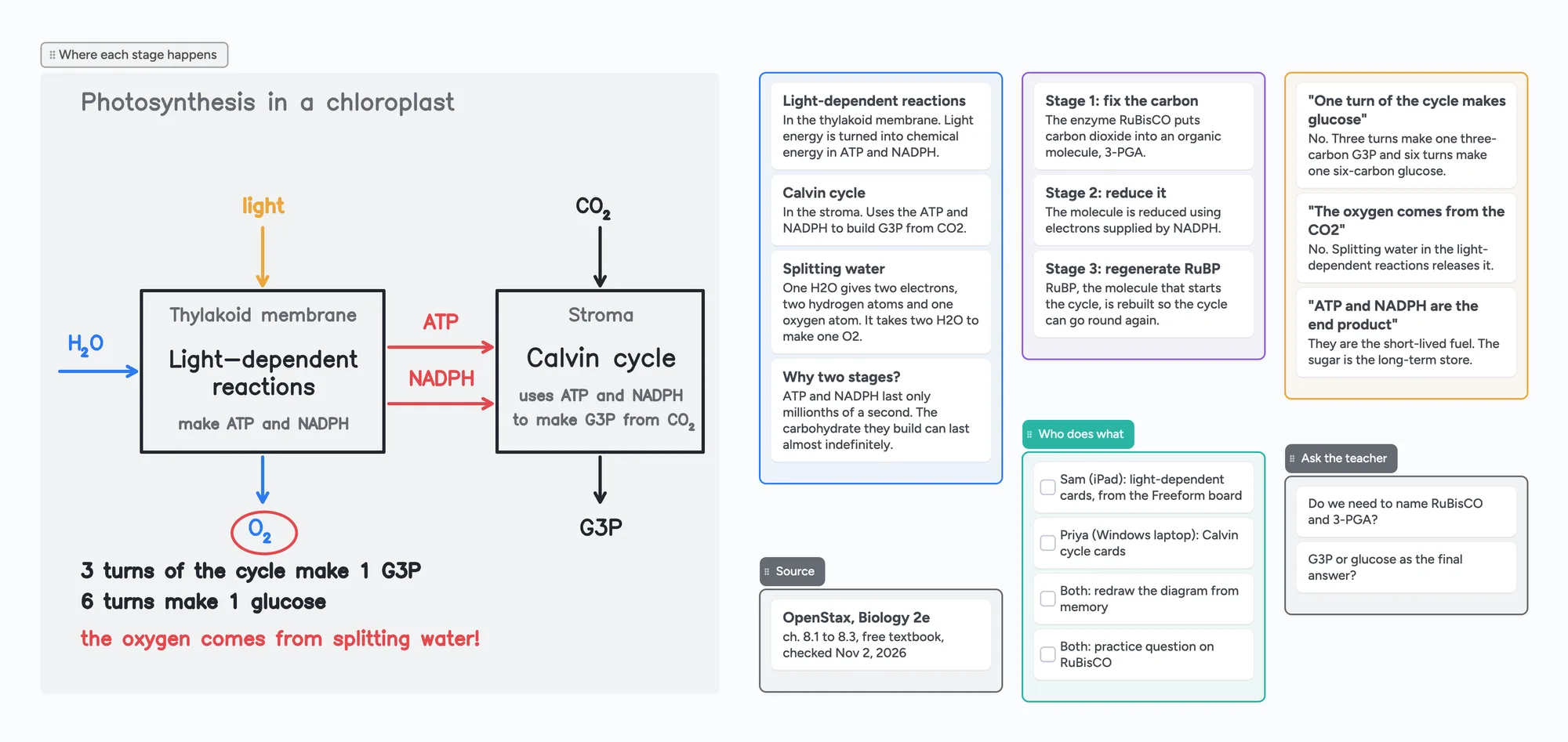
The ready board above shows where that ends up. Two classmates are splitting photosynthesis, one on an iPad and one on a Windows laptop. The diagram of where each stage happens is drawn by hand. Each stage sits on cards, the usual mix-ups are listed, and a checklist says who covers what. The science comes from OpenStax Biology 2e, chapter 8, read November 2, 2026. Open it and swap in your own topic.
What doesn't carry over
Instaboard can't import a Freeform board as editable items. The imported pages are a picture, each imported PDF becomes its own board and uses one of your 5 free boards, and the stickies and text from Freeform don't turn into cards. Retype the few notes that matter.
Other ways people get around it
- Share your screen on a call. In Zoom or Google Meet the other person sees your Freeform board live, but it only goes one way: they can't touch it.
- Work in a tool that runs everywhere from the start. If your group is mixed, it is easier to begin on a board everyone can open than to move the work later. See Freeform alternatives for Windows and Android for what each one gives you for free.
- Borrow an Apple device. Anyone with an iPhone, iPad or Mac and an Apple Account can open the shared board, so a friend's iPad works for a one-off.
Where Freeform is the better choice
- When everyone is on Apple. Real-time collaboration, participant cursors and Follow Along, which jumps you to wherever someone is working, are built in. You can start a collaboration from Messages.
- It costs nothing to use, and boards live in iCloud, so there is no board or item cap to run into. Only the owner's iCloud storage is used.
- Apple Pencil handwriting and Freeform's drawing tools are excellent, and scenes make a board easy to present.
- No import step. Anything you build there stays editable; the PDF route loses that.
If one person in your group is on Windows or Android only once, a PDF is enough, and you don't need another app.
What Instaboard doesn't do
- No Freeform import beyond the PDF, and it can't open a Send a Copy link.
- Editing needs a free sign-in. Viewing a board by link doesn't.
- The free plan is 5 boards and 150 items (cards, lists, images, text boxes; pen strokes, sections and arrows don't count), with 3 images and 1 file per board.
- No handwriting search and no AI. The eraser removes a whole stroke at a time.
- Calls on the board need everyone signed in, and free calls are limited to 60 minutes.
- Changes made offline are kept and sync when you're back online, but it isn't an offline-first app.
Start from the ready board
It opens in your browser in a few seconds, with nothing to install. Sign in for free when you want to save it and share it.
Questions
Can I share a Freeform board with someone on Windows or Android?
Not so they can open it in Freeform. Apple says everyone you share with must be signed in to an Apple Account on iOS 16.2, iPadOS 16.2, macOS 13.1 or later, and there's no Windows or Android app. You can send a PDF, which opens anywhere but is view-only.
Is there a web version of Freeform I can send them to?
No. Apple's list of what iCloud.com offers web-only accounts doesn't include Freeform, as of November 2, 2026.
Does a Send a Copy link work on an Android phone?
Apple describes the copy as something the recipient adds to their own boards in Freeform, and Freeform doesn't exist on Android, so we haven't found a way to open it there. Send a PDF instead.
Can my classmate write on the PDF I send?
In any app that lets you mark up PDF pages, yes, but nothing they write comes back to your Freeform board. If you both need to work on the same page, import the PDF into a board you can share, such as Instaboard.
Does my classmate need an Instaboard account to see the board?
No. Anyone with the link can view it. To add or change anything they sign in for free with Google, Apple or email.
Can I import my Freeform board into Instaboard?
Only as a PDF, which opens as pages you can write and draw on. The notes and shapes from Freeform stay part of the picture and don't turn into cards.
Is Instaboard free?
Yes. The free plan includes 5 boards, 150 cards and items across your account (pen strokes, arrows and sections don't count), 3 images and 1 file per board, unlimited collaborators and video calls up to an hour. Pro is $5 a month billed yearly ($59.99 a year), or $7.99 monthly, and the people you invite join free.
Sources
- Apple: Collaborate in Freeform boards and folders on iPhone
- Apple: Collaborate in Freeform boards and folders on iPad
- Apple: Share a Freeform board or folder on Mac
- Apple: Send a copy or PDF of a Freeform board on iPad
- Apple: Send a copy of a Freeform board on Mac
- Apple: Export a Freeform board as a PDF on Mac
- Apple: Change your Freeform settings on iPhone
- Apple: Keep your Freeform boards up to date and share them with iCloud
- Apple: Apps and features available for iCloud.com web-only accounts
- Apple Community: Freeform app: can non-Apple users collaborate?
- r/applefreeform: Web access (April 2024)
- OpenStax Biology 2e, chapter 8: Photosynthesis
Related
How to export an Apple Freeform board (PDF, image or another app)
Freeform has no Save as Image button. Export as PDF (Share > Export as PDF, or File > Export Board as PDF on Mac), then use Preview for PNG or JPEG.
A Freeform alternative that works on Windows, Android and the web
Freeform only runs on Apple devices, and everyone needs an Apple Account even to view a shared board. A free alternative that works on Windows, Android and any browser, with a call on the board.
Make a biology concept map from your own notes
Turn your lecture notes into a biology concept map: concepts on cards, labelled arrows, feedback loops and a recall check. Worked example on the HPA axis, a ready board to copy, and a nursing version.
A free infinite canvas app for your notes, on Windows, Android, Chromebook and iPad
Free infinite canvas apps for class notes on Windows, Chromebook, Android and iPad: where each one runs, what its free plan really gives, and a ready notes board to open.