For students who take Cornell notes on a laptop or tablet
Cornell notes, digital: cue cards that stay linked to your notes
A printed Cornell page has a cue column, a notes column and a summary strip. On a board each of those becomes something you can move: a cue is a card with a checkbox, an arrow joins it to its notes, and you can add a photo, a diagram or a question for class next to it. Below is a filled example on glycolysis, the steps for building your own, and an honest look at when a plain template is the better choice.
Updated
The short answer
- The method: a narrow cue column on the left, a wide notes column on the right and a short summary at the bottom. You take notes during class, write the cues afterwards, then cover the notes and answer each cue out loud.
- On a board a cue is a card with a checkbox, joined to its notes by an arrow. Move a card and the arrow stays attached to it, so you can re-order the page without redrawing it.
- A board adds a hand-drawn big picture, photos next to the notes, and a self-quiz list you can tick. A printable template can't move things around or be shared as one link.
- A printable or notebook app is better if you want a plain page, handwriting search or deep PDF annotation. Instaboard has none of that, and the layout is manual.
What the Cornell method is
The method comes from Walter Pauk at Cornell University. Cornell's alumni magazine says he developed it in the 1950s and that it spread widely after his book *How to Study in College* (1962). Cornell's Learning Strategies Center describes it in five steps: record, questions, recite, reflect and review.
- Record the lecture or reading in the notes column during class. Leave the cue column empty for now.
- Questions: afterwards, write a question or keyword for each chunk of notes in the cue column.
- Recite: cover the notes, read a cue and answer it out loud, then check.
- Reflect on how the ideas connect, and write the summary at the bottom in your own words.
- Review the page regularly. Cornell's center suggests spending at least ten minutes reviewing your notes.
The University of Cincinnati's Learning Commons gives a page layout: notes column about 6 inches wide, cue column about 2.5 inches wide, on a page 9 inches tall, with the cues and summary written soon after class. These are the measurements for a paper page. On a board you don't need them, but the proportions are why the cue column is narrow.
Build one on a board, step by step
- Add two sections side by side, Cues on the left and Notes on the right, and a third section underneath called Summary.
- During class, add one card per idea in the Notes section. Type short phrases, or draw with the pen. A photo of the slide can sit next to the card.
- After class, add a card in the Cues section for each note card and write a question in it. Turn on the checkbox for each cue.
- Draw an arrow from each cue card to its note card. The arrow stays attached to both cards when you move them.
- Write the summary in your own words, in the Summary section.
- To review, cover the notes (or scroll them off screen), answer each cue out loud and tick it when you get it. Redo the unticked ones tomorrow.
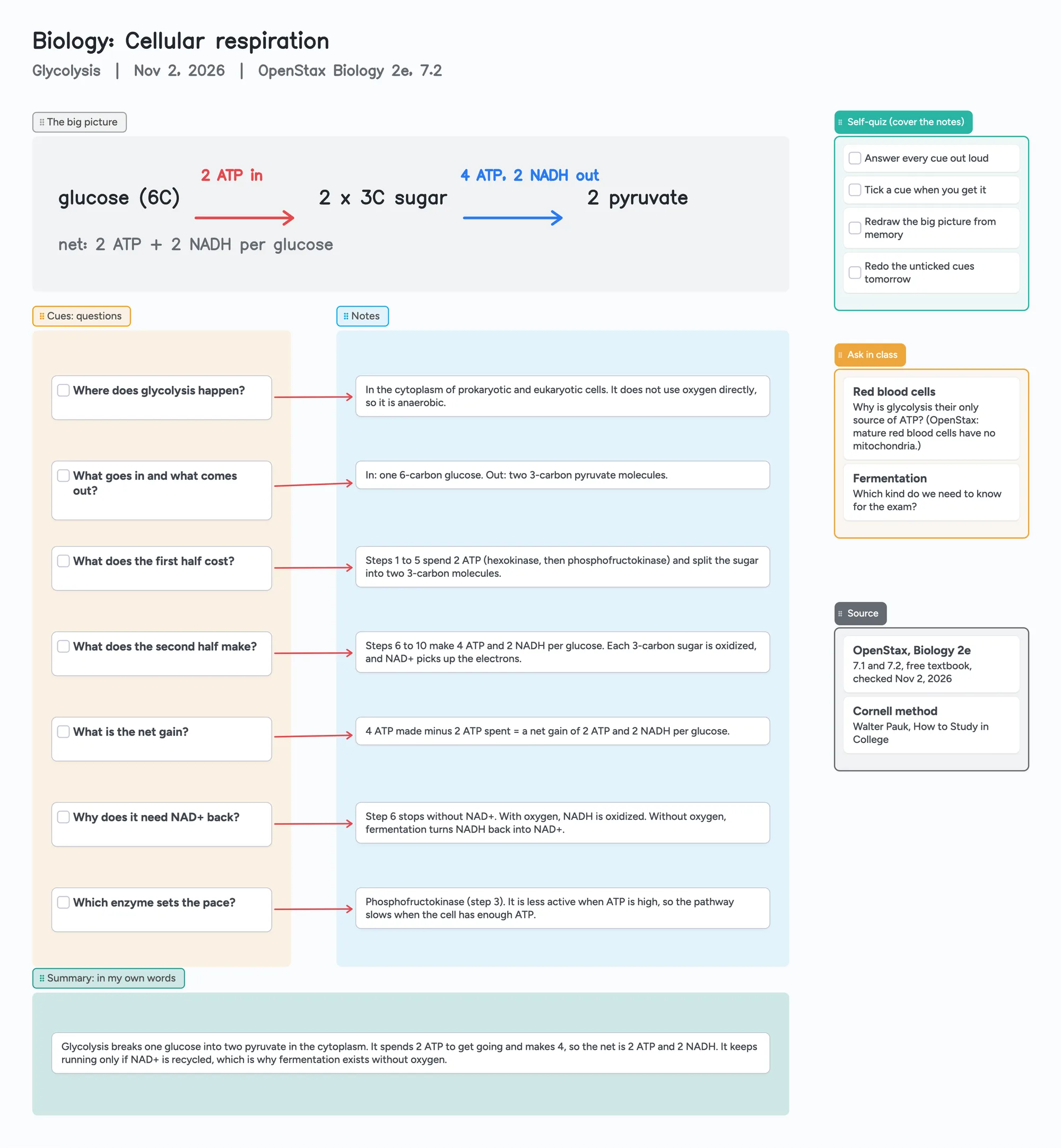
The ready board above follows exactly this layout. It is a worked example on glycolysis, taken from OpenStax's open biology textbook (Biology 2e, sections 7.1 and 7.2, read November 2, 2026). It is an example, not your lecture, so replace it with your own notes.
The example: glycolysis in seven cues
| Cue | What the note card says |
|---|---|
| Where does glycolysis happen? | In the cytoplasm of prokaryotic and eukaryotic cells. It does not use oxygen directly, so it is anaerobic. |
| What goes in and what comes out? | In: one 6-carbon glucose. Out: two 3-carbon pyruvate molecules. |
| What does the first half cost? | Steps 1 to 5 spend 2 ATP (hexokinase, then phosphofructokinase) and split the sugar into two 3-carbon molecules. |
| What does the second half make? | Steps 6 to 10 make 4 ATP and 2 NADH per glucose. |
| What is the net gain? | 4 ATP made minus 2 ATP spent = a net gain of 2 ATP and 2 NADH per glucose. |
| Why does it need NAD+ back? | Step 6 stops without NAD+. With oxygen, NADH is oxidized. Without oxygen, fermentation turns NADH back into NAD+. |
| Which enzyme sets the pace? | Phosphofructokinase (step 3). It is less active when ATP is high, so the pathway slows when the cell has enough ATP. |
From OpenStax Biology 2e, section 7.2 Glycolysis, read November 2, 2026. The wording is shortened for the board.
The big picture at the top is hand-drawn in the board's pen: glucose, 2 ATP in, two 3-carbon sugars, 4 ATP and 2 NADH out, two pyruvate. The "Ask in class" list holds the questions the notes didn't answer, which is where a Cornell page usually has its blank space.
What a board does that a printable page can't
- Cards move and arrows follow. Add a missed point in the middle of the notes, drag the cards down and the cue-to-note arrows stay attached.
- Cues are tickable. Each cue card has a checkbox, so the review step has a visible score and tomorrow's list is whatever isn't ticked.
- Room for what doesn't fit a column. A diagram, a photo of the whiteboard or a list of questions for class goes beside the notes, not squeezed into the margin.
- One link to share. Send the board to a study partner. Anyone can look at it without an account; to write on it, they sign in for free with Google, Apple or email.
- Handwriting is optional. You can type the cards or write with a pen or stylus on the same board.
When a printable, a document or a notebook app is the better choice
- You want a plain page. A Google Docs, Word or printed Cornell template is faster to set up and has no limits to think about. If you only need the layout, use one.
- You want to search your handwriting. Goodnotes' own Windows page advertises handwriting search and handwriting-to-text. Instaboard has neither.
- You annotate PDFs all day. A PDF import becomes its own board in Instaboard and uses one of the five free boards. A notebook app built for PDFs is a better fit for slide decks.
- You need an offline-first app. Changes made offline are kept and sync when you're back online, but Instaboard isn't built to work offline first.
Handwriting or typing?
Cornell's Learning Strategies Center says research favors taking notes by hand over typing. On a board you can do either, or both: type the notes and draw the diagram.
What Instaboard doesn't do
- The layout is manual. There is no Cornell template that builds itself, no auto-spacing and no AI that writes cues for you. The ready board is a layout to copy.
- No handwriting search and no conversion of handwriting to text. The eraser removes a whole stroke at a time.
- Editing needs a free sign-in. Viewing a board by link doesn't.
- The free plan is 5 boards and 150 items (cards, lists, images, text boxes; pen strokes, sections and arrows don't count), with 3 images and 1 file per board. One board per class fills up fast, so use one board per topic or unit.
- No import from other note apps. PDF import is the only route in. Full-board PDF export works only on drawing boards and trip planners; for a card board, selected cards and lists can be saved as an image.
Start from the ready board
It opens in your browser in a few seconds, with nothing to install. Sign in for free when you want to save it and share it.
Questions
What are Cornell notes?
A note-taking system developed by Walter Pauk at Cornell in the 1950s. The page has a notes column, a narrow cue column and a summary. You write cues after class, then cover the notes and answer them to study.
How do I take Cornell notes digitally?
Use two sections, Cues and Notes, and a Summary underneath. Put one card per idea in Notes, add a question card in Cues for each, join them with an arrow, and write the summary in your own words. The ready board above is a filled example.
Do the arrows move when I move a card?
Yes. An arrow joins two cards and stays attached to both, so dragging a card drags its end of the arrow with it.
Is there a Cornell notes template I can open?
Yes, the board above. It is a glycolysis example from OpenStax's open textbook. Replace the text with your own lecture and keep the layout.
Can Instaboard search my handwriting?
No. There is no handwriting search and no handwriting-to-text. If you need that, a notebook app that offers it is the better tool.
Can I share my Cornell board with a study group?
Yes. Copy the board link and send it. Anyone can look at it without an account, and anyone who wants to write on it signs in for free.
Is Instaboard free?
Yes. The free plan includes 5 boards, 150 cards and items across your account (pen strokes, arrows and sections don't count), 3 images and 1 file per board, unlimited collaborators and video calls up to an hour. Pro is $5 a month billed yearly ($59.99 a year), or $7.99 monthly, and the people you invite join free.
Sources
- Cornell Learning Strategies Center: The Cornell Note-taking System
- Cornell Learning Strategies Center: Cornell Note Taking System
- Cornellians: Popular Study Method has 'Cornell' Written All Over It
- University of Cincinnati Learning Commons: The Cornell Method for Note-Taking
- OpenStax Biology 2e: 7.2 Glycolysis
- OpenStax Biology 2e: 7.1 Energy in Living Systems
Related
Make a biology concept map from your own notes
Turn your lecture notes into a biology concept map: concepts on cards, labelled arrows, feedback loops and a recall check. Worked example on the HPA axis, a ready board to copy, and a nursing version.
A free infinite canvas app for your notes, on Windows, Android, Chromebook and iPad
Free infinite canvas apps for class notes on Windows, Chromebook, Android and iPad: where each one runs, what its free plan really gives, and a ready notes board to open.
How to export a Miro board (and what you get when you do)
How to export a Miro board as a PDF, image or CSV, what Free gets (low resolution, no bulk export), what an export leaves out, and how to keep working from it. Checked against Miro's help center.
How to share a Freeform board with someone on Windows or Android
Freeform can't be opened or edited on Windows or Android. What Apple lets you send instead (PDF, image), and how to move the board to one you can both write on. Steps for iPhone, iPad and Mac.
A pharmacology concept map you can edit: one list per drug class
A filled pharmacology concept map you can open and edit: five blood pressure drug classes with the prototype drug, how it works, side effects, what to watch for and what to teach. How to build your own, and where a printable template is better.
How to organize organic chemistry notes: a reaction map on cards you can move
How to organize organic chemistry notes so reactions connect: a filled reaction map you can open and edit, with one card per reaction, arrows between functional groups and a synthesis worked backwards. Where a printed reaction map or a notebook is better.