For novelists and screenwriters
Outline a novel or screenplay with index cards, on a board you can share
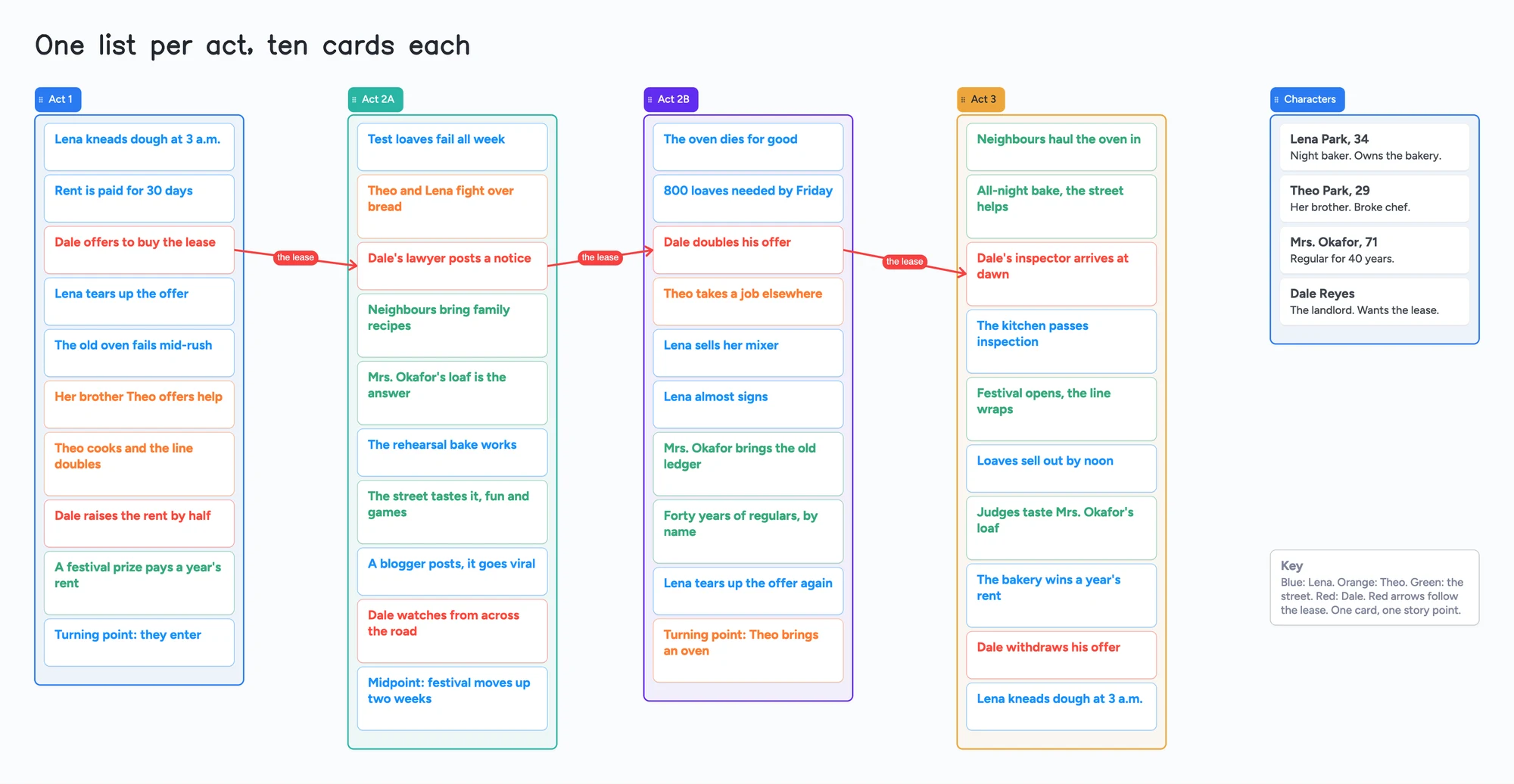
The index-card method is simple: one beat per card, the cards in four acts, and you move them until the story holds. This page shows it on a board: one list per act, ten short cards in each, a list of characters and red arrows for a subplot. It is an outline tool only. It has no script formatting, no drafting, no word count and no export to Final Draft, Scrivener or Plottr, and a long novel with a story bible will pass the free plan's 150 items.
Updated
The short answer
- What it is: one board with a list per act and one card per beat. Each card holds a few words. You drag cards between lists until the order works.
- What it isn't: no screenplay formatting, no manuscript editor, no word count, no timeline view, no character database, and no export to Final Draft, Scrivener or Plottr. Selected cards and lists can be saved as a PNG.
- The example board uses 50 of your 150 free items: 45 cards and 5 lists (our arithmetic). Each card and each list counts; pen strokes, sections and arrows don't. A long novel with a story bible will pass 150, and Pro removes the limit.
- A co-writer needs a free sign-in to write. They can open the link and look without one.
What this outline board can't do
- It holds the outline, not the script. There is no screenplay format, no scene headings, no page count and no word count. You write the pages in your script software or word processor.
- No export to Final Draft, Scrivener or Plottr and no import from them. Selected cards and lists can be saved as a PNG.
- No timeline view and no character database. The Characters list is four plain cards. You can't filter by character.
- 150 items on the free plan, across your account. Each card and each list is 1 of the 150. The example board is 45 cards and 5 lists, so 50. A 90-scene novel in four act lists is 94 before any characters (our arithmetic), and a story bible on top passes 150. Pro is $5 a month billed yearly ($59.99 a year) and removes the item limit.
- 5 boards and 3 images per board on the free plan. Keep one board per project. The example board has no images.
- You arrange cards by hand. Cards stay where you put them, and a list keeps its cards in the order you give them.
How to outline with index cards on the board
Screenwriting.io describes the Save the Cat method as breaking a screenplay into 15 beats and then into 40, with 10 cards each in Act 1, Act 2A, Act 2B and Act 3. That 10/10/10/10 split is the layout of the example board. The card text on it is our own invented story, and the beats are described in our own words. Save the Cat has its own Beat Sheet Mapper on the Save the Cat site; this page copies none of its beat names.
- Make one list per act. Name them Act 1, Act 2A, Act 2B and Act 3 (or Act 1, 2 and 3 if you prefer three).
- One beat per card, in a few words. John August's hints for index cards say to keep them short, up to seven words, and that most movies can be summarized in fewer than 50 cards. Every card on the example board is seven words or fewer.
- Code the cards by storyline. August suggests a letter code for characters. On the board, a card colour does the same job: blue for Lena, orange for Theo, green for the street, red for Dale. The colour key sits at the bottom of the board.
- Mark the turning points. The last card of Act 1 and of Act 2B starts "Turning point:" and the last card of Act 2A starts "Midpoint:". Name them however your structure does.
- Move cards until the order holds. Drag a card to another spot in its list or into another list. That is the whole method.
Writers disagree about whether software helps. In r/Screenwriting (January 2022), one person who works with four rows of ten cards said that software notecard modes are usually lacking the ability to arrange each row separately, and that they used MURAL to co-write with a partner far away. That is one person's view. A list on this board keeps its own cards, so each act is its own column of cards.
Follow a subplot with arrows
On the example board, three red arrows labelled "the lease" join the third card of each act list in turn: Dale's offer, his lawyer's notice, his doubled offer and his inspector. You can read the landlord's thread without reading every card. Arrows and sections don't count toward the 150 items. The arrows are part of the example board, and you can delete or redraw them.
An arrow can join cards in different lists, and it can carry a caption and its own colour. It stays attached when you reorder a card inside its list and when you move a whole list, so the thread survives a restructure. Each card also takes its own colour, separate from its list's colour, which is how the example board marks Lena, Theo, the street and the landlord. Lists reorder independently of each other, and you can drag a card from one list into another when a beat moves to a different act.
The novel version: four acts of equal length
Phil Halton's index-card method for a novel, from his own page, plans in four acts of equal length, or in a 5/10/5 split for a 20-chapter book, and notes the subplot on the cards. On the board that is the same four lists, with a card per chapter or per scene instead of per beat.
- Use a short title and one line. A card can hold a bold title and a body, so a scene fits as "Chapter 7: the letter arrives" with one line under it.
- Keep the draft elsewhere. The cards are the plan. Word count, chapters and prose stay in your writing tool.
- Watch the count. One card per scene adds up, so a novel of a hundred scenes uses most of the free plan on its own.
A chapter list or book outline on the same board
A chapter-by-chapter outline is the same job with a different card. Make one list per part (or per act), put one card per chapter in it, and start each title with the chapter number, like "7. The letter arrives", with one line of what changes in the chapter underneath. Colour the cards by point of view or storyline, and drag a chapter to another list when the book's shape changes.
The count is the limit: a 30-chapter book in three part lists is 33 items (30 cards and 3 lists), and a 60-chapter book in four lists is 64 (our arithmetic). A story bible, a character list and notes on the same account share the same 150, and Pro removes the limit.
Outlining with a co-writer
This is a smaller part of the page, because we found no searches for it. It works like this:
- In the share menu, set "Anyone with the link can edit".
- Send the link, or the 4-digit join code. The code expires after 2 hours of inactivity, so send the link to someone you'll need later.
- Your co-writer signs in free (Google, Apple or email) to write. Someone who isn't signed in can open the link and read everything, but can't change anything. Once they're signed in, what they add shows up on your board within a few seconds.
- The board counts as one of their 5 free boards, and the cards they add count toward their own 150. If they're already at 5 boards, they can still open the link and write; the board just isn't added to their boards.
Outlining a pilot or a season
The same layout works for a TV pilot or a season, as a smaller use. Make one list per episode, put a short card for each beat in it, and start each card with "A:", "B:" or "C:" for the story it belongs to. Use arrows for a thread that runs across episodes.
The count is the limit: 8 episodes of 10 cards each is 88 items (8 lists and 80 cards), and 10 episodes of 15 cards is 160 (10 lists and 150 cards), which passes the 150 free items and means Pro (our arithmetic).
One person's view from r/Screenwriting (August 2020, the top reply, 87 votes) was that for a spec series you don't plan the whole thing: "Pilot and a bible" and move on. Whether that holds for your project is your call. The board is useful for the pilot and a short season outline, not for planning 360 pages.
If you work on a TV writers' room project, Final Draft, WritersRoom Pro and Arc Studio are made for it (table below).
Index card tools for writers, side by side
Each row is from the maker's own pages, read on November 7, 2026. Prices change, so check the page before you buy.
| Tool | Built for | Price on its page | What stands out |
|---|---|---|---|
| Instaboard | Any visual organizing, with a pen | Free: 5 boards, 150 items; Pro $5 a month billed yearly | Lists, cards and arrows on one canvas; any browser and the iPhone, iPad and Android apps; a co-writer signs in free to write |
| Cork | Writers | Free: 3 boards; paid plans from $19 a year | Kanban columns per act or per episode, a free corkboard view, Markdown export; its screenwriter page says it has no real-time collaboration |
| Plottr | Planning a novel or series | Plottr $60 a year (desktop); Pro $9.99 a month or $99 a year; 30-day free trial | Templates, series bible, word-count tracking; real-time collaboration is on Pro |
| Scrivener | Writing the whole manuscript | Free trial on its store page; see Scrivener for the price | Every section has a virtual index card, and moving a card reorders the manuscript; compiles to Word, PDF, Final Draft and plain text |
| Dabble | Writing a novel | Writer $15 a month billed annually | Pricing page lists a Plot Grid and co-authoring, with a 14-day trial |
| Milanote | Mood boards and creative projects | Free: 100 notes, images or links and 10 uploads; $9.99 a month billed annually | Free boards with no time limit; many images |
| Final Draft | Writing screenplays | See Final Draft for the price | Beat Board with colour-coded beats and Flow Lines, an Outline Editor, send outline to script; Mac and Windows, not Chromebook |
Swipe the table sideways to see every column.
Sources are listed at the bottom of the page, all read on November 7, 2026.
When another tool is the better choice
- You want a cork wall for writing and nothing else. Cork is made for it, with columns per act and a free plan of 3 boards. The free plan counts boards, not cards.
- You are planning a whole series or book with a bible. Plottr is built for that, with templates, a series bible and word-count tracking, from $60 a year on the desktop. Live co-plotting there is on Pro; see a free way to plot with a partner.
- You write the whole manuscript in one place. Scrivener ties each section to a virtual index card, so moving a card moves the text. Instaboard holds no manuscript text.
- You like Scrivener's corkboard but write on a device it doesn't list. Scrivener's overview page names iOS, macOS and Windows. The board here runs in a browser, so it is a way to lay out and move index cards there. It does not write or compile a manuscript, and moving a card here does not move any text.
- You write a novel and want plot and co-writing in one writing app. Dabble's pricing page lists a Plot Grid and co-authoring on its Writer plan.
- You need to put a beat board into a script. Final Draft's Beat Board sends your outline to the script. Its product page lists Mac and Windows, not Chromebook.
- You work on a TV series. WritersRoom Pro has Season, Character and Scrap boards and revision history; its Indie edition is $9.98 a month and its Partner edition $17.98 a month, both for personal, non-commercial use. Arc Studio's Pro plan ($99 a year) lists outlining tools and inviting collaborators, and its Free plan lists neither.
- You have a lot of images. Milanote's free plan allows 100 items and 10 uploads. Instaboard allows 3 images per board.
For scene cards by point of view, drafted ticks and a corkboard look, see the digital corkboard for writers.
Start from the ready board
It opens in your browser in a few seconds, with nothing to install. Sign in for free when you want to save it and share it.
Questions
Can I outline a novel with index cards online for free?
Yes. Instaboard's free plan has 5 boards and 150 items, and each card and each list counts. A short outline fits. A novel of a hundred scenes plus a story bible will pass 150, and Cork's free plan has 3 boards.
How many index cards should a screenplay have?
It depends on the method. Screenwriting.io describes Save the Cat as 40 beats in four acts of ten, and John August's hints say most movies can be summarized in fewer than 50 cards. The example board has 40 beat cards.
Can two people outline a screenplay on the same board?
Yes. Set "Anyone with the link can edit" and send the link. Your co-writer signs in free to write, and the board counts as one of their 5 free boards.
Can I use it for a chapter-by-chapter outline?
Yes. Make one list per part, one card per chapter, and drag chapters between lists. A 30-chapter book in three lists is 33 of your 150 free items. It holds the outline only, not the chapters' text.
Does it format a script or export to Final Draft?
No. It has no script format and no export to Final Draft, Scrivener or Plottr. Selected cards and lists can be saved as a PNG. Write the script in a script editor.
Can I plan a TV pilot or season on it?
For a pilot or a short season, yes: a list per episode and cards tagged A, B or C. Ten episodes of 15 cards is 160 items, which passes the free 150. For a writers' room, Final Draft, WritersRoom Pro and Arc Studio are built for it.
Is it better than Scrivener's corkboard?
Not for drafting. Scrivener's index cards are attached to your manuscript sections, so moving a card moves the text. Instaboard's cards hold only the outline, and it is a shared board with ink and arrows.
Sources
- Screenwriting.io: how screenwriters use index cards (Save the Cat as 15 beats and 40, read Nov 7, 2026)
- Screenwriting.io: what is Save the Cat (10 beats each in Act 1, 2A, 2B and 3, read Nov 7, 2026)
- Save the Cat: Beat Sheet Mapper (the Save the Cat site's own product, 15 beats; read Nov 7, 2026)
- John August: 10 hints for index cards (2010, read Nov 7, 2026)
- Phil Halton: story outlines with index cards (read Nov 7, 2026)
- r/Screenwriting: four rows of ten cards and MURAL (Jan 2022, one person's account)
- r/Screenwriting: how do you plot a TV series (Aug 2020, one person's view)
- Plottr: pricing (Plottr $60 a year, Pro $9.99 a month or $99 a year, 30-day trial; read Nov 7, 2026)
- Scrivener: overview (virtual index cards, compile targets; read Nov 7, 2026)
- Dabble: pricing (Writer $15 a month billed annually, Plot Grid, co-authoring; read Nov 7, 2026)
- Cork: pricing (free 3 active boards, paid from $19 a year; read Nov 7, 2026)
- Cork: for screenwriters (columns per act and episode, no real-time collaboration; read Nov 7, 2026)
- Milanote: plans (free 100 items, 10 uploads, $9.99 a month billed annually; read Nov 7, 2026)
- Final Draft: how to use the Beat Board (colour-coded beats, Flow Lines, Outline Editor; read Nov 7, 2026)
- Final Draft: the Beat Board for everything in your script (Map Out Your TV Series; read Nov 7, 2026)
- Final Draft: product page (macOS and Windows, not Chromebook; read Nov 7, 2026)
- WritersRoom Pro: home page (Indie $9.98 a month, Partner $17.98 a month, personal non-commercial; read Nov 7, 2026)
- WritersRoom Pro: the boards (Season, Character and Scrap boards; read Nov 7, 2026)
- Arc Studio: pricing (Free and Pro plan lists; read Nov 7, 2026)
Related
A digital corkboard for your scene cards, free to start
A digital corkboard for outlining a novel with scene cards: colour by point of view, drafted ticks, subplot arrows. Honest comparison with Cork, Corkulous, Plottr, Scrivener and Milanote.
A mystery novel outline board for suspects, clues and red herrings
Outline a mystery novel on one board: a list per suspect, clues, red herrings and reveal order. A free ready board, and where Plottr and Sheets do more.
Character relationship map: a filled template two people can edit
A filled character relationship map to copy: factions, a card per character and captioned arrows for who wants what. Edit it together with a co-writer. Free plan limits stated.
A free Milanote alternative for student projects, and where Milanote is better
Milanote's free plan stops at 100 notes, images or links. What Instaboard's free plan gives a student project, where Milanote is better, and a ready project board.