For the owner or shift lead of a small cafe, shop or bar
A shift handoff template for a small shop: one shared board instead of a group chat
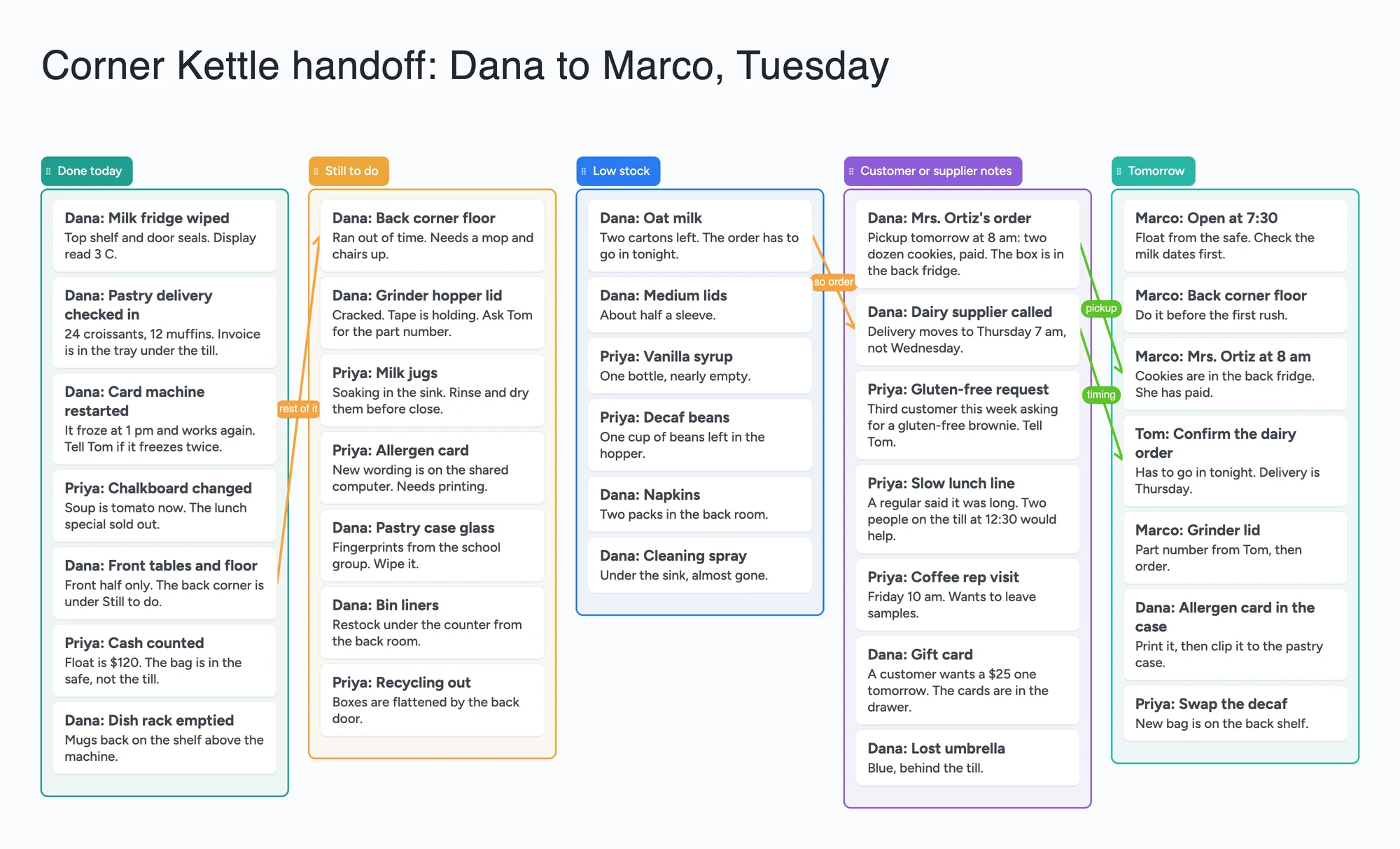
This is for the person finishing a shift and the person starting the next one at a small cafe, shop or bar. One board has five lists (done today, still to do, low stock, customer or supplier notes, tomorrow), and every card starts with the writer's first name. It is a handoff for a counter, not a record: it isn't a nursing, care or clinical handover, this page makes no claim that it logs who changed or ticked a card or when, and it doesn't send reminders or alerts. We make Instaboard, and a group chat, Connecteam or Homebase do more of that; the sections below say where. Use the board for the part a chat does badly: what is finished, what carries over, what is running out, and what the next person needs to know, all in one place they can open from a link.
Opens in your browser. Anyone can view; a free sign-in lets you edit.
Updated
The short answer
- What it is: one board with five lists (done today, still to do, low stock, customer or supplier notes, tomorrow) and a card for each item. Every card title starts with the first name of the person who wrote it, so the next shift knows who to ask. The example is an invented cafe, Corner Kettle.
- What it isn't: not a clinical, nursing or care handover record. This page makes no claim that it shows who ticked something or when, and it doesn't send reminders or alerts or schedule shifts. If you need those, a team app does them: see the table below.
- Arrows: an arrow joins a card in one list to a card in another, takes a caption and its own colour, and stays attached when a card is moved. The example joins a half-finished floor job to the card that carries it into tomorrow, and the low oat milk to the supplier call about the delivery.
- Free plan: the example is 40 of your 150 free items (34 cards, 5 lists and 1 title text box, our count). Arrows, sections and pen strokes don't count. Writing needs a free sign-in. Pro is $5 a month billed yearly ($59.99 a year), or $7.99 monthly.
What this board doesn't do, and where a group chat, Connecteam and Homebase are better
Read on November 21, 2026 from each tool's own pages. Connecteam's pricing page lists a Small Business plan with "all hubs and all features, entirely free for up to 10 users". Its Operations hub lists unlimited checklists, forms and tasks, a time clock and job scheduling, and its Communications hub includes chat. Homebase's pricing page lists a Basic plan at $0 per location per month for 1 location and up to 10 employees, with basic scheduling and basic time tracking; its Task Manager, "build and assign task lists" and track completion, is a paid add-on at $13 a month per location, and. Trello's pricing page lists a Free plan with up to 10 collaborators per Workspace, unlimited cards, up to 10 boards per Workspace, assignees, due dates and iOS and Android apps; advanced checklists are on Standard, $5 per user a month billed annually.
So for a team of up to ten that needs a tick, a reminder, a schedule or a time clock, those tools do real work this board doesn't. This board has no reminders, alerts or scheduling, and this page claims no history of who changed or ticked a card. Its edge is small: a filled-in layout you can copy and read at a glance, on one link.
Where these tools win
If you want a task assigned to a named person with a due date and a reminder, use Connecteam, Homebase Task Manager or Trello. If you want a time clock and shift scheduling, use Connecteam or Homebase. If a quick note is all it takes, a group chat is faster than a board. Use this board when the handoff is a list of things the next person reads, not a task someone is chased for.
The group chat as a log, and where it breaks
Bartenders in r/bartenders (December 23, 2025) were arguing about it. u/Informal_Bus_4077 wrote that all group chats are muted on their phone; another commenter wrote that the point of a group chat is a running log of messages between shifts, so people who don't like it can mute it. u/greasydenim said their bar uses a Google Calendar where the shift manager makes nightly notes to pass on information to the next shift. In r/barista (May 19, 2024), u/spytez suggested opening and closing sheets, daily and weekly sheets broken down by shift, and inventory sheets with par levels; a different commenter said that with Google Sheets they had to print everything out because it was the only way to get people to use them, and u/Krustofthe509 suggested a group chat, a notebook and a cork board. Each of those is one person's account, not a rule.
A chat is a good log for "the card machine froze". It is a poor place for "what is still undone and what is running out", because the answer is scattered through the messages. The board keeps those as lists, and an item that carries over is a card you can drag from one list to the next.
How to use it at the end of a shift
- Open the board and replace the example. Swap Corner Kettle for your shop. Delete the cards you don't want; each one is 1 of your 150 items.
- Put what is finished in Done today. One card per job with the writer's first name first and a line of detail, such as "Dana: milk fridge wiped".
- Put what carries over in Still to do. Say why, so the next person doesn't redo your thinking: "Ran out of time. Needs a mop and chairs up."
- Keep a running Low stock list. One card per item and how much is left. When someone places the order, drag the card out or delete it.
- Use the notes list for what customers and suppliers said. A pickup, a delivery that moved, a request you keep hearing.
- Write Tomorrow as who does what first. Start each card with the person's first name, so the opener reads one list.
- Share it. In the share menu set Share to "Anyone who joins can edit" (new boards start view-only). A teammate signs in free and writes live. Someone who only needs to read can open the same link signed out, but can't change anything.
A copy of the board takes 1 of your 5 free boards. If you start a new board for every day, keep one board and clear the cards each shift instead.
Not a clinical, nursing or care handover
Searches for "shift handover template" and "shift notes template" mostly return nursing, care and IT templates, and this board isn't one. It isn't a record of what happened, makes no claim to track who read or changed a card, and isn't designed for patient or client information. Don't put personal or health information about customers on it. It is meant for a counter: stock, jobs and messages.
This board vs a group chat vs Connecteam vs Homebase vs Trello
| Tool | What we read (Nov 21, 2026) | Good at | Not what you get |
|---|---|---|---|
| Instaboard board | Free: 5 boards, 150 items. Pro $5/mo billed yearly | A filled-in handoff layout, a first name on every card, one link | Assigned tasks, reminders, scheduling, a time clock; no claim of a history of who changed a card |
| A group chat | Not a vendor claim; commenters in r/bartenders describe it as a running log | Quick notes in the moment, everyone already has it | A list of what is still undone or running low |
| Connecteam | Small Business plan: all hubs and all features, free for up to 10 users; Operations hub: unlimited checklists, forms and tasks, time clock, job scheduling | Assigned checklists, scheduling, time clock, chat | A free-form board with arrows |
| Homebase | Basic: $0 per location per month, 1 location, up to 10 employees (basic scheduling, basic time tracking); Task Manager add-on $13 a month per location | Scheduling and time tracking at $0, task lists as a paid add-on | A free-form board; task lists are not in the Basic plan as listed |
| Trello | Free: up to 10 collaborators and 10 boards per Workspace, unlimited cards, assignees and due dates; advanced checklists on Standard ($5 per user a month, annual) | Cards with assignees and due dates on phone apps | A prefilled shop handoff; you build the lists yourself |
Swipe the table sideways to see every column.
From each vendor's own pages and the Reddit threads below, read November 21, 2026. A group chat row is our summary of what commenters said, not a quote.
Limits of the free plan for a handoff board
- Items. Each card, list and text box is 1 of your 150 free items, across all your boards. The example is 34 cards, 5 lists and 1 title text box, 40 in all. Arrows, sections and pen strokes don't count.
- Several boards add up. Our arithmetic: copying the example for three counters or three shops is 3 boards and 120 items, which leaves 30 items for everything else. Keep one board and clear it each shift.
- Boards. The free plan includes 5 boards, and a copy takes 1 of them.
- Photos. 3 images per board. The example has none. A link card's preview picture no longer counts toward the 3.
- No reminders, no due-date alerts, no schedule. The board doesn't tell anyone that a job is late or that the next shift starts.
- No claim about who did what. A first name in the title is typed text. This page makes no claim that the board logs who ticked, moved or edited a card.
- Writing needs a free sign-in. Someone who joins by link or code can add cards, and the board counts as one of their 5. A signed-out reader can only look.
Start from the ready board
It opens in your browser in a few seconds, with nothing to install. Sign in for free when you want to save it and share it.
Questions
Is there a free shift handoff template for a small shop?
Yes. Open the board, replace the example cafe with your shop and set Share to "Anyone who joins can edit" if your staff need to write on it. It is a board of cards and lists, not a log, a schedule or a task app.
Is this a nursing or clinical handover template?
No. It isn't a record of who changed what, isn't built for patient or client information, and shouldn't hold personal or health details about customers. It is meant for stock, jobs and messages between shifts at a cafe, shop or bar.
Does it remind the next shift or show who did what?
No. It has no reminders or alerts, and this page claims no due dates or history. The first name at the start of each card is typed text. For assigned tasks with reminders, look at Connecteam, Homebase's Task Manager or Trello.
Can my whole team write on it?
Anyone who opens the link and signs in free can write on it live, if you set Share to "Anyone who joins can edit". The board counts as one of their 5 free boards, and the cards they add count toward their own 150 items. Someone who isn't signed in can only read it.
How many cards fit on the free plan?
Each card, list and text box is one of the 150 items across all your boards. The example handoff is 40. That is our arithmetic. Arrows are free.
Sources
- Connecteam: pricing (read November 21, 2026)
- Homebase: pricing (read November 21, 2026)
- Trello: pricing (read November 21, 2026)
- r/bartenders: day shift and night shift group chat (December 23, 2025, replies are single accounts)
- r/barista: opening and closing sheets for a coffee shop (May 19, 2024, replies are single accounts)
Related
A cafe opening and closing checklist on one shared board
A cafe opening and closing checklist on one shared board: opening, side work, closing, shift notes, weekly jobs. No reminders; Connecteam and Homebase do those.
An office holiday party planning board: who owns what, in one place
Plan the office holiday party with a small committee on one shared board: budget, venue, food, gift swap rules and the evening. Free ready board, and where SignUpGenius does more.
A short film pre-production board: who owns what, on one screen
Plan a short film with a director and a producer on one shared board: cast, crew, gear, permits, locations and shoot days. Free ready board, and where StudioBinder does more.