For a director and an editor sharing one list of notes
A post-production tracker board: which cut is done and who owns each note
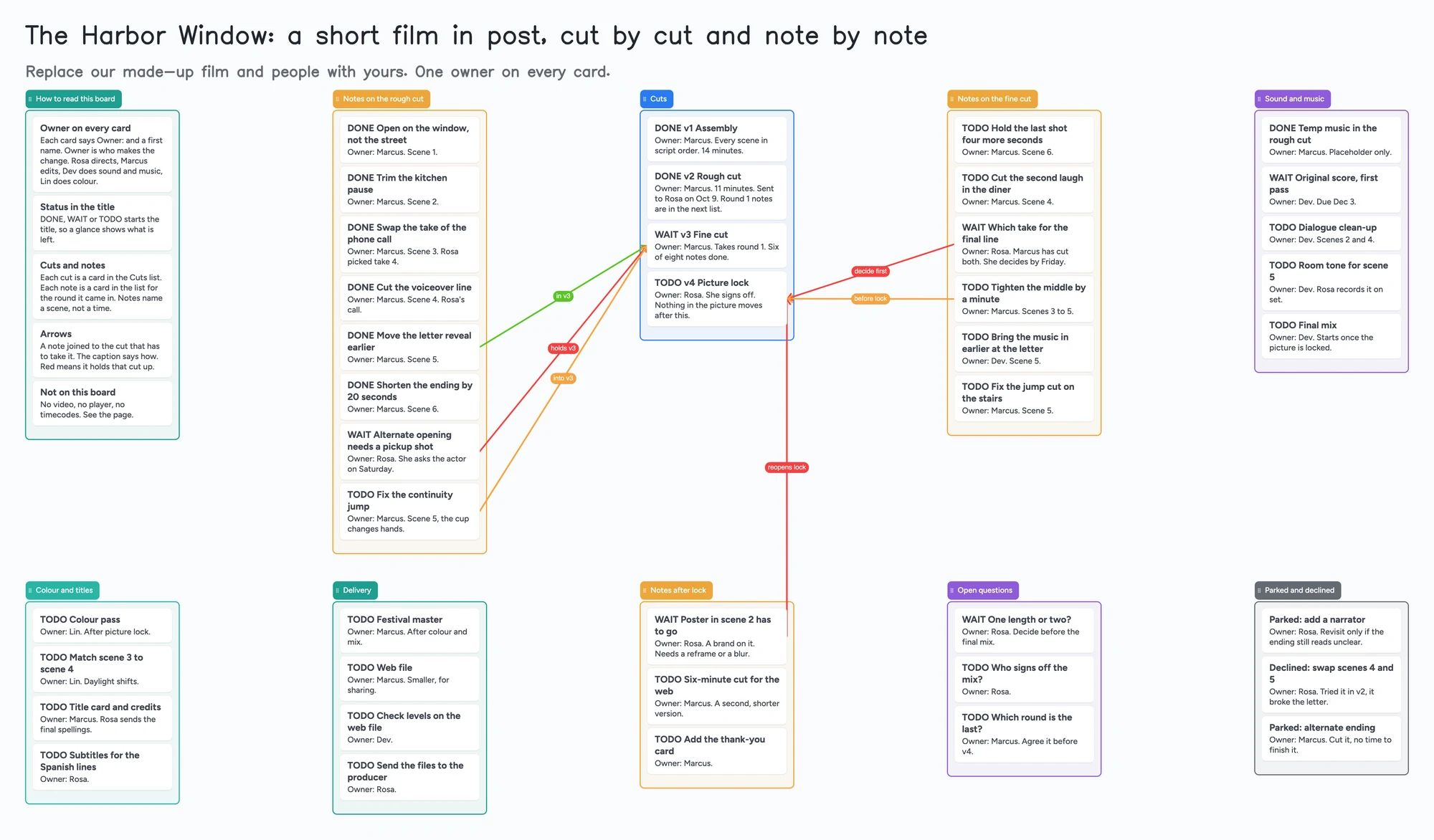
This is for a director and an editor (and the sound and colour people they hand off to) who want one shared page that answers two questions: which cut is done, and who owns each note. It has a list for each round of notes, a list of cuts, lists for sound and music, colour and titles and delivery, and lists for notes that came after lock, open questions and notes parked or declined. Every card names an owner and starts with DONE, WAIT or TODO. It isn't a review tool. You can't upload a cut, play it, or pin a note to a frame or timecode here; Frame.io and Vimeo do that, and the next section says where each is better. Use the board for the part around playback: who has to change what, which note is holding up which cut, and whether picture lock is really locked.
Updated
The short answer
- What it is: one board with a list for each round of notes, a list of cuts (v1 assembly to v4 picture lock) and a list for each hand-off after picture. Every card says "Owner:" and a first name, DONE, WAIT or TODO starts the title, and a note names a scene, not a time.
- What it isn't: no video, no player, no timecodes, no frame-accurate comments, no reminders. Nobody is told when a note is added or a status changes.
- Arrows: an arrow joins a card in one list to a card in another, takes a caption and its own colour, and stays attached when a card moves. The example joins the notes still open to the fine cut and to picture lock: red for "holds this cut", orange for "into this cut".
- Free plan: the example is 55 of your 150 free items (45 cards and 10 lists, our count). Arrows, sections and pen strokes don't count. A long edit with hundreds of notes passes 150 on its own (see the limits).
Where Frame.io, Vimeo, Evercast and a sheet are better
Read on November 11, 2026 from each tool's own pages. Frame.io's home page says you can "upload creative files, manage projects, assign tasks, get precise feedback, and share your work". Its Review & Approval page lists anchored comments ("click anywhere to leave precise, accurate feedback right where it's needed"), frame-accurate hover preview and scrub, and "frame-accurate feedback left in Frame.io as markers on their Final Cut Pro timeline". Its home page lists a Free plan with up to 2 members, 2GB storage and up to 2 projects. If the main job is watching the cut and pinning a comment to a frame, use it, not a board.
Vimeo's video collaboration page describes time-stamped comments you can sort, filter and resolve, status labels and version history so "every teammate knows which cut is current", and comments that sync with Adobe Premiere Pro. Its plan table lists "File transfer and video review" from Starter ($13 a month billed annually) up; the Free plan is 1 seat and 1GB. Evercast is for live sessions: its post-production schedule article says each virtual room "offers the ability to draw, chat, take notes, and record" while you stream from your editing software, and it offers a free Google Sheets schedule template with a Gantt timeline, departments (Editorial down to Finishing, with assembly cut, rough cut, fine cut and picture lock as editorial tasks), a tasks and assignments sheet and a budget sheet. Airtable's free digital video production template has tables for equipment and media clearance, a calendar view of production dates, and a filter so the editor sees a separate task list.
Where these tools win
To watch a cut and comment on a frame, use Frame.io or Vimeo. To review live while the editor shares their screen, use Evercast. To get dates, a Gantt chart and sums, use the Evercast sheet or Airtable. Use this board next to them, or first when there is no review tool yet, for the question none of them draw: which note belongs to which cut, who owns it, and what is still holding up lock.
Instaboard also has a general Video Edit Pipeline template: stages from footage intake to delivery, with labels and a place to attach review links. This page is about something narrower, the notes and the cuts they go into.
How to run notes and cuts on the board
Editors in r/editors describe the same problem in different tools. In a 2020 thread, the poster u/45Jung kept timecoded notes in a Google doc, colour coded by sound, picture or VFX, and asked if there was something better; u/stormy_star5 highlights each done note in yellow and doesn't delete notes, in case a second-cut note contradicts the first; u/neonraygun uses red sequence markers for client notes and turns them green when changed; u/Fish-across-face said the tricky part is consolidating several people's notes in one place. In a 2024 thread, u/mybossthinksimworkng's Sheets grid runs timecode, network note, story notes, editor notes and "confirmed done", with someone above confirming each note is done; u/youseguise uses four columns: timecode, note, initials of the note giver and Y/N. Each is one person's method. The board doesn't pick one for you.
- Make a card for each cut. The example has v1 assembly, v2 rough cut, v3 fine cut and v4 picture lock in the Cuts list, with the owner and what the cut takes.
- Make a list for each round of notes, and a card for each note. Name a scene instead of a time ("Scene 5"); the board has no timecodes. Put the person who makes the change on the "Owner:" line, not the person who gave the note.
- Start each title with DONE, WAIT or TODO. WAIT is for a note that needs a decision or a pickup shot first. Nothing sorts by it, so scan for it by eye.
- Join a note to the cut that has to take it. The example draws a green "in v3" arrow for a note already done, an orange "into v3" arrow for one still open, and a red "holds v3" arrow from a note that is waiting on a pickup shot.
- Show what holds up lock. Two fine-cut notes and one late note point at the v4 card: "decide first" (red), "before lock" (orange) and "reopens lock" (red). If a red arrow lands on v4, the picture isn't locked.
- Keep a Parked and declined list. When notes in the same round contradict each other (a theme in the 2025 thread below), move the one you aren't doing there with a line saying why, so it isn't raised again.
- Copy the board for the next film. It takes 1 of your 5 free boards.
On notes volume, the numbers in r/editors are single reports. In a December 2025 thread, u/richard_lutz, the poster, counted about 250 to 325 notes on a 40-minute edit; u/MajorPainInMyA described a producer who left about 30 notes on the first pass of a 15-minute video and 20 or more on the second, for up to 8 passes; u/kghimself said many notes within the same teams contradict each other. That is the case for one owner per note and a parked list. It is also the case for keeping only open notes as cards.
This board vs Frame.io vs Vimeo vs a sheet
| Tool | What we read (Nov 11, 2026) | Good at | Not what you get |
|---|---|---|---|
| Instaboard board | Free: 5 boards, 150 items. Pro $5/mo billed yearly | Which note goes into which cut, who owns it, what holds up lock | Video, playback, timecodes, reminders, sums |
| Frame.io | Free plan: up to 2 members, 2GB, up to 2 projects (home page) | Anchored comments, frame-accurate preview, markers on the editor's timeline | A board of cards and arrows |
| Vimeo | Video review from Starter ($13/mo billed annually); Free is 1 seat, 1GB | Time-stamped comments, status labels, version history, Premiere sync | A free review plan |
| Evercast | Free Google Sheets schedule template; live review rooms | A Gantt timeline, departments, tasks and a budget sheet; live sessions | An arrow from a note to the cut that takes it |
Swipe the table sideways to see every column.
From each tool's own pages, read November 11, 2026. We name no tool as the best; they do different jobs.
Limits of the free plan for post-production
- Items. Each card and each list is 1 of your 150 free items, across all your boards. The example is 45 cards and 10 lists, 55 in all (our count). Arrows, sections and pen strokes don't count. Two boards like it come to 110 of the 150, and a third passes it.
- Long edits. A card per note passes 150 fast: one poster in r/editors reported about 250 to 325 notes on a 40-minute edit, and even 250 cards would use more than the whole free allowance (our arithmetic). Keep only the open notes as cards, or one card per scene with the notes in its body, and clear done ones off between rounds.
- Boards. The free plan includes 5 boards. Making your own copy of the example uses 1 of them; a card that opens its own board uses another, so the example keeps everything on one board.
- Files and photos. 3 images and 1 file per board. A cut won't fit, and there is no player. Put a link to the review page in a card. On the web a link card's preview picture no longer counts toward the 3 images, but the iPhone, iPad and Android apps still count it until their next update.
- No timecodes, no frame-accurate comments. A note can say "Scene 5" or "after the line about the window"; it can't point at a frame.
- No reminders, alerts or sorting. Nobody is told when a card changes, and nothing sorts by DONE, WAIT or TODO. Card colour is the border and text only.
- Writing needs a free sign-in. An editor or composer who joins by link or code can add cards and arrows, and the board counts as one of their 5.
Start from the ready board
It opens in your browser in a few seconds, with nothing to install. Sign in for free when you want to save it and share it.
Questions
Is there a free post-production tracker template?
Yes. Open the board, replace the example film, cuts and notes with yours and set Share to "Anyone with the link can edit" if your editor needs to write on it. It is a board of cards, lists and arrows, not a spreadsheet and not a review tool.
Can the editor see the video on it?
No. There is no player and no timecode. Put a link to your review page in a card, and use Frame.io, Vimeo or similar to comment on frames.
Does it work for YouTube or corporate video, not a film?
The lists work for any edit with rounds of notes: delete the sound and colour lists you don't need. The example is a short film.
Will it tell the editor when I add a note?
No. The board has no notifications. Tell them you've added notes, or have them keep the board open; changes show within seconds.
How many notes fit on the free plan?
Each card and each list is one item of the 150 across all your boards. The example is 55. That is our arithmetic. Arrows are free.
Sources
- Frame.io home page: plans and features (read November 11, 2026)
- Frame.io: Review & Approval (read November 11, 2026)
- Vimeo: video collaboration and review (read November 11, 2026)
- Evercast: a simple post-production schedule template (read November 11, 2026)
- Airtable: Free Digital Video Production Template (read November 11, 2026)
- r/editors: how do you keep track of your video editing notes? (2020; replies are single accounts)
- r/editors: note tools that work for editors and producers (2024; replies are single accounts)
- r/editors: lets talk about notes, how many have you received (December 2025; replies are single accounts)
Related
A short film pre-production board: who owns what, on one screen
Plan a short film with a director and a producer on one shared board: cast, crew, gear, permits, locations and shoot days. Free ready board, and where StudioBinder does more.
A festival strategy board for a short film, shared with your producer
Plan a short film's festival run on one shared board: goals, three budgets, tiers, a card per festival with fee, deadline and premiere rule. A filled example to copy. Not a submission tool.
A documentary outline board: the story you hope to tell, and what you still need to get
Outline a documentary on one shared board: three act lists, interviews, scenes to film and archive, with arrows between them. Free ready board, and where Celtx, StudioBinder and Boords do more.