For people backing up a Trello board or moving a small team out of it
How to export a Trello board, and what to do with the file
Any member can export a Trello board as JSON from the board menu, and a Premium Workspace adds CSV. Neither file can be imported to rebuild a board, in Trello or in Instaboard, so moving means retyping. If you are 10 people or fewer, staying on Trello is simpler. We make Instaboard; this page shows the steps, what the files leave out, and a ready board to retype into.
Opens in your browser. Anyone can view; a free sign-in lets you edit.
Updated
The short answer
- JSON: Trello's export page says all board members can export a board to raw JSON. In the board menu choose Print, Export, and Share, then an export option.
- CSV: only boards in Premium Workspaces. It leaves out comments and archived cards (typing .csv at the end of the board link adds the archived ones).
- No way back in: Trello says it is "not currently possible to import JSON or CSV formats to re-create a Trello board". Instaboard has no Trello import either, so you retype the lists.
- Stay on Trello if your team is 10 people or fewer and needs automation, Power-Ups or Premium views. This page is for a team that is leaving anyway.
- Instaboard's limits: 5 boards, 150 items across your account and 3 pictures per board, no Trello-style Power-Ups and no reminders or due-date alerts. Pro removes the item limit.
What each export gives you, from Trello's own pages
These are Trello's Atlassian Support pages, read in full on November 25, 2026. None of them shows a date on the page.
| Export | What Trello's export page says | What it means for a move |
|---|---|---|
| JSON, one board | "All board members can export a board to raw JSON format." It is "not easily read by humans". | A full dump for a backup or a script. You can't read it like a list. |
| CSV, one board | "Boards in Premium Workspaces can be exported to CSV format", openable in any spreadsheet program. | Needs a paid Workspace. No comments in it. Archived cards are left out unless you type .csv on the board link. |
| Every board in a Workspace | With Trello Premium, in CSV and JSON. Only Workspace admins can create and download it. | Has an option to include raw attachments in a ZIP; without it, files stay linked to Trello-hosted copies. |
| From the web version only, not the mobile app. Printing a board prints the front of every card. | A paper copy of the lists. The back of each card is not on it. | |
| Inbox cards | "Currently, it's not possible to export the cards in your Inbox." | Drag them onto a board first, then export. |
Swipe the table sideways to see every column.
Trello's "Export data from Trello", "Making sense of Trello's JSON export" and "Print a board or card" pages, read November 25, 2026. Trello's pricing page lists "Simple data export" under Premium (read the same day).
Export a board, step by step
- Open the board and click the board menu.
- Choose Print, Export, and Share, then pick an export option.
- Save the JSON file somewhere you will find it again. Trello suggests Firefox or a JSON viewer app to read it; its JSON page names the JSONView extension for Chrome and Firefox.
- If your Workspace is Premium, export the CSV too, and add the archived cards by typing .csv at the end of the board's web address.
- Open a few cards on the board. A Workspace export without raw attachments links to Trello-hosted files; Trello's pages don't say what a single-board JSON does with them, so save the attachments you still need.
If your Workspace is not Premium and you want a spreadsheet, Trello's own JSON page points to third-party Power-Ups or a Chrome extension called TrelloExport. They are other companies' tools; we have not tried them.
What the file leaves behind
- Old comments and history. The JSON holds the 1000 most recent actions on a board, comments included. Older ones need the Workspace export, which is Premium.
- Comments in the CSV. Trello says comments aren't in it, because a spreadsheet row doesn't suit one card with many comments.
- Archived cards in the CSV, unless you add .csv to the board link.
- The look of the board. Neither file rebuilds lists in order, colours or covers anywhere else.
- Automation and Power-Ups. Trello's pricing page lists 250 Workspace command runs a month on Free and unlimited Power-Ups per board. Nothing in an export recreates them in another tool.
Why you retype: no import on either side
Trello's export page ends the argument for Trello too: "It is not currently possible to import JSON or CSV formats to re-create a Trello board." Its import page says "Trello doesn't have a generic import tool" and lists three routes into Trello: pasted text (each new line becomes a card), its API, and third-party Power-Ups.
Instaboard goes the same way. It has no Trello, JSON or CSV import (the only import is a PDF, which becomes a page you write on). A board you move here is typed in by hand. For a board of a few lists that is a short job; for a board with hundreds of cards, it is not, and Trello is the better place to stay.
Hollis Street Pantry's board, list by list
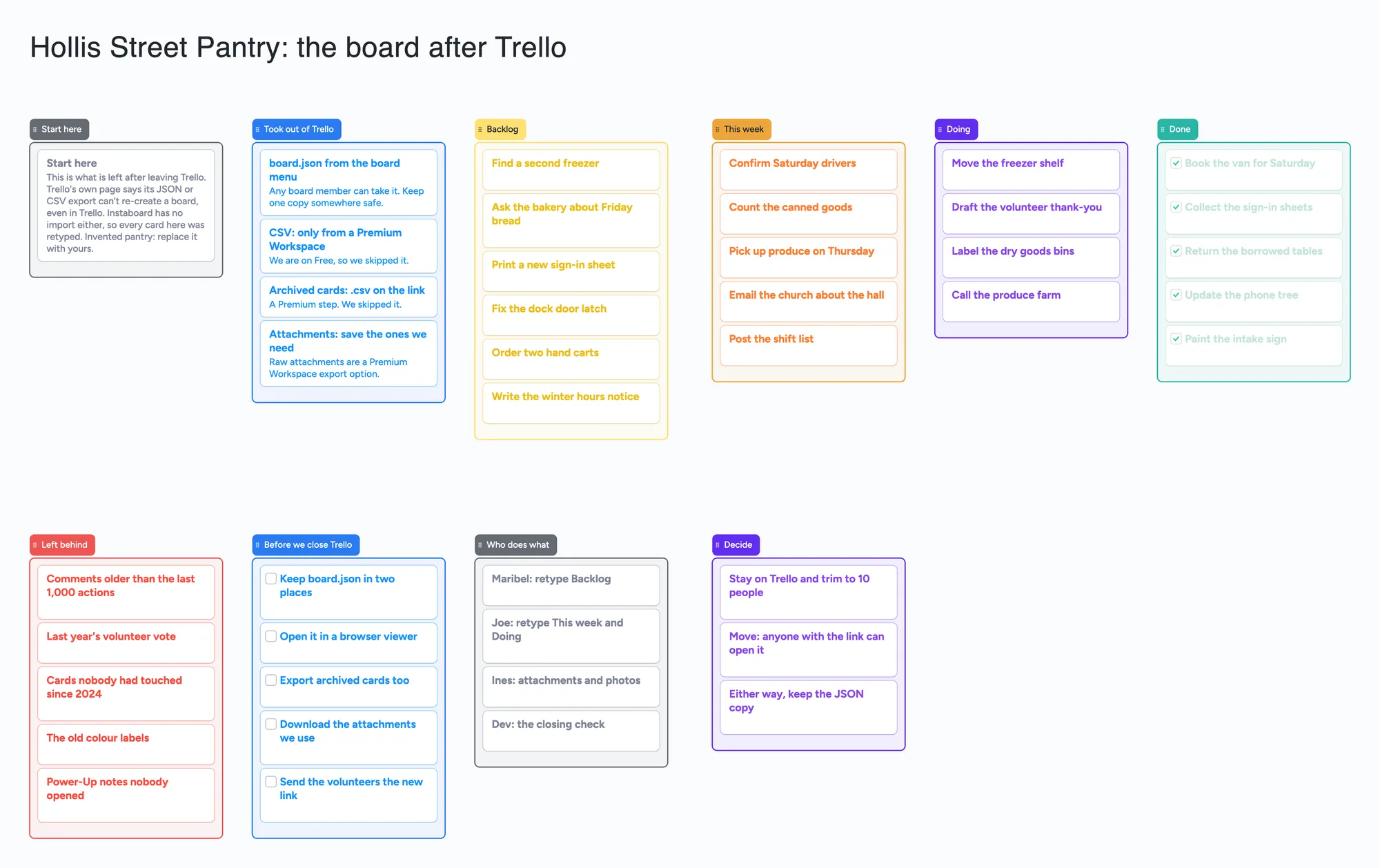
The example is invented. Maribel, Joe, Ines and Dev run a small volunteer food pantry that outgrew Trello's 10-collaborator Free limit and decided to move. The top row is their Trello lists, retyped. The bottom row is the move itself.
| List | What it holds | In the pantry's board |
|---|---|---|
| Start here | Why the board looks like this | A card saying the export can't be imported, so every card was retyped |
| Took out of Trello | What came out of Trello and where it is kept | board.json, the CSV the pantry skipped on Free, archived cards, attachments |
| Backlog, This week, Doing, Done | The pantry's four Trello lists, retyped | Find a second freezer; Confirm Saturday drivers; Move the freezer shelf; Book the van (ticked) |
| Left behind | What did not come with them | Comments past the last 1,000 actions, cards untouched since 2024, old colour labels |
| Before we close Trello | A tick-box checklist | Keep board.json in two places; export archived cards too; send the volunteers the new link |
| Who does what | One card per person | Maribel retypes Backlog; Joe retypes This week and Doing; Ines handles attachments |
| Decide | The choice, written down | Stay on Trello and trim to 10 people, or move; either way keep the JSON copy |
Swipe the table sideways to see every column.
Board names, people and tasks are made up. The cards are notes about a Trello board; nothing connects to Trello.
The useful order is the bottom row first: decide what you keep, then retype only the lists that are still live. The "Left behind" list is the one most teams skip, and it is where a missing comment or an old label turns up weeks later.
When Trello is the better choice
- You are 10 people or fewer. Trello Free is up to 10 collaborators per Workspace, unlimited cards and up to 10 boards per Workspace (pricing page, read November 25, 2026). Nothing forces you out.
- You rely on automation or Power-Ups. Trello lists 250 Workspace command runs a month on Free and 1,000 on Standard. Instaboard doesn't have Trello's automation or Power-Ups.
- You need Timeline, Table, Dashboard or Map views. Trello lists them under Premium. Instaboard's nearest are a calendar view for cards with due dates and a per-list sort.
- You capture from email and Slack. Trello lists email and Slack capture to Inbox on Free. We don't claim that for Instaboard.
- You have hundreds of cards. A retype of that size is a project; Trello's paste-in route goes the other way, from a spreadsheet into Trello.
What staying costs for 1, 5 and 25 people
Trello bills per user. These are Trello's listed prices on its pricing page, read November 25, 2026, multiplied out (our arithmetic). On Instaboard, the board's owner pays for Pro if they want it, and people you invite join free; the FAQ below has the plan and price.
| People | Trello Free | Trello Standard, $5 per user a month billed yearly | Trello Premium, $10 per user a month billed yearly |
|---|---|---|---|
| 1 | $0 | $60 a year | $120 a year |
| 5 | $0 | $300 a year | $600 a year |
| 25 | Over the 10-collaborator limit | $1,500 a year | $3,000 a year |
Swipe the table sideways to see every column.
Our arithmetic from Trello's listed monthly prices times 12. If one person only wants the CSV, $12.50 is Trello's listed price per user a month billed monthly (pricing page, read November 25, 2026); we did not read Trello's cancellation terms.
How much of the free plan the pantry's board uses
The board is 53 items: 42 cards, 10 lists and 1 text box. Instaboard Free allows 150 items across all your boards, so one copy uses about a third. A second copy makes 106, and a third would make 159, past 150 (our arithmetic). Pro removes the item limit.
Two Reddit threads, one person's view each
r/trello, January 1, 2024 (OP u/UpvotedLies; read in an archive copy, 22 comments, 2 removed). The OP asked why exporting workspaces is so hard and later settled on a GitHub backup script. One commenter answered "There is, if you pay for premium." That commenter also named a Power-Up, Blue Cat Reports, that exports a limited amount for free (we did not try it). Another, in the same thread, wondered whether they would have to write a script just to parse the JSON.
r/projectmanagement, June 10, 2026 (OP u/Circuit_Sage_4125; read in an archive copy, 15 comments, 3 removed). An 11-12 person company hit Trello's 10-user limit and asked for a free tool with the same one-column-per-person board. Replies named other kanban tools, suggested a spreadsheet, and asked whether that layout was right at all. None of them suggested importing the old board.
Start from the ready board
It opens in your browser in a few seconds, with nothing to install. Sign in for free when you want to save it and share it.
Questions
Can I export a Trello board for free?
Trello's export page says all board members can export a board to raw JSON and does not tie that to a plan. CSV is only for boards in Premium Workspaces. Trello's pricing page lists Premium at $10 per user a month billed yearly.
Can I import a Trello export into Instaboard?
No. Instaboard has no Trello, JSON or CSV import; the only import is a PDF. Trello says its own JSON and CSV exports can't re-create a board either, so you retype the lists. A board of a few lists is a short job; hundreds of cards is not.
Does a Trello export include comments and archived cards?
The JSON holds the 1000 most recent actions on a board, comments included. The CSV has no comments and skips archived cards, unless you type .csv at the end of the board link. A full comment history needs a Premium Workspace export.
How do I read a Trello JSON file?
Trello's JSON page says it is easier to read in a browser with formatting and names the JSONView extension for Chrome and Firefox. For anything past browsing, it suggests searching for keywords or asking a developer.
Can I print a Trello board?
Yes, from the web version, not the mobile app. Printing a board prints the front of every card and leaves out the back, so details from the back of cards are not on it. A single card prints with its back details.
Is Instaboard free?
There is a free plan: 5 boards, 150 cards and items across your account (pen strokes, arrows and sections don't count), and 3 pictures and 1 file per board. Anyone with the link can read a board; writing on it takes a free sign-in. Pro removes the item limit and adds invite-only boards: $5 a month billed yearly ($59.99 a year), or $7.99 monthly.
Sources
- Trello Help: Export data from Trello (Atlassian Support; page shows no date; read in full November 25, 2026)
- Trello Help: Making sense of Trello's JSON export (page shows no date; read November 25, 2026)
- Trello Help: Print a board or card (page shows no date; read November 25, 2026)
- Trello Help: Import data into Trello (page shows no date; read November 25, 2026)
- Trello: Pricing (page shows no date; read November 25, 2026)
- r/trello: Why is there no easy way to export trello workspaces? (OP u/UpvotedLies, January 1, 2024; replies are single accounts, read in an archived copy, November 25, 2026)
- r/projectmanagement: Moving away from Trello 10-member limit, Free options for a transparent team board? (OP u/Circuit_Sage_4125, June 10, 2026; replies are single accounts, comments we read, read November 25, 2026)