For two or three people shipping a first app to the App Store and Google Play
An app launch checklist on one shared board: the waits first, then build, store page, review access and launch week
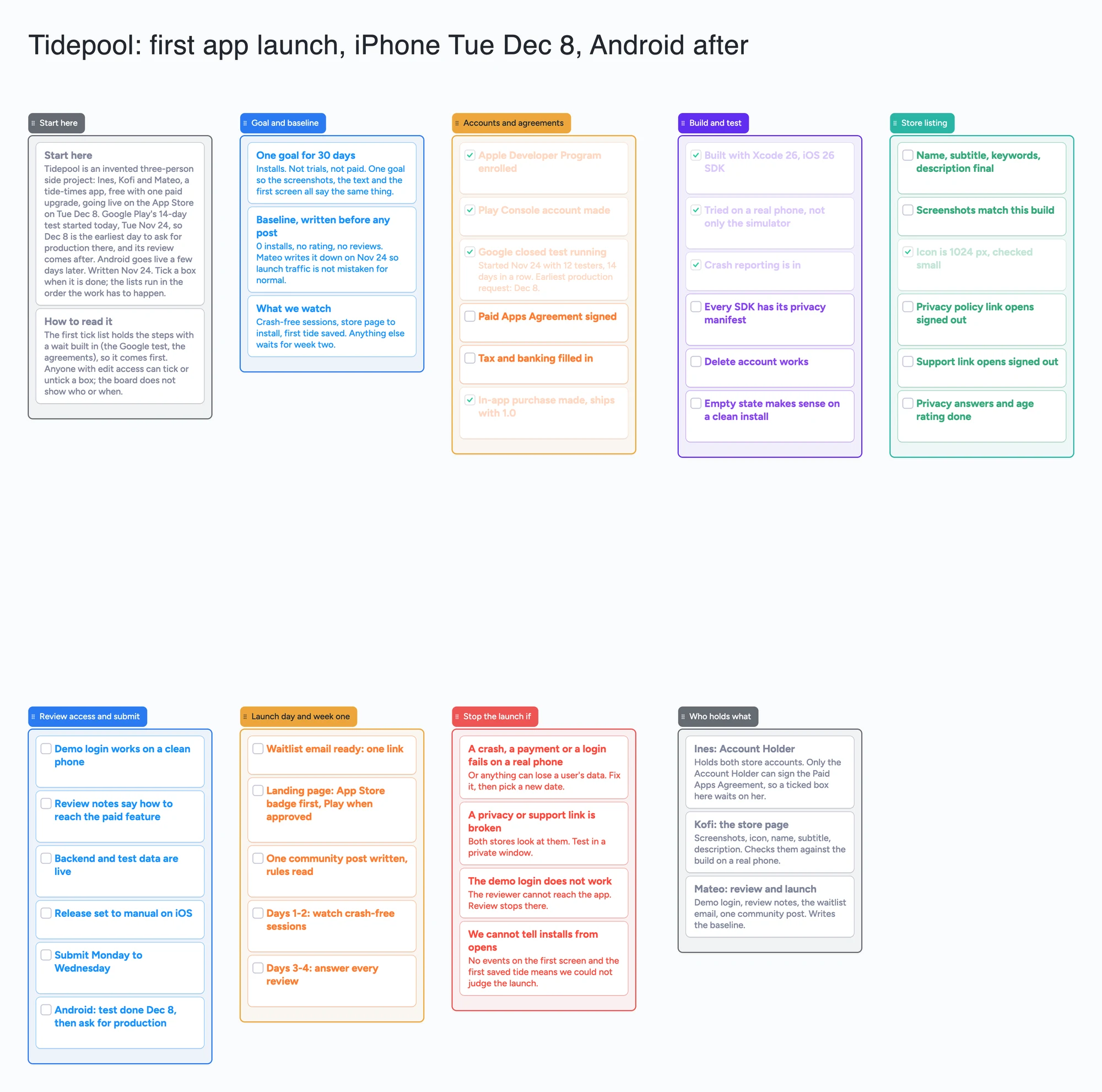
We make Instaboard, an online board. This page gives you an app launch checklist already laid out on it, filled in for an invented three-person side project: Tidepool is a tide-times app, free with one paid upgrade, and Ines, Kofi and Mateo want it live on the App Store on Tuesday, December 8. The board has nine lists: a goal and baseline, five tick-box lists in the order the work has to happen (accounts and agreements, build and test, store listing, review access and submit, launch day and week one), a list of stop conditions and a list of who holds what. Open it, swap in your own app and send the link to your crew. It is a list you tick by eye, not a release tracker: it sends no reminders or due-date alerts, does not talk to App Store Connect or Play Console and cannot tell you a link is broken. Below we say what each of four 2026 launch guides says, where they differ, and when a store console or a launch tool is the better choice.
Opens in your browser. Anyone can view; a free sign-in lets you edit.
Updated
Read this first: what the board does and doesn't do
- What it is: one screen your crew ticks through between "the app works on my phone" and "the app is live". Twenty-nine tick boxes in five lists, a goal, stop conditions and who holds what. Tidepool uses 51 of your 150 free items.
- What it is not: no reminders, due dates or alerts, no link to App Store Connect or Play Console, no check that a privacy link opens or a build processed, and no record of who ticked a box or when. Anyone with edit access can tick or untick.
- What it covers: a first launch on both stores for a small crew, from four guides we read in full on November 24, 2026. It is not Apple's or Google's own checklist; we did not read their documentation pages.
- Keep off it: demo-account passwords, signing keys, tax or banking details. A link board is not private. Put those in a password manager and write only "in the password manager" on a card.
- When to use something else: a tool that tracks each release for you, or the store consoles themselves. A section below lists them.
The steps that make you wait, and the dates they set
A checklist in the order of the work puts the waits first, because they can't be rushed. The Accounts list is first for that reason. What the pages we read say, and what it does to Tidepool's calendar (the dates are our arithmetic; the board sends no reminders or due-date alerts):
| Step | What the page says | Tidepool |
|---|---|---|
| Apple Developer Program | AppScreenshotStudio: $99 a year; enrollment typically processes within 48 hours, up to a week if identity verification is flagged; an organisation needs a D-U-N-S Number, which it says takes 2-4 weeks | Ines enrolled as an individual: ticked |
| Google Play closed test | AppScreenshotStudio, citing a Google Help page we did not read: a personal account created after November 2023 needs a closed test with at least 12 testers opted in for 14 consecutive days, and the clock restarts if someone opts out | Test starts Nov 24 and runs 14 days to Dec 7, so Dec 8 is the earliest day to ask for production |
| Paid Apps Agreement | AppScreenshotStudio: needed for a paid app or any in-app purchase; only the Account Holder can sign it, with tax and banking details. AppScreens lists it as something to confirm is active | Ines signs it; the box waits on her |
| First in-app purchase | AppScreenshotStudio and AppScreens: the first purchase of each type is submitted together with the app version | Made now, ships with 1.0: ticked |
| Apple review | LaunchBuddy: Apple says most submissions are reviewed within a day, but first submissions and apps with logins or in-app purchases can take longer; leave a buffer of a few days. AppScreenshotStudio: 90% within 24 hours | Tidepool has a login and a purchase, so its plan is to submit on Monday Nov 30, eight days before Dec 8 |
| Google review | AppScreenshotStudio: typically 1-3 days, up to 7 for new apps | Production asked Dec 8 at the earliest, so Dec 9 to Dec 15 |
Swipe the table sideways to see every column.
Read November 24, 2026. The pages are vendor content (screenshot and release tools) and quote Apple and Google; we did not open the Apple or Google pages they cite. Dates in the last column are our arithmetic from the figures in the middle column.
That is why the board's title says iPhone on Dec 8 and Android after: the 14-day test sets Android's earliest day. Put the dates in a calendar that reminds you; a card with "Dec 8" typed on it reminds nobody.
Tidepool's board, list by list
The example is invented. Ines holds both store accounts, Kofi owns the store page, Mateo owns review access and launch. Each list answers one question, and the three lists that only exist for a launch are the Accounts list (what blocks us for days), Stop the launch if, and Who holds what.
| List | The question it answers | In Tidepool's board |
|---|---|---|
| Goal and baseline (blue) | What are we trying to do in 30 days, and from what starting point? | "Installs. Not trials, not paid"; baseline 0 installs, no rating, no reviews, written before any post |
| Accounts and agreements (orange, tick boxes) | What has a wait built in? | "Google closed test running", "Paid Apps Agreement signed", "Tax and banking filled in" |
| Build and test (purple, tick boxes) | Is the build one a reviewer can open? | "Tried on a real phone, not only the simulator", "Delete account works", "Empty state makes sense on a clean install" |
| Store listing (green, tick boxes) | Does the page match the build? | "Screenshots match this build", "Privacy policy link opens signed out" |
| Review access and submit (blue, tick boxes) | Can the reviewer reach every feature? | "Demo login works on a clean phone", "Release set to manual on iOS" |
| Launch day and week one (orange, tick boxes) | Who hears about it, and what do we watch? | "Waitlist email ready: one link", "Days 1-2: watch crash-free sessions" |
| Stop the launch if (red) | What makes us pick a new date? | A crash, a payment or a login failing on a real phone; a broken privacy or support link; a demo login that doesn't work; no way to tell installs from opens |
| Who holds what (grey) | Who is the one person for each job? | Ines the Account Holder, Kofi the store page, Mateo review and launch |
Swipe the table sideways to see every column.
The board's own wording. The tick boxes can be ticked and unticked by anyone with edit access, and the board doesn't show who ticked or when. The ninth list, Start here, has two cards: what the board is, and how to read it.
Four launch guides, and what each adds that the others don't
We read four 2026 guides in full on November 24; the dates each page prints are in the sources list below. Each is written by a company that sells a related tool, which is why we call them vendor content. The board folds them into one list, so here is what each contributed:
| Guide | Scope | What it adds |
|---|---|---|
| LaunchBuddy: App Store Connect release checklist (a release-planning app for iOS developers) | iOS releases | Eight checks before Submit for Review; define the version goal; TestFlight on real devices; phased release runs 7 days from 1% to 100% and can be paused for up to 30 days. Its page says it is free for 2 apps and 2 releases, Pro from $2.99 a month |
| AppScreens: App Store Connect release checklist (a screenshot tool) | iOS submissions | A copy-paste review-notes template; the demo account must work with no two-factor or SMS block; test account deletion; answer the 2026 age-rating questions again; the first-submission purchases go with the version |
| AppLaunchFlow: app launch checklist 2026 (a screenshot and listing tool) | iOS and Android | Three gates (product, store, growth), each with an owner and a stop condition; one goal, one main metric and two guardrail metrics; a baseline before announcing; weekly changes for four weeks |
| AppScreenshotStudio: indie app launch checklist (a screenshot tool) | iOS and Android, on a four-week timeline | The Google 14-day closed test; the Account Holder signs the agreements; a waitlist and landing page; a launch-day list; don't launch on a Friday |
Swipe the table sideways to see every column.
From each page as read November 24, 2026. Instaboard isn't affiliated with any of these companies. Pricing is not listed on the AppScreens, AppLaunchFlow or AppScreenshotStudio pages we read (as of November 24, 2026).
They don't agree on one thing. AppScreenshotStudio's summary says "Build with Xcode 16+ minimum", while its own section on the technical audit and the AppScreens page both say builds uploaded from April 28, 2026 must use Xcode 26 and the iOS 26 SDK. The board says Xcode 26 because two pages say it, but we did not read Apple's own requirements page, so check it before you rely on it.
When not to launch: the stop list
AppLaunchFlow says to stop a launch for critical journey failures, data-loss or payment risk, broken authentication, misleading listing claims, missing privacy or review information, or no measurement for the core funnel, and says minor visual polish can wait for after launch. Tidepool's red list turns four of those into cards:
- A crash, a payment or a login fails on a real phone. Fix it, then pick a new date. AppScreenshotStudio makes the same point for crashes: fix them before spending on marketing.
- A privacy or support link is broken. AppScreenshotStudio says both stores reject apps with a broken privacy policy link and to test it in a private window.
- The demo login doesn't work. AppScreens says the demo account must work today, with no two-factor, SMS or expired-password block, and the workspace needs sample data.
- We can't tell installs from opens. AppLaunchFlow's measurement gate: without events on the first screen and the first saved item, the launch can't be judged.
The wording is ours. A board can show the list, but whether one of these is true is a human call on launch morning.
One person holds the accounts
AppScreenshotStudio says only the Account Holder can sign the Paid Apps Agreement, so on a team account that step waits on one specific person. Tidepool's Who holds what list puts it on the first card: Ines holds both store accounts, so any ticked box that needs an account waits on her. Kofi's card is the store page, checked against the build on a real phone; Mateo's is the demo login, review notes, the waitlist email and one community post, and he writes the baseline.
One gap, on purpose: AppLaunchFlow lists a support gate (FAQ, contact path, an owner for launch-day problems), and the board has no card for it. If your app will have users who write in, add one. Days 5-7 of launch week (AppScreenshotStudio: check which keywords drive impressions) are not on the board either; the example stops at day 4.
How many launches fit in 150 items?
Each card and each list is 1 of your 150 free items, across all your boards. The title text box counts too. Arrows, sections and pen strokes don't. Ticking a box adds nothing. Our arithmetic from Tidepool's lists:
- As built: 9 lists + 41 cards + the title = 51.
- Room left: 150 - 51 = 99 items.
- A second app as a copy: 51 + 51 = 102. A third would be 153, over the limit.
- Notes added during launch: a card for each rejection note or fix leaves 99 for them; two a day for the first week is 14.
- Boards: a copy takes 1 of your 5 free boards.
Pro removes the item limit: $5 a month billed yearly ($59.99 a year), or $7.99 monthly. One app on one board doesn't need it.
What a board can't do for a launch
- Remind anyone. No reminders, due dates or alerts. "Dec 8" is text.
- Read App Store Connect or Play Console. The board does not know whether a build processed, a purchase is approved or the closed test has run 14 days; people tick.
- Check a link, a login or a screenshot. It holds the reminder to test, not the test.
- Show who ticked a box, or when. Anyone with edit access can untick one.
- Keep anything private. Anyone who joins can view the board; don't put logins, keys or tax details on it.
- Offline. Changes made offline are kept and sync when you're back online.
Where other tools do this better
Read November 24, 2026. Not listed means not on the page we read; it doesn't mean the tool lacks it. No ranking: they suit different crews.
| Option | What its page says | Better than a board at | Where a board fits |
|---|---|---|---|
| LaunchBuddy | A release planner for iPhone, iPad and Mac with a submission checklist attached to each release, App Store Connect integration and AI release-note drafts; says free for 2 apps and 2 releases, Pro from $2.99 a month | Keeping the list attached to one release and to its tasks | A crew shipping once, on both stores, that wants one shared screen |
| App Store Connect and Play Console themselves | The guides we read send you there for the build, metadata, privacy and age-rating answers, review notes, agreements and the Google test; we did not open Apple's or Google's own pages | The real status of every step | Remembering the order and who does what |
| A TestFlight beta | AppScreenshotStudio: TestFlight internal testing covers up to 100 team members and external up to 10,000 testers once the build passes Beta App Review; builds expire after 90 days | Finding crashes on real devices before review | Writing down what to retest |
| Screenshot and listing tools (AppScreens, AppLaunchFlow, AppScreenshotStudio) | Each page's own product makes store screenshots, captions and exports; pricing is not listed on the pages we read (as of November 24, 2026) | Making and exporting the screenshots | Ticking that they match the build |
Swipe the table sideways to see every column.
From each page as read November 24, 2026. Vendor content. Instaboard isn't affiliated with any of these.
Set up your own, in order
- Open the board and delete Tidepool's cards as you replace them, so it is never half Tidepool.
- Write your goal and your baseline first, before any announcement. AppLaunchFlow says to record the baseline before launch traffic arrives.
- Start the waits today. If you need the Google closed test, recruit testers and start the clock; the rest can move while it runs.
- Put each name on one card in Who holds what, starting with the Account Holder.
- Tick as you finish, and untick if it breaks again. A ticked "Screenshots match this build" is wrong the moment the build changes.
- Copy the board for the next app or release rather than clearing this one, so the old ticks stay as a record.
- Share it. Set the share setting so anyone who joins can edit ("Anyone who joins can edit"); new boards start view-only, and each person signs in to write.
Limits of the free plan for this board
- Items. Each card and each list is 1 of 150 free items across your account; the example is 51. Arrows, sections and pen strokes don't count.
- Boards. 5 on the free plan. "Make a copy" takes 1 of them.
- Pictures. 3 per board. The example has none; screenshots belong in your design folder.
- Writing needs a free sign-in. Anyone who joins can view the board; to change it they sign in, and the board then counts as 1 of their 5.
- Private details. A link board is not the place for logins or keys; invite-only boards are a Pro feature.
Start from the ready board
It opens in your browser in a few seconds, with nothing to install. Sign in for free when you want to save it and share it.
Questions
What goes on an app launch checklist?
The four guides we read cover the same ground in different orders: developer accounts and agreements, a build tested on real devices, the store listing and its links, privacy and age-rating answers, review notes with a working demo login, release timing and a launch-week plan. This board puts them in five tick lists in the order the work happens.
How far ahead should we start?
AppScreenshotStudio lays its checklist out over four weeks, with accounts and testing four weeks out. The reason is the waits: it says a new personal Google Play account needs a closed test with 12 opted-in testers for 14 days in a row, and AppLaunchFlow suggests freezing the listing message at least a week before submission. Tidepool starts the Google test 14 days before the date it wants.
Can both stores launch on the same day?
Only if both are ready on their own. AppLaunchFlow says a coordinated date is useful for marketing, but delaying one platform beats launching a weaker experience for symmetry. Tidepool puts iPhone on Dec 8 and Android after, because the Google test only ends on Dec 8 and its review comes after.
What do we put in the review notes?
AppScreens says to give a demo account that works today, with no two-factor or SMS block, a sample workspace, where to find paid features and how to test them, and any hardware or test files. Tidepool's Review access list has the cards for it; the passwords themselves stay in a password manager, not on the board.
Does the board tell us when something is late?
No. It has no reminders, due dates or alerts, and it doesn't read the store consoles. Put the dates in a calendar that does remind you, and use the board to see what is left and who holds it.
How much of the free plan does it use?
The example is 9 lists, 41 cards and the title, 51 of your 150 free items, and a copy takes 1 of your 5 free boards. Two apps as copies are 102 items. That is our arithmetic, and your other boards share the 150. Pro removes the item limit.
Sources
- LaunchBuddy: App Store Connect Release Checklist for Indie iOS Developers (page prints June 21, 2026 and Updated October 6, 2026; read in full November 24, 2026; vendor content)
- AppScreens: App Store Connect Release Checklist for Indie App Launches in 2026 (page prints Updated 6 Apr 2026; read in full November 24, 2026; vendor content)
- AppLaunchFlow: App Launch Checklist 2026, 30-Day Plan for iOS and Android (page prints Feb 9, 2026; read in full November 24, 2026; vendor content)
- AppScreenshotStudio: App Launch Checklist 2026, 7 Steps (page prints March 30, 2026 and Last updated: September 24, 2026; read in full November 24, 2026; vendor content; it cites Apple and Google help pages we did not read)
Related
A book launch plan board: who owns each task and which reader still owes a review
Plan one book launch on a shared board with your editor, publicist or co-author: a card per task and per ARC reader, an owner on each, arrows from a task to the one waiting on it. Free ready board.
A game jam plan your whole team can see and edit
A shared game jam or hackathon plan for a small team: scope lists, a list per person, assets and hour checkpoints. A filled example to copy.
A decision log template on one shared board: open, decided, revisit, reversed
A decision log template on one shared board for two to five people: open questions, decided with the why, revisit on a date, reversed. When a spreadsheet or Notion is the better home.