For a free Miro team that just hit the board limit
Miro's free plan limit, explained: which 3 boards stay editable and what to do with the rest
On Miro's free plan only the 3 most recently created boards in your team stay editable; every older board turns view-only, and you can't pick which ones. If you are using 3 or fewer, stay on Miro Free. If you are at the limit, you can delete, export, copy or pay. We make Instaboard, and this page gives you a board that sorts a studio's 12 Miro boards into those four piles.
Opens in your browser. Anyone can view; a free sign-in lets you edit.
Updated
The short answer
- The rule: Miro Free keeps the 3 most recently created boards in your team editable. Older boards are locked in view-only mode. You can't choose which ones (Miro Help, Free plan, read November 24, 2026).
- Team, not person: the limit counts the whole team's boards, and everyone you invite by email joins the team and sees every board. Free has no private boards.
- Ways out: delete boards you don't need, copy a locked board, or pay. Starter is $8 per member a month billed yearly (Miro's pricing page, read November 24, 2026). Two members on Starter is $192 a year (our arithmetic).
- Stay on Miro Free if you only ever work on 3 boards at once or less. This page is for the studio that works on more.
- Instaboard Free gives you 5 boards, 150 items across your account and 3 pictures per board. It also has limits, listed below. Pro removes the item limit (and the picture limit).
The rule, in Miro's own words
Miro's Free plan help page says team members "can create as many boards as they want", but that "only three most recently created boards in your team are available for editing and collaboration with your team. The rest of the boards in the team are inactive and are locked in a view-only mode" (Miro Help, Free plan, read November 24, 2026; the page shows no date).
- Created, not opened. The 3 editable boards are the 3 newest by creation. Opening an old board doesn't make it active. Miro's FAQ answers "Can I decide which of the boards will be active in my free team?" with "No, those are always the 3 most recently created boards."
- Per team. Miro's "The board is locked" article says the limit applies to the whole team and not to every member individually, so a teammate's boards count against yours.
- Everyone sees everything. On Free, every user you invite by email is added to your team and can view all boards on the dashboard. Miro's help says no private boards are allowed on Free.
- Locked is not gone. Inactive boards stay in the dashboard in view-only mode. Miro's help gives three ways to edit one again: delete boards you don't need (or ask teammates to), create a copy of the inactive board, or upgrade.
A copy is a newly created board, so by the rule above it becomes one of the 3 newest. That part is our inference: the help page doesn't say which board it locks instead.
Oak Lane Studio's twelve boards, list by list
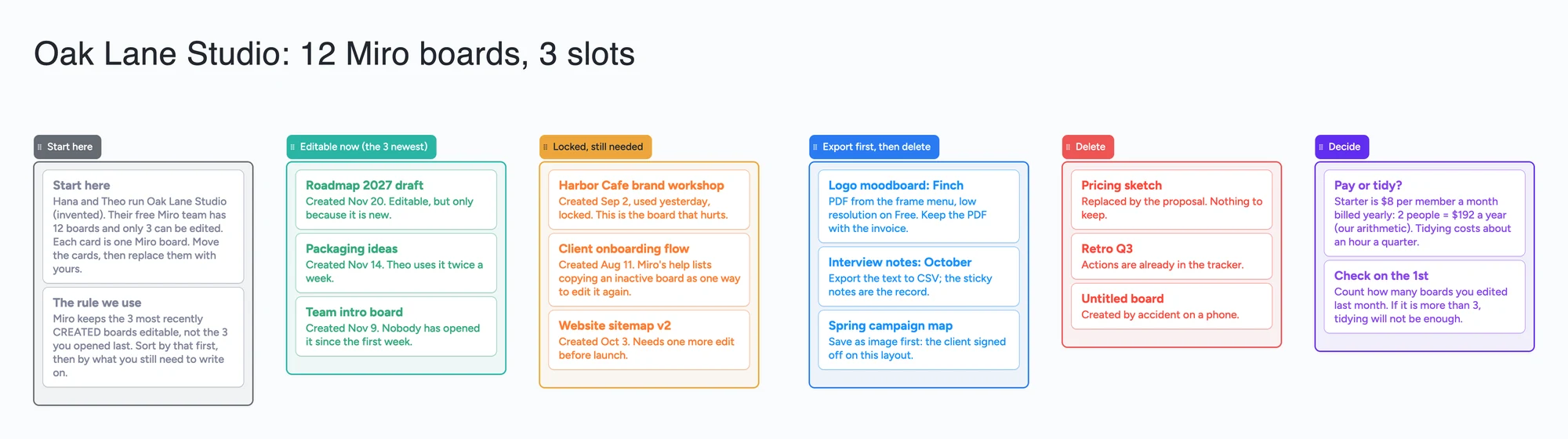
The example is invented. Hana and Theo run a two-person design studio with a free Miro team and 12 boards. Each card on the board is one Miro board, and each list is a decision.
| List | What goes in it | In Oak Lane's board (the cards on the board) |
|---|---|---|
| Editable now (green) | The 3 newest boards, whatever they are | "Roadmap 2027 draft", "Packaging ideas", "Team intro board". The last has not been opened since its first week |
| Locked, still needed (orange) | Older boards someone still has to write on | "Harbor Cafe brand workshop", used yesterday and locked; "Client onboarding flow"; "Website sitemap v2", one edit before launch |
| Export first, then delete (blue) | Boards you want a record of | A logo moodboard as a PDF, interview notes as CSV text, a campaign map as an image |
| Delete (red) | Boards that are finished or made by accident | "Pricing sketch", "Retro Q3", "Untitled board" |
| Decide (purple) | The pay-or-tidy call, with the arithmetic | Starter for two people is $192 a year; tidying is about an hour a quarter (Hana's estimate, invented) |
Swipe the table sideways to see every column.
The board's own wording. Board names and dates are made up. A card is a note about a Miro board; it doesn't connect to Miro.
The useful move is the order. First sort by what you still need to write on. A board you only look at can stay locked, because view-only is enough. The painful ones are the orange cards: old boards that are still live work.
Before you delete: what you can take out of Miro on Free
Miro's export article (read November 24, 2026) lists what Free can export:
- Image or PDF: on Free in low resolution only. High resolution without a watermark is listed for Starter, Business, Enterprise and Education. Free exports work in Chrome, Safari, Firefox, Opera, the desktop app and the tablet app; the table shows no mobile export on any plan.
- PDF pages: each frame becomes one page, so a board with no frames needs one around everything first (the article gives the steps).
- CSV: the text content, available on every plan in Chrome, Safari and Firefox.
- Owner setting: export is only available if the board owner enables it for collaborators in the board's content settings.
An image or PDF is a picture, not editable sticky notes. For a client sign-off or an invoice that is enough. For a board you still edit, copying or paying is the route.
Pay or tidy: the arithmetic
Starter lifts the editable limit, adds private boards and visitor editing. Prices are from Miro's pricing page, read November 24, 2026; check it before you buy. Our arithmetic at the yearly price:
- 1 member: $8 x 12 = $96 a year.
- 2 members (Hana and Theo): $8 x 2 x 12 = $192 a year.
- 5 members: $8 x 5 x 12 = $480 a year.
- Business is listed at $20 per member a month billed yearly; Miro's plans table lists guests who can view and comment on Starter, and guests who can also edit on Business and Enterprise.
Paying is the right call when the same 5 or 6 boards are live at once, and you'd rather not think about it. It is not the right call if the studio is only keeping old boards for reference: export those and delete them.
A simple test is on the board's Decide list: count how many boards you actually edited last month. If it was more than 3, tidying will not hold for long.
When Miro is simply the better choice
- You never need more than 3 boards at once. Miro Free then costs nothing, and its pricing page lists templates, docs, tables, timelines and kanban on Free. Our board has fewer of those.
- Someone must edit without signing in. On Miro's paid plans, visitors can edit a public board without an account. On Free, visitors can only view (Miro Help, Collaboration with Visitors). On Instaboard, anyone can view by link, and writing needs a free sign-in.
- You run workshops or need video on the board. Miro's plans table lists video calls from Starter up, voting and timer on paid plans. Instaboard's calls are different, and it has no voting.
- You depend on integrations. Miro lists Slack, Teams, Google Drive and more; Instaboard has none of these.
- You need high-resolution export or board versions. Miro lists both on paid plans. We don't list board versions as an Instaboard feature.
- You are an educator. Miro's Education plan page lists unlimited active boards for educators and students of qualifying schools. It also says (read November 24, 2026) that Miro isn't currently accepting new requests for it.
What Instaboard's free plan does instead, and where it also stops
| Miro Free | Instaboard Free | |
|---|---|---|
| Editable boards | 3 most recently created in the team; older are view-only | 5 in your own list, all editable; a board you open from someone's link counts as 1 of your 5 |
| Content limit | No item limit is listed on its Free plan help page (as of November 24, 2026) | 150 items across your account (cards, lists, text boxes and pictures count; pen strokes, arrows and sections don't); 3 pictures and 1 file per board |
| Who sees your boards | Everyone you invite joins the team and sees all boards; no private boards | Anyone with the link can view; invite-only boards are a Pro feature |
| Visitors | View only | View by link without an account; writing needs a free sign-in |
| Video call on the board | Not on Free (Starter and up) | Free calls up to 60 minutes per call, sign-in needed, no recording |
| Paid price | Starter $8 per member a month, billed yearly | Pro $5 a month billed yearly ($59.99 a year), or $7.99 monthly; invited people join free |
Swipe the table sideways to see every column.
Miro facts from miro.com/pricing and Miro's help center, read November 24, 2026. Instaboard facts are ours.
A free Instaboard account also stops: at 5 boards you can't create a sixth, though a shared link still opens. Because items are counted across all your boards, one busy board can use up most of the 150. Pro removes the item limit and the picture limit.
Does your list of boards fit in 150 items?
The sorting board is a good use of the item limit because it is small. Our arithmetic from Oak Lane's board:
- As built: 6 lists + 16 cards + the title text box = 23.
- A studio with 30 Miro boards: 30 cards + 2 start cards + 6 lists + the title = 39.
- Room left: 150 minus the 9 fixed items (2 start cards, 6 lists, the title) leaves 141 board cards on one Instaboard board, if it is your only board.
If you use Instaboard for real work boards as well, they share the same 150.
What this board can't do
- Connect to Miro. It doesn't read your Miro account or tell you which boards are locked. You type the names and dates.
- Move a Miro board over. There is no Miro import. You can import a PDF as pages you write on, or put an image on a board.
- Remind you. No reminders, due dates or alerts.
- Sort or count. No filters or totals; you read it by eye.
- Keep it private. A board shared by link isn't private; don't put client names you wouldn't share.
Set up your own, in order
- Open the board and replace Hana and Theo. Delete their cards as you go.
- Add one card per Miro board. Title = the board's name; the line under it = when you created it and the last time anyone edited it.
- Mark the 3 newest. Move those to Editable now. They are the boards Miro lets you write on.
- Sort the rest by need. Still needed goes to Locked, still needed; a record you want goes to Export first; everything else goes to Delete.
- Export and delete. Do the Export list first, then delete the Delete list. Each deleted board frees a slot, by Miro's rule.
- Fill the Decide list. Write your member count and the yearly price from Miro's page, then pick.
Start from the ready board
It opens in your browser in a few seconds, with nothing to install. Sign in for free when you want to save it and share it.
Questions
How many boards can I edit on Miro's free plan?
Three. A free team can hold more boards, but only the 3 most recently created are active for editing. The rest are locked in view-only mode, according to Miro's Free plan help page (read November 24, 2026).
Can I choose which Miro boards stay editable?
No. Miro's help page says the active boards are always the 3 most recently created. To change which ones are active you can delete boards, create copies of inactive ones, or upgrade the team.
Does the Miro board limit apply to me or to my team?
To the team. Miro's help says the limit applies to the whole team and not to every member individually, so boards your teammates create count too. Everyone invited by email on the free plan joins the team and sees all of its boards.
Can I export a Miro board before I delete it?
Yes. On the free plan you can export an image or PDF in low resolution, and the text as CSV, if the board owner has export enabled. High resolution without a watermark is listed for paid plans. An image or PDF is a picture, not editable notes.
Did Miro change the free board limit in 2026?
Miro's help page, read November 24, 2026, describes the same rule: 3 active boards. A Miro community thread (September 15 to October 5, 2026) has users describing being unable to create a new board past 3. In it, a Miro staff reply (September 16) says the 3 active-board limit is part of the Free plan, and a volunteer community moderator (September 17) says the help-article wording appears to confirm new restrictions. One user wrote on October 5 that "they got it back, we will see for how long". We draw no conclusion.
What does Instaboard's free plan give me instead of 3 boards?
Five boards that all stay editable, 150 items across your account and 3 pictures per board. Anyone can view a shared board by link, and writing needs a free sign-in. Pro removes the item limit. Instaboard has none of Miro's Slack, Teams or Google Drive integrations.
Sources
- Miro Help: Free plan (3 most recently created boards editable; team members and board access; read November 24, 2026; page shows no date)
- Miro Help: The board is locked (limit is per team; downgrade cases; read November 24, 2026)
- Miro Help: Plans and features available (Free column: boards, visitors, guests, video calls; read November 24, 2026)
- Miro: pricing (Free $0, 3 editable boards; Starter $8 per member a month billed yearly; Business $20; read November 24, 2026)
- Miro Help: Collaboration with Visitors (visitors on Free can only view; read November 24, 2026)
- Miro Help: How to export your board (Free low resolution only, CSV on all plans; read November 24, 2026)
- Miro Help: Education plan (read November 24, 2026: not accepting new requests)
- Miro Community: The unexpected change of the Miro Free Plan (September 15 to October 5, 2026; read November 24, 2026)
Related
How to export a Miro board (and what you get when you do)
To export a Miro board to PDF: Board menu, Export, Save as PDF; each frame is one page. Free is low resolution only. Image and CSV steps, and what's left out.
A free infinite canvas app for your notes, on Windows, Android, Chromebook and iPad
OmniCanvas alternative? Compare the free plans of OmniCanvas, Goodnotes, Concepts and Obsidian Canvas, and open a free shared infinite canvas board.
Whiteboard for Google Classroom: share one board with your class
Post one shared Instaboard board in Google Classroom or on a Google Sites page as a link. Set it so the class can write; students 13+ sign in free. No grading.