For one person, or two people sharing a to-do list
A personal kanban board you can copy: five lists, a limit of two in Doing
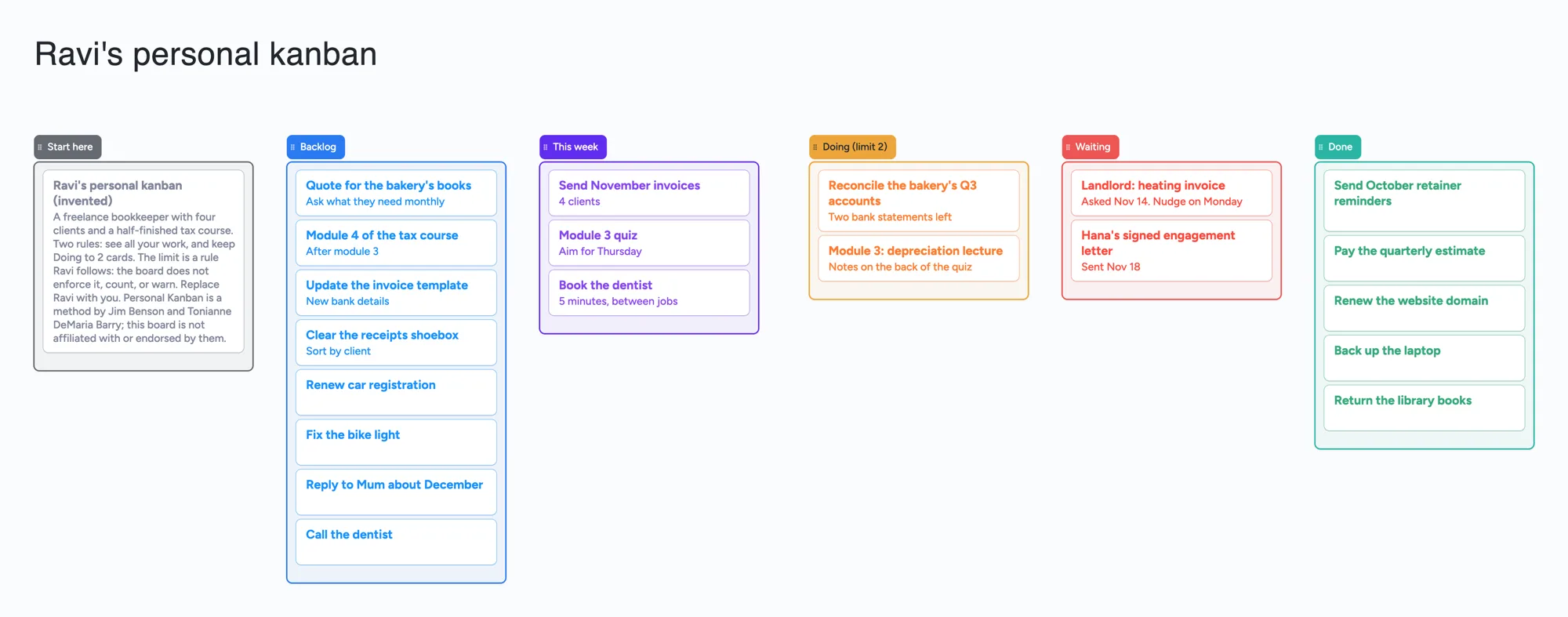
We make Instaboard, a free online board. Before the board, one plain answer: if you work alone, want no sign-up at all and never share the board, a free kanban tool that stores boards on your own device is a better fit than we are, and below we name three. This page is for the other case: you want the same small board open on your phone and laptop, or you share it with a partner, a helper or a client who can read it from a link. It is filled in for an invented freelance bookkeeper, Ravi: a Backlog, This week, Doing with a limit of 2, Waiting and Done. The limit is a rule Ravi follows. The board does not enforce it, count anything, send reminders or move cards for you. "Personal Kanban" is a method by Jim Benson and Tonianne DeMaria Barry: we are not affiliated with or endorsed by them.
Opens in your browser. Anyone can view; a free sign-in lets you edit.
Updated
Read this first: what this board does and doesn't do
- What it is: six lists in a row. Cards move left to right when you drag them. Ravi's board uses 28 of your 150 free items.
- The limit is a rule, not a feature: "Doing (limit 2)" is typed into the list title. Nothing stops you dropping a third card in, and nothing warns you. You keep the rule.
- No automations or reminders. Nothing moves a card by itself, resets a list or tells you a card is late. The dates on Ravi's cards are typed text, and nothing fires on them.
- Writing needs a free sign-in. Anyone with the link can read the board. Everyone who edits signs in free, and the board then counts as 1 of their 5.
- Free and Pro: Free keeps 5 boards, 150 items and 3 pictures per board. Pro is $5 a month billed yearly ($59.99 a year), or $7.99 monthly, and adds no image limit, invite-only boards and per-person permissions.
When a free kanban tool with no sign-up is the better pick
A personal kanban is usually one person's list. For that job, three free tools say on their own pages that they need no account (read November 22, 2026), and we do need a free sign-in to write on a board. If you never share the board and never need it on a second device, use one of them.
- KanbanThing says it needs no login, registration or email, and that you name a board, set a password and get a link that others can use to edit. It also says every board is removed up to 60 days after it is created.
- kanban.fit says there is no signup and that boards are saved in your browser, so there is no sync between devices and no collaboration.
- FreeKanban says there is no registration and that boards live in your browser's local storage; a share link gives the other person a copy, and there is no live sync.
Where a shared board fits instead: the same board open on a phone and a laptop without exporting a file, a second person who edits it live, or a link a client can read with nothing to install. If none of those is you, close this page and use the tool that needs no sign-up.
The method in a few lines (and whose it is)
The method comes from Jim Benson and Tonianne DeMaria Barry. A Modus Institute article that Personal Kanban's own site republishes says they published the book "Personal Kanban: Mapping Work, Navigating Life" in 2011 and describes two rules: visualize your work, and limit work in progress (WIP). It suggests a maximum of 2 to 3 cards in progress and says the easiest start is three columns: to do, in progress and done (page read November 22, 2026; the page shows no date). Kanban Tool's Personal Kanban page gives the same two rules and the same three sections (read November 22, 2026; no date shown). We haven't read the book. This page describes a board in our own words and does not reproduce their materials.
Our general explainer of the column idea is What is a kanban board?. If your work is a weekly review rather than a flow of cards, see the GTD board.
Ravi's board, list by list
The example is invented. Ravi is a freelance bookkeeper with four clients and a half-finished tax course.
| List | What goes in it | In Ravi's board |
|---|---|---|
| Start here (grey) | What the board is and what its rules are | One card: two rules, and that the limit is a rule Ravi follows, not something the board enforces |
| Backlog (blue) | Everything he might do, one card each, no order promised | 8 cards: "Quote for the bakery's books", "Module 4 of the tax course", "Renew car registration", "Fix the bike light" |
| This week (purple) | What he has chosen to finish in the next seven days | 3 cards: "Send November invoices", "Module 3 quiz", "Book the dentist" |
| Doing, limit 2 (orange) | What he is working on right now. Two at most | "Reconcile the bakery's Q3 accounts", "Module 3: depreciation lecture" |
| Waiting (red) | Started, but the next move is someone else's | "Landlord: heating invoice (asked Nov 14)", "Hana's signed engagement letter (sent Nov 18)" |
| Done (green) | What he has finished | 5 cards, from "Send October retainer reminders" to "Return the library books" |
Swipe the table sideways to see every column.
The board's own wording. The dates in the Waiting cards are typed text; this page relies on no date field, and the board sends no reminder.
A week on the board
- Monday: choose the week. Ravi drags three cards from Backlog into This week. Anything left in Backlog is allowed to wait.
- Pull, don't push. He drags a card from This week into Doing only when Doing has fewer than two cards. That count is his, not the board's.
- Blocked? Move it to Waiting. The heating invoice is the landlord's move. It leaves Doing and frees a slot for the next card.
- Finish: drag to Done. The slot opens, and he pulls the next card.
- Friday: look at it. Done shows what he finished, Waiting shows what to nudge on Monday, and Backlog is where new ideas go.
Anyone with edit access can move any card, so if two people share the board, agree who moves what. That is a team agreement, not something the board enforces.
The limit of 2: the part a board can't do for you
Limiting work in progress is half of the method, and it is the half that needs a tool that counts. Ours doesn't. The list title "Doing (limit 2)" is a reminder in text, so the board will let you put five cards in it, and it will not turn the list red or warn you. KanbanThing's page describes one of its six looks as having WIP meters, and Trello's pricing page lists built-in automation (both read November 22, 2026), but we haven't tested whether either enforces a limit and don't claim it.
- What works anyway: a visible number in the list title, and a Doing list short enough that three cards look wrong.
- What you give up: an automatic warning, a count, a card colour that changes when you break the rule.
- If two people share it: write the limit in the Start here card so both of you read the same rule.
Does it fit in 150 items?
Each card and each list is 1 of your 150 free items, across all your boards. The title text box counts too. Arrows, sections and pen strokes don't. Moving a card between lists adds nothing; only a new card does. Our arithmetic from Ravi's board:
- As built: 6 lists + 21 cards + the title = 28.
- New cards, nothing deleted: if Ravi adds 5 new cards a week and never deletes a finished one, the board reaches 28 + 5 x 24 = 148 in week 24 and goes over in week 25.
- A heavier user: 10 new cards a week reaches 150 in about 12 weeks (28 + 10 x 12 = 148).
- What a clear-out does: we haven't tested how deleting finished cards changes the count on an account, so don't plan around it. A fresh board each quarter is safer, but it takes 1 of your 5 boards, and the old board's cards still count while it exists.
- Other boards share the 150. Another board on the same account draws from the same pool.
So a light personal kanban fits on Free for months. A person who adds dozens of cards a week will hit the limit, and Pro doesn't change the 150 (we have no source that says it does); what Pro adds is listed above.
Where other tools do this better
Read November 22, 2026. Prices and limits change, so check the page before you choose. No ranking: they suit different people. Every row is what the tool's own page says; nothing here is from using it.
| Tool | What its page says | Better than a board at | Where a board fits |
|---|---|---|---|
| KanbanThing | No login, registration, email or install. A board is a name, a password and a link; edit and view-only links. Free, paid for by ads. Boards are deleted up to 60 days after creation. A calendar view and a timeline by most recent activity. Says it does not push other people's changes onto your screen, so you reload | Starting with nothing to sign up for, letting a helper write without an account | A second person's edits showing up live without a reload (a signed-in free joiner sees changes live here) |
| kanban.fit | No signup; unlimited boards and cards within your browser's storage (usually about 5 MB); up to 10 columns a board; tags, due dates and priorities. Boards stay on your device, with no sync between browsers or devices. Says Trello is a better fit if you need to share today | Privacy on your own device, priorities, working offline after the first visit | The same board on your phone and laptop, and a link for someone else |
| FreeKanban | No registration; boards in your browser's localStorage, JSON export and restore. A share link opens the board as a copy in someone else's browser. No live sync | No account, JSON backups, three layout densities | One shared board that two people edit live, not two copies |
| Trello Free | Unlimited cards, up to 10 boards per Workspace, 10 collaborators per Workspace, assignee and due dates, mobile apps, 250 Workspace command runs a month. Standard $5 a user a month billed annually ($6 monthly); Calendar and Timeline views are listed on Premium ($10 annual) | Automation, mobile apps, a card count we don't cap | Nothing to set up beyond a free sign-in to write; no automations to learn |
Swipe the table sideways to see every column.
From each tool's own pages, read November 22, 2026: kanbanthing.com, kanban.fit, freekanban.com, trello.com/pricing. Pages show no date we could read. Instaboard isn't affiliated with any of these.
What people who use it say
On r/productivity (thread posted February 5, 2023; 15 of its 23 comments loaded when we read it on November 22, 2026), u/BoredDev133 asked for a free kanban board for solo projects and said team features didn't matter. Replies, each one person's view:
- u/nowt_means_owt prefers Notion's flexibility; u/planningatlas likes Trello; u/ltgimlet (October 4, 2024) suggests Apple Reminders to anyone on Apple devices who wants a really light kanban board.
- u/QubitBob likes KanbanFlow; u/kovadom (October 15, 2024), on trying it: "Simplicity is key here. That's what I was looking for - something like a board I can simply move things around, without all the 'advanced' stuff other tools offer."
- u/LuisG8 (October 31, 2024) runs Planka, self-hosted, for solo projects.
On r/trello (thread posted March 19, 2023; 16 of its 20 comments loaded), u/Thegreatdigitalism asked how people use Trello for personal tasks. u/spiralan runs lists for today, tomorrow, this week, inbox, waiting and done, uses Trello automations to move cards that have due dates, and has a rule that moves untouched cards to another board each month. u/Trick-Two497 says most of their projects fit on a single card with a checklist. u/SignificantViolinist keeps high-level work on a physical kanban whiteboard for the immediate visual snapshot and uses Trello only for the day-to-day.
So what the heavy users describe is automation, which this board lacks, and what the light users ask for is something they can simply move cards around on, which it does. These are a handful of commenters, not a count of people who use the method.
What a board can't do for a personal kanban
- Enforce the limit. No count, no warning, no red list.
- Move cards for you. No automations, no rules, no recurring cards. A weekly chore is a card you recreate.
- Remind you. No reminders or due-date alerts. "Nudge on Monday" is text.
- Show a timeline. The cards stay in lists; there is no time axis.
- Keep a history. We haven't checked whether the board records who moved a card or when, so don't rely on it; anyone with edit access can move any card.
- Be private on a link. Anyone with the link can view a board; invite-only boards are a Pro feature.
- Offline. Changes made offline are kept and sync when you're back online.
Set up your own, in order
- Open the board and replace Ravi. Delete his cards as you go.
- Empty your head into Backlog. One card per thing, however small.
- Choose your limit. Two or three, per the article above, and write it in the Doing list title and the Start here card.
- Pick this week. Drag a few cards from Backlog to This week and no more than you can finish.
- Share it if someone else needs it. Set the share setting so anyone who joins can edit ("Anyone who joins can edit"); new boards start view-only, and each person signs in free to write.
- Look at it once a week. Clear what you don't need from Done, nudge what's in Waiting.
Limits of the free plan for this board
- Items. Each card and each list is 1 of 150 free items across your account; the example is 28. Arrows, sections and pen strokes don't count.
- Boards. 5 on the free plan. "Make a copy" takes 1 of them.
- Pictures. 3 per board. The example has none.
- Writing needs a free sign-in. Anyone with the link can read the board; to change it they sign in free, and the board then counts as 1 of their 5.
- Private work. A link board is not the place for anything you want kept private.
Start from the ready board
It opens in your browser in a few seconds, with nothing to install. Sign in for free when you want to save it and share it.
Questions
Is there a free personal kanban board template?
Yes, several. Trello, Notion and others offer them, and this page has a ready board: Backlog, This week, Doing with a limit of 2, Waiting and Done, filled in for one freelancer. It is free within 5 boards and 150 items, and writing needs a free sign-in.
Do I need to sign up to use it?
To read a board, no: anyone with the link can view it. To write on it you sign in free (Google, Apple or email). If you want no sign-up at all, KanbanThing, kanban.fit and FreeKanban say on their pages that they need no account.
Does the board enforce the work-in-progress limit?
No. "Doing (limit 2)" is text in the list title. The board has no count or warning, so you keep the rule yourself. Personal Kanban's own materials, which we haven't read in full, treat the limit as one of two rules.
Can I share a personal kanban board with a partner?
Yes. Set the share setting so anyone who joins can edit and send the link; each person signs in free to write, and a signed-in free joiner sees changes live. Anyone with edit access can move any card, so agree who moves what.
Can the board remind me or move cards for me?
No. Instaboard has no reminders or automations for cards, so nothing moves a card or tells you it is late. If you want that, Trello lists automation and due dates on its plans.
How many cards fit on the free plan?
150 items across your account, where each card and each list is one item. Ravi's board is 28. Adding 5 new cards a week with nothing deleted reaches about 148 in week 24. That is our arithmetic, and your other boards share the same 150.
Sources
- Personal Kanban: "Unlock Your Potential with a Personal Kanban Board" (originally Modus Institute's blog; two rules, 2011 book, 2 to 3 cards in progress; read in full November 22, 2026; page shows no date)
- Kanban Tool: Personal Kanban (two rules, three sections; read November 22, 2026; page shows no date)
- KanbanThing home page and FAQ (no login, passwords, 60-day boards, no push of others' changes; read November 22, 2026; page shows no date)
- kanban.fit home page and FAQ (no signup, browser storage, no sync, 10 columns; read November 22, 2026; page shows no date)
- FreeKanban home page and FAQ (no registration, localStorage, share link copies, no live sync; read November 22, 2026; page shows no date)
- Trello pricing (Free, Standard $5, Premium $10; read November 22, 2026; page shows no date)
- r/productivity: "Is Trello still the best free kanban board for personal projects or is there anything better?" (u/BoredDev133, posted 2023-02-05; 15 of 23 comments loaded; read November 22, 2026)
- r/trello: "Using Trello for personal stuff" (u/Thegreatdigitalism, posted 2023-03-19; 16 of 20 comments loaded; read November 22, 2026)
Related
A GTD template on one shared board: inbox, next actions, projects and a Friday review
A Getting Things Done style template on one shared board: inbox, next actions by context, projects, waiting for, someday and a Friday review. What a board can't do, and the apps that can.
A now next later roadmap template on one shared board
A now next later roadmap template on one shared board: problems not dates, a Not doing list, evidence beside it. Filled in for a three-person team. No timeline, votes or reminders.
A decision log template on one shared board: open, decided, revisit, reversed
A decision log template on one shared board for two to five people: open questions, decided with the why, revisit on a date, reversed. When a spreadsheet or Notion is the better home.