For online tutors
A Lessonspace alternative for tutors who don't want to pay by the hour
Lessonspace is a purpose-built tutoring room: video, a whiteboard with an equation editor, recording and scheduling integrations. It also has no free plan. After a 14-day trial the cheapest plan is $9 a month for 10 hours, and every hour after that costs $1.95. If you teach a handful of students, or you're still deciding whether tutoring is worth paying a platform for, here is what the hours add up to, what Lessonspace does better than we do, and a cheaper way to run the same lesson.
Updated
The short answer
- Lessonspace has a 14-day free trial and no free plan. Basic is $9 a month with 10 hours included and $1.95 for each extra hour; Starter is $29 for 30 hours.
- Lessonspace is stronger on tutoring features: recording, an equation and graph editor with LaTeX, a code tab, a resource library, scheduling integrations and students who join without signing up.
- On Instaboard you start free: 5 boards, the pen never counts toward a limit, and video calls up to an hour. Pro is $5 a month billed yearly, and your student signs in once, for free, to write.
What a lesson on the board looks like
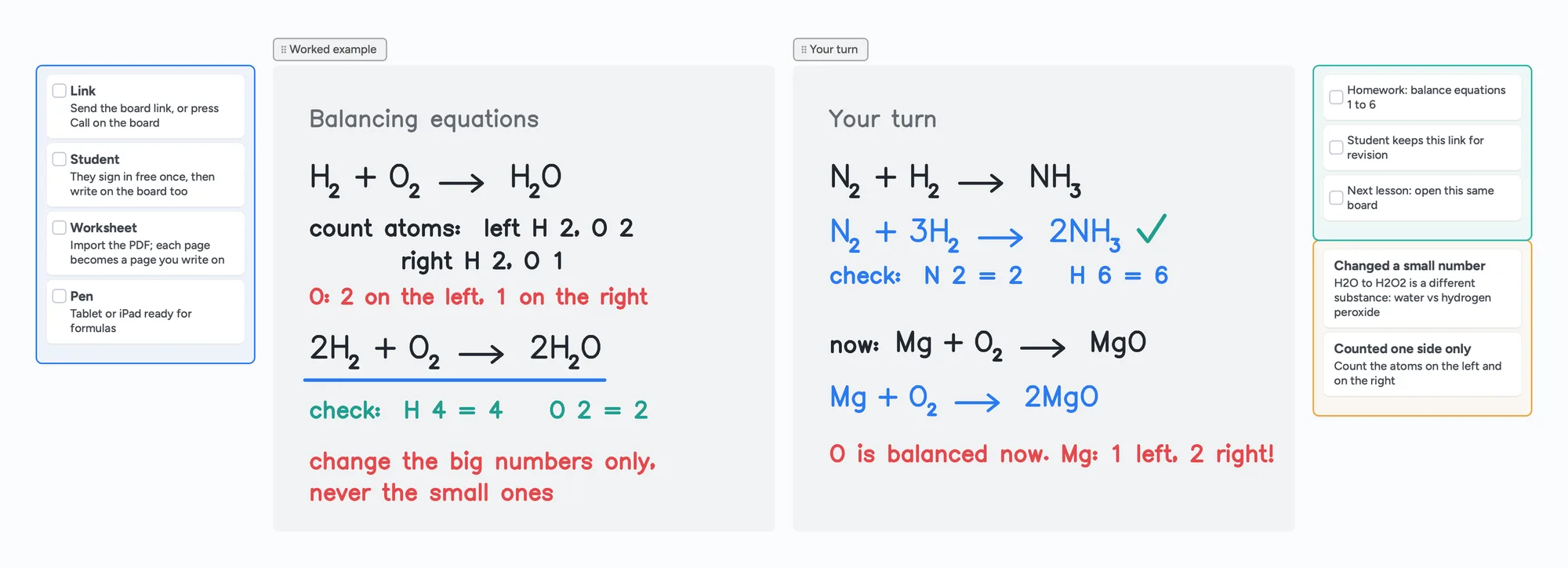
The call sits on top of the board: you write and point with the laser, your student writes their answer on the same page in their own colour, and you both see it live.
What Lessonspace costs for a tutor
Lessonspace's pricing page (checked November 2, 2026) lists four plans billed monthly, with no contract. Every plan includes all features; what changes is how many hours are bundled and what extra hours cost.
| Plan | Per month | Hours included | Each extra hour | Aimed at |
|---|---|---|---|---|
| Basic | $9 | 10 | $1.95 | Part-time individual tutors |
| Starter | $29 | 30 | $1.80 | Full-time tutors or tutor groups |
| Pro | $99 | 100 | $1.20 | Small to medium agencies |
| Advanced | $199 | 200 | $0.95 | Large agencies |
Swipe the table sideways to see every column.
From thelessonspace.com/pricing, November 2, 2026. Sessions with more than 4 participants cost an extra $0.25 per participant hour. Unused hours don't roll over.
How the hours are counted matters for a tutor. Lessonspace bills per second, and only while two or more devices are connected to your Space at the same time. A device is a "connection": if you open the Space in two browser windows, that counts as two. A one-hour lesson with your student is one hour of usage.
| Teaching hours a month | Cheapest Lessonspace plan | Cost per month | Cost per year |
|---|---|---|---|
| 10 | Basic | $9.00 | $108 |
| 20 | Basic ($9 + 10 extra hours at $1.95) | $28.50 | $342 |
| 30 | Starter | $29.00 | $348 |
Swipe the table sideways to see every column.
Our arithmetic from Lessonspace's published prices, not a quote from Lessonspace. At 30 hours Basic would cost $48, so Starter is the cheaper plan.
Instaboard Pro is $59.99 a year ($5 a month billed yearly), or $7.99 monthly, with no hour meter. The free plan has no meter either.
Lessonspace and Instaboard side by side
| Lessonspace | Instaboard | |
|---|---|---|
| Free plan | No. 14-day free trial, then from $9 a month | Yes: 5 boards, pen strokes don't count toward the 150-item limit, calls up to 1 hour |
| Pricing model | Monthly plan plus hours (billed per second while 2+ devices are connected) | Flat: Pro $59.99 a year or $7.99 monthly |
| Student joins | One click in the browser, no install, no sign-up | Opens the link in a browser or the app; a free sign-in is needed to write (anyone can view without one) |
| Video call | Built in, up to 10 people per Space (4 included in the hourly price) | Built into the board, free up to 1 hour, no limit on Pro |
| Whiteboard | Infinite canvas, pen, highlighter, shapes, grid or line backgrounds, unlimited tabs | Infinite canvas, pressure pen, highlighter, hold to straighten, laser pointer, cards and lists |
| Maths and science tools | Equation and graph editor with LaTeX support | Equation cards and a Desmos calculator widget; no LaTeX editor |
| Worksheets | Import PDF, Word or PowerPoint; each page becomes a whiteboard | Import a PDF; each page becomes a page you write on |
| Recording | Record sessions and play back; free storage for 90 days | None |
| Lesson summary | AI-generated summary of recorded sessions | None |
| Scheduling and billing tools | Integrations with Teachworks, TutorCruncher, TutorBird, Wise and others; API | None |
| Tablets | Graphics tablets (Wacom) and iPad stylus | Pen tablets and iPad Apple Pencil, plus iPad, iPhone and Android apps; stylus side button erases |
| Kept between lessons | Spaces auto-save and persist; export as template | One board per student, same link next week |
Swipe the table sideways to see every column.
Lessonspace facts from thelessonspace.com (home, pricing, features and whiteboard pages), checked November 2, 2026. Instaboard limits from the app.
Where Lessonspace is the better choice
- Recording and playback. Lessonspace can record every action in a Space and play it back, with free storage for 90 days. Instaboard has no recording at all.
- A classroom, not just a board. You can lead the Space so students follow your view, lock the board while you teach and unlock it for their turn, and control student video and audio. Instaboard has no class mode.
- Maths and science tools. The equation and graph editor supports LaTeX, and there is a code tab with syntax highlighting. We have equation cards and a Desmos widget.
- Students never sign in. They join with one click, with no account. On Instaboard they need a free sign-in before they can write.
- Tutoring business tools. Integrations with Teachworks, TutorCruncher, TutorBird and Wise, white-labelling, an API, a resource library inside the Space and automatic lesson summaries. Instaboard has none of these.
- Agencies. Per-space tool control, an admin dashboard and accounts for teachers, students and staff.
If you run an agency, record lessons for parents, or teach full-time, Lessonspace is built for that and can be worth its price. If you're still building up students, a free board lets you start before the hours justify a plan.
When Instaboard fits better
- You're starting out, or teach a handful of students. Free covers 5 boards, one per student, with no meter running. Lessonspace charges from the first hour after the trial.
- You teach under about 10 hours a month. At that level Lessonspace is $108 a year; Instaboard Pro is $59.99, and Free costs nothing.
- Your student has to write. They sign in once, then write next to you on the same page in their own colour.
- You hand out worksheets as PDFs. Import one and each page becomes a page you both write on. Each imported PDF uses one of your 5 free boards.
- You write on an iPad. The iPad app has a pressure-sensitive Apple Pencil, and stylus mode lets the pencil draw while a finger scrolls.
- You're keeping your Zoom or Meet call. Open the board next to it and paste the link in the chat.
The ready board above is a chemistry lesson, laid out the way a lesson goes: a checklist before you start, a worked example in ink, your student's turn in blue, homework and the mistakes to redo. For the setup with Zoom, see our Zoom Whiteboard comparison; for the full walkthrough, our tutoring whiteboard guide.
What Instaboard doesn't do
- No recording and no lesson summaries.
- No class mode. You can't lock the board or control a student's video and audio.
- Students sign in to write. Anyone with the link can view, but writing needs a free account with Google, Apple or email.
- Free calls end at 60 minutes. Pro has no limit, or keep using Zoom or Google Meet next to the board.
- No scheduling, invoicing or payments, and no Teachworks, TutorCruncher or similar integration.
- Equation cards, not a LaTeX editor, and no code editor.
- No Word or PowerPoint import. PDFs only.
- The eraser removes whole strokes. Undo is the quickest way to fix the last thing you wrote.
Start from the ready board
It opens in your browser in a few seconds, with nothing to install. Sign in for free when you want to save it and share it.
Questions
Is Lessonspace free?
No. Lessonspace offers a 14-day free trial, and the cheapest plan after that is Basic at $9 a month with 10 hours included, then $1.95 for each extra hour.
How does Lessonspace count hours?
Per second, and only while two or more devices are connected to your Space at the same time. Each device counts as one connection, so a user with two windows open counts twice. Unused hours don't roll over.
Does Lessonspace record lessons?
Yes. Sessions can be recorded and played back, and recordings are stored free for 90 days. Longer storage is a paid add-on. Instaboard doesn't record lessons.
Do students need an account on Lessonspace?
No. Lessonspace says students join with one click, with no install and no sign-up. On Instaboard a student can view without signing in, but needs a free account to write.
Can I use Instaboard for the whole lesson, call included?
Yes. Press Call on the board and you both talk on the same link, free for up to an hour. Pro has no limit, and you can keep Zoom or Google Meet open next to the board if you prefer.
Is Instaboard free?
Yes. The free plan includes 5 boards, 150 cards and items across your account (pen strokes, arrows and sections don't count), 3 images and 1 file per board, unlimited collaborators and video calls up to an hour. Pro is $5 a month billed yearly ($59.99 a year), or $7.99 monthly, and the people you invite join free.
Sources
Related
A Zoom Whiteboard alternative where your student writes too
Zoom's free whiteboard gives you 3 editable boards, sharing is built around Zoom accounts, and free calls stop at 40 minutes. What tutors use instead, where Zoom is still better, and a ready lesson board.
An online whiteboard for tutoring that works the way you teach
A free whiteboard for online tutoring: paste the worksheet, write with a pen, and your student answers on the same board. Call on it or beside Zoom.
A Bitpaper alternative for tutors, now that free is join-only
Bitpaper's free plan can only join papers since April 2025, and a lapsed plan turns your papers read-only. What tutors use instead, where Bitpaper is still better, and how to move your lessons over.
An Explain Everything alternative for live lessons, where your student writes too
Explain Everything Free gives you 3 one-slide projects, 3-minute videos and 15 minutes of collaboration. What the paid plans add, what it does better, and a free board where your student writes live.