For a novelist planning a book one expansion at a time
A snowflake method template board: from one sentence to a scene list, on one screen
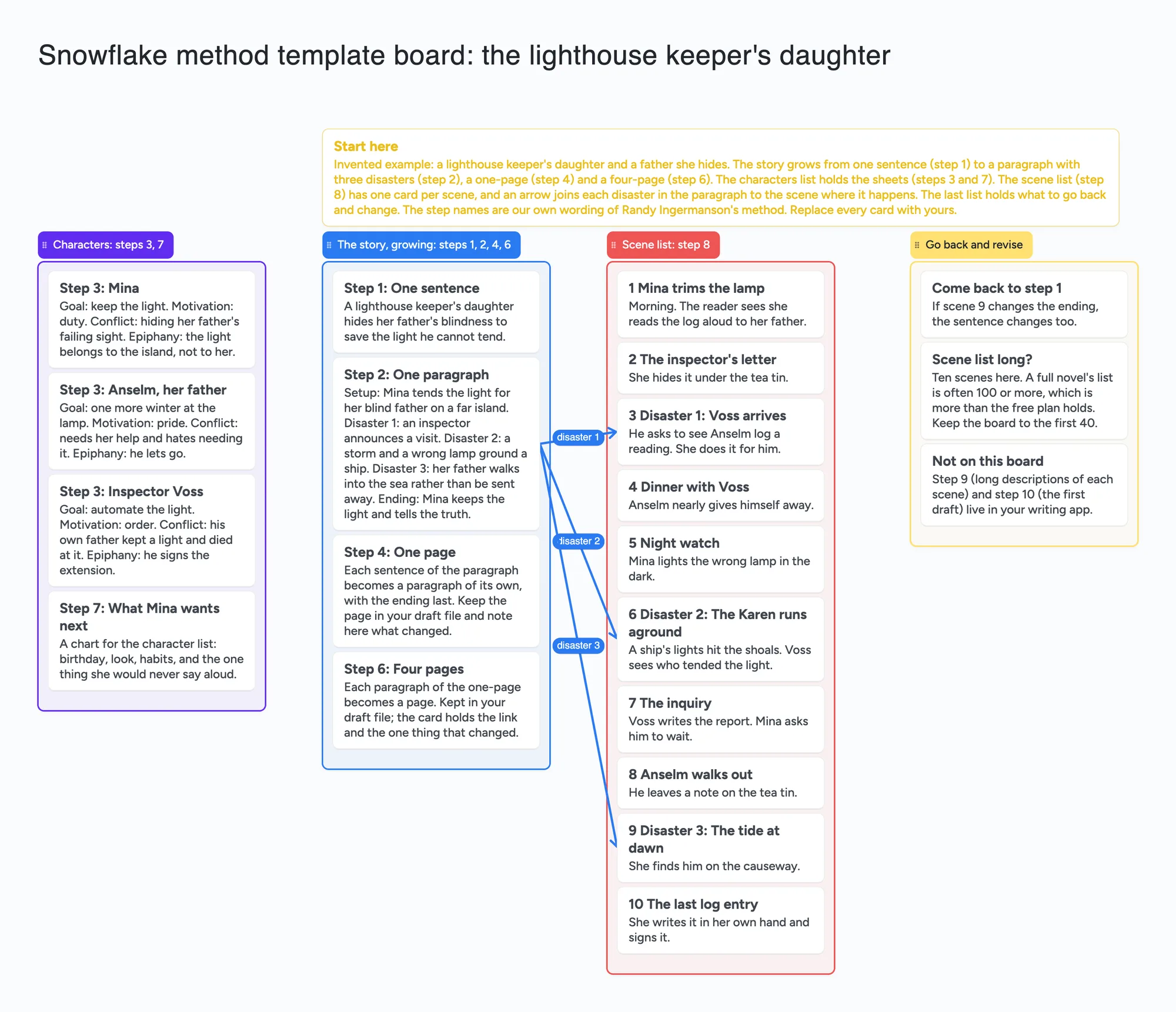
This is for a novelist who plans by growing the story in stages, from one sentence to a paragraph to a synopsis to a scene list, and wants those stages visible side by side, for themselves or a critique partner. The ready board has the early steps as cards in a growing list, the character sheets in another, one card per scene in a scene list, captioned arrows from each of the paragraph's three disasters to the scene where it happens, and a list of what to go back and change. It is a planning board, not a manuscript: it does not hold your synopses at full length, draft, count words or remind you of anything. Plottr, Scrivener, Obsidian and Wavemaker handle parts of the method better, and the sections below say which.
Opens in your browser. Anyone can view; a free sign-in lets you edit.
Updated
The short answer
- What it is: the early steps of the method as cards in one list (sentence, paragraph, one page, four pages), the character sheets in a second, a scene list with one card per scene, and a list of what to revisit. Arrows join each disaster in the paragraph to its scene.
- Who made the method: Randy Ingermanson. Our step names are our own wording, and this page and board are not affiliated with or endorsed by him.
- What it isn't: the synopses themselves belong in your writing app or document (a card is not the place for four pages). There is no draft, no word count, no reminders, no sorting and no file import or export (Copy as image only).
- Where it stops: a real scene list is often 100 lines or more (Ingermanson's own words). That passes the free plan around 133 scenes (our arithmetic below).
- Sharing: anyone with the link can read the board with no account. Writing takes a free sign-in, and new boards start view-only, so set Share to "Anyone with the link can edit" for a co-author or critique partner.
- Free plan: the example is 27 of your 150 free items (22 cards, 4 lists and the title text box, our count). Arrows, sections and pen strokes don't count.
What the method asks for, from its author's own pages
Ingermanson's page (read November 18, 2026) lists ten steps: a one-sentence summary; a one-paragraph summary (setup, three disasters and an ending); character summary sheets; a one-page synopsis; character synopses; a four-page synopsis; character charts; a scene list in a spreadsheet, one line per scene; an optional long description of each scene, which he says he no longer does; and the first draft. He says the design phase takes about 100 hours for him, and that you can go back to any step at any time.
His scene list post (August 25, 2025; read November 18, 2026) calls a scene list a list of story ideas, and describes a proactive scene as goal, conflict and setback, and a reactive scene as reaction, dilemma and decision. It suggests 3 by 5 cards or a spreadsheet. The board's scene cards are one line each for that reason.
How to fill it in
- Open the board above and make it yours. The example, a lighthouse keeper's daughter and the father she hides, is invented: replace every card.
- Write the sentence and the paragraph first. Two cards. The paragraph holds the setup, the three disasters and the ending.
- Add the character cards. The example uses goal, motivation, conflict and epiphany as the fields; the field names are our wording, so rename them.
- Keep the long synopses elsewhere. Put the one-page and four-page in your writing app and use the cards for what changed at each step.
- Build the scene list. One card per scene, a line each. Draw an arrow from each disaster in the paragraph to the scene where it happens, and caption it.
- Use the last list for steps you go back to. If scene 9 changes the ending, the sentence changes. The method says you can go back; the board gives you a place to write down that you did.
- Share the link with a critique partner. Set Share to "Anyone with the link can edit" so they can write; they sign in free.
If you are under 18, check with a parent or your school before you sign up for a new tool. The example story is invented.
A note on the name
The Snowflake Method is Ingermanson's method and he sells his own books and software around it. This page names it only as the source of the idea, the step names on the board are our own wording, and the page and board are not affiliated with or endorsed by him. We did not find or read a trademark notice for the name.
Where Plottr, Scrivener, Obsidian and Wavemaker are better
Ingermanson's page says his Snowflake Pro software is discontinued and points to Plottr, which has Snowflake Method character, plot and project templates he wrote notes for. Plottr's template page (read November 18, 2026) shows a project with a three-disaster plotline of three scene cards, his notes, tags and character attributes. Ingermanson's page says Plottr runs on Mac and Windows and has a 14-day free trial; Plottr's template page links a free trial without giving a length, so check before you rely on it. If you want his templates and a timeline, that is the better fit.
On the Literature & Latte forum (Scrivener's maker), a reply says the method is easy to copy in Scrivener's basic novel template, with the expanding synopses as documents in the binder outside the draft; the poster says they have a template but we saw none attached, so we did not see a template. That keeps the steps next to your draft, which this board does not. An Obsidian user's guide and a community plugin named for the method exist; we did not test them. Obsidian's pricing page says it is free without limits with no sign-up, and it links notes to each other, which a card board does not. Wavemaker's blog says it has a snowflake tool in its software, built on a cards version of the method in which you throw away the original card; two commenters there asked to keep the earlier card instead of discarding it, so read it before you choose.
Where these win
For Ingermanson's own templates, use Plottr. For steps beside your draft, use Scrivener. For linked notes, use Obsidian. For a cards-based snowflake tool, look at Wavemaker. Use this board for a shared one-screen picture of the story's growth and its scene list.
What writers on Reddit say about the method
In one r/writing thread (September 30, 2023), u/lornajardine said they used it with success; u/Fireflyswords said it doesn't let you explore, so you end up with an unusable outline; u/No_Owl6328 said it is flexible and iterative. In an older one (2017), u/Nekromos said a document or spreadsheet is enough. Those are single accounts. They are why the board keeps the last list for going back, and why we don't call the method the right one.
This board vs Plottr vs Scrivener vs Obsidian
| Tool | What we read (Nov 18, 2026) | Good at | Not what you get |
|---|---|---|---|
| Instaboard board | Free: 5 boards, 150 items, 3 images per board. Pro $5 a month billed yearly ($59.99 a year), or $7.99 monthly | A shared one-screen picture; scene cards; arrows from disaster to scene | Long synopses, a draft, a timeline |
| Plottr | Snowflake templates with the author's notes; Mac and Windows; free trial (14 days per Ingermanson's page) | The author's own templates, a timeline | A free shared board |
| Scrivener | Forum reply on copying the method in Scrivener's novel template; no template file seen | Steps beside the draft | A shared board |
| Obsidian | Pricing page: free without limits, no sign-up; community plugin and user guide named (not opened) | Linked notes | Visual lists of cards |
Swipe the table sideways to see every column.
From each tool's own pages and the threads named, read November 18, 2026. We name no tool as the best; they do different jobs.
What each one costs over three years
| Tool | Listed price | Three years (our arithmetic) |
|---|---|---|
| Instaboard | Free: 5 boards, 150 items; Pro $59.99 a year or $7.99 a month | $0 within the free limits; $179.97 on Pro billed yearly, or $287.64 at $7.99 a month |
| Ingermanson's article | Free to read; the price of his book was not read | $0 for the article |
| Snowflake Pro | His page says it is no longer sold or supported; the last version (1.2.1, December 11, 2019) is free to anyone who owns an earlier version or his book | $0 for those owners; not available otherwise |
| Plottr | $60 a year or $150 once, Windows and Mac; Pro $99 a year adds the browser app; Snowflake project, plot and character templates | $180 at $60 a year; $150 once; $297 on Pro at $99 a year |
| The Novel Factory | Basic: $82.50 a year (struck through on the page), $57.75 a year with code BLACKFRIDAY2026 on the day we read it; $8.25 a month on the page's monthly view; 30-day free trial | $247.50 at $82.50 a year; $173.25 at the code price; $297 at $8.25 a month; sale prices change |
| Reedsy Studio | Core writing and formatting free with a free Reedsy account; Essential $4.99 a month and Outlining $7.99 a month (from the Studio home page FAQ; the pricing page text shows no figures) | $0 for core Studio; $179.64 on Essential; $287.64 on Outlining |
| Scrivener | Not checked: its overview page lists no price and its buy page did not load | Not checked |
Swipe the table sideways to see every column.
Listed prices from each maker's own page, read on November 19, 2026, in US dollars. The three-year column is our arithmetic and assumes the price doesn't change. A spreadsheet or a word processor you already own costs nothing extra.
Where each one runs
| Tool | Runs on, as listed |
|---|---|
| Instaboard | Any modern browser, plus iPhone, iPad and Android apps; changes are kept and sync when you're back online, but it isn't offline-first. |
| Plottr | Windows and Mac, works offline; the browser app is on Pro, which its page says works on tablets |
| The Novel Factory | A progressive web app that works in a browser and can be downloaded to work offline; its FAQ lists Windows, Android, iOS and macOS devices |
| Snowflake Pro | His page says the last version was updated to run on Mac OS 10.15 and still runs on Windows and Linux |
| Scrivener | macOS, Windows and iOS, per its overview page |
| Reedsy Studio | In a browser with a free Reedsy account; no dedicated mobile app, but its page says it works in a mobile browser |
Each cell is from the maker's own pages, read on November 19, 2026.
Which tool for which job
- You want the steps explained, free: Ingermanson's own article walks through all ten.
- You want a template that follows the steps: Plottr, which his page recommends and says he helped build the Snowflake templates for.
- You want step 8's scene list with columns and sorting: a spreadsheet, which is what the method itself suggests. A card is not a spreadsheet: this board has no columns and no sorting.
- You want long synopses and character charts: a word processor. The one-page and four-page synopses are pages of text, not card text.
- You want steps 1 to 3 and the scene cards on one board you can share by link: Instaboard. A critique partner signs in free to edit.
- You prefer a different card method: Margaret Dilloway's 60 index cards method (her post, updated 2023) is a separate, older approach to outlining; she says the snowflake can be used in conjunction with it. Each is one writer's view of what works.
How many cards fit
Mapping steps 1 to 3 and step 8 onto cards in our own words: 1 card for the sentence, 5 for the paragraph (setup, three disasters, ending), then 4 characters x (1 list + 6 cards for goal, motivation, conflict, epiphany and the rest) = 28 items, then 4 quarter lists and 90 scene cards = 94 items. That is 1 + 5 + 28 + 94 = 128 of your 150 free items, 129 with a title text box (our arithmetic). Arrows, sections and pen strokes are free. Because a card is not a spreadsheet, put the scene detail in the card title, for example "12 | Ana | crosses the border".
Limits of the free plan for a snowflake board
- Items. Each card and each list is 1 of your 150 free items, across all your boards. The example is 22 cards, 4 lists and a title text box, 27 in all (our count), 10 of them scene cards. The other 17 stay the same, so 100 scenes is 117 items and 130 scenes is 147 (our arithmetic). Past about 133 scenes the free plan is full.
- Boards. The free plan includes 5 boards. Making your own copy of the example uses 1.
- Long text. A card is for a few lines, not a four-page synopsis. Keep those in your writing app.
- No manuscript, no counts, no reminders, no sorting, and no timeline axis.
- No linked cards. An arrow joins two cards; you can't link a card by name or see backlinks.
- Writing needs a free sign-in. Viewing doesn't.
- Copy as image only. To send the plan to someone without the link, use Copy as image on the board.
Start from the ready board
It opens in your browser in a few seconds, with nothing to install. Sign in for free when you want to save it and share it.
Questions
Is there a free snowflake method template I can edit online?
Yes. Open the board, replace the example story with yours, and set Share to "Anyone with the link can edit" if a co-author needs to write on it. It is a board of cards, lists and arrows, not a document. Plottr has Ingermanson's own templates if you want those.
Can I use the snowflake method with index cards?
Yes. Ingermanson's scene list post suggests 3 by 5 cards or a spreadsheet for the scene list. On the board each scene is one card in a list.
Where do the one-page and four-page synopses go?
In your writing app or a document. The board has cards for the sentence and paragraph and a note on what changed at each later step, because a card is not the place for four pages.
How many scenes fit on the free plan?
The example is 27 items of your 150, 10 of them scenes. A scene list of 100 would be about 117 items, and the free plan is full around 133 scenes. That is our arithmetic. Arrows are free.
Do I have to do all ten steps?
Ingermanson says you can go back to any step, and that he no longer does the long scene descriptions. The board has a list for steps you revisit.
Is there a snowflake method app for novel outlining?
Ingermanson's own software, Snowflake Pro, is no longer sold or supported; his page says the last version is free to anyone who owns an earlier version or his book. On the same article he says he now uses Plottr and recommends it to Snowflakers, and he made Snowflake character, plot and project templates for it. The Novel Factory also has a page on the method. An Instaboard board shows the early steps and the scene cards in a different shape: it holds short steps, not page-long synopses, so keep those in a document.
Is there a free snowflake method template online?
Yes. The ready board has the steps as cards and lists, free within the free plan's 5 boards and 150 items; viewing needs no account and editing a free sign-in. Ingermanson's own article explaining all ten steps is also free to read. The board is not a spreadsheet, so there are no columns or sorting.
How do I use the snowflake method with index cards?
In our words: one card for the one-sentence summary, about five cards for the paragraph (the setup, three disasters and the ending), a list per major character with a card each for storyline, motivation, goal, conflict, epiphany and a paragraph, then one card per scene in four lists, one for each quarter of the book. Put the scene detail in the card title. Ingermanson suggests 3 by 5 cards or a spreadsheet for the scene list. Margaret Dilloway's 60 index cards method is a different, older approach; her post says the snowflake can be used alongside it.
Is Instaboard free?
Yes. The free plan includes 5 boards, 150 cards and items across your account (pen strokes, arrows and sections don't count), 3 images and 1 file per board, unlimited collaborators and video calls up to an hour. Pro is $5 a month billed yearly ($59.99 a year), or $7.99 monthly, and the people you invite join free.
Sources
- Randy Ingermanson: Snowflake Pro, free download page (read November 19, 2026)
- Plottr: Snowflake Method project template (read November 19, 2026)
- Plottr: pricing (read November 19, 2026)
- The Novel Factory: pricing (read November 19, 2026)
- The Novel Factory: The Snowflake Method (read November 19, 2026)
- Reedsy Studio (read November 19, 2026)
- Literature & Latte: Scrivener overview (read November 19, 2026)
- Margaret Dilloway: How to Outline a Novel, 60 Index Cards Method (read November 19, 2026)
- Randy Ingermanson: How to Write a Novel Using the Snowflake Method (read November 18, 2026)
- Randy Ingermanson: scene list post (August 25, 2025; read November 18, 2026)
- Plottr: Snowflake Method project template (read November 18, 2026)
- Wavemaker: The Snowflake Method (read November 18, 2026)
- Literature & Latte forum: The SnowFlake Method by Randy Ingermanson (read November 18, 2026)
- r/writing: Snowflake method (September 30, 2023)
- r/writing: thread on the snowflake method (2017; u/Nekromos, u/Lady_margot)
Related
A novel beat sheet on one shared board: 15 beats, three acts, scenes under each beat
A 15-beat novel outline to open and edit: 3 act sections, a list per beat, scene cards under each. Free-plan item counts and where other tools are better.
Outline a novel or screenplay with index cards, on a board you can share
Outline a novel or screenplay on digital index cards: one list per act, 40 short cards, subplot arrows, a co-writer on the same board. Free to start; TV pilot too.
24-chapter novel outline board: acts, chapters and beats on one shared board
A filled 24-chapter novel outline to open and edit: four act sections, a list per chapter, three beat cards each. Item counts for the free plan stated, and where other tools are better.
A hero's journey template board: twelve stages, the figures, and where your story bends the model
A shared hero's journey template: 12 stage cards in three lists, the figures who appear, and a list for where your story merges, repeats or skips a stage. Free to open.