For students and note-takers
A free infinite canvas app for your notes, on Windows, Android, Chromebook and iPad
Most infinite canvas apps for notes are built for one kind of device, or give you a handful of free boards. If you study on a Windows laptop, a Chromebook, an Android tablet or an iPad, here is what runs where, what each free plan really gives you, and a ready notes board you can open and make yours.
Updated
The short answer
- Instaboard is a free infinite canvas in any modern browser, so it works on Windows laptops, Chromebooks and Macs, and it has apps for iPhone, iPad and Android. Your boards are the same on every device.
- Many other free canvases cover only some of those devices or cap the free tier. Apple Freeform runs only on Apple devices. Goodnotes' free plan has no cross-platform sync. Excalidraw+ has 1 scene on its free tier.
- Instaboard's free plan: 5 boards, 150 items such as cards, lists and images, 3 images per board. Pen strokes don't count. Anyone can view a board by link; editing needs a free sign-in.
- Pick another app if you need handwriting turned into searchable text or fully offline typed notes. Instaboard does neither.
Free infinite canvas apps for notes, by device
Seven apps people use for notes on an infinite canvas, what each one runs on and what you get without paying. Every row is from the maker's own pages, read on November 2, 2026.
| App | Runs on | What the free plan gives | The catch |
|---|---|---|---|
| Instaboard | Any modern browser (Windows, Mac, Chromebook), iPhone, iPad, Android | 5 boards, 150 items (cards, lists, images), 3 images per board; pen strokes don't count | A free sign-in to edit; no handwriting search; no AI |
| Concepts | iOS, Windows, Android, ChromeOS | Infinite canvas, unlimited drawings, five layers, basic JPG export | A sketching app: selection and editing tools and PNG export are paid; the Windows, Android and ChromeOS versions are still catching up with iOS |
| Goodnotes | iPad, iPhone, Mac, Android tablets, Windows, Web | 3 notebooks, 3 text documents, 3 whiteboards (infinite canvas), 5 MB imports | No cross-platform sync on Free |
| Excalidraw | Any browser | Excalidraw+ free tier: 1 infinite scene, unlimited collaborators | A diagram tool; the free web app keeps drawings in your browser's storage, which can be cleared |
| Obsidian Canvas | Windows, Mac, Linux, iOS, Android | Free without limits, with Canvas as a core plugin | Typed Markdown notes first; syncing across devices is a paid add-on; Chromebook isn't on the download list |
| OmniCanvas | Any browser | Unlimited notes and infinite canvases, free account | Handwriting to text and the AI tools are on the $80 a year Pro plan |
| Apple Freeform | iPhone, iPad, Mac | Free, built in | Apple devices only |
Swipe the table sideways to see every column.
Free plans change often. Sources are listed at the bottom of the page, all read on November 2, 2026.
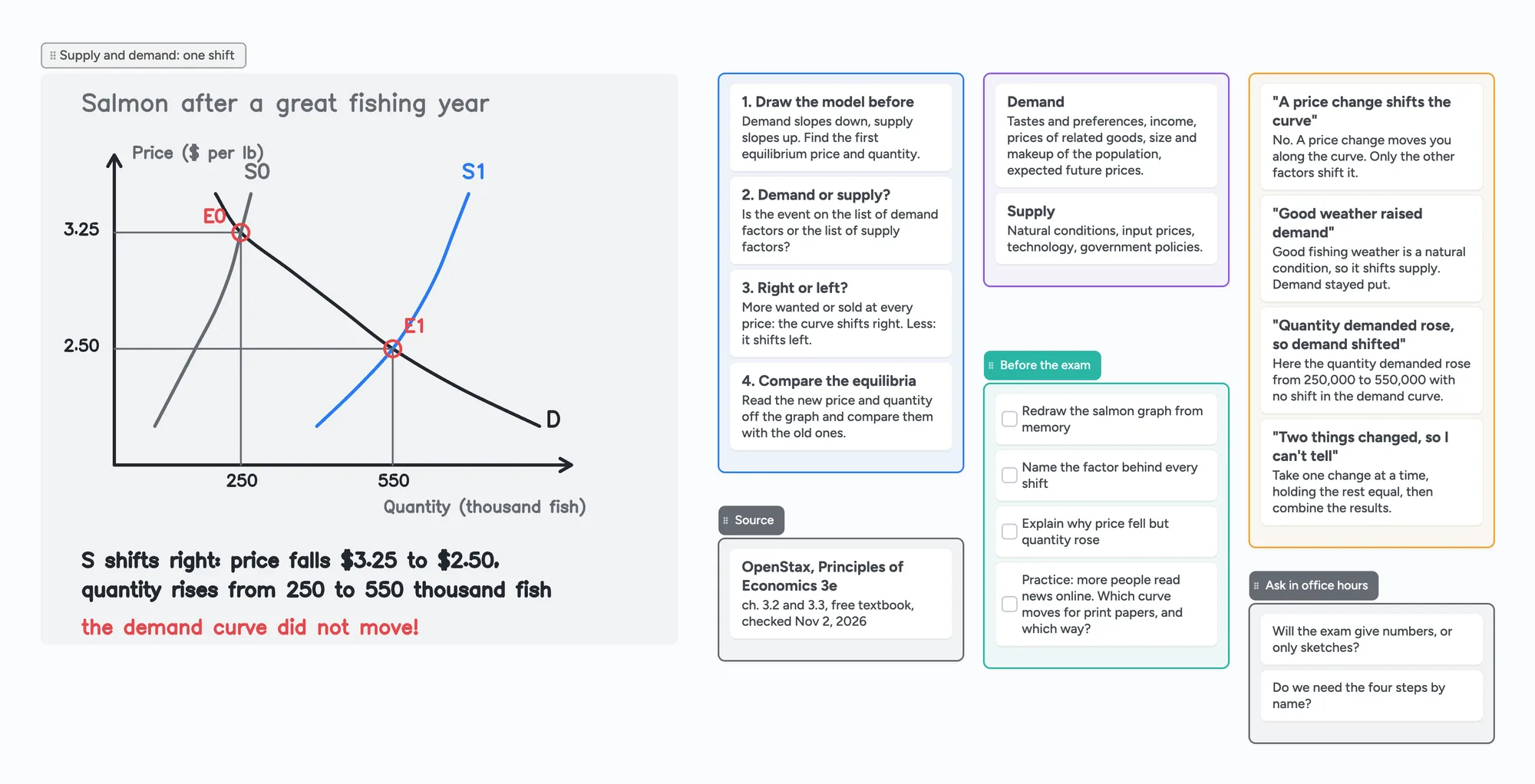
What a notes canvas looks like: one economics topic on one board
The ready board above is one topic from an intro economics course, supply and demand. It is built the way students use a canvas: the graph drawn by hand on the left, and the same topic sorted into lists beside it.
- The graph. The salmon example from OpenStax: demand and supply curves, a good fishing year that shifts supply to the right, the price falling from $3.25 to $2.50 and the quantity rising from 250 to 550 thousand fish. The numbers are the textbook's own table.
- The four steps from the textbook, one card each, so you can read them in order.
- What shifts a curve: the demand factors and the supply factors from the same chapter.
- Mix-ups to avoid, like thinking a price change shifts a curve. A price change moves you along the curve.
- A checklist for the exam and a list of questions for office hours.
Zoom out and the whole topic fits on one screen. Zoom in on one card to read it. When you start a new chapter, open a new board, or put a card on the board that opens into its own board for that chapter. To turn lecture notes into questions you can test yourself on, see Cornell notes, digital; for a writer's outline wall, see digital corkboard.
On Windows, Chromebook, Android and iPad
- Windows and Mac: open instaboard.app in Chrome, Edge or Safari. Nothing to install. A plug-in pen tablet works for handwriting, and pen pressure works in the browser (how to set one up).
- Chromebook: open instaboard.app in the Chrome browser. It is the same web app as on a laptop, so your boards look the same.
- Android: the Instaboard app from Google Play, or the browser.
- iPad and iPhone: the Instaboard app from the App Store. On iPad, turn on stylus mode and Apple Pencil draws while your finger scrolls, so you don't leave stray marks while you move around the board.
Apple's own Freeform does the same job, but Apple's guide describes it only for Apple devices, so you can't edit those boards on a Windows laptop or an Android tablet. If you study on a mix of devices, or share notes with someone who does, a canvas that runs in a browser avoids that (more on Freeform alternatives).
Sharing a board
Send the link. Anyone can view it with no account. To add to it, they sign in for free with Google, Apple or email.
When another app is the better choice
- You want handwriting turned into text you can search. Instaboard keeps handwriting as ink and doesn't read it. OmniCanvas Pro lists handwriting to text, and Goodnotes lists handwriting search.
- You mostly type notes and want them as local files. Obsidian keeps Markdown files on your device and is free without limits, and its Canvas plugin arranges notes, images and files on a canvas.
- You sketch or draw with layers. Concepts is built for sketching: layers, brushes, vector strokes.
- You live in Apple's world. If everyone you study with has an iPhone, iPad or Mac, Freeform is free and already installed.
- You need a notebook of many pages. A canvas is for material that doesn't fit one order. For lecture notes in order, a page-by-page notebook app is simpler.
What to know about Instaboard's free plan
- 5 boards and 150 items. Items are cards, lists, images, text boxes, sticky notes and widgets. Pen strokes, sections and arrows don't count.
- 3 images and 1 file per board. A photo of a handwritten page is one image. A PDF you import becomes its own board of pages you can write on, and uses one of your 5 boards.
- Editing needs a free sign-in with Google, Apple or email. Viewing doesn't.
- It doesn't read or search your handwriting, and there is no AI that writes your notes.
- The eraser removes whole strokes, not part of one.
- No import from other apps. You can't bring in a Freeform, Goodnotes or Miro file. Selected cards and lists can be saved as a PNG.
- It's built to be online. If your connection drops, your changes are kept and sync when you're back, but it isn't an offline-first app with local files like Obsidian.
- Pro is $5 a month billed yearly ($59.99 a year) and removes the board, item and image limits.
Start from the ready board
It opens in your browser in a few seconds, with nothing to install. Sign in for free when you want to save it and share it.
Questions
Is there a free infinite canvas app for Windows?
Yes, several. Instaboard runs in the browser on Windows with nothing to install. Concepts and Goodnotes have Windows apps with free tiers, Obsidian has a free Windows app whose Canvas plugin arranges notes on a canvas, and Excalidraw and OmniCanvas run in the browser. Each free tier has different limits, listed in the table above.
What infinite canvas app works on a Chromebook?
Browser apps work on a Chromebook: open instaboard.app, Excalidraw or OmniCanvas in Chrome. Concepts lists ChromeOS support. Obsidian doesn't list ChromeOS on its download page.
Is Apple Freeform available on Android or Windows?
No. Apple's guide describes Freeform boards syncing across your Apple devices. For a canvas that opens on Windows, Android and Chromebook as well as iPad, use one that runs in a browser or has apps for each platform.
Is Instaboard free forever?
The free plan has no time limit. It covers 5 boards, 150 items such as cards, lists and images, and 3 images per board; pen strokes don't count. Pro is $5 a month billed yearly and removes the limits.
Can Instaboard turn my handwriting into text?
No. Handwriting stays as ink and isn't searchable, and there is no AI that writes your notes. Pen pressure works, and a card can hold typed notes next to the handwriting.
Can I use it offline?
Instaboard is built to be online. If your connection drops mid-session, your changes are kept and sync when you're back. If you need notes stored as local files that work with no internet at all, a local app such as Obsidian is the better fit.
Do I need an account to open the board above?
No. You can open and look around it without an account. To add to it or change it, sign in for free with Google, Apple or email.
Sources
- Goodnotes: The 15 best free note-taking apps for students in 2026 (Sep 11, 2026; Goodnotes free limits, platforms, sync)
- Goodnotes Support: Create, Manage, and Navigate Whiteboards in Goodnotes
- Concepts: plans and platforms
- Concepts: feature list by platform
- Excalidraw+: pricing (free tier: 1 infinite scene)
- Excalidraw: the free web app
- Obsidian: pricing (free without limits, Sync is an add-on)
- Obsidian: download (platforms)
- Obsidian Help: Canvas
- OmniCanvas: pricing
- Apple: Freeform User Guide
- OpenStax Principles of Economics 3e: 3.2 Shifts in Demand and Supply
- OpenStax Principles of Economics 3e: 3.3 Changes in Equilibrium Price and Quantity: The Four-Step Process
Related
A Freeform alternative that works on Windows, Android and the web
Freeform only runs on Apple devices, and everyone needs an Apple Account even to view a shared board. A free alternative that works on Windows, Android and any browser, with a call on the board.
A pen tablet for online tutoring: what to buy and how to set it up
Which pen tablet to buy for online tutoring (Wacom, XP-Pen, Huion, about $40 to $60), how to set it up with pen pressure in the browser, and a whiteboard your student can write on too.
Make a biology concept map from your own notes
Turn your lecture notes into a biology concept map: concepts on cards, labelled arrows, feedback loops and a recall check. Worked example on the HPA axis, a ready board to copy, and a nursing version.
Build a nursing concept map for your patient
How to build a nursing concept map from your clinical notes, step by step: patient, pathophysiology, assessment data, labs, meds, priority problems, interventions and outcomes. A worked heart failure example you can open and edit.
Cornell notes, digital: cue cards that stay linked to your notes
How to take Cornell notes on a screen: a filled example (glycolysis) with cue cards joined to note cards by arrows, a self-quiz checklist and a summary. What a board does that a printable can't, and where a printable is better.
A digital corkboard for your scene cards, free to start
A digital corkboard for outlining a novel with scene cards: colour by point of view, drafted ticks, subplot arrows. Honest comparison with Cork, Corkulous, Plottr, Scrivener and Milanote.