For makers who sell at craft fairs and markets, alone or with a helper
A market vendor checklist template: one shared board for your stall, your car and your helper
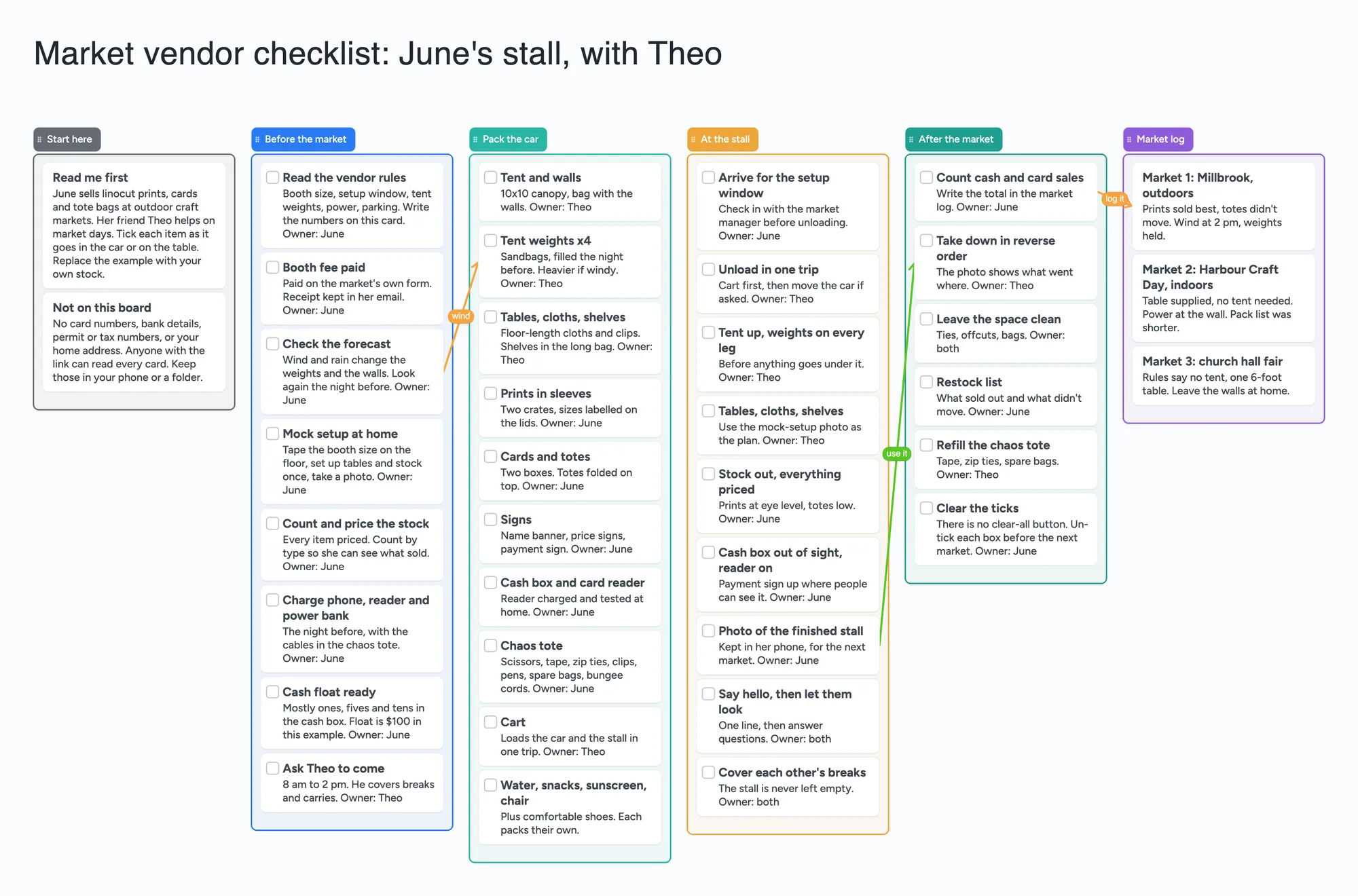
We make Instaboard, a free online board. This is a vendor checklist for a craft or art stall (not food) laid out as a shared board, filled in for one invented maker: June, who sells linocut prints, cards and tote bags at outdoor markets, with her friend Theo helping. It has six lists: Start here, Before the market, Pack the car, At the stall, After the market and a Market log. The four task lists have tick boxes and a first name on each job. If you sell alone, a printed checklist is enough and does the job better: it needs no sign-in, and the first section below says when to use one. This board earns its place when a second person packs or staffs the stall and you both need to see what is done. It sends no reminders, takes no payments, draws no booth map and doesn't record who ticked what or when.
Opens in your browser. Anyone can view; a free sign-in lets you edit.
Updated
Read this first: when a printable is enough, and what this board does
- A printable is enough if you sell alone. One person, one list, a pen and a car: print a checklist and tick it on paper. SmartFarmPilot's 47-item farmers market checklist is one example (see the sources). A shared board only helps when two or more people pack, staff or restock and need to see the same list.
- What the board is: four lists in time order (before the market, pack the car, at the stall, after the market) with a tick box on every card, a Start here card, and a Market log with one card per market. Each job ends with an owner's first name. The example is invented: June and her helper Theo.
- What it isn't: no reminders or alerts, no payments or card reader, no booth map, no stock counts and no record of who ticked a box or when. Anyone you give edit access can un-tick anything, and nothing records it. There is no clear-all button, so you un-tick each box before the next market.
- Free plan: the example is 45 of your 150 free items (38 cards, 6 lists and 1 title text box, our count). Arrows and pen strokes don't count. Writing needs a free sign-in. Pro is $5 a month billed yearly ($59.99 a year), or $7.99 monthly.
When a printed checklist is enough, and when a shared board helps
SmartFarmPilot's page "Farmers Market Checklist: 47 Items to Never Forget (Printable PDF)" (read November 22, 2026; the page we read shows no publication or update date) is built around produce and sampling, and the page promotes the company's own farm software. Even so, its structure is what most vendors need: booth equipment, product supplies, payment and business, marketing, personal essentials, then a day-before, morning-of, setup, during, end-of-market and after-market sequence. It says to print it and check each item off as you load. For a person who sells alone, that is the right answer.
- Use paper if you sell alone or you pack the same way every time. Paper never needs a sign-in or a battery.
- Use a board if a helper packs part of the car, a friend covers your break, or two people share one stall and each needs to see what is left. Everyone with the link sees the same ticks live, once you set Share to "Anyone who joins can edit" and they sign in free.
- Use a spreadsheet if you want sorting, sums or a history of who edited a cell. Google Sheets (below) does that and this board doesn't.
On the board, changes you make with no signal are kept and sync when you're back online. Open it at home before you leave, so it is already loaded.
The example, list by list
June sells linocut prints, cards and tote bags (no food, so none of the food-handling or sampling lines a produce checklist carries). Theo helps from 8 am to 2 pm. Each job ends "Owner:" and a first name.
- Start here (2 cards). "Read me first" says what the board is and to tick as you go. "Not on this board" keeps card numbers, bank details, permit or tax numbers and a home address off it, because anyone with the link can read every card.
- Before the market (8 cards). Read the vendor rules, booth fee paid, check the forecast, mock setup at home, count and price the stock, charge the phone, reader and power bank, cash float ready, ask Theo to come.
- Pack the car (10 cards). Tent and walls, four tent weights, tables, cloths and shelves, prints in sleeves, cards and totes, signs, cash box and card reader, a chaos tote of small fixes, a cart, and water, snacks, sunscreen and a chair.
- At the stall (9 cards). Arrive for the setup window, unload in one trip, tent up with weights on every leg, tables and shelves from the mock-setup photo, stock out and priced, cash box out of sight with the reader on, a photo of the finished stall, say hello then let people look, and cover each other's breaks.
- After the market (6 cards). Count cash and card sales, take down in reverse order, leave the space clean, a restock list, refill the chaos tote, and "Clear the ticks" (the reset is by hand).
- Market log (3 cards). One card per market with a line on what sold and what the place's rules were. Three arrows link the forecast card to the tent weights, the stall photo to take-down, and the sales count to the first market's log card.
The $100 cash float and every price or time in the example are invented. Swap in your own.
What people at stalls put on the list
Two threads in r/CraftFairs, read in full on November 22, 2026 (every comment the page loaded). Each reply is one person's view, credited per account. In "what advice do you have for first time vendors?" (u/RemarkableHoliday792, January 6, 2025), u/SlinkSkull, u/drcigg and u/Excellent-Anxiety404 each recommend a trial setup, and u/drcigg adds taping off a space the exact size of the booth at home. u/drcigg also recommends loading the vehicle the night before, arriving on time for setup, and bringing cash in ones, fives, tens and twenties (about 200-300 dollars' worth, depending on your price range) plus a card reader. u/braidedRainbow suggests taking a photo of your setup for next time. u/arcus1985 brings a tape measure and bright tape because neighbours try to take space. u/OcelotReady2843 keeps a small notebook with the date, name and place of each fair and codes the sales, so after a year the data shows which fairs worked. u/batmangelina keeps a tick-box vendor checklist and most of the stock packed together.
In "Newbie Checklist?" (u/masterpeabs, June 23, 2025, a potter picking markets), u/sage_kitten adds water, sunscreen, a fan and two first aid kits, one for the vendor and one for the display. u/lilcanuckduck keeps a "chaos tote" of scissors, zip ties, tape, battery banks and spares. u/Ok-Eagle5181 keeps an "office box" and adds bungee cords and clamps. u/Briilliant_Bob did a mock setup in the garage the week before. u/swuie and u/kittykatblack both say to weight the tent legs, u/swuie giving 20-25 lb per leg, u/kittykatblack 20-25 lb for breezy and 40-45 for windy. u/drcigg says their first two shows took almost 2 hours to set up because everything was carried in, until they borrowed a cart. u/katubug posts their phone-note checklist, with a cash box of "$135 + coins".
The example board turns those into cards; they are people's habits, not rules. Weights, insurance and permits differ by market, so the first card on the board is "Read the vendor rules". SmartFarmPilot's page also says some markets require 40 lb per leg and that markets often want a copy of an insurance certificate on file; both are its claims, and your market's own page decides.
How to set it up with a helper
- Open the board and replace the example. Swap June and Theo for you and your helper and the prints, cards and totes for your own stock. Delete cards you don't need; each is 1 of your 150 items.
- Write the market's rules on the first card. Booth size, setup window, weights, power and parking, copied from the market's own page.
- Give every job a first name. Typed text, not a login: it tells your helper whose job it is, nothing more.
- Do a mock setup, then take a photo. Keep the photo in your phone and put the plan in words on the card. The board holds 3 images at most, so don't put a stall photo on it.
- Share it. In Share, set the board to "Anyone who joins can view" or "Anyone who joins can edit" (new boards start view-only). Your helper signs in once, free, to tick. Someone who only needs to read can open the link signed out and can't change anything.
- Tick together. Everyone with edit access sees a tick live. After the market, count the sales, add a Market log card, and un-tick each box before the next one. A copy of the board keeps its ticks, so clear a copy too.
A copy of the board takes 1 of your 5 free boards, and a helper who joins by link counts it as one of theirs. The 4-digit join code expires after 2 hours of inactivity.
What this board doesn't do, and where a printable, Google Sheets and Square do it better
Read on November 22, 2026 from each tool's own pages.
| Tool | What its own page says (Nov 22, 2026) | Better than this board for | Not what you get |
|---|---|---|---|
| Instaboard board | Free: 5 boards, 150 items, 3 pictures per board. Pro $5/mo billed yearly | A helper ticking the same list live; a market log in the same place | Reminders, payments, booth map, stock counts, who/when ticked, sorting |
| Printable checklist (SmartFarmPilot) | 47-item farmers market checklist, "Printable PDF"; page shows no date; says to print it and check each item as you load | Selling alone, no signal, no sign-in | A shared list; it is written for produce and promotes the company's own software |
| Google Sheets | Help page: share as Editor, Commenter or Viewer; add comments and assign tasks; version history shows who edited and restores earlier versions | Sums, sorting, who edited what, a sales log you can total | A card layout with a tick box per job |
| Square | Pricing page: Square Free is $0/mo per location; in person (tap, dip or swipe) 2.6% + 15¢, online 3.3% + 30¢. Reader page: first reader free, $10 for each additional; offline payments | Taking card payments at the stall | A checklist; it takes payments and keeps sales, it doesn't plan your day |
Swipe the table sideways to see every column.
From each tool's own pages, read November 22, 2026. Prices change; check the page. Not affiliated with any of them.
Where these win
If you take cards, use a reader such as Square. If you want totals or a history of who edited a cell, use Sheets. If you sell alone, print a checklist. Use this board when two people share the stall and each needs to see what is packed, set up and still to do.
Limits of the free plan for a vendor board
- Items. Each card, list and text box is 1 of your 150 free items, across all your boards. The example is 38 cards, 6 lists and 1 title text box, 45 in all. Arrows and pen strokes don't count.
- The log grows. Our arithmetic: adding one Market log card for each of 12 markets takes the board from 45 to 57. Delete old log cards, or keep them on a second board, to stay near 45.
- Several boards add up. A second board for a different stall type (indoor and outdoor, say) doubles the layout to about 90 items, which leaves 60 for everything else.
- Boards. The free plan includes 5 boards, and a copy takes 1 of them.
- Photos. 3 images per board. The example has none.
- No reminders, no due-date alerts, no counts or sums. A "Cash float ready" card is text. The board doesn't tell anyone that market day is tomorrow or add up the day's sales.
- No record of who ticked. A first name is typed text. Anyone with edit access can un-tick any box and nothing records who did.
- Writing needs a free sign-in. A helper who joins by link or code can tick boxes and add cards, and the board counts as one of their 5. A signed-out reader can only look.
Start from the ready board
It opens in your browser in a few seconds, with nothing to install. Sign in for free when you want to save it and share it.
Questions
Is there a free market vendor checklist template?
Yes. Open the board, replace June's stall with yours and set Share to "Anyone who joins can edit" if your helper needs to tick boxes. If you sell alone, a printed checklist is just as good and needs no sign-in.
Is this for a food stall?
No. The example is a non-food stall (prints, cards and totes). Food vendors have health and permit rules that vary by place, and this board holds none of them. A produce-based checklist like SmartFarmPilot's covers sampling and cold storage.
Does it remind me about a market or a booth fee?
No. It has no reminders or alerts. Put the date and the payment deadline in your phone's calendar.
Can it take card payments or add up my sales?
No. Use a card reader such as Square for payments, and a spreadsheet if you want totals. The board only holds a Market log card per market with a line about how it went.
Can I tell who ticked a box?
No. A tick records no name and no time. Everyone with edit access sees it live, and anyone with edit access can un-tick it. The first name at the end of a card is typed text.
How many cards fit on the free plan?
Each card, list and text box is one of the 150 items across all your boards. The example is 45. If you add a Market log card for each of 12 markets, that is about 57 (our arithmetic). Arrows are free.
Sources
- SmartFarmPilot: Farmers Market Checklist, 47 items (read November 22, 2026; page shows no date)
- Google Docs Editors Help: Collaborate in Sheets (read November 22, 2026)
- Square: pricing (read November 22, 2026)
- Square: card reader (read November 22, 2026)
- r/CraftFairs: what advice do you have for first time vendors? (January 6, 2025, replies are single accounts)
- r/CraftFairs: Newbie Checklist? (June 23, 2025, replies are single accounts)
Related
A craft fair planning template: one shared board for the organising committee
Plan a craft fair or makers market with a small committee on one shared board: venue, vendor call, confirmed vendors, waitlist, setup, market day and volunteers. Free ready board; Zeffy and Eventbrite do the payments.
A cafe opening and closing checklist on one shared board
A cafe opening and closing checklist on one shared board: opening, side work, closing, shift notes, weekly jobs. No reminders; Connecteam and Homebase do those.
A shift handoff template for a small shop: one shared board instead of a group chat
A shift handoff template for a small cafe, shop or bar: done today, still to do, low stock, notes and tomorrow on one shared board, with a first name on every card. Free to copy. Not a clinical record.