Updated after the October 14 change
MindMeister's free plan now keeps your 3 oldest maps. Here's what to do.
On October 14, 2026, MindMeister changed its free Basic plan. The 3-map limit now applies to each person instead of each team, maps other people share with you count toward it, and it keeps your 3 oldest maps instead of your newest. Everything else is grayed out. Free accounts also can't export a map in any format, so moving out isn't simple. Here is what changed, how to get a map back, and where else your maps can live.
Updated
The short answer
- MindMeister Basic now allows 3 maps per person, maps shared with you included, and keeps the 3 oldest. The rest are grayed out, not deleted.
- To open a grayed-out map, leave a shared map you don't need, delete one you own, or upgrade. Paid plans are billed for at least 6 months.
- Free users can't export or print. If you only need a few maps elsewhere, rebuilding them by hand is often quicker than paying to export.
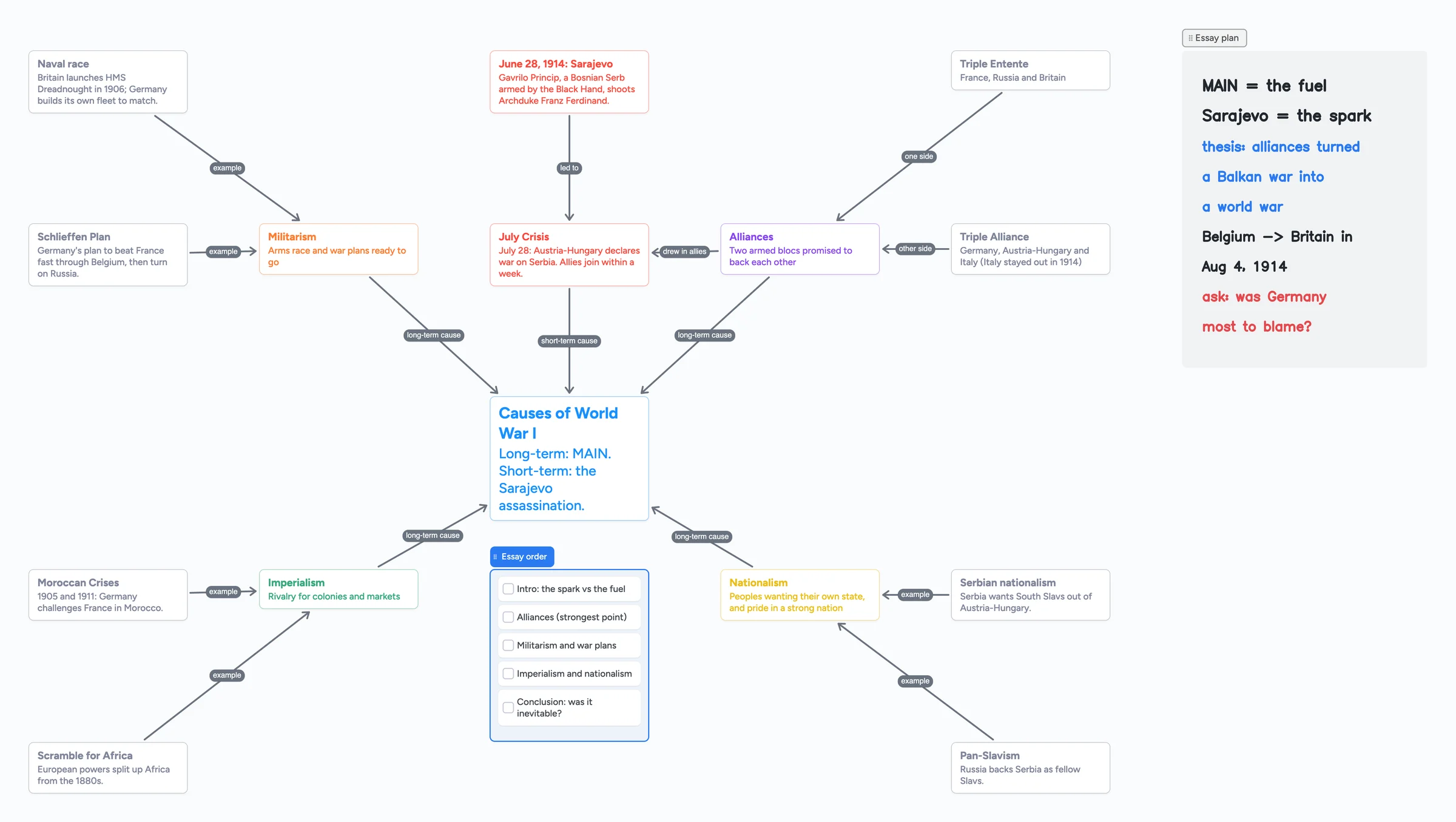
- Instaboard Free gives you 5 boards of cards and labelled arrows, and arrows don't count toward the 150-item limit. You arrange the map yourself; there is no automatic layout.
What changed on October 14, 2026
MindMeister removed team maps. Every map is now private and stays shared only with the people who have opened it. On the free Basic plan, three things changed at once:
- 3 maps per person, not per team. Before, a team on Basic shared one pool of 3 maps.
- Shared maps count. A map a classmate or colleague shares with you uses one of your 3, the same as a map you made.
- The 3 oldest stay open. Until October 14, Basic kept your 3 most recently created maps. Now it keeps the 3 created first, so the map you made last week may be the one that's grayed out.
- Grayed-out maps can't be opened or edited, but they aren't deleted. The owner and anyone else with access can still work on them.
MindMeister calls this a return to how Basic worked before team maps arrived in 2024. Paid plans have no map limit, but teammates who never opened a team map lost access to it on October 14, even on a paid plan. The owner can share it with them again.
Who notices this most
Students and study groups. If three classmates each share a map with you, your own maps after the first few can turn gray, and maps you share with free users can turn gray for them.
How to get a grayed-out map back
Free up one of your 3 places and the next oldest grayed-out map opens again. MindMeister lists three ways:
- Leave a map someone shared with you that you no longer need. It disappears from your list without affecting anyone else.
- Delete a map you own that you don't need any more.
- Upgrade to a paid plan to open every map at once.
If a classmate keeps a map you both need, the simplest fix is often to leave it yourself and ask them to share a screenshot or a view link when you need it.
Free accounts can't export
On Basic, Export and Print are grayed out in the map editor and open an upgrade prompt. MindMeister's own plans page says the free plan has had no export in any format since June 30, 2026. Exports by plan:
| Basic (free) | Personal | Pro | Business | |
|---|---|---|---|---|
| Mind maps | 3 (shared maps count) | Unlimited | Unlimited | Unlimited |
| PDF, PNG, JPG, Markdown | No | Yes | Yes | Yes |
| No | Yes | Yes | Yes | |
| Word, PowerPoint | No | No | Yes | Yes |
| Export all maps at once | No | No | No | Yes (MindMeister, MindManager or FreeMind files) |
| Price (12 months / 6 months) | Free | €6.50 / €7.50 a month | €10.50 / €12.50 a month | €15.50 / €19.00 a month |
Swipe the table sideways to see every column.
From MindMeister's export help page and pricing page, checked October 28, 2026. Prices are MindMeister's euro reference prices; they vary by region. There is no monthly billing, and students, educators and non-profits can ask support for 50% off.
Because the shortest plan is 6 months, upgrading just to export costs about €45 at the reference price. If you only need two or three maps somewhere else, it's usually faster to rebuild them by hand: open the map, and type each branch into the new tool as you go. The text is what matters; the layout takes minutes to redo.
Free plans side by side
| MindMeister Basic | Xmind Free | Instaboard Free | |
|---|---|---|---|
| Maps or boards | 3, shared maps included | 10 online maps | 5 boards, boards opened from a shared link included |
| Layout | Automatic tree or free | Automatic tree | You place every card; no automatic layout |
| Export | None | Pro only (from $4.92 a month) | Select the map and save it as an image; view link |
| Collaborators | Unlimited | Real-time collaboration on Premium | Unlimited; editors sign in free, anyone can view |
| AI map from a prompt or file | Yes (beta) | 50 AI credits | No |
| Beyond the map | Outline mode, presentations, MeisterTask | Presentations (5 slides free) | Checklists, pen and handwriting, images, video calls |
Swipe the table sideways to see every column.
MindMeister and Xmind facts from their pricing pages, checked October 28, 2026.
Where MindMeister is still the better choice
- Automatic layout. Add a topic and MindMeister places it on the tree for you. In Instaboard you drag each card where you want it.
- Outline mode. You can write the map as an indented list and switch back to the map.
- AI. MindMeister can start a map from a prompt or an uploaded file. Instaboard has no AI.
- Presentations and tasks. Present the map branch by branch, or send topics to MeisterTask.
- Exports on a paid plan. Markdown, Word, PowerPoint and MindMeister or FreeMind files. Instaboard has none of these.
- Your existing maps. Nothing imports into Instaboard, so years of maps are easiest to keep where they are.
If you live in tree-shaped maps and want them laid out for you, paying for MindMeister Personal or trying Xmind is the closer fit.
When Instaboard fits better
- Your map isn't a tidy tree. Causes that feed each other, a feedback loop, two branches that meet: put cards anywhere and label each arrow with how they connect.
- You study with it. Put the essay checklist, a photo of your notes and handwriting on the same board as the map, the way the ready board above does.
- You share with classmates. Anyone can view a board from a link without an account, and editors sign in free.
- You want a branch to grow. A card can open into its own board, so one branch can become a whole page of detail.
- You write with a pen. On an iPad or a tablet you can handwrite notes next to the cards.
For a study map built from your own class notes, see the biology concept map guide or the nursing concept map guide.
Coming from Popplet?
Popplet's website went offline in summer 2026. Its letter to users gives July 1, 2026, and its homepage says the service ends August 1, 2026. The Popplet iPad app is still available. Popplet stopped charging subscriptions on January 1 and points users to Superstructures.io, a free web tool for collaborative visual thinking made by one of Popplet's original founders.
- For a class activity, where every student types into one shared diagram, Superstructures was built for that by Popplet's founder and is the natural next step.
- For your own picture-and-text maps, Instaboard cards hold a title, text and an image, joined by arrows. Free boards take 3 images each, so a photo-heavy Popplet needs a few boards or Pro.
- Nothing imports from Popplet. Rebuild the map, or use a screenshot of the old one as a reference image on the board.
What Instaboard doesn't do
- No automatic mind-map layout, outline mode or AI. You arrange the cards.
- No import from MindMeister, Xmind, FreeMind, OPML or Popplet.
- No Word, PDF or Markdown export for a map board. You can share a link or save selected cards as an image.
- Boards shared with you count. Like MindMeister now, a board you open from someone's link counts toward your 5 free boards. At the limit you can still open shared links, but they aren't added to your boards.
- 3 images per board on Free, and 150 cards and items across your account. Arrows, sections and pen strokes don't count.
Start from the ready board
It opens in your browser in a few seconds, with nothing to install. Sign in for free when you want to save it and share it.
Questions
Is MindMeister still free?
Yes, the Basic plan is free, with 3 mind maps per person. Since October 14, 2026, maps shared with you count toward the 3, and the 3 oldest stay available. Free accounts can't export or print.
Why are my MindMeister maps grayed out?
You have access to more than 3 maps on the Basic plan. Only the 3 created first stay available. Leave a shared map, delete one you own or upgrade, and the next oldest map opens again. Grayed-out maps aren't deleted.
Can I export my MindMeister map for free?
No. Export and Print need the Personal plan or higher, and the shortest billing period is 6 months. For a few maps, rebuilding them by hand in another tool is often quicker.
Can I import a MindMeister map into Instaboard?
No. Instaboard can't import MindMeister, FreeMind or OPML files. Rebuild the map with cards and arrows; a 15-card map takes a few minutes.
Is Popplet shutting down?
The website has gone offline: Popplet's letter says July 1, 2026 and its homepage says August 1, 2026. The iPad app is still available, and Popplet points users to its founder's free tool, Superstructures.io.
Is Instaboard free?
Yes. The free plan includes 5 boards, 150 cards and items across your account (pen strokes, arrows and sections don't count), 3 images and 1 file per board, unlimited collaborators and video calls up to an hour. Pro is $5 a month billed yearly ($59.99 a year), or $7.99 monthly, and the people you invite join free.
Sources
Related
Make a biology concept map from your own notes
Turn your lecture notes into a biology concept map: concepts on cards, labelled arrows, feedback loops and a recall check. Worked example on the HPA axis, a ready board to copy, and a nursing version.
Build a nursing concept map for your patient
How to build a nursing concept map from your clinical notes, step by step: patient, pathophysiology, assessment data, labs, meds, priority problems, interventions and outcomes. A worked heart failure example you can open and edit.
A Miro alternative for personal use, tutors and families
Miro's free plan keeps only 3 boards editable, and in September 2026 it briefly blocked a fourth board entirely. Where Miro is still the better tool, and a free alternative with more boards, calls on the board and Apple Pencil.