For math tutors and teachers
An online whiteboard for math: write, graph and let your student write too
Math is the hardest subject to teach on a whiteboard. You need to write numbers fast, draw a graph, show the next line of working, and watch your student do the same. Some math whiteboards come with equation editors and graphing built in; others are just a good pen. Here is what each part takes, which free tools have what, and a ready slope lesson board to start from.
Updated
The short answer
- For most tutoring, handwriting is the main math tool. Write the working line by line, draw the graph on a grid, and let your student write the next line in their own colour.
- Instaboard has a pressure-sensitive pen, a grid background, equation cards for typeset formulas and a Desmos graphing calculator widget. It has no LaTeX editor, no computer algebra and no built-in graph plotter.
- If you want typed LaTeX, a function plotter or step-by-step solving inside the whiteboard, WooWhiteboard, MathWhiteboard and PhiBoard have them. Their free limits are in the table below.
- Students can view with no account but need a free sign-in to write. Free calls run 60 minutes; Pro ($5 a month billed yearly) has no limit.
What a lesson on the board looks like
The call sits on top of the board, so you talk and write in the same place. You write with a pen, point with the laser, and your student writes their answer on the same page in their own colour.
What a math tutor needs from a whiteboard
Tutors who write about this tend to ask for the same five things. The list is ours, drawn from what math whiteboards advertise on their own pages (checked November 2, 2026), not from a survey:
- Fast handwriting. Numbers, fractions, powers and signs written by hand, ideally with a pen tablet or an iPad and Apple Pencil. See which pen tablet to buy and how to use an iPad as the whiteboard on Zoom.
- A grid or graph area, so a line or a parabola lands on proper axes.
- Typed equations when handwriting is not enough, for example a long fraction in a worked example you want to stay readable.
- A way to bring in the worksheet, so you both write on the real problem.
- A student who can write, not just watch. Most of the learning is in the student's next line.
Three ways to put math on an Instaboard board
| What it is | Best for | |
|---|---|---|
| Ink | Write with a pressure-sensitive pen, finger or stylus. Hold the pen still to straighten a line. Set the background to a grid to draw axes. | Working, graphs by hand, geometry sketches, anything your student should copy |
| Equation card | A card that shows a typeset formula. It is a formula card, not a full math editor. | A clean fraction or power you want to stay readable, like a rule on a cheat-sheet |
| Desmos widget | A Desmos graphing calculator you add to the board. The board shows a picture of the graph. Press Edit to open the full calculator, and the saved graph syncs to the board. | Plotting a function accurately, checking a hand-drawn graph |
Swipe the table sideways to see every column.
Instaboard facts from the app, checked November 2, 2026. The Desmos widget needs an internet connection and, as built, shows a snapshot on the board rather than a live, shared graph.
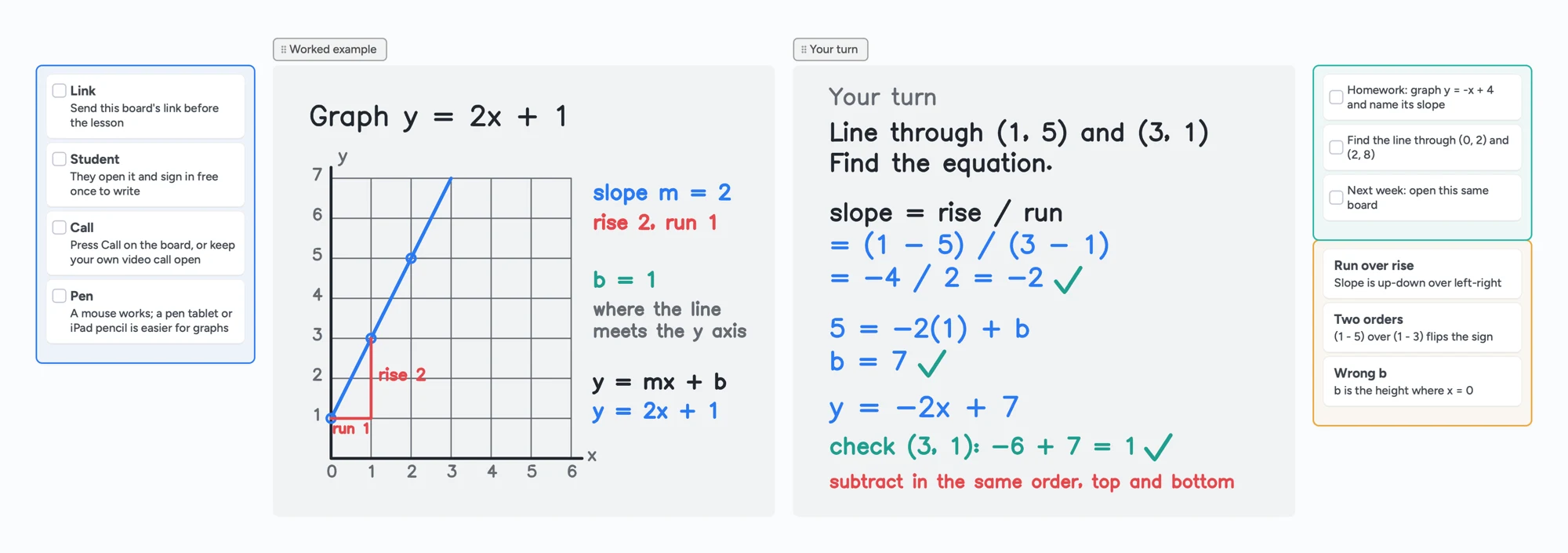
The ready board above is made with ink and cards only: a hand-drawn graph of y = 2x + 1 with the rise and run marked, a worked second problem for your student (the line through (1, 5) and (3, 1)), a homework list and a list of the mistakes to redo. The arithmetic is checked: the slope is (1 − 5) / (3 − 1) = −2, so 5 = −2(1) + b gives b = 7, and y = −2x + 7 passes through (3, 1) because −6 + 7 = 1.
Math whiteboards compared: what each one has
| Math tools | Cost and limits (their pages, November 2, 2026) | |
|---|---|---|
| Instaboard | Pen, grid background, equation cards, Desmos widget, PDF import, built-in call | Free: 5 boards, 150 cards and items (pen strokes don't count), 3 images and 1 file per board, calls up to 60 minutes. Pro $5/month billed yearly. |
| WooWhiteboard | Equation editor, function graphing on a grid, Wolfram Alpha integration, video chat, export as JPG, PNG, GIF or PDF | Its page calls it a free online whiteboard for teaching. |
| Ziteboard | Formula editor (basic LaTeX or a virtual keyboard), graph plotter, compass | Math Tools are for Pro users only, a one-time $40. Free plan: 3 boards you own, 3 basic colors, first PDF page only. |
| MathWhiteboard.com | Graphing calculator, handwriting recognition, a computer algebra system, PDF as background, works in the browser | Its page says free for teachers, tutors and students. |
| PhiBoard | Function graphs, LaTeX formulas, shapes, saves lessons as PDF, live collaboration with voice | Its page says free with no board limits. The site is in Polish. |
Swipe the table sideways to see every column.
Taken from each tool's own pages on November 2, 2026. Features and limits change; check the tool before you rely on it for a paying student. Instaboard's Pro price is for the whole app, not an add-on for math.
Where the other tools are the better choice
- You want typed LaTeX or a function plotter in the whiteboard. WooWhiteboard, MathWhiteboard and PhiBoard list them on their pages. Instaboard only has equation cards and the Desmos widget.
- You teach algebra or calculus with a computer algebra system. MathWhiteboard's page lists a full computer algebra system; Instaboard has none.
- Your students need practice with immediate feedback. Graspable Math's activities for grades 6 to 12 let students move terms in an equation and moves that break the math don't go through. A whiteboard is not that.
- You just need a graph. Desmos's free graphing calculator in the browser is faster for plotting than any whiteboard. Use it next to the board, or add it as the widget.
- You teach a class, not one student. WooWhiteboard's page advertises a teaching mode for many students at once; Instaboard has no class mode.
Instaboard fits best when handwriting is how you teach, you want your worksheet, the call and your student's writing in one link, and you would rather not pay for a math add-on. For a longer look at the free plan against Bitpaper, Lessonspace and Pencil Spaces, see our tutoring whiteboard guide.
Run a math lesson on the board in five steps
- Open the lesson board above and make it yours. Keep one board per student; it stays between lessons.
- Import the worksheet. Add the PDF and each page becomes a page you both write on. Each imported PDF uses one of your 5 free boards.
- Send the link or the 4-digit code. Your student opens it and can view at once. They sign in once, free, to write.
- Start the call on the board, or keep Zoom or Meet and open the board beside it. Free calls on the board end at 60 minutes. Pro has no limit.
- Work the example, then hand over. You write the first problem in black. Your student writes the next in their own colour. Tick what's right, circle what to redo.
New to teaching online? How to teach math online walks through a first lesson step by step.
Tip for graphs
Set the board background to a grid before you start. Draw the axes first, then the points, then the line. Hold the pen still at the end of a stroke and the line straightens.
What Instaboard doesn't do for math
- No LaTeX editor. Equation cards show typeset formulas; there is no full formula editor.
- No built-in graph plotter and no computer algebra. The Desmos widget is the graphing option, and it needs an internet connection.
- The eraser removes whole strokes. Undo is the quickest fix for the last thing you wrote.
- No handwriting recognition. Your writing stays as ink; it isn't turned into typed math.
- Students sign in to write. Anyone with the link can view; writing needs a free sign-in with Google, Apple or email.
- Free calls end at 60 minutes, and there is no lesson recording, class mode or scheduling.
- Free covers 5 boards, 3 images and 1 file per board.
Start from the ready board
It opens in your browser in a few seconds, with nothing to install. Sign in for free when you want to save it and share it.
Questions
What is the best free online whiteboard for math?
It depends on how you teach. For handwritten working with your student writing too, a whiteboard with a good pen is enough; Instaboard's free plan covers that. If you want typed LaTeX, a function plotter or a computer algebra system in the whiteboard, WooWhiteboard, MathWhiteboard and PhiBoard list those on their own pages. Compare their limits above.
Can I type equations on Instaboard?
You can add an equation card that shows a typeset formula. There is no LaTeX editor and no equation solver. Many tutors write the working by hand and keep equation cards for the formulas they want to stay clean.
Does Instaboard have a graphing calculator?
There is a Desmos graphing calculator widget. The board shows a picture of the graph, and you press Edit to open the full calculator and change it; the saved graph syncs to the board. It needs an internet connection. Instaboard has no graph plotter of its own.
Can my student write on the board?
Yes. Anyone with the link can view. To write, your student signs in once for free with Google, Apple or email.
Can I write math with a mouse?
You can, but it's slow. A pen tablet costs about $40 to $60 and makes your writing readable; an iPad with Apple Pencil works too. See [which pen tablet to buy](/pen-tablet-for-online-tutoring).
Is Instaboard free?
Yes. The free plan includes 5 boards, 150 cards and items across your account (pen strokes, arrows and sections don't count), 3 images and 1 file per board, unlimited collaborators and video calls up to an hour. Pro is $5 a month billed yearly ($59.99 a year), or $7.99 monthly, and the people you invite join free.
Sources
- WooWhiteboard: Free online whiteboard for teaching and math tutoring
- Ziteboard: Math Tools add-on, Formula Editor
- Ziteboard: Interactive Graph Plotter
- Ziteboard: Pricing and plan limits
- MathWhiteboard.com
- PhiBoard: free online math whiteboard (Polish)
- Graspable Math: activities for grades 6 to 12
- Desmos Graphing Calculator
Related
An online whiteboard for tutoring that works the way you teach
A free whiteboard for online tutoring: paste the worksheet, write with a pen, and your student answers on the same board. Call on it or beside Zoom.
A pen tablet for online tutoring: what to buy and how to set it up
Which pen tablet to buy for online tutoring (Wacom, XP-Pen, Huion, about $40 to $60), how to set it up with pen pressure in the browser, and a whiteboard your student can write on too.
Use your iPad as a whiteboard on Zoom (and let your student write too)
How to use an iPad and Apple Pencil as a whiteboard in a Zoom lesson: screen mirroring, Zoom Whiteboard, or a shared board your student writes on too. Or skip Zoom and call right on the board. Step by step, with the echo fix.
A whiteboard for Google Meet, now that Jamboard is gone
Google Meet lost its Jamboard whiteboard, and the add-ons often don't work on personal accounts. How to run a lesson with a shared whiteboard next to Meet, or skip Meet and call right on the board. With a ready lesson board.
How to teach math online: your first lesson, step by step
How to tutor math online as a beginner: what you need, how to run a first lesson on a board your student writes on too, with Zoom, Google Meet or no video app at all, and what to do without a whiteboard.