For people backing up Miro boards or moving a project out of Miro
How to export a Miro board (and what you get when you do)
Miro lets you save a board as an image, a PDF or a CSV of its text. It has no one-click backup for a Free account, and the export is a picture rather than editable sticky notes. Here are the steps, what each format keeps, what gets left out, and how to carry on working from the file afterwards, whether that's in Miro's rivals or in an Instaboard board.
Updated
The short answer
- One board at a time: open the board menu (three dots, then Board, then Export) and choose Save as image or Save as PDF. Each frame becomes one PDF page, so put what you want inside frames first.
- On the Free plan exports are low resolution only. High resolution without a watermark needs Starter or higher. Miro's own help says CSV of the board's text works on every plan, but only in Chrome, Safari, Firefox and the desktop app.
- There is no bulk export for individuals. Whole-account exports exist only for Enterprise admins, through eDiscovery export jobs.
- An export is a picture, not a copy. Comments, voting results and frame titles are not in it, and you can't open it in Miro again as an editable board.
Export a board, step by step
These steps follow Miro's help center page "How to export your board", read November 2, 2026. Export only shows up if the board owner or a co-owner has allowed it for collaborators in the board's content settings, so if the menu entry is missing, ask the owner first.
As a PDF
- Create at least one frame around what you want to keep. Each frame becomes a separate page in the PDF, in the order shown in the board overview panel.
- Open the three-dots menu next to the board name, then Board, then Export, and choose Save as PDF.
- Pick the size: Small file size or Best quality. Small PDFs don't carry clickable links; links work in the vector version.
- Click Export. In Safari, make sure pop-ups are allowed, or nothing seems to happen.
The whole board on one page
- Select everything with Ctrl+A (Windows) or ⌘A (Mac).
- Use the three dots on the context menu to wrap the selection in a frame.
- On the frame's menu choose Export as image and select Vector if your plan has it. The file is saved as a PDF.
As an image
- Open the Export submenu and choose Save as image.
- Drag the handles over the part of the board you want. Zoom out first to capture all of it.
- Choose JPG, PDF or SVG and the size your plan allows (Small, Medium, Large or Vector), then click Export.
As a spreadsheet (CSV)
Select a frame or any content, open the three-dots menu and choose Export to CSV. The text from sticky notes, tables, cards, text boxes and shapes goes into one column. Miro's help center says the CSV doesn't keep the board's structure or the relationships between items, though exported tables keep their structure.
What your plan and device allow
| Free plan | Starter, Business, Enterprise, Education | |
|---|---|---|
| Image or PDF resolution | Low resolution only (small size) | Low or high resolution, no watermark |
| CSV of the text | Yes, in Chrome, Safari, Firefox and the desktop app | Same |
| Where it works | Chrome, Safari, Firefox, Opera, the desktop app and the tablet app for images and PDFs | Same |
| On a phone | No export | No export |
| Board backup file (.rtb) | Not available | Yes, for board owners and co-owners; limited to 1 GB |
| Many boards at once | No: one board at a time | Enterprise admins only, through eDiscovery export jobs |
Swipe the table sideways to see every column.
From Miro's help center articles on exporting, board backups and board export from the Admin console, read November 2, 2026. Miro Free keeps only your 3 most recent boards editable, so export the older ones before you need them.
Miro's eDiscovery export lets an Enterprise admin export up to 1,000 boards in one job, and the results can be downloaded for 14 days. Other tools' guides say the same thing from the other side: Figma's help for importing Miro boards says there isn't a way to export boards in bulk from Miro, and Atlassian points to Miro's Enterprise bulk exporter for several boards at once.
The .rtb backup is for Miro only
On paid plans, Download board backup saves an .rtb file that can be restored into another paid Miro team. It is a way to keep a copy inside Miro, not a file other apps open.
What an export leaves out
- Comments. Miro's help center says comments aren't included in the exported document, though it has them in its backlog.
- Frame titles. Not shown on the export. Replace the titles with text boxes before you export if you want them.
- Voting results. They can't be exported. Take a screenshot.
- Anything outside a frame, when you export a PDF. Only what's inside frames is exported, and hidden frames are skipped.
- Structure. A PNG or PowerPoint file isn't offered at all: Miro's help says you can save PDF, JPG, SVG or CSV.
- Image quality. Miro's help center says bitmap images on the board are compressed when they're uploaded. Files you uploaded to the board can be downloaded one by one if the owner allows it.
Large boards sometimes fail to export. Miro's troubleshooting page suggests splitting the board into frames, hiding frames you don't need, and exporting them separately. Separate PDFs can be joined again in any PDF tool.
What to do with the file afterwards
| Where | What the Miro PDF becomes | Notes |
|---|---|---|
| Instaboard | A board of pages you can write and draw on, next to cards and lists | The notes stay a picture; you retype what you still use. No Miro import. |
| FigJam | Text becomes editable and objects can be moved and resized | Needs a vector PDF exported from Miro. Figma lists which Miro objects convert. |
| Zoom Whiteboard | Text, notes, shapes, connectors, labels, frames and images become editable | Zoom says a paid Miro license is needed for the highest-quality PDF. |
| Confluence whiteboards | Sticky notes, text and borders stay editable; drawings and embeds become images | Use Save as image and Vector PDF, as Atlassian describes. |
Swipe the table sideways to see every column.
From Figma Learn, Zoom Support (article updated March 20, 2026) and Atlassian Support, read November 2, 2026.
If your Miro board was a workshop with many sticky notes that you want to keep editing, FigJam, Zoom Whiteboard and Confluence turn a vector PDF into editable items and we don't. See Miro alternatives for how Instaboard differs from Miro, and where Miro is still the better tool.
Keep working in Instaboard: the route
- Export the board from Miro as a PDF (steps above), one frame per page.
- In Instaboard choose Import PDF. The file opens as a new board of pages you can write and draw on.
- Open the ready board above, or start your own, and rebuild the notes you still use as cards and lists. A card can open into its own board if a topic grows.
- Copy the board link and send it. Anyone can look at it without an account; to write, they sign in for free with Google, Apple or email.
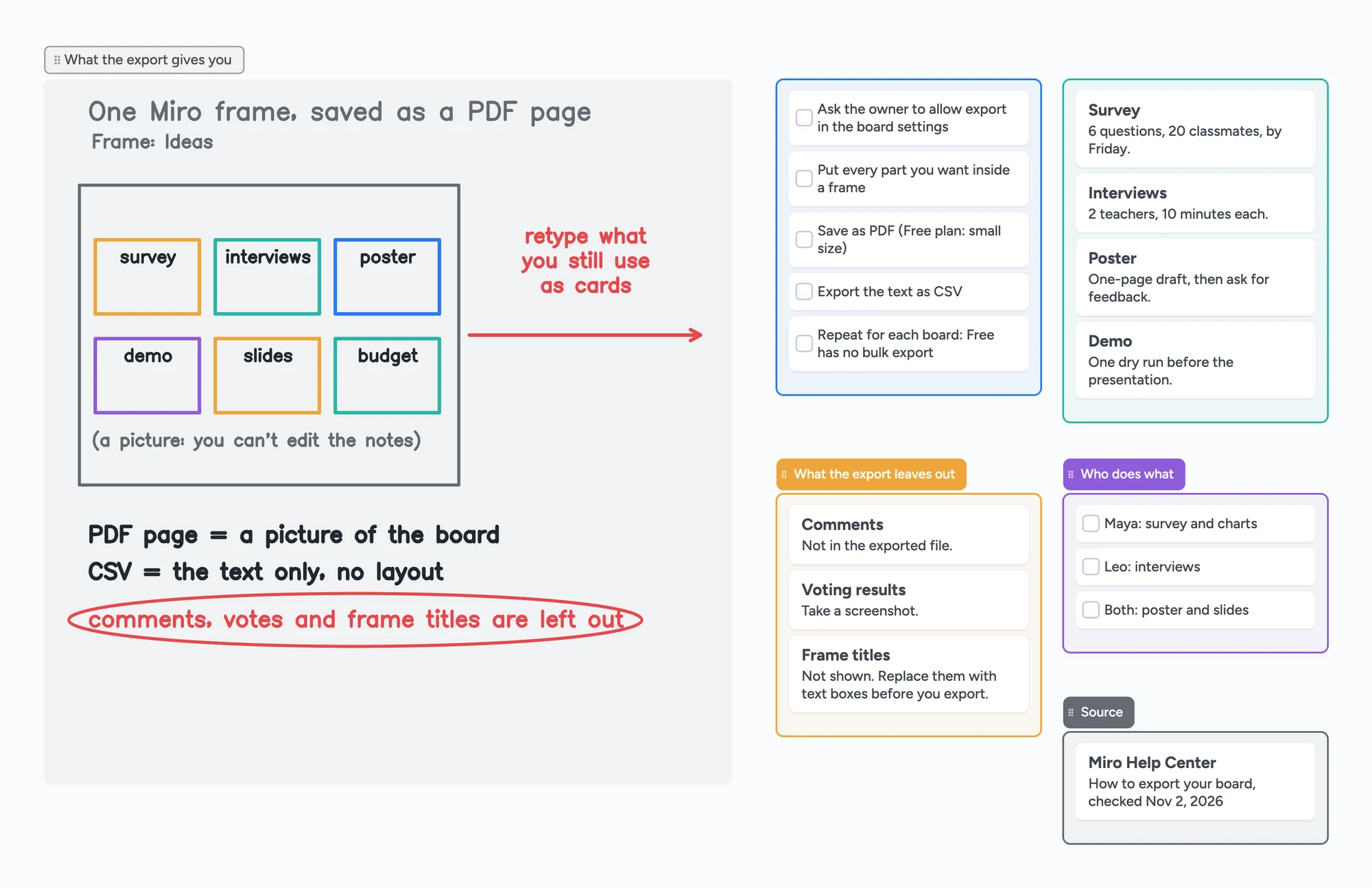
The ready board shows where that ends up for a school group project. The exported frame sits in the picture on the left, the ideas still in use are cards, a checklist covers the steps before leaving Miro, and a short list says what the export drops. The project itself is an invented example; the export facts are from Miro's help center, read November 2, 2026.
What doesn't carry over
Instaboard can't import a Miro board as editable items. A PDF import becomes its own board and uses one of your 5 free boards. The sticky notes in it are a picture, so retype the few that matter.
Is it worth backing up now?
Bending Spoons announced on September 10, 2026 that it would buy Miro and, in a press release dated October 26, 2026, said it had completed the acquisition. That release talks about growth and investment and doesn't announce plan or price changes. We haven't found one as of November 2, 2026, so nothing says your boards are going away. Miro Free already keeps only your three most recent boards editable, though, so exporting what you'd hate to lose takes a few minutes and costs nothing.
What Instaboard doesn't do
- No Miro import beyond a PDF, and the notes in it don't become cards.
- Editing needs a free sign-in. Viewing a board by link doesn't.
- The free plan is 5 boards and 150 items (cards, lists, images, text boxes; pen strokes, sections and arrows don't count), with 3 images and 1 file per board.
- No handwriting search and no AI. The eraser removes a whole stroke at a time.
- Full-board PDF export only works on drawing boards and trip planners. For other planning boards, selected cards and lists can be saved as an image.
- Changes made offline are kept and sync when you're back online, but it isn't an offline-first app.
Start from the ready board
It opens in your browser in a few seconds, with nothing to install. Sign in for free when you want to save it and share it.
Questions
Can I export a Miro board on the free plan?
Yes, one board at a time, as a low-resolution image or PDF, and the text as CSV, from a computer or tablet. High resolution without a watermark needs Starter or higher. The board owner has to allow export for collaborators.
Can I export all my Miro boards at once?
Not on a Free or Starter account. Miro's bulk board export is an Enterprise admin tool: up to 1,000 boards per export job, available to download for 14 days.
Why can't I see the export option in Miro?
Usually the board owner or co-owner has switched it off in the board's content settings. Otherwise check that your plan, browser and device support it: there's no export on phones, and CSV needs Chrome, Safari, Firefox or the desktop app.
Is a Miro PDF export editable?
No. It is a picture of the board. Some tools, like FigJam, Zoom Whiteboard and Confluence, can convert a vector PDF into editable items. Instaboard opens it as pages you can write on, and you retype the notes you still use.
Are comments included in a Miro export?
No. Miro's help center says comments aren't included, frame titles aren't shown and voting results can't be exported.
Can I move my Miro boards to Instaboard?
Not as editable boards. Export as a PDF and import it into Instaboard, where it becomes pages you can draw on and build cards next to. It uses one of the 5 free boards.
Is Instaboard free?
Yes. The free plan includes 5 boards, 150 cards and items across your account (pen strokes, arrows and sections don't count), 3 images and 1 file per board, unlimited collaborators and video calls up to an hour. Pro is $5 a month billed yearly ($59.99 a year), or $7.99 monthly, and the people you invite join free.
Sources
- Miro Help: How to export your board
- Miro Help: Board export issues
- Miro Help: How to save board backup
- Miro Help: Board Export from Admin console overview
- Miro Help: Download exported boards
- Miro pricing
- Figma Learn: Import Miro boards to FigJam
- Zoom Support: Exporting and importing content from Miro to Zoom Whiteboard
- Atlassian Support: Import to whiteboards from Miro, Mural, and Figjam
- Bending Spoons: completes the acquisition of Miro (October 26, 2026)
- r/miro: How to export a Miro board to PDF (August 11, 2026)
Related
A free Miro alternative for personal use, tutors and families
Miro Free keeps only 3 boards editable. Instaboard has 5 editable boards, video calls, Apple Pencil and sync when you're back online. Where Miro still wins.
How to export an Apple Freeform board (PDF, image or another app)
Freeform has no Save as Image button. Export as PDF (Share > Export as PDF, or File > Export Board as PDF on Mac), then use Preview for PNG or JPEG.
How to export your Microsoft Whiteboard boards, even hundreds at once
The Whiteboard apps retired on October 16, 2026. How to export your boards as images, ZIP or HTML, export every board at once with PowerShell, why PDF and print fail on the web, and what personal accounts can still do.
A free infinite canvas app for your notes, on Windows, Android, Chromebook and iPad
Free infinite canvas apps for class notes on Windows, Chromebook, Android and iPad: where each one runs, what its free plan really gives, and a ready notes board to open.