For a creative director, an account lead and a client on one project
A creative brief board: one shared page, an owner on every section, and who signs off
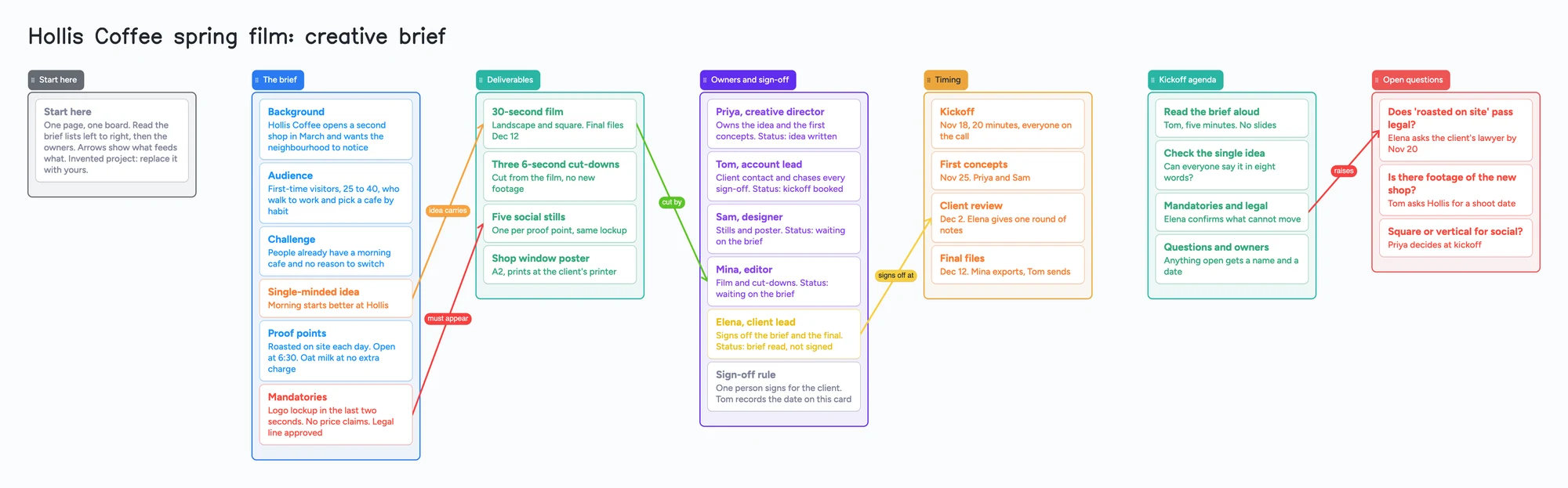
This is for a creative director, an account lead or a brand lead who wants the brief, the deliverables and the sign-off on one page the client can open, instead of a document that exists in three versions by the second week. The ready board has lists for the brief (background, audience, challenge, the single-minded idea, proof points, mandatories), the deliverables, the owners and their sign-off status, the timing, a kickoff agenda and open questions. It is the text half of a brief: there is no file library, no approval workflow, no reminders and no timeline axis, so dates and status live in the card text and someone has to chase them. Milanote is the better pick when the brief is led by images, and Figma, Canva and Miro are better at some other parts; the next section says which.
Opens in your browser. Anyone can view; a free sign-in lets you edit.
Updated
The short answer
- What it is: one board read left to right. The brief list holds six cards (background, audience, challenge, single-minded idea, proof points, mandatories); deliverables, owners and sign-off, timing, a kickoff agenda and open questions follow. Each owner card names a first name, the role and a status line.
- What it isn't: no file or asset library, no approval workflow, no reminders and no timeline axis. Status is text on a card and someone chases it. The free plan takes 3 images and 1 file per board, so a long list of reference pictures belongs in another tool.
- Arrows: an arrow joins a card in one list to a card in another, takes a caption and its own colour, and stays attached when a card moves. The example joins the single-minded idea to the 30-second film ("idea carries"), the mandatories to the social stills ("must appear") and the kickoff item on mandatories to the open legal question it raises.
- Sharing: anyone with the link can read the board with no account. Writing takes a free sign-in, and new boards start view-only, so set Share to "Anyone with the link can edit" for your client.
- Free plan: the example is 35 of your 150 free items (28 cards and 7 lists, our count). Arrows, sections and pen strokes don't count.
Where Milanote, Figma, Canva, Miro and Storyflow are better
Read on November 12, 2026, each from its own page. Milanote's video creative brief page offers a free template, says you can upload images, video and files, and says boards support comments and "smart notifications and alerts"; its plans page lists Free "with no time limit" as 100 notes, images or links and 10 file uploads with unlimited shared boards, and paid at $9.99 a month billed annually or $12.50 billed monthly per person. If the brief is carried by pictures, footage and references, Milanote is the better pick, and this board is not trying to be that.
Figma's creative brief template page for FigJam lists an overview, vision and objectives, audience, main message, timeline and budget, and says to "pass the document back and forth between collaborators". Canva's guide (June 2026, 16 minutes) says a brief is typically one or two pages and that at an agency the creative director and the account manager or executive write it, with the creative director and a project manager doing it for an in-house team. Miro's creative brief collection lists free templates and says contributors work on the same canvas at once and can add mood boards, comments and links to assets. Those three are better when you want a long-established template, a document layout or a workshop canvas.
Storyflow's creative brief page describes a brief the client reads from a view-only link with no account, a named approver who signs off on the live version, and a production plan on the same board with dates, owners and status cells. It says Storyflow is paid-only during early access, with plans from $7.99 a month billed annually, that a Free plan launches before the end of 2026, and that anyone a paid member invites to a board joins free. If you want the plan and the budget table built on the same board, that is the better fit, and it is Storyflow's description of itself.
Where these win
For a brief led by images and files, use Milanote. For a ready document layout, a classic template or a live workshop canvas, use Figma, Canva or Miro. For dated plans, tables and an AI-built first draft, use Storyflow. Use this board for the text half: the brief in writing, one owner on each section, who signs off, and what is still open.
A film brief can carry on into a short film pre-production board once it is signed off, and a documentary outline board uses the same owner-on-every-card layout.
How to run a brief on the board
People who write briefs for a living tend to keep them short and settle them in a room. In r/advertising's thread on go-to brief formats, u/OddProjectsCo wrote that the brief is a Word document of at most about a page and a half with eight sections, including a single-minded idea of eight words or fewer, proof points and mandatories; u/Fun-Fuel-997 wrote that the tool matters less than discipline, with one source of truth and a kickoff meeting; and u/Traditional-Swan-130 wrote that they keep it in Docs, under a page, and hold a kickoff. Each is one person's method, and the board follows them: one page, the single-minded idea on its own card, and a kickoff list.
- Fill the brief list first. Background, audience, challenge, the single-minded idea, proof points and mandatories are one card each. Keep the idea to a sentence anyone can say out loud.
- Name an owner on every owner card. The example has Priya (creative director), Tom (account lead), Sam (designer), Mina (editor) and Elena (client lead), each with a status line such as "waiting on the brief".
- Write the sign-off rule on a card. In the example one person signs for the client and Tom records the date on that card. The board doesn't lock anything after sign-off: anyone with edit access can change any card, so the rule is a team agreement.
- Join what feeds what. Arrows run between neighbouring lists: the idea to the film it shapes, the mandatories to the stills that must show them, a deliverable to the person who cuts it, an approval to the date it is due.
- Run the kickoff from the Kickoff agenda list. Read the brief aloud, check the single idea, confirm the mandatories, then give every open question a name and a date.
- Keep an Open questions list. Anything nobody has answered goes there with a first name beside it, and draw an arrow to it from the agenda item that raises it.
- Copy the board for the next project. It takes 1 of your 5 free boards.
This board vs Milanote vs Figma vs Canva vs Miro vs Storyflow
| Tool | What we read (Nov 12, 2026) | Good at | Not what you get |
|---|---|---|---|
| Instaboard board | Free: 5 boards, 150 items, 3 images per board. Pro $5/mo billed yearly | The brief in writing, an owner on each section, sign-off status, a kickoff list | A file library, approvals, reminders, a timeline axis |
| Milanote | Free with no time limit: 100 notes, images or links, 10 uploads; $9.99/mo billed annually | Briefs with images, video and files; comments and notifications on its page | Free is capped at 100 items |
| FigJam (Figma) | Template page lists overview, vision, audience, message, timeline, budget | A ready layout and Figma's community templates | We read no plan limits for it today |
| Canva | Guide dated June 2026; one to two pages | Writing and designing a brief document | A shared board with arrows |
| Miro | Free templates collection; real-time collaboration, comments, mood boards | A workshop canvas with many templates | We read no plan limits for it today |
| Storyflow | Paid-only early access; from $7.99/mo billed annually; Free plan coming before the end of 2026 | Dated plans, tables, a client link with no account | A free plan today |
Swipe the table sideways to see every column.
From each tool's own pages, read November 12, 2026. We name no tool as the best; they do different jobs.
Limits of the free plan for a creative brief
- Items. Each card and each list is 1 of your 150 free items, across all your boards. The example is 28 cards and 7 lists, 35 in all (our count). Arrows, sections and pen strokes don't count. Four more briefs of this size on their own boards would reach 175, so keep only the live ones.
- Boards. The free plan includes 5 boards. Making your own copy of the example uses 1 of them; a card that opens its own board uses another, so the example keeps everything on one board.
- Files and pictures. 3 images and 1 file per board. The client's logos, footage and reference pictures won't fit; put links in the cards. On the web a link card's preview picture no longer counts toward the 3 images, but the iPhone, iPad and Android apps still count it until their next update.
- No approval workflow. Sign-off is a card and a status line. Nothing records who approved which version, and nothing stops a card changing after it is signed.
- No reminders and no timeline axis. A date is text in a card. Nothing warns anyone when it passes, so tell people yourself.
- Writing needs a free sign-in. A client who joins by link or code can add cards and arrows, and the board counts as one of their 5.
- Copy as image only. To send the brief to someone without the link, use Copy as image on the board.
Start from the ready board
It opens in your browser in a few seconds, with nothing to install. Sign in for free when you want to save it and share it.
Questions
Is there a free creative brief template I can share with a client?
Yes. Open the board, replace the example project, team and sections with yours, and set Share to "Anyone with the link can edit" if your client needs to write on it. It is a board of cards, lists and arrows, not a document.
Can the client approve the brief on the board?
They can read it and, after a free sign-in, change cards. Sign-off is a card that names who signs and a status line, not an approval step, and nothing records which version was approved.
Can I put reference pictures and brand files on it?
Only a few. The free plan takes 3 images and 1 file per board. For an image-led brief, Milanote is the better fit; put links to your reference folder in a card here.
Will it remind people when a date is due?
No. Dates are text in cards and nothing reminds anyone. Tell the person yourself or use a calendar for the dates that matter.
How many briefs fit on the free plan?
Each card and each list is one item of the 150 across all your boards. The example is 35, so four of that size come to 140. That is our arithmetic. Arrows are free.
Sources
- Milanote: Video Creative Brief template (read November 12, 2026)
- Milanote: Plans & pricing (read November 12, 2026)
- FigJam by Figma: Creative Brief Template (read November 12, 2026)
- Canva: Writing a creative brief (June 2026, read November 12, 2026)
- Miro: Creative Brief templates (read November 12, 2026)
- Storyflow: Creative Brief Template (read November 12, 2026; the vendor's own description)
- r/advertising: what's your go-to format for creative/marketing briefs (2025; replies are single accounts)
Related
A short film pre-production board: who owns what, on one screen
Plan a short film with a director and a producer on one shared board: cast, crew, gear, permits, locations and shoot days. Free ready board, and where StudioBinder does more.
A documentary outline board: the story you hope to tell, and what you still need to get
Outline a documentary on one shared board: three act lists, interviews, scenes to film and archive, with arrows between them. Free ready board, and where Celtx, StudioBinder and Boords do more.
A free Milanote alternative for student projects, and where Milanote is better
Milanote's free plan stops at 100 notes, images or links. What Instaboard's free plan gives a student project, where Milanote is better, and a ready project board.