For game masters prepping a session
DnD session planner online: a filled board for one session, shared with your table
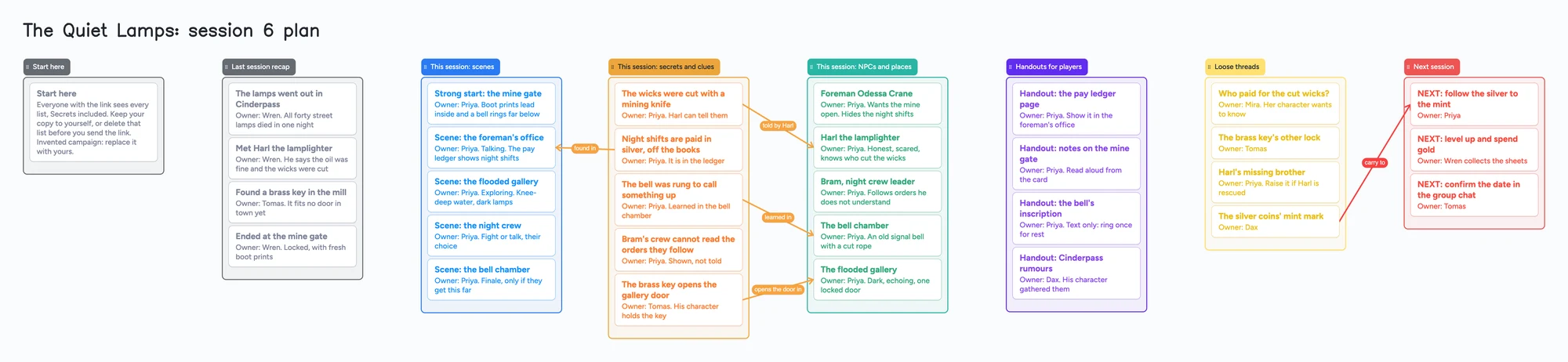
Most session planners are a printed sheet, a note app or a wiki you have to set up. This page gives you a filled board to copy: one invented session with last session's recap, five scenes, five secrets and the place each one can be found, the people and places you will need, four handouts, loose threads and a next-session list. Every card has an owner. Open it, swap in your own session, and send one link to your table. One thing first: everyone who has the link sees everything on the board, secrets included, so the section on secrets below says how to keep yours to yourself.
Opens in your browser. Anyone can view; a free sign-in lets you edit.
Updated
The short answer
- One list per job, one card per item, one owner per card. Last session recap, scenes, secrets and clues, NPCs and places, handouts, loose threads, next session. Each card starts with "Owner:" and a name, usually the DM, and sometimes a player who is tracking their own thread.
- An arrow shows where a secret can be learned. The arrow runs from the secret to the person, scene or place that gives it up, and its caption says how: "told by Harl", "found in", "learned in".
- Everyone with the link sees everything. On the free plan a card can't be hidden from one person. Keep your secrets on a board you don't share and send players a second board without them (steps below), or use Pro's per-person permissions and invite-only boards.
- Players can read it without an account. Anyone with the link sees every list, card, arrow and caption. To write, a player signs in free (Google, Apple or email). New boards start as "Anyone with the link can view"; set "Anyone with the link can edit" only if players should add cards.
- Free plan limits, up front: 5 boards, 150 items across all your boards, 3 pictures per board. Every card and every list is one item. The ready board is 39 items, so four boards that size would pass 150 (our arithmetic): keep one board and rewrite it each session.
- What it doesn't have: dice, maps with pins, stat blocks, search or links between cards. Notion, Obsidian, Kanka and World Anvil are better for a wiki, and D&D Beyond is where character sheets live.
The big limit: everyone with the link sees the secrets list
A board link on the free plan shows the whole board, either to look at or to edit. It can't show one list to you and hide it from your players, and it can't hide part of a card. Per-person permissions and invite-only boards are on Pro. That matters here, because a session plan is half things the players should see and half things they shouldn't.
A simple way to handle it on the free plan, using two boards:
- Open the ready board and fill in everything on your own board, including the secrets and clues list and the NPC notes. Don't share this one.
- Start a second board for the table and put on it only the recap, handouts, loose threads and next session, retyped or copied card by card. Leave out the secrets list and anything you wouldn't say aloud.
- Send players the link to the table board. Each board takes one of your 5 free boards, and a board a player opens from your link takes one of theirs.
The two boards drift apart, so the table board works best for things that change slowly: the recap, the handouts and the date for next time. If you want one list that truly stays hidden while the rest is shared, use a tool built for it (see below).
How the ready board is laid out
It follows the order most prep guides use. Sly Flourish's Lazy GM Resource Document (updated December 24, 2024, read November 14, 2026) lists eight prep steps, among them a strong start, potential scenes, secrets and clues, fantastic locations and important NPCs. The board has a place for each of those, and it adds a recap, handouts, loose threads and a next-session list, because those are the parts a table shares.
- Start here: how to read the board. Delete it once you've replaced the example.
- Last session recap: four cards, one per thing that happened, with an owner. The player who keeps notes can own these.
- This session: scenes: a strong start first, then the scenes you expect, each with what kind of scene it is (talking, exploring, fighting).
- This session: secrets and clues: each card is something the players can find out. Arrows run from each one to where it can be learned.
- This session: NPCs and places: the few people and places you'll need tonight, not the whole cast. For a full cast sorted by place, use the NPC tracker board.
- Handouts for players: the text of each handout as a card, ready to paste into chat or read aloud.
- Loose threads: open questions players or you want to follow up, each with an owner.
- Next session: cards that start with "NEXT:". Delete each one when you've used it.
How to set it up for your own session
- Open the ready board above. Rename the lists if you like and replace the example story with yours.
- Write the recap first. One card per event, in a line. Ask a player to own it and fix what you got wrong.
- Add three to five scenes. Start with a strong start, then the scenes you expect. Players rarely follow the plan, so leave the order loose.
- List the secrets and clues, then draw an arrow from each to where it can be learned. If a secret has no arrow, players can't find it tonight. Give it one or cut it.
- Put only tonight's people and places in the NPC list.
- Write handouts as cards. Players can read them on the board, or you can paste the text into chat.
- Finish with Next session. Before you close the board, add the one or two things you'll pick up next time, and who owns them.
- Share the link as above. Set "Anyone with the link can edit" only if players should add or fix cards.
If players and you type in the same card at the same moment, the edits are merged keystroke by keystroke with no lock, so give each person their own cards. Everyone sees what others add within a few seconds. A card a player adds counts toward their own 150 items, not yours.
The free-plan limits, before you build
Instaboard's free plan allows 5 boards and 150 items per account, with 3 pictures and 1 file per board. Each card and each list is one item; arrows and pen strokes don't count. The ready board has 31 cards and 8 lists, so it is 39 items. Pro is $5 a month billed yearly ($59.99), or $7.99 monthly.
Our own arithmetic: four boards the size of this one is 156 items, which passes 150, because the limit counts all your boards together. Keep one board for the campaign and rewrite it for each session. Move yesterday's recap into one short card in Last session recap, and delete cards you've used. A card that opens into its own board counts toward your 5, so keep each session on one board rather than one board per scene.
A board someone opens from your link takes one of their own 5 free board slots. If they are already at 5, they can still open the link and write; the board just isn't added to their boards.
Handouts, maps and portraits: three pictures per board
The free plan allows 3 pictures per board, so the ready board has none: every handout is text on a card. A handwritten letter or a map is a picture and takes one of the 3. A link card's preview picture doesn't count. For maps with pins, Kanka is built for it (below); for dice and battle maps you'll want a virtual tabletop, which this board is not.
When something else is the better choice
Each line is from the maker's own page, read on November 14, 2026, unless it says otherwise. Plans change, so check the page before you pay.
| Tool | What it does well for session prep | What the page says about cost and sharing | Where this board is different |
|---|---|---|---|
| Instaboard | Recap, scenes, clues, handouts and next session on one board; arrows from each secret to where it is learned | Free: 5 boards, 150 items, 3 pictures per board. Anyone with the link can view; writing needs a free sign-in | No hidden lists on Free, no search, no links between cards, no dice, maps or stat blocks |
| Notion | Databases, linked pages and search. Sly Flourish's free Lazy GM campaign template for Notion has a session template that links to NPC and location cards (his article, July 6, 2020) | Free is $0 per member a month for individuals; Plus is $10 per member a month (its pricing page). It lists "Limited for 2+ members" on pages and blocks for Free, and file uploads up to 5 MB each | Notion is better for a wiki and for linking. You build the layout yourself; the same article calls needing to be online to view notes "a major drawback" (2020) |
| Obsidian | Free local notes with links and a graph. Sly Flourish says he moved from Notion to Obsidian in 2024 and keeps session notes in plain files (his article, November 4, 2024) | Free with no sign-up (its pricing page). Sync is $4 per user a month billed annually. Collaborators on a shared vault each need an active Sync subscription, up to 20 users, and it doesn't support live editing of the same file (its help page) | Obsidian is better for search and links, and for notes only you read. Sharing with players costs each of them a Sync subscription |
| Kanka | A free campaign wiki with journals for session plans and recaps, quests, relations and maps | Free is unlimited entries and unlimited campaigns (its pricing page). Its features page says you control what each member sees and can preview as any member | Kanka is better when secrets must stay hidden and when you want a wiki. It's not a board you can lay out by hand |
| World Anvil | Worldbuilding articles, maps, timelines and campaign tools | Its April 8, 2024 post lists the free account at 2 worlds, 1 RPG campaign, 42 articles and 2 maps, with the autolinker and advanced search included. Its pricing page didn't load for us on November 14, so check current terms | World Anvil is better for a long-running world and for hiding content. It's a lot to set up for one session |
| D&D Beyond | Character sheets, rules and campaigns; free printable tracking sheets | Its Tracking Sheets page (Basic Rules) offers a Campaign Journal as a downloadable PDF, with a space for a summary of what's planned and for earlier events that matter. Its pricing page didn't load for us | D&D Beyond is better for character sheets. The journal is a printable page you fill in by hand, with no sharing |
Swipe the table sideways to see every column.
Read November 14, 2026, except Notion's template article (2020) and Sly Flourish's Obsidian article (2024), which carry their own dates. The pricing pages of World Anvil and D&D Beyond didn't load; their lines rest on the pages named.
- You want links between everything. If you want to click from a secret to the NPC who knows it, use Notion, Obsidian or Kanka. Here, the arrow is the link, and it only runs between cards on the board.
- You want hidden notes. Kanka's features page describes member visibility; the Instaboard free plan has none. Use two boards or Pro.
- You want character sheets. D&D Beyond is the place for them; this board holds no rules content.
- You only want a printable sheet. The D&D Beyond Campaign Journal PDF says permission is granted to photocopy it for personal use.
On Reddit, game masters disagree about which note tool to use. In r/DnD in July 2023, u/tea-cup-stained named Notion and Obsidian as the two serious contenders, called Notion "great for sharing" and chose Obsidian for fast links; u/RuroniHS replied that a basic paint program lets you place text anywhere. In r/DMAcademy in July 2025, u/Prior_Actuator9003 described a template page they copy for each session: a summary of last session, where each player is, and planned scenes. Those are single accounts, not a verdict.
What the board doesn't do
- No hidden lists on the free plan. Everyone with the link sees every card. Per-person permissions are on Pro.
- No search, no links between cards and no wiki pages.
- No dice, no maps with pins and no battle grid.
- No stat blocks or rules content.
- No session scheduling, reminders or timeline axis.
- Writing needs a free sign-in.
- 3 pictures per board, 5 boards and 150 items on the free plan.
For a cast of people sorted by place, with who leans on whom, see the DnD NPC tracker board. For a cast in a novel or screenplay rather than a campaign, see the character relationship map.
About the name
Instaboard is not affiliated with Wizards of the Coast. "D&D" and "DnD" are used on this page only to name the game this board is meant for. The campaign, people, places and secrets on the ready board are invented, and the board holds no rules content from any game.
Start from the ready board
It opens in your browser in a few seconds, with nothing to install. Sign in for free when you want to save it and share it.
Questions
Is there a free DnD session planner online?
Yes. The ready board on this page is free to open and copy; you sign in free with Google, Apple or email to edit it. The free plan has 5 boards, 150 items and 3 pictures per board. Notion, Obsidian and Kanka are also free to start with, and each says what it limits on its own pricing page.
What goes in a DnD session notes template?
A recap of last session, the scenes you expect, the secrets and clues and where players can learn them, the NPCs and places you'll need, handouts, loose threads and what to pick up next time. The ready board has one list for each, and an owner on every card.
What is a good DnD session prep template?
It depends on how much you like to prep. Sly Flourish's Lazy GM Resource Document lists eight short steps, from reviewing the characters and a strong start to secrets and clues, locations, NPCs, monsters and rewards. The board here covers most of them as lists and leaves out monsters and rewards, which belong on a stat block or a sheet.
Can my players see the secrets?
On the free plan, yes if they have the link: everyone with the link sees the whole board, and a card can't be hidden from one person. Put the table board together without the secrets list. Per-person permissions and invite-only boards are on Pro.
Do my players need an account?
To read, no. Anyone with the link sees every list, card, arrow and caption. To write, a player signs in free with Google, Apple or email. Until then their edits are blocked.
How do I give players a handout?
Put the text on a card in the Handouts list and share the link, or paste the text into your group chat. A picture handout takes one of the 3 pictures per board on the free plan; Pro has no picture limit.
How many sessions fit on the free plan?
The ready board is 39 items, so four boards that size would pass the free 150. Keep one board for the campaign and rewrite it each session, moving old recaps into one short card.
Can I put stat blocks, dice or maps on it?
There is no dice, grid or stat block content. You can type anything on a card yourself, and one picture of a map takes one of the 3 pictures. For battle maps and dice use a virtual tabletop.
Is Instaboard free?
Yes. The free plan includes 5 boards, 150 cards and items across your account (pen strokes, arrows and sections don't count), 3 images and 1 file per board, unlimited collaborators and video calls up to an hour. Pro is $5 a month billed yearly ($59.99 a year), or $7.99 monthly, and the people you invite join free.
Sources
- Sly Flourish: The Lazy GM's Resource Document (updated Dec 24, 2024; read Nov 14, 2026)
- Sly Flourish: Using Notion.so for Lazy RPG Campaign Planning (Jul 6, 2020; read Nov 14, 2026)
- Sly Flourish: Using Obsidian for Lazy RPG Prep (Nov 4, 2024; read Nov 14, 2026)
- Notion: pricing (read Nov 14, 2026)
- Obsidian: pricing (read Nov 14, 2026)
- Obsidian Help: collaborate on a shared vault (read Nov 14, 2026)
- Kanka: plans and pricing (read Nov 14, 2026)
- Kanka: features (read Nov 14, 2026)
- World Anvil blog: Update, free account changes (Apr 8, 2024; read Nov 14, 2026)
- D&D Beyond: Tracking Sheets, Basic Rules (read Nov 14, 2026)
- D&D Beyond: Campaign Journal sheet, PDF (read in full Nov 14, 2026)
- r/DnD: "The best app to write and plan your DnD sessions?" (Jul 2023, read in full Nov 14, 2026)
- r/DMAcademy: "Session Prep Notes Template" (Jul 2025, read in full Nov 14, 2026)
Related
DnD NPC tracker online: a filled board you can share with your table
A filled NPC tracker to copy: people by place, factions, a next-session list and arrows for who leans on whom. Share one link with your table. Free plan limits stated.
Character relationship map: a filled template two people can edit
A character relationship chart you fill in by hand: a card per character, captioned arrows, shared with a co-writer. No auto-layout or line styles.
A mystery novel outline board for suspects, clues and red herrings
Outline a mystery novel on one board: a list per suspect, clues, red herrings and reveal order. A free ready board, and where Plottr and Sheets do more.