For a chef or sous who trains new cooks on the line, in prep and at the dish pit
Kitchen training checklist: one shared board with a list for every station
A grid of who has been trained on which station is what a chef wants at a glance, and a spreadsheet does it well. This board makes a smaller version of that grid out of lists: each station is a list, each card is one cook at one step, and a tick means that step is done. A tick shows done, not who ticked it or when. There is no sign-off record, no reminder and no food-safety record, so the two pages that do more come first below. We make Instaboard, the board it runs on.
Opens in your browser. Anyone can view; a free sign-in lets you edit.
Updated
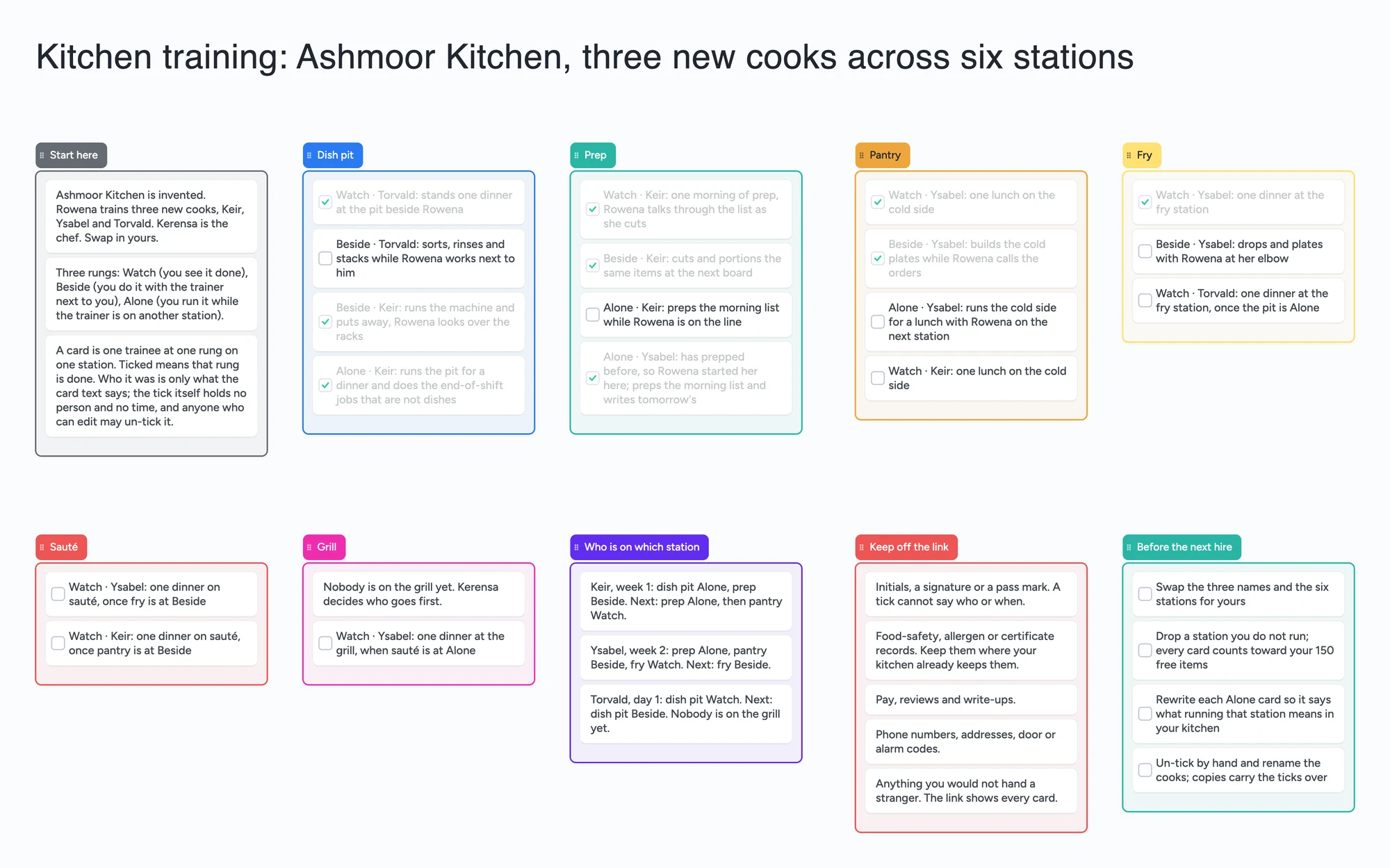
Stations as lists, and a tick that shows done
- The grid: six station lists (dish pit, prep, pantry, fry, sauté, grill), a card for one cook at one step (Watch, Beside or Alone), and a list of who is on which station. A trainer and two or three new cooks can open the same link.
- Not here: initials, a signature, a pass mark, a sign-off record, a reminder, a count of who can run each station, and any food-safety, allergen or certificate record. The board makes no claim that a cook is qualified.
- Ticks: a tick shows a step is done and nothing more. It holds no person and no time, anyone who can edit may un-tick it, and nothing logs that. To start over you un-tick by hand, and a copy brings the ticks with it.
- Your 150: all 45 items of the example count toward your 150 free ones (our count: cards, lists and the title box). Each copy also uses one of your 5 free boards. Someone who is signed out can read the board but not change it.
Where a sheet or a scheduler beats a board
Both pages below are about the same grid. One is an Excel checklist with room for initials; the other is a cross-training matrix that counts how many people can run each station alone. Neither is a shared link, and each records things this board leaves out, so read them before you decide a board is enough.
| Source | What its page describes | It wins when you need | What the board offers instead |
|---|---|---|---|
| Chefs Resources, "Kitchen Training Checklist for Cooks" (a chef's forms and training site; the page shows no date) | An Excel checklist with a tab for each station. It can be generic for all cooks or station by station, and its example sets "Properly Cuts/Portions Fish" against "Properly Cuts/Portions Halibut at 7 oz". It says the sheet gives "an 'at a glance' picture of who has been trained on each station or piece of equipment", and that initials show a cook was trained. The page shows "Premium Membership: $6.75/month" for the download and says Excel is required. | Initials beside each skill and recipe-by-recipe lines, kept as a file the chef owns | A station is a list and a cook's step is a card. Ticks carry no initials. |
| Mays, "Cross-training matrix template for restaurants and cafés" (restaurant scheduling software; Mays Team, July 2, 2026) | A grid with people down the side and stations across the top, four levels (Learning, Supervised, Independent, Trainer), a count row at the bottom, a 30-day plan table, and a column for a food-safety certificate in its example. It says the manager fills the grid in, not the employee, and that its own software does not hold the grid itself: "keep the matrix itself in a sheet". | Counting who can run each station alone, tied to a schedule and to sign-off forms | Three steps instead of four, no count row (you read the lists), no certificate column. Anyone with edit access can tick. |
Swipe the table sideways to see every column.
Both rows quote each page as read on November 27, 2026. Mays sells scheduling software and Chefs Resources sells forms and training; we have tried neither product.
When a sheet is the better tool
If a cook's skills have to be initialled, counted across a whole roster or tied to a work schedule, use a sheet or your scheduling tool. This board is for a trainer and new cooks to see the next step together, and for little else.
A station is a list, and a cook at a step is a card
The example is Ashmoor Kitchen, which is invented. Rowena trains three new cooks, Keir, Ysabel and Torvald, and Kerensa is the chef. Six of the ten lists are stations: Dish pit, Prep, Pantry, Fry, Sauté and Grill. The other four are Start here, Who is on which station, Keep off the link and Before the next hire.
Every station card begins with a step and a name. Watch means the cook sees it done. Beside means the cook does it with Rowena next to them. Alone means the cook runs it while Rowena is on another station. There are 18 such cards, 9 Watch, 5 Beside and 4 Alone, and 9 of them are ticked. The name sits in the card text, because a tick does not hold one.
A card exists only where someone's plan reaches. Keir has no Watch card on the pit, because he started there Beside, and the Grill list holds a single Watch card for Ysabel and a card saying nobody is on it yet. Nothing stops anyone ticking a step out of order. Cards such as "once fry is at Beside" are a note to the trainer, and the board does not enforce them.
Two dishwashers say the pit is where new people get left alone
In r/dishwashers' "New dishwashers always struggle their first week - what's your #1 tip?" (posted 2025-09-08 UTC; Reddit lists 40 comments; an archived copy holds 39, none removed or deleted), the poster says they worked front of house and watched new dishwashers struggle. Each reply is one account's view.
u/dragonridrrclem writes: "My number one tip would be to have them work with an experienced dishwasher who will give them an opportunity to work through the process." The same reply suggests an hour or two on the first step, sorting, rinsing and stacking, and thirty minutes or an hour at each step (soaking, rinsing, sanitizing, putting away), and adds "Don't forget any extra stuff your dishwasher has to do at end of shift." u/Exciting_Lab_8074, in a separate comment, says to "have your best dish dude shadow them a few shifts" and calls leaving new dishwashers on their own "throwing dish dudes to the wolves".
On the example board the pit has cards for two cooks: Torvald at Watch and Beside, Keir at Beside and Alone. The end-of-shift jobs sit in the Alone card's own text, not in a separate list, so the card says what running the pit means before anyone ticks it. Those are two accounts' views on one thread, not a standard.
How long a station takes depends on whom you ask
In r/AskCulinary's "Line cooks, how long does it take you to learn the ins/outs of a new kitchen?" (posted 2020-02-06 UTC; Reddit lists 9; an archived copy holds 9, none removed), u/Coldman5 describes a place where a cook was "hired for and trained on just one station to begin" and lists the time to "moderate proficiency" after training: prep cook 1 week, pantry 3, fry 3, sauté 4 and grill 5 to 6, with training itself "usually 2-7 shifts". The account adds that it was one example, at a place whose menu "changed maybe once a year".
A reply from u/lensupthere agrees with the list and offers different numbers from other kitchens, such as 2 to 3 weeks for a flat-top grill and 3 to 4 for a broil station. u/i_hate_beignets writes of a cafe where they "knew the whole menu after a week" and a 400-seat steakhouse "where I never knew anything outside my station". Different kitchens, different answers.
The board prints no number of weeks for that reason. If your kitchen has a number, write it in the Alone card for that station.
Prep before the line, if the kitchen lets you
In r/KitchenConfidential's "Need help with practical advice in training new line/prep cooks" (posted 2019-03-23 UTC; Reddit lists 14; an archived copy holds 14, none removed; one author now shows as deleted on Reddit), u/NemaKnowsNot describes one order: a shadow shift in prep first, about a week on prep, then the line, "repeating the process from prep room" on each line station. The poster, u/sovereign110, answers that "we'll need to put them to work immediately" and has little separate time for shadowing, saying they usually start new hires on the line.
The board takes no side. Keir's cards run dish pit then prep, Ysabel's prep then pantry then fry, and Torvald's only start at the pit. Each cook's steps sit on the lists of the stations they have reached, so the order a kitchen picks shows in which cards exist and which are ticked.
Reading the board on a Tuesday afternoon
The list called Who is on which station has three cards, one for each cook: where they are on each station now and what comes next. Keir is at Alone on the dish pit and Beside on prep, Ysabel is at Alone on prep, Beside on pantry and Watch on fry, and Torvald is at Watch on the pit.
Counting by eye across the station lists, an Alone card is ticked on the pit (Keir) and on prep (Ysabel), and nowhere else. Pantry has an Alone card for Ysabel that is not ticked, and fry, sauté and grill have none. Mays says a station with only one cook at Independent or Trainer is "one call-out from trouble". The board has no count row, so that reading is yours to make, and the Grill list is the one to look at first.
Anyone holding the link sees it all
Every card is visible to whoever has the link; only Pro can limit a board to invited people. The Keep off the link list on the board names five things to leave out:
- Initials, a signature or a pass mark. A tick cannot say who or when.
- Food-safety, allergen or certificate records. Keep them where your kitchen already keeps them.
- Pay, reviews and write-ups.
- Phone numbers, addresses and door or alarm codes.
- Anything you would not hand a stranger.
What 45 items cost against your 150
A free account holds 150 items across all its boards. Cards, lists, text boxes, pictures, sticky notes and widgets count as items; arrows, pen strokes and sections do not. The example has 34 cards, ten lists and a title box, which is 45. Two copies make 90, three make 135 and a fourth goes past 150 (our arithmetic); every copy also uses one of your 5 free boards. Billed yearly, Pro is $59.99 ($5 a month) and lifts the item and picture limits; billed monthly it is $7.99.
A smaller kitchen can drop a station list and its cards. One board for one trainer and a few cooks, with ticks cleared by hand between hires, stays well inside the limit.
Taking it to your own line
- Put in your people and your stations. Swap the three cooks and the six stations for yours, and drop any station you do not run.
- Say what Alone means in each Alone card. One sentence about what running that station is in your kitchen, so the tick means the same thing to you and the cook.
- Add the cards you need and no more. One card per cook per step, written with the name, and only for the steps you plan to reach.
- Let new cooks tick their own steps if you want that. Share has an "Anyone who joins can edit" switch. Those who join need a free sign-in to write; a signed-out visitor only reads.
- Before the next hire, un-tick the cards yourself. Nothing clears them in one go, and a copy arrives with its ticks.
Start from the ready board
It opens in your browser in a few seconds, with nothing to install. Sign in for free when you want to save it and share it.
Questions
Can a trainer and new cooks work on the same station list?
Yes. The link opens the same lists for everyone. For new cooks to tick their own steps, turn on "Anyone who joins can edit" in Share. They need a free sign-in to write, and anyone signed out can only look.
Does a tick say who trained a cook, or when?
No. A tick shows a step is done and holds neither a person nor a time. Whoever can edit may un-tick it, and nothing logs that. If you need initials, the Chefs Resources sheet is built for them.
Is this a food-safety or certification record?
No. The board holds no food-safety, allergen or certificate record and says nothing about whether a cook is qualified. Keep those records where your kitchen already keeps them.
Why a card for each cook at each step, and not one card per station?
A tick means one thing, one cook at one step. A station card with three names in it cannot show that Keir is at Alone on the pit while Torvald is at Watch. The cost is more cards, which is why the example counts them.
Will anyone be told when a cook is ready for the next step?
No reminder or alert fires when a card is waiting. The trainer reads the Who is on which station list and moves the plan.
How far does the 150-item limit go?
Three copies of the 45-item example come to 135 and a fourth goes past 150 (our arithmetic). Keep one board and un-tick it between hires to stay inside.
Sources
- Chefs Resources: Kitchen Training Checklist for Cooks (the page shows no date; read November 27, 2026; a chef's forms and training site that sells an Excel download)
- Mays: Cross-training matrix template for restaurants and cafés (Mays Team, July 2, 2026; read November 27, 2026; restaurant scheduling software)
- r/dishwashers: New dishwashers always struggle their first week - what's your #1 tip? (2025-09-08 UTC; read November 27, 2026; Reddit lists 40, an archived copy holds 39, none removed or deleted; each reply is one account's view)
- r/AskCulinary: Line cooks, how long does it take you to learn the ins/outs of a new kitchen? (2020-02-06 UTC; read November 27, 2026; Reddit lists 9, an archived copy holds 9, none removed; each reply is one account's view)
- r/KitchenConfidential: Need help with practical advice in training new line/prep cooks (2019-03-23 UTC; read November 27, 2026; Reddit lists 14, an archived copy holds 14, none removed; each reply is one account's view)