For college seniors and graduates applying to law school, and the advisor or parent who reads along
A law school application tracker board, one list per school
We make Instaboard, an online board. This page gives you a law school application tracker laid out on it and filled in for an invented applicant, Rosa, who is applying to four made-up schools. Each school gets its own list: the deadline and decision type, the portal and its last status, what that school asks for and notes. One list holds what every school needs, one holds the recommenders, and one is a weekly list with tick boxes. The board does not check any school's portal for you, it holds no logins, passwords, scores or transcripts, and it has no reminders or due-date alerts. Rosa and the schools are made up.
Opens in your browser. Anyone can view; a free sign-in lets you edit.
Updated
Read this first: what the board does and doesn't do
- It does not check any portal for you. You open each school's portal and type what it says on that school's card. Tools that log in for you exist and are named below; this board is for the rest: documents, recommenders, notes and a weekly list.
- It holds no logins, passwords, scores or transcripts. A card holds what you did and when. Anyone with the link can read the board.
- It has no reminders or due-date alerts. The weekly list has tick boxes only. Put each deadline in your calendar yourself.
- Each school's admissions page decides what it requires, including which admission tests and reports it takes. Read it before you fill in that school's list; the example cards are invented.
- What it is: one place for every school's dates, what is still missing and who is writing what. The example uses 41 of your 150 free items.
- Free plan: 5 boards, 150 items, 3 pictures per board. Copying the board takes 1 of your 5 boards. Writing on it needs a free sign-in. New boards start with "Anyone who joins can view".
Why one list per school: five school pages, five sets of dates
We read five law school admissions pages on November 24, 2026. A date is printed below only where we found one; the dates in the list are each school's own deadlines.
- Wisconsin (page prints no update date; we found none in its page data): applications open September 1; early decision due December 4 and binding; regular decision due March 1; an 11-line checklist that includes two letters of recommendation, and a $65 fee.
- Florida State (no update date found): applications open September 1; priority deadline March 15; final deadline July 31; decisions on a rolling basis.
- Vanderbilt (page data: published September 14, 2023, modified October 20, 2026): applications open September 1, 2026; binding early decision due November 1, 2026; regular decision due April 1; at least two letters of recommendation.
- FIU (page data: modified September 23, 2026): completed application due June 30; $20 fee; rolling review from mid-September or early October; financial aid priority needs the aid form and the application by December 15, 2026.
- Stanford (no update date found): the application opens September 15, 2026; December 1, 2026 for a scholars program; February 15, 2027 for the application; $85 fee.
Our reading: the same step has a different date at every school, and some dates are binding and some are rolling. That is the case for one list per school, with the decision type written on its first card, so a December date is never mistaken for a rolling one.
Rosa's board, list by list
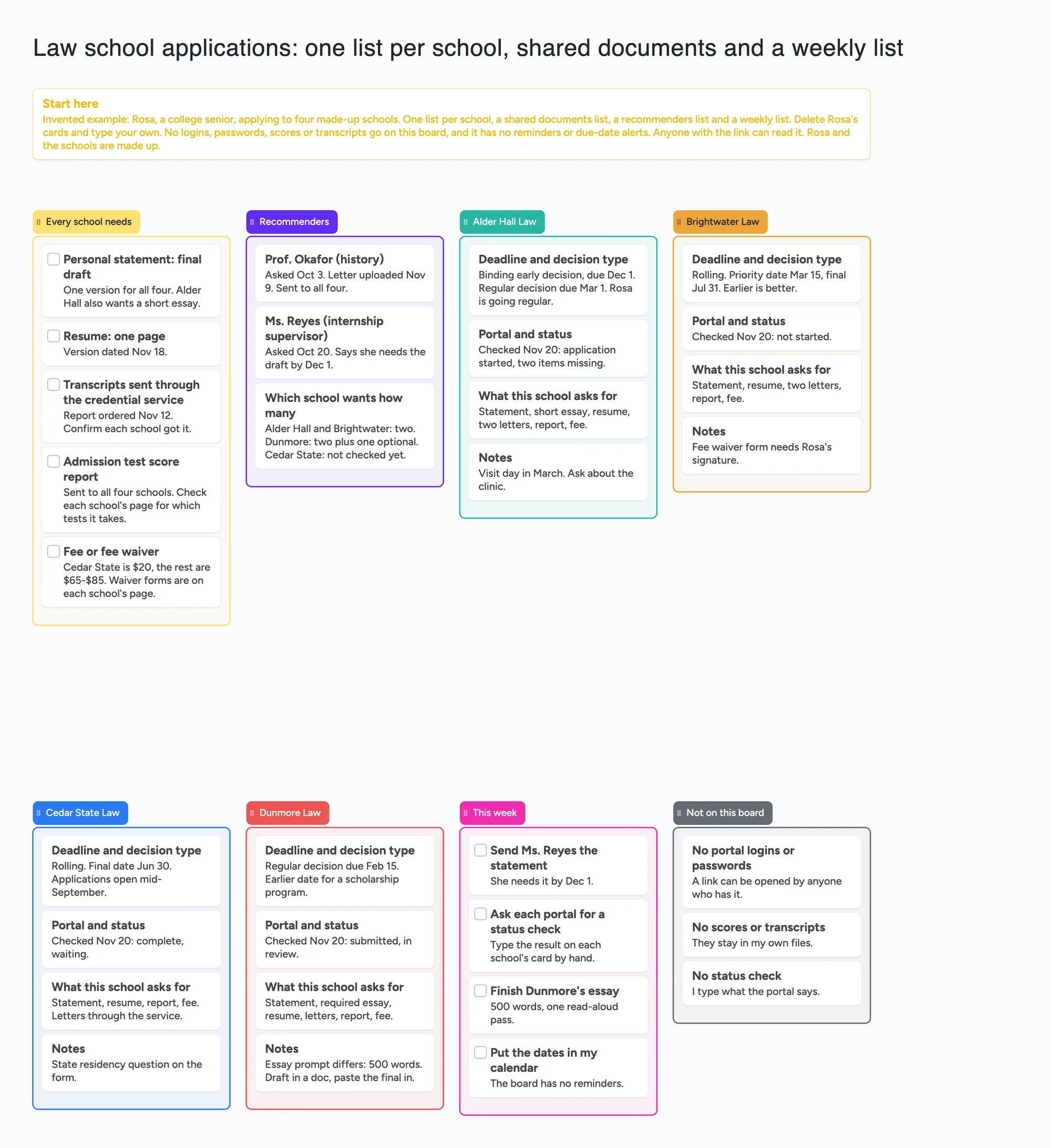
Rosa, the four schools, the recommenders and every date on the board are invented, and no card holds a login or a score. Read the top row left to right, then the bottom row.
- Every school needs. Five tick-box cards: personal statement, resume, transcripts sent through the credential service, the admission test score report and the fee or fee waiver. These are done once and sent to every school.
- Recommenders. Two people, when each was asked and when each letter went in, plus a card for which school wants how many letters.
- Alder Hall Law, Brightwater Law, Cedar State Law, Dunmore Law. Four cards each, in the same order: deadline and decision type, portal and status, what this school asks for, notes. Rosa's last status check is dated on each portal card.
- This week. Four tick-box cards: send a recommender the draft, ask each portal for a status, finish one essay, put the dates in her calendar.
- Not on this board. Three cards: no portal logins or passwords, no scores or transcripts, no status check.
Documents once, sent four times
The Wisconsin and Vanderbilt pages each ask for two letters of recommendation, Wisconsin lists a resume and a personal statement, and Stanford lists a resume, a personal statement and a required essay. The shared list holds the version you send everywhere, with its date, so you can see at a glance which school got which draft. The school lists hold only what differs: a short essay, an extra letter, a different fee.
A card cannot hold a file well, and this board is not a place to keep your statement. Keep the document in your own folder and write its version and date on the card.
What applicants say about tracking
Replies are single accounts, not research; these are the comments we read, on November 24, 2026.
- In r/lawschooladmissions ("Application Tracker", OP u/Individual-Crow-237, February 8, 2026), the OP is new to the process and asks whether there is a good way to track applications. All three replies are about tracking, and two name the same site: u/SelectionThese8451 writes "lsd!" and u/-ute writes that lsd.law lets you "press a button and get a status check on all the schools you applied to". The third, u/ff8b9r9f, says to use LSD once you have submitted, but that while you are still writing, "I created folders for each school in Google Drive to hold the essays & track what I had submitted".
- In r/lawschooladmissions ("Law School Decision Tracking Spreadsheet - A Call to Action!", OP u/schnoodlebopp, November 22, 2019), the OP shares a spreadsheet of what each school's process looks like and asks for more data, including status checkers, communications and interview notes. Commenters add details: u/RBGetintolawschool asks whether admitted-students weekends could be added, and u/adoniscr33d corrects how one school's first status reads. It is a shared reference about schools, not a tracker of one person's own applications.
Our reading from this thread: once applications are in, the answer is a tool that checks statuses; for the writing stage, one commenter used a folder per school. This board does not check statuses. It does the part around that: who is writing what, what is still missing at each school, and what you have to do this week.
The status line is typed by you
Every school's portal shows its own status, and the board shows only what you typed the last time you looked. That is why Rosa's portal cards carry a date: "Checked Nov 20". An old date is the warning. If you want the status pulled for you, use a tool that does it (see the table) and keep this board for everything else.
How much of the 150 it uses
Our arithmetic: the example is 8 lists, 32 cards and a title, 41 items. The shared lists, the recommenders, the weekly list, the Not on this board list, the Start here card and the title are 21 items, and each school adds one list and four cards, 5 items. Four schools make 41, and 25 schools make 146; the 26th goes over. If each school list holds eight cards instead of four, each school adds 9 and 14 schools make 147. Someone who writes on your board adds the cards they type to their own 150. A copy takes 1 of your 5 free boards. Pro removes the item limit.
What a board can't do
- No status checks. The board never opens a school's portal. You type each status by hand.
- No logins. Do not put portal passwords on a board that anyone with the link can read.
- No reminders or due-date alerts. A card can carry a due date, but nothing alerts you. Use your calendar.
- No totals across schools. A list can be sorted or filtered on its own; nothing counts how many schools are complete.
- No import from a school's portal, a spreadsheet or the credential service. Every card is typed by hand.
- Ticks don't say who or when. Anyone with edit access can untick a box, and a copy keeps its ticks, so untick the lists before you reuse the board.
- A copy takes 1 of your 5 free boards, and the example uses none of the 3 pictures allowed per board.
Where other tools do this better
Read on November 24, 2026; pages change, so check them. A date is printed only where a page shows one.
| Tool | What we read | Better for |
|---|---|---|
| lsd.law status checker | Its page says you add each school's portal login and it logs in for you with one click, and that the basic status checker is free (its claim; we did not try it, and we did not look for a page date) | Seeing every portal's status without opening each one |
| Each school's own portal | The school pages we read send applicants to an online application | The real status, and the only place the application is submitted |
| A spreadsheet | The 2019 thread's spreadsheet is a shared Google Sheet the OP links, with a section per school's process (commenters refer to its cells) | Sorting and filtering many schools by deadline or fee, and counting what is left |
| Instaboard board | Free plan: 5 boards, 150 items, 3 pictures per board. Lists and cards you type, shared by link. No status checks, import, reminders or due-date alerts | Documents, recommenders and notes for each school in one place that a parent or advisor can read and write on |
Swipe the table sideways to see every column.
From the pages and threads named, read November 24, 2026. Our wording, not theirs.
Where these win
Use a status tool if the stress is refreshing portals, and a spreadsheet if you are weighing many schools by date and cost. Use this board when the problem is keeping track of who is writing what, what is missing at each school and what to do this week.
How to use it, in about twenty minutes
- Open the board and sign in free when it asks you to write. Delete Rosa's cards and keep the lists.
- Rename the four school lists and add or delete lists to match your schools.
- Read each school's admissions page and fill in its deadline, decision type and what it asks for. Write the date you read it.
- Fill the shared lists once: your statement version, resume version, which reports are sent and who is writing letters.
- After each portal check, type the status and the date on that school's portal card.
- Fill the weekly list and put every deadline in your calendar. Untick the list each week.
- To share it, set Share to "Anyone who joins can edit" if a parent or advisor should write. Each person who writes signs in for free. Keep logins, scores and transcripts off it.
Start from the ready board
It opens in your browser in a few seconds, with nothing to install. Sign in for free when you want to save it and share it.
Questions
What should a law school application tracker include?
For each school: the deadline, whether the decision type is early, regular or rolling, the portal and its last status, what that school asks for and any notes. Shared across schools: your statement and resume versions, the reports you have sent and who is writing your letters. On this board each school has its own list and the shared items have theirs.
Does the board check my application status?
No. It never opens a school's portal. You type each status and the date you checked it. A tool such as lsd.law says it logs in to each school's portal for you; this board does not and holds no logins.
Are all law school deadlines the same?
No. In the five school pages we read, applications open on September 1 at three schools and September 15 at one (FIU gives no opening date), early decision dates run from November 1 to December 4 and are binding, regular decision ranges from February 15 to April 1, and two schools review on a rolling basis with final dates in June or July. Read each school's own page.
Can a parent or advisor read it?
Yes. New boards start with "Anyone who joins can view", so anyone with the link can read it. Set it to "Anyone who joins can edit" if they should write; each person who writes signs in for free. Keep logins, scores and transcripts off it.
Can I put my documents on the board?
It is not meant for them. A card holds a version and a date, and the document stays in your own folder. Anyone with the link can read the board.
Is Instaboard free?
Yes. The free plan includes 5 boards, 150 cards and items across your account (pen strokes, arrows and sections don't count), 3 images and 1 file per board, unlimited collaborators and video calls up to an hour. Pro is $5 a month billed yearly ($59.99 a year), or $7.99 monthly, and the people you invite join free.
Sources
- University of Wisconsin Law School: J.D. application process (page prints no update date; read November 24, 2026)
- Florida State University College of Law: J.D. admission policies and procedures (no update date found; read November 24, 2026)
- Vanderbilt Law School: J.D. admissions (page data: published September 14, 2023, modified October 20, 2026; read November 24, 2026)
- FIU College of Law: how to apply (page data: modified September 23, 2026; read November 24, 2026)
- Stanford Law School: J.D. application process (no update date found; read November 24, 2026)
- lsd.law: one-click status checker (a vendor's page; we did not look for a date; read November 24, 2026)
- r/lawschooladmissions: Application Tracker (OP u/Individual-Crow-237, February 8, 2026; replies are single accounts; read November 24, 2026)
- r/lawschooladmissions: Law School Decision Tracking Spreadsheet (OP u/schnoodlebopp, November 22, 2019; replies are single accounts; read November 24, 2026)