For the person handing a project over, and the person taking it on
A project handover template on one shared board: status, open work, people, first week
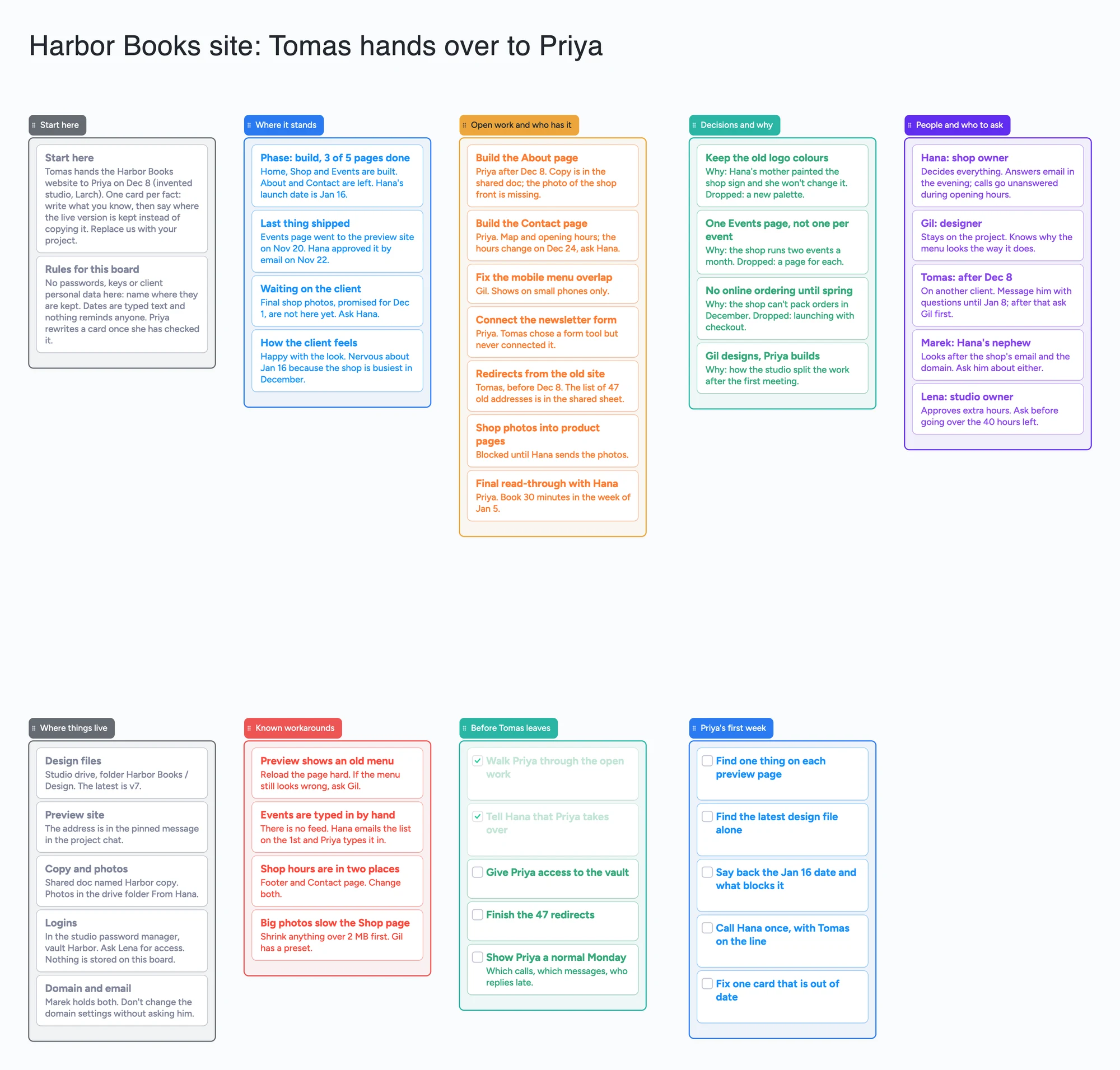
We make Instaboard, an online board. This page gives you a project handover already laid out on it, filled in for an invented three-person web studio: Tomas is moving to another client and hands the Harbor Books site to Priya. Nine lists: where it stands, open work and who has it, decisions and why, people to ask, where things live, known workarounds, a tick-box list for the person leaving and a first-week list for the person arriving. Open it, replace Tomas and Priya with you and send the link to whoever takes over. It is a briefing you read by eye, not a project tracker: no reminders or due-date alerts, no sign-off, and no place for passwords. If your handover needs signatures or dated closeout, use a document, and below we say when.
Opens in your browser. Anyone can view; a free sign-in lets you edit.
Updated
Read this first: what the board does and doesn't do
- What it is: one screen the new owner can read in ten minutes: where the project stands, what is open and who has it, what was decided and why, who to ask, where the files live and the quirks nobody wrote down. The Harbor Books handover uses 51 of your 150 free items.
- What it is not: no reminders or due-date alerts, no sign-off or acceptance step, no history of who changed a card, and no field that shows who ticked a box or when. Anyone with edit access can change or untick any card.
- Keep off it: passwords, keys, client personal data, contracts and anything private. A link board is not private. Write where those things are kept, not what they are.
- Why a board at all: the person leaving and the person arriving can both open it, add a card or correct one while they talk, and nobody has to rebuild a document after every call. Anyone who joins can view it; to change it they sign in free.
- When to use a document instead: client sign-off, dated closeout, or a long questionnaire. A section below lists them.
When a document or form is the better handover
Start with the cases where this board is the wrong tool. A handover between two people on the same team, where the new owner needs the picture and the contacts, is what the board is for. These are not:
- The client has to accept the work in writing. Smartsheet's page of handover templates lists a client acceptance sign-off form with a section for dated signatures (page dated June 7, 2022, read November 24, 2026). A board has no signature, no date stamp and no lock.
- Closeout has to be tracked against dates. The same page describes a handover checklist with owner, due date, status and planned versus actual completion dates. A board has no planned-versus-actual columns and shows no totals.
- You need to prove what was handed over, and when. Anyone with edit access can rewrite or untick a card, and we make no claim of a history of changes.
- The briefing is long and structured. One Reddit reply describes a handover document of roughly 50 questions that sales must finish before an internal meeting (below). That is a form, not a board.
- It involves anything private. Invite-only boards are a Pro feature; a link board is open to everyone who has the link.
If none of those apply, a board is a fast way to put the picture on one screen and keep it current while two people work through it.
Write for the person arriving, not the person leaving
project-management.com's handover guide (page dated October 7, 2026, read in full November 24, 2026; the site says it may earn money from partner links) says a handover should give the incoming owner status, outstanding work, key contacts, risks and next steps, and should also pass on context: the reasons behind decisions, dependencies, known workarounds and access. It lists a short checklist for the end of the handover and a few tips. Two of them shaped this board:
- Keep changing information where it lives. The guide suggests linking to the current schedule or task board instead of copying figures that will go out of date. Tomas's "Where things live" list is made of pointers for that reason.
- Test the handover from the receiver's side. The guide suggests asking the incoming owner to find a key file, reach a system or explain the next milestone using only the handover. Priya's first-week list is that test as tick boxes.
The guide is a vendor-adjacent explainer, one author's view of good practice. We use it for what a handover should cover, not as proof that any layout works better.
Tomas's handover, list by list
The example is invented. Tomas builds websites at a small studio, Larch, and is moving to another client on December 8. He hands the Harbor Books shop site to Priya. Each list answers one question the new owner will ask in the first days.
| List | The question it answers | In Tomas's board |
|---|---|---|
| Where it stands (blue) | How far along is it, and what is the client feeling? | "Phase: build, 3 of 5 pages done", "Waiting on the client": final shop photos promised for Dec 1 |
| Open work and who has it (orange) | What is not done, and whose is it? | "Build the About page" Priya after Dec 8; "Redirects from the old site" Tomas, before Dec 8, 47 addresses |
| Decisions and why (green) | What was settled, so I don't reopen it? | "No online ordering until spring" Why: the shop can't pack orders in December. Dropped: launching with checkout |
| People and who to ask (purple) | Who decides, who knows, who is reachable when? | "Hana: shop owner" answers email in the evening; "Tomas: after Dec 8" reachable until Jan 8 |
| Where things live (grey) | Where is the latest of everything? | "Design files": studio drive, folder Harbor Books / Design, latest is v7 |
| Known workarounds (red) | What breaks, and what do I do about it? | "Shop hours are in two places": footer and Contact page, change both |
| Before Tomas leaves (tick boxes) | What must the leaver still do? | "Walk Priya through the open work" ticked; "Finish the 47 redirects" not yet |
| Priya's first week (tick boxes) | Can I actually run this now? | "Find the latest design file alone", "Say back the Jan 16 date and what blocks it" |
Swipe the table sideways to see every column.
The board's own wording. Dates here are text typed into a card; the board sends no reminders or due-date alerts. The tick boxes can be ticked and unticked by anyone with edit access, and the board doesn't show who ticked or when.
The ninth list, Start here, holds two cards: what the board is and the rules (no passwords, nothing reminds anyone, the new owner rewrites a card once she has checked it).
Point to where things live, and keep secrets off the board
The most useful card on a handover board is often the one that says where something is, and the most dangerous is the one that pastes it in. Tomas's "Logins" card says the studio password manager, the vault name and who grants access. It stores nothing. The pattern works for each kind of thing:
- Files and designs: the folder path and which version is latest, not the file.
- Live figures: a pointer to the schedule or sheet that holds them. A card that copies "47 redirects" goes stale; a card that says which sheet has the list does not.
- Accounts and access: who can grant it and where the credentials are kept. Never the credentials.
- Client contact details: first names and roles on the board, the address book elsewhere.
Because anyone with the link can view the board, treat each card as something you'd be comfortable having a stranger read.
What project managers say about handovers
These threads are about different handovers, so we keep them apart. Each reply is one person's view, read in full November 24, 2026.
- A manager leaving a company (r/projectmanagement, posted 2020-06-22, 4 of 6 comments loaded). u/antipinkkitten suggests writing a hand-off document that includes what a normal day looks like and links to the current plans, labelling files so a stranger can follow them, and not holding a single hand-off meeting on the last day, because the replacement then has no time to ask questions. Tomas's "Show Priya a normal Monday" card comes from that.
- Sales passing a deal to delivery (r/projectmanagement, posted 2026-01-30, 12 of 15 comments loaded). The poster, u/Upboats1, says context gets lost between HubSpot and Asana. u/DeliciousBuilder0489 has sales fill in a document of about 50 questions before a one-hour internal meeting; u/ConstructionNo1511 used an Excel sheet whose first tab sales completed; u/Low_Friendship463 calls it a process problem and suggests a transition call. These are sales-to-delivery handoffs, a bigger job than the board is built for.
- Another sales-to-project-manager thread (r/projectmanagement, posted 2025-01-29, 5 of 7 comments loaded). u/Chicken_Savings describes a formal checklist signed off by sales and the project manager, a workshop a week after the invitations go out, and missing documents flagged on the checklist. That is the sign-off case above.
Only the first is about one person handing a running project to another; the other two are about a sales-to-delivery transfer, and they lean on a form, a long checklist or a signed step, which is where a document beats a board.
Priya's first week: a check she can run herself
The last list is a short check the new owner runs in her own first week. Each card is something she can do without asking, or a gap she should report:
- Find one thing on each preview page. If she can't, a pointer in Where things live is wrong.
- Find the latest design file alone. Tests the folder path card.
- Say back the launch date and what blocks it. If she gets it wrong, Where it stands is stale.
- Call the client once, with Tomas on the line. The owner of the relationship changes hands in front of the client.
- Fix one card that is out of date. The board only stays useful if the new owner starts correcting it.
These are our suggestions, built on the receiver's-side test in the guide above. Tick them as you go; the board shows a box ticked or not, and nothing more.
How many handovers fit in 150 items?
Each card and each list is 1 of your 150 free items, across all your boards. The title text box counts too. Arrows, sections and pen strokes don't. Our arithmetic from Tomas's lists:
- As built: 9 lists + 41 cards + the title = 51.
- Two handovers of this size: 2 × 51 = 102.
- Three: 3 × 51 = 153, which is 3 over the 150 free items, so the third will not fit unless you trim cards or remove an older board.
- Boards: each handover is its own board and a copy takes 1 of your 5 free boards.
Pro removes the item limit: $5 a month billed yearly ($59.99 a year), or $7.99 monthly. For one handover now and then you won't need it; an agency that hands over a project every few weeks might.
What a board can't do for a handover
- Remind anyone. No reminders or due-date alerts. "Before Dec 8" is text.
- Record acceptance. No signature, no approval step, no lock after hand-off.
- Show who changed what. We make no claim of an edit history, and the tick boxes don't show who ticked or when.
- Hold private material. Anyone who has the link can view it.
- Sum or schedule. No totals, hours left or planned-versus-actual dates; "40 hours left" is a number someone types.
- Offline. Changes made offline are kept and sync when you're back online.
Where other tools do this better
Read November 24, 2026. Not listed means not on the page we read; it doesn't mean the tool lacks it. Check each vendor's page before you buy. No ranking: they suit different handovers.
| Option | What its page says | Better than a board at | Where a board fits |
|---|---|---|---|
| A handover document (Google Doc or PDF) | project-management.com (October 7, 2026) offers a handover template as a Google Doc copy and a PDF download | Narrative, a fixed page order, printing and attaching to a contract | A picture the two of you can move cards on while you talk |
| Smartsheet handover templates | Page dated June 7, 2022: Excel, Word and PDF templates, including a checklist with owner, due date, status and planned and actual dates, and a client acceptance form with dated signatures. Pricing is not listed on that page (as of November 24, 2026) | Dated closeout, owners and status in columns, signatures | No spreadsheet to fill in; the receiver reads it on one screen |
| ClickUp and Miro handover templates | project-management.com describes ClickUp's as for coordinating a transfer with several people and Miro's as for passing on knowledge during an active project. We did not read ClickUp's page, and the Miro page we fetched returned only a template gallery, so nothing here is checked against either | Inside a workspace the team already uses | A team that doesn't have, or doesn't want, a workspace account |
| An answer in the Asana Community | A forum answer (October 22, 2025, by a community member titled Ambassador - Forum Leader) lists finishing documentation and handing it to operations, a handoff meeting or review beforehand, and training videos | Handing an ongoing system to an operations team | A smaller project with one named successor |
Swipe the table sideways to see every column.
From each page as read November 24, 2026. The Smartsheet page is dated June 7, 2022 and may have changed. Instaboard isn't affiliated with any of these.
Set up your own, in order
- Open the board and replace Tomas and Priya. Delete their cards as you go so the board is never half theirs.
- Start with Where things live. It is the easiest list to write and the one the new owner needs first.
- Move open work in with a name on every card. Say who has it, not just what it is.
- Write the decisions with the reason. One line of Why and what was dropped, so nobody reopens it by accident.
- Add the workarounds you'd otherwise explain at the desk. These are the cards nobody else can write.
- Share it. Set the share setting so anyone who joins can edit ("Anyone who joins can edit"); new boards start view-only, and each person signs in free to write.
- Spread the handover over days. Tick the leaver's list as you go, and let the new owner correct a card each day.
Limits of the free plan for this board
- Items. Each card and each list is 1 of 150 free items across your account; the example is 51. Arrows, sections and pen strokes don't count.
- Boards. 5 on the free plan. "Make a copy" takes 1 of them.
- Pictures. 3 per board. The example has none; put screenshots in a linked document.
- Writing needs a free sign-in. Anyone with the link can read the board; to change it they sign in free, and the board then counts as 1 of their 5.
- Private handovers. A link board is not the place for contracts, client personal data or credentials; invite-only boards are a Pro feature.
Start from the ready board
It opens in your browser in a few seconds, with nothing to install. Sign in for free when you want to save it and share it.
Questions
What should a project handover include?
The current status, the work still open and who has it, the upcoming commitments, the key contacts, the risks and dependencies, the decisions and why they were made, how to reach each system, any manual workarounds, and the first things the new owner should do. On this board that is nine lists, from Where it stands to Priya's first week. A guide on project-management.com dated October 7, 2026 lists much the same set.
What is the difference between a project handover and a transition plan?
That guide's answer is that a handover documents what the new owner needs to know, such as status, open tasks, risks and contacts, while a transition plan covers how and when the transfer happens, including timing and training. This board is a handover: it holds the picture, not a schedule or training plan.
Does a project handover need sign-off?
Not always. The same guide says sign-off can help for client work, regulated projects or operational transfers, where the receiver confirms they have reviewed it and accepted responsibility. The board has no signature, approval step or lock, so if you need one, use a document or form for that part and keep the board for the briefing.
Can I put passwords and logins on the board?
No. Anyone who has the link can view the board, so keep credentials in a password manager and write on the card where they are kept and who can grant access. The example's Logins card does exactly that and stores nothing.
How many handovers fit on the free plan?
Each card and each list is 1 of the 150 items across your account. The example is 9 lists, 41 cards and the title, 51 items, so two handovers of that size are 102 and a third, at 153, would not fit. Each handover is its own board and a copy takes 1 of your 5 free boards. That is our arithmetic, and your other boards share the 150. Pro removes the item limit.
Who writes the handover, and who checks it?
The person leaving usually writes it, with input from whoever looks after a part of the work. The person arriving should read it before the transfer and say what is unclear, which is why the board ends with a first-week list the new owner runs herself. A card that she can't act on is the sign it needs rewriting.
Sources
- project-management.com: Project Handover Template (page dated October 7, 2026; read in full November 24, 2026; vendor-adjacent, partner links)
- Smartsheet: Free Project Handover Templates (Kate Eby, June 7, 2022; read in full November 24, 2026)
- Asana Community: Handover Templates? Industry best practices post project closure (October 22, 2025; one reply by a community member titled Ambassador - Forum Leader; read November 24, 2026)
- r/projectmanagement: Offboarding and project hand off tips? (posted 2020-06-22; u/antipinkkitten; 4 of 6 comments loaded; read November 24, 2026)
- r/projectmanagement: Sales to Delivery Handoff (u/Upboats1, posted 2026-01-30; replies 2026-01-30 to 02-01; 12 of 15 comments loaded; read November 24, 2026)
- r/projectmanagement: Internal Handover process (u/Least_Photograph7663, posted 2025-01-29; 5 of 7 comments loaded; read November 24, 2026)