For a small remodeling or repair crew at the end of a job
Punch list template: one shared closeout board for the crew
A punch list is the closeout list: the small things still to fix before a job is called done. It is not an estimate, a quote or an invoice, and this board holds none of those. It is filled in for an invented crew, Pennybrook Home Repair, finishing a bathroom remodel: Gunnar runs the job, Dashiell is the finish carpenter and Maelis does the tile and paint, for an invented homeowner, Wilhelmina. It has eleven lists: Start here, Walk-through order, Bathroom, Hall and bedroom, Outside and cleanup, Waiting on someone else, Not a punch item, Done and checked, Notes from the walk-through, Keep off this board and Set it up for your job. A tick shows no name and no time, anyone with edit access can un-tick it, and nothing on the board records a sign-off, a payment or an approval.
Opens in your browser. Anyone can view; a free sign-in lets you edit.
Updated
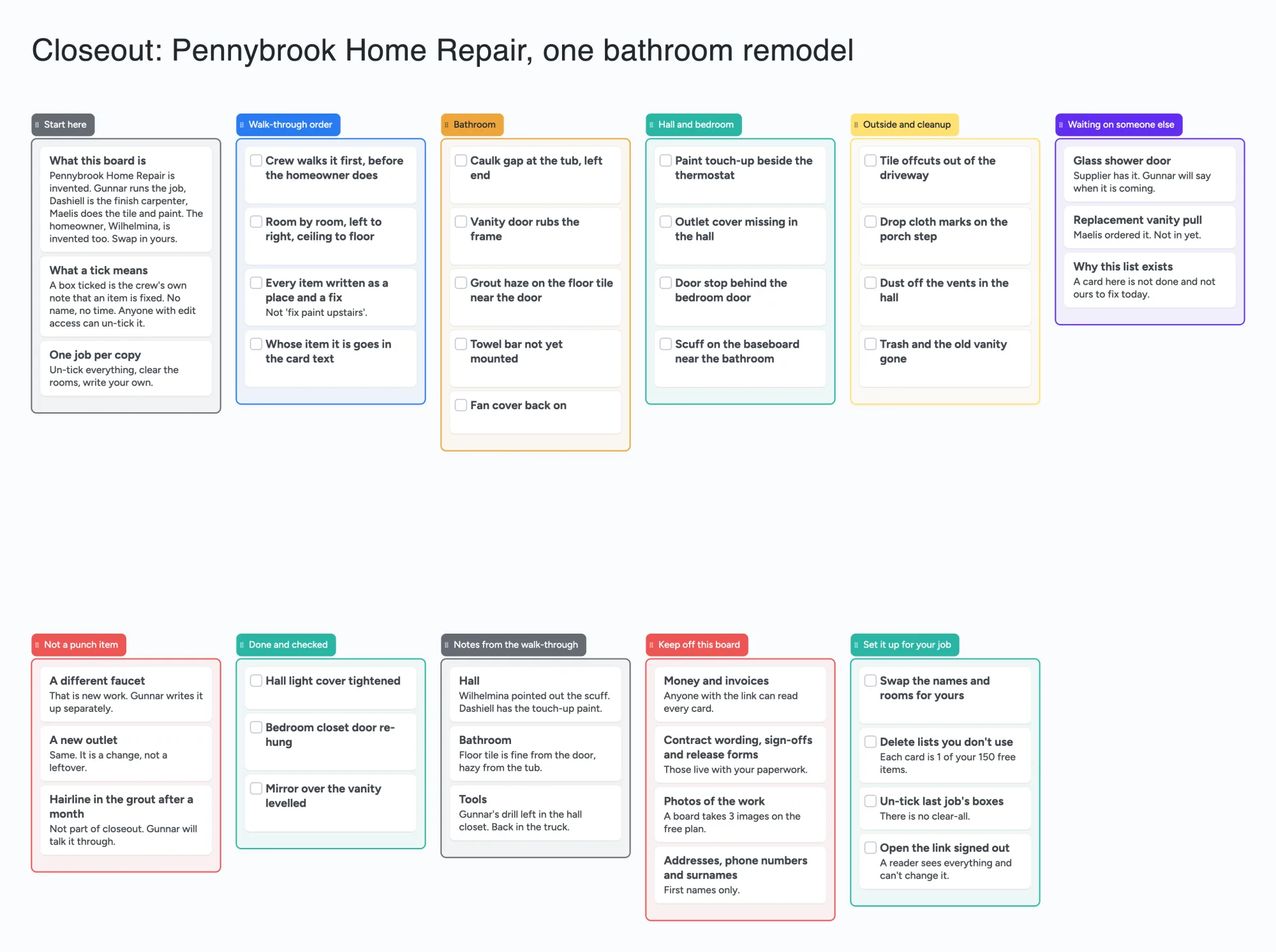
A closeout list, not paperwork
- What it covers: the last stretch of one small job: how the walk-through goes, each room's leftover items, the items waiting on someone else, what is not a punch item, and what is done and checked. The crew and homeowner are invented and every name is a first name.
- What it leaves out: estimates, quotes, invoices, contract wording, sign-offs, release forms and photos of the work. Nothing on it approves or releases a payment.
- What a tick means: the crew's own note that an item is fixed. No name, no time; anyone with edit access can un-tick it.
- Your plan: the example is 52 of your 150 free items (40 cards, 11 lists and 1 title text box, our count). Arrows and pen strokes don't count. A copy takes 1 of your 5 boards. Writing needs a free sign-in; a reader can open the link signed out and can't change anything.
What counts as a punch item, and what does not
Building Optimal, a homeowner-side guide (no date shown on the page; its markup holds a hidden Oct 13 date), says "A good punch list is specific enough that a tradesperson who wasn’t at the walkthrough can find the item and fix it. Each line should have a location, a description, who’s responsible, and a place to mark it done." The example's room lists are written that way: a place and a fix, such as "Caulk gap at the tub, left end" and "Vanity door rubs the frame", with the name of whoever owns it in the card text when it matters.
The Not a punch item list holds three cards: a different faucet, a new outlet and a hairline in the grout after a month. The same guide says what to leave off a punch list: "Changes. If you’ve decided you want a different faucet or one more outlet, that’s new work. It gets priced and approved as a change order, separate from the punch list." The same guide says items that "show up later" are different: "A nail pop that appears after the first season or a door that starts sticking in the summer is a warranty item." Whether something is a change or a warranty item depends on your contract; the board only keeps the question away from the leftover list.
When to start the list
In an r/ConstructionManagers thread, "How do you make punch lists quickly?" (posted 2024-09-10 UTC by someone running their own home renovation as construction manager; the archived copy we read has 57 comments, 2 removed, so 55 with text; many replies name apps such as Procore, Buildertrend and Archisnapper, and one commenter says they built their own app), u/peauxtheaux writes "Excel for sure. Also I would wait until they are at certain milestones to do a punch list." u/tower_crane, who says they are a builder, adds "it is beyond frustrating to receive punchlist items before we are even done with our work." and "Do punchlists after framing, MEP rough in, and then again after finishes (cabinets, flooring, painting, trim, etc.)" Each is one account's view.
The board has a Walk-through order list whose first card says the crew walks it before the homeowner does. TaskTag, a punch list app company, says in a blog post (Apr 2026) to "Start during the final 10–15% of the project — not during the client walkthrough." That is a vendor's view, and the board does not take a side on percentages.
Room by room, with who is coming back
Smartsheet's punch list page (June 20, 2017, "updated September 19, 2025") describes its simple form as "perfect for tracking incomplete or corrective work on small to midsized construction projects", with columns for "location, subcontractor, priority, status, due date, and completion date for easy sorting and filtering." On r/ConstructionManagers u/wagonspraggs, who signs the comment "Source: Quality Manager", writes "if you dont include location or contractor responsible it wont get fixed."
The board takes location and owner as text. Each room is a list (Bathroom, Hall and bedroom, Outside and cleanup) and each card is one fix; the owner goes in the card text. It has no priority or status columns. Each list has its own Sort and Filter, one list at a time, and the example does not use them; nothing filters all the rooms by one trade.
Two lists carry what the crew does not fix today. Waiting on someone else holds the glass shower door (the supplier has it) and a replacement vanity pull (ordered, not in yet). Done and checked holds the three items already finished. Nothing moves a card between lists by itself.
How many jobs one free account can hold
- Items. Each card, list and text box is 1 of your 150 free items, across all your boards. The example is 52. Arrows and pen strokes don't count. Pro removes the item limit ($5 a month billed yearly, $59.99 a year, or $7.99 monthly).
- More than one job. Our arithmetic: two copies are 104 items and three are 156, which passes 150 if nothing else is on your account. Each copy is also 1 of your 5 boards. Keep one board, un-tick it and rewrite the rooms for the next job.
- Un-ticking. There is no clear-all button, and a copy keeps its ticks. The example has 24 tick boxes; un-tick them before the next job.
- No reminders or due-date alerts. Nothing on the board tells anyone to come back.
- Who can write. A new board starts as "Anyone who joins can view". To let the crew tick items, tick "Anyone who joins can edit" in Share; writing needs a free sign-in, and a reader who opens the link signed out can't change anything.
- Open the board and swap the names. Replace Pennybrook Home Repair, the crew and Wilhelmina with yours.
- Rewrite the room lists. One list per room or area you actually worked in; keep each card to a place and a fix.
- Delete the lists you don't use. A job with nothing outside can lose that list.
- Read it as a stranger would, then open the link signed out. No money, no addresses, no photos.
Other punch list tools, and when they fit better
Each row below quotes or paraphrases one page we read on November 26, 2026. We make Instaboard and are not affiliated with any of them; plans and prices can change.
| Where it comes from | What it says about itself | Reach for it when | Here, the same job is |
|---|---|---|---|
| Smartsheet punch list templates (a software company's template page) | Templates "in Excel, Microsoft Word, Adobe PDF, Google Docs, and Google Sheets"; the construction one has "columns for punch ID, task name, responsible party, due date, description, and comments" | A form with columns for trade, priority, status and dates, in a file | Rooms as lists and one fix per card; no columns, no file |
| Punch List by RunBook (a Notion template) | "a construction defect and closeout tracker"; its "Schedule Health formula flags overdue, due-today and undated open items"; the page shows "Last updated 2 months ago" and lists the creator's own links | A database with views, a chart and overdue flags | No formulas; a card can carry a due date and a list can filter Overdue |
| TaskTag blog: construction punch list template (an app company's blog post) | "A complete punch list has 6 core sections: project info, interior, exterior, MEP, site cleanup, and sign-off" (post dated Apr 2026); we did not open the app | A longer room-by-room checklist and a sign-off section | Shorter rooms of your own; no sign-off section |
Swipe the table sideways to see every column.
From each page, read November 26, 2026. Smartsheet and TaskTag sell software; the Notion template is a listing in Notion's own gallery.
Where this board stops
If you need photos on each item, a sign-off, an approval or a printed form for the homeowner, use a tool built for that. Use this board when a small crew just wants one shared list of what is left, room by room, which anyone with edit access can update.
What never goes on a board anyone with the link can read
New boards start as "Anyone who joins can view", and invite-only boards are a Pro feature, so the Keep off this board list holds four things on purpose:
- Money and invoices. The board does not hold a quote, an estimate, an invoice or a payment, and it never works out what is owed.
- Contract wording, sign-offs and release forms. In an r/Carpentry thread (posted 2025-02-13 UTC; the archived copy has 47 comments, none removed), the contractor who posted writes, in their own comment, "I don't have anything in the contract that talks about punchlists and final walkthroughs". Where yours is written is between you and the homeowner; it is not on a card here.
- Photos of the work. A board holds 3 images on the free plan, and the example has none. Keep photos with your job file.
- Addresses, phone numbers and surnames. First names only.
Start from the ready board
It opens in your browser in a few seconds, with nothing to install. Sign in for free when you want to save it and share it.
Questions
Is there a punch list template a small crew can share?
Yes. Open the board, replace Pennybrook Home Repair and the invented homeowner with yours and share the link. It holds the walk-through order, a list for each room, a list for items waiting on someone else, a list of what is not a punch item and a done list.
Is this an estimate or an invoice?
No. A punch list is the closeout list of small items left to fix. The board holds no quote, no estimate, no invoice and no payment, and it never works out what is owed.
Can it record a sign-off or an approval?
No. A tick shows no name and no time, and anyone with edit access can un-tick it. It is the crew's own note that an item is fixed, not a sign-off, and it does not release a payment.
Can I add photos of the defects?
Not in the example, which has none, and a board holds 3 images on the free plan. Keep photos with your job file and put the place and the fix on the card.
Will it remind the crew to come back?
No. Nothing on the board sends a reminder or a due-date alert.
How many jobs fit on the free plan?
Keep one board and reuse it. The example is 52 items, so two copies are 104 and a third passes the 150 free items (our arithmetic), and each copy takes 1 of your 5 boards.
Sources
- Building Optimal: Punch List: Meaning, Examples, and How It Works (read November 26, 2026; no date shown on the page, though its markup holds a hidden Oct 13 date; a homeowner-side guide)
- Smartsheet: punch list templates ("June 20, 2017 (updated September 19, 2025)"; read November 26, 2026; a software company's page)
- Notion Marketplace: Punch List by RunBook (read November 26, 2026; page shows "Last updated 2 months ago"; the creator lists their own links)
- TaskTag blog: Construction Punch List Template: The Complete Closeout Checklist for Contractors in 2026 (Apr 2026; read November 26, 2026; an app company's blog post)
- r/ConstructionManagers: How do you make punch lists quickly? (2024-09-10 UTC; read November 26, 2026; the archived copy has 57 comments, 2 removed (55 with text); replies are single accounts)
- r/Carpentry: General Contractors & Tradespeople: What’s Your Policy on Punch Lists? (2025-02-13 UTC; read November 26, 2026; the archived copy has 47 comments, none removed; the line quoted is the original poster's own comment)