For teachers and tutors mapping a school year with a co-teacher, not for student work
A curriculum map template on one shared board, month by month
We make Instaboard, an online board for planning with other people. This page gives you a year map already laid out on it, filled in for two invented teachers, Priya and Dan, who share a Grade 8 science course. There is one list for each month, a card for each unit with who leads it and roughly how many weeks it takes, a card for each unit test, and one list of the dates that don't move: breaks, the state test, the last day. Open it, replace the science units with yours and send the link to the colleague you map with. It is a picture of the year you both read and drag around, and nothing more. It does not count teaching days, add anything up or check your standards, and it is not a matrix of outcomes by course. If that is what you need, the table below says what to use. The same board does what people call a pacing guide or a year at a glance.
Opens in your browser. Anyone can view; a free sign-in lets you edit.
Updated
Read this first: what the board does and doesn't do
- What it is: a school year on one screen. A unit card sits in the month it starts and says about how many weeks it runs, who leads it and what the test is. When a unit slips, you drag its card into the next month. The example uses 58 of your 150 free items.
- What it isn't: not a matrix of outcomes by course, and no standards library. It doesn't count teaching days: "about 4 weeks" is a number Priya and Dan typed. Nothing adds up, nothing flags a gap, and nothing sends a reminder.
- Same job, other names: a curriculum map, a pacing guide and a year at a glance are close cousins, and the board covers all three at the level of units and dates. The section below says how the sources use each word.
- No student data: a board is shared by link. Put no student names, grades, accommodations or notes about a child on it.
- Free plan: 5 boards, 150 items, 3 pictures per board. Copying the board takes 1 of your 5 boards. Writing on it needs a free sign-in. New boards start with "Anyone who joins can view". Pro adds invite-only boards and removes the item limit.
Curriculum map, pacing guide, year at a glance: which one is this?
Teachers use the three words loosely, and the pages we read do too. Read November 25, 2026; the summaries are ours and none of the authors has seen the board.
| Page | How it uses the idea (our summary) |
|---|---|
| happyheartsin1st.com, "Creating a Curriculum Map to Stay Organized" (post shows no date) | A curriculum map is the academic plan for the year: the big picture of what you teach in each subject. Five steps: gather your materials, fill in the school calendar, place the units month by month or quarter by quarter, adjust, then save it and share it with your team. The author says district maps can be wordy. |
| thehungryteacherblog.com, "How I Map Out My School Year in Middle School ELA" (page shows no date) | Starts from a year at a glance, then big skills and genres spread across the year, with catch-up days left at the end of units. |
| Edutopia, "Designing a Well-Crafted Pacing Guide" (page shows June 9, 2025; written for the 2025-26 school year) | A pacing guide starts by counting the days you really have: the author found 109 usable teaching days out of 180 in an IB class. The author's Google Sheet has a tab for each term and a row for each week, with columns for focus, objective, standards, inquiry question, assessments and notes, shared with colleagues who teach the same course. |
Pages read November 25, 2026: happyheartsin1st.com, thehungryteacherblog.com and edutopia.org (links in Sources).
So a map is the whole year in units, a year at a glance is the dates, and a pacing guide is the day count behind them. The board holds the first two well: units by month, with the fixed dates in their own list. For the day count, the Edutopia method is a spreadsheet. The board is where you and your co-teacher look at the result.
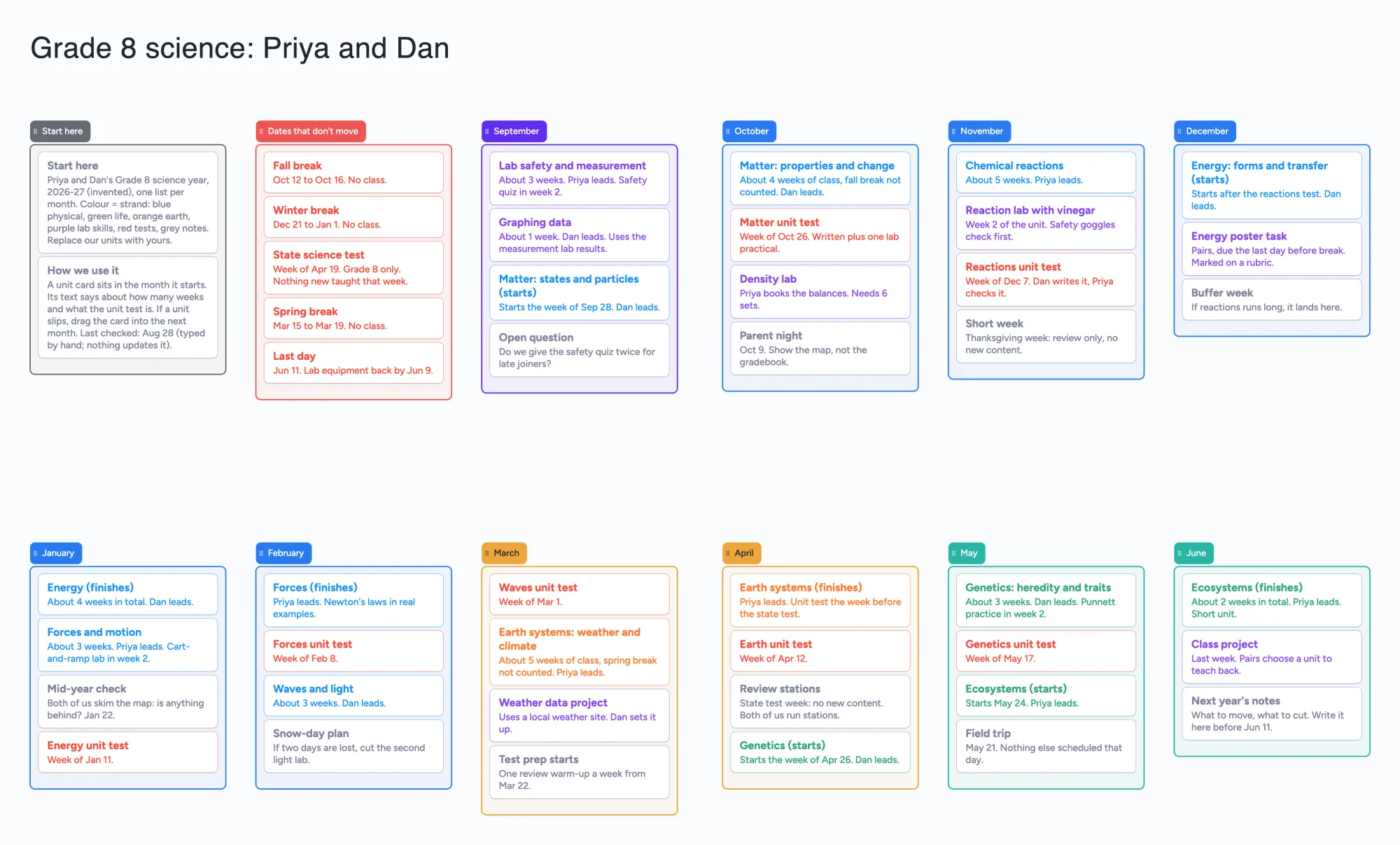
Priya and Dan's Grade 8 science year, list by list
The year is invented, including every date. Read the board from the top left, across, then the second row.
- Start here. Two grey cards: what the colours mean (blue physical science, green life science, orange earth science, purple lab skills, red tests, grey notes) and how the board is used, ending with a "last checked" line typed by hand, because nothing on the board updates itself.
- Dates that don't move. Five red cards: fall break, winter break, the state science test week, spring break and the last day. Putting them in one list means nobody hunts for them inside a month.
- September to December. Each month has its unit cards and one or two grey notes. September holds lab safety and graphing before matter starts. October has the matter unit test and a density lab, with a parent night card that says to show the map, not a gradebook. November is reactions, with a short Thanksgiving week of review only. December starts energy and holds a buffer week for a unit that ran long.
- January to June. Energy finishes, then forces and motion, waves and light, weather and climate, genetics and ecosystems. A unit that runs across months is split in two cards, one saying "starts" and one "finishes" or a second part, so each month list shows what is live in it. Grey notes carry the mid-year check, a snow-day plan (cut the second light lab if two days are lost), review stations in state test week and the notes for next year.
- Who leads. The unit cards name Priya or Dan as the lead. Each of them can see their own months at a glance without a separate list.
Nothing on the board is dated except what Priya and Dan write in a card's words. A week of October is not a field, it is text.
When a unit slips: the part a map is for
A year map is only useful if it changes in October. Three moves cover most of what happens to it:
- A unit runs long: drag its "finishes" card to the next month and drop the "buffer" note into the gap. In the example, the buffer week sits in December for exactly this.
- Days are lost: the snow-day note says what to cut first, so the choice is made in August, not under pressure in February.
- A unit is dropped: delete the card and read the month again. Nothing else on the board changes, because nothing is linked.
That is also why unit cards give about how many weeks, not a start and end date: a typed date has to be edited every time something moves. Unit cards give about how many weeks, and a few cards carry a typed date: the first card of a unit, Parent night, the mid-year check and the field trip. The Reddit threads below plan the same way.
How many years fit in 150 items?
Each card and each list is 1 of your 150 free items, across all your boards. The title text box counts too. Arrows, sections and pen strokes don't. Our arithmetic from the example:
- As built: 12 lists + 45 cards + 1 title = 58.
- Two courses on two boards: 2 x 58 = 116, and 2 of your 5 free boards.
- Three courses: 3 x 58 = 174, over 150.
- Next year: copy the board and edit it. The copy takes 1 of your 5 boards and its items count against the same 150, so delete last year's board when you no longer need it.
- With Pro, the 150-item limit is removed.
What a board can't do
- No day counting. The board does not know the school calendar, so it cannot tell you that eight units leave 22 days each. You count, or use a spreadsheet. Instaboard does have due dates and a calendar view for lists; this board does not use them, and every date is typed into a card.
- Not a matrix. There is no grid of outcomes by course or standard by unit, and nothing shows a standard that is missing. If your school asks for a matrix, use their document.
- No standards library. Paste the wording from your own document into a card if you want it there.
- No reminders or due-date alerts. Nothing tells Dan the energy unit is starting.
- Cards don't link to lesson plans. A unit card is a few lines. Daily lesson plans belong in your planner.
- It is not private by default. New boards start with "Anyone who joins can view". Anyone you give the link to can read; sign-in is only needed to write. Set it to "Anyone who joins can edit" only if your co-teacher should write on it.
- A copy takes 1 of your 5 free boards, and writing needs a free sign-in.
- 3 pictures per board. The example has none.
Where other tools do this better
Read on November 25, 2026; plans and pages change, so check the page. A source date is printed only where the page shows one.
| Tool | What the page says | Better for |
|---|---|---|
| Edutopia's pacing guide method (page shows June 9, 2025) | A Google Sheet with a tab for each term and a row for each week; the author counts the real teaching days first | A day count, standards in a column, and a file the whole course team can sort |
| Notion Teacher Curriculum Map template (marketplace listing) | The listing shows a Get template button, a rating of 4.8 from 37 ratings and "Last updated last year", and says to structure your teaching year by topic, standard and activity, week by week. By Notion4Teachers; we read the listing, not the template inside | Teachers who already plan in Notion |
| Teachers Pay Teachers curriculum map template (happyheartsin1st listing) | An editable PowerPoint and Google Slides template; the listing shows $4.00, an Add to cart button and 495 ratings | A printable, designed map to put on the wall or send to a principal |
| Google Docs, Sheets or Slides | Not read for this page | A document your school may require, with comments and version history |
| Instaboard board | 5 boards, 150 items, 3 pictures per board on the free plan | Two teachers reading and moving the same year map, one link, no file to send |
Swipe the table sideways to see every column.
Pages read November 25, 2026: edutopia.org, notion.com/templates/teacher-curriculum-map, the teacherspayteachers.com listing and happyheartsin1st.com (links in Sources). Our wording, not theirs.
Where these win
If your school wants a matrix, a standards column or a day count, use a spreadsheet or the school's own document. If you want something to print and hang up, a designed template does that. Use this board when two teachers want to see the year, move a unit and agree on it, with a link in place of an attachment.
What teachers say about mapping a year
From r/Teachers, a new teacher asking how to plan the whole year (OP u/Powerful-Flatworm693, June 5, 2025; we read 25 comments in an archived copy; each reply is one person's view). u/ItsQuinnyP, the top reply, said to plan your first unit loosely and plan the second during the first. u/ChaoticNaive described the order scope, then sequence, then counting class periods, and gave eight units at about 22 days each as an example. u/Ok_Wrangler5173 suggested a calendar with the hard dates in it, a look at the district pacing guide, and penciling units in as big blocks.
From r/Teachers, a thread on year-long maps (November 21, 2022; we read 12 comments in an archived copy). u/External_Berry8790 lays the year out by weeks in each month, puts the units in, and said it is not a replacement for daily lesson plans. u/Wafflinson keeps a one-page document of the major concepts.
From r/Teachers, a short thread (July 30, 2022; we read 7 comments in an archived copy). One commenter, u/niewiem728, put the months in rows with the plans for each month underneath.
Two lessons for this board: people plan the year in big blocks and move them, so unit cards say "about" and a number of weeks, and a map does not replace lesson plans, so no unit card tries to hold one.
How to use it, in about an hour
- Open the board and sign in free when it asks you to write. Replace the science units with yours and delete any list you don't need.
- Fill the dates that don't move first: breaks, the state or end-of-year test, the last day. Do it from your school's calendar.
- Place the units. One card per unit in the month it starts, a second "finishes" card where it runs on, and a red card for its test. Write about how many weeks and who leads.
- Leave one buffer card in the month you most often run late, and one note saying what you would cut first.
- Send the link. Set Share to "Anyone who joins can edit" if your co-teacher should write on it, or leave it on view if they should only read. Each person who writes signs in free.
- Look at it again in October and in January, when the year stops matching the plan, and drag cards. A tutor running one course for a small group maps it the same way; put no student names on the board.
Start from the ready board
It opens in your browser in a few seconds, with nothing to install. Sign in for free when you want to save it and share it.
Questions
What is a curriculum map?
A plan for the whole school year: what you teach, in what order, over which months. The pages we read describe it as the big picture of topics for each subject, placed month by month or quarter by quarter. Here it is a shared board with a list for each month.
Is a curriculum map the same as a pacing guide?
They overlap. A map shows the year in units; a pacing guide adds how many days each unit gets, and Edutopia's method starts by counting the days you really have. The board shows the units and the fixed dates but does not count days, so keep the count in a spreadsheet if you need it.
Can I use it as a year at a glance?
Yes, at the level of months and the dates that don't move: breaks, test weeks and the last day each have a card. It is not a calendar grid, and the dates are typed text, so nothing counts them or reminds you.
Can my co-teacher and I map the year on the same board?
Yes. New boards start with "Anyone who joins can view", so anyone with the link can read it. Set it to "Anyone who joins can edit" if your co-teacher should write too; each person who writes signs in free. Put no student names or grades on it.
How many courses fit on the free plan?
The example is one course and 58 of your 150 free items. Two courses on two boards is about 116 and three is about 174, over the limit (our arithmetic). Copying the board for next year takes 1 of your 5 free boards.
Is Instaboard free?
There is a free plan: 5 boards, 150 cards and items across your account (pen strokes, arrows and sections don't count), and 3 pictures and 1 file per board. Anyone with the link can read a board; writing on it takes a free sign-in. Pro removes the item limit and adds invite-only boards: $5 a month billed yearly ($59.99 a year), or $7.99 monthly.
Sources
- happyheartsin1st: Creating a Curriculum Map to Stay Organized (post shows no date; read November 25, 2026)
- Teachers Pay Teachers: Curriculum Map Template and Pacing Guide, Editable (listing shows $4.00, Add to cart and 495 ratings; read in a browser November 25, 2026)
- The Hungry Teacher: How I Map Out My School Year in Middle School ELA (page shows no date; read November 25, 2026)
- Edutopia: Designing a Well-Crafted Pacing Guide (page shows June 9, 2025; read November 25, 2026)
- Notion Marketplace: Teacher Curriculum Map template (listing shows rating 4.8 from 37 ratings and "Last updated last year"; read in a browser November 25, 2026)
- r/Teachers: how do you plan out the whole year (OP u/Powerful-Flatworm693, June 5, 2025; replies are single accounts, 25 comments read in an archived copy November 25, 2026)
- r/Teachers: year-long curriculum maps (November 21, 2022; replies are single accounts, 12 comments read in an archived copy November 25, 2026)
- r/Teachers: planning the year (July 30, 2022; replies are single accounts, 7 comments read in an archived copy November 25, 2026)