For a producer, a director, a stage manager and department heads who share a hall
A community theatre production board: who owns what, and what needs a ruling
We make Instaboard, an online board. This one is a production board for a small amateur company: a list for each department, a list of clashes that need a ruling, and tick lists for prep week, tech week, every performance and strike. It is filled in for an invented company, Quay Street Players, putting on an invented farce, Dinner at Seven. It does not collect conflicts, write call sheets, add up a budget or write rehearsal reports, and it sends no reminders or due-date alerts. A board suits one job in a small company: putting every department's open decisions and the stage manager's checklists in one place that producer, director and department heads can all open.
Opens in your browser. Anyone can view; a free sign-in lets you edit.
Updated
What this board does and doesn't do
- It holds decisions and jobs. It doesn't collect cast conflicts, make a call sheet or add up a budget. "Tuesday and Thursday evenings" is words on a card in the example, not a rehearsal plan the board works out.
- No reminders or due-date alerts. A card with a first name on it doesn't tell that person anything. Tell people in the room, by message or at the production meeting.
- Keep contact details and personal information off it. Anyone with the link can read the board. The example has first names and jobs only: no phone numbers, no addresses and no conflicts sheet. Adults only; this page isn't written for school or youth productions.
- Free plan limits: 5 boards, 150 items across your account and 3 pictures per board. A copy of this board takes 1 of your 5. Pro is $5 a month billed yearly ($59.99 a year), or $7.99 monthly, and removes the 3-picture limit and the item limit.
- Everyone with edit access can move or tick any card. Nothing records who ticked a box or when, so agree who ticks what.
Who this is for, and who it isn't
It's for a company where the producer, the director, the stage manager and three or four department heads are volunteers, share one hall and don't sit in the same room most weeks. One question we read in a non-profit production group's thread: two departments want the same stage. A board doesn't answer it, but it does show it, and it holds the ruling once somebody makes it.
It isn't for a company that already runs a production-management system with schedules and budgets. It also doesn't replace the stage manager's paper prompt book. If your problem is the rehearsal schedule and cast conflicts, that is a scheduling job and a poll plus a calendar do it better. The table below says where.
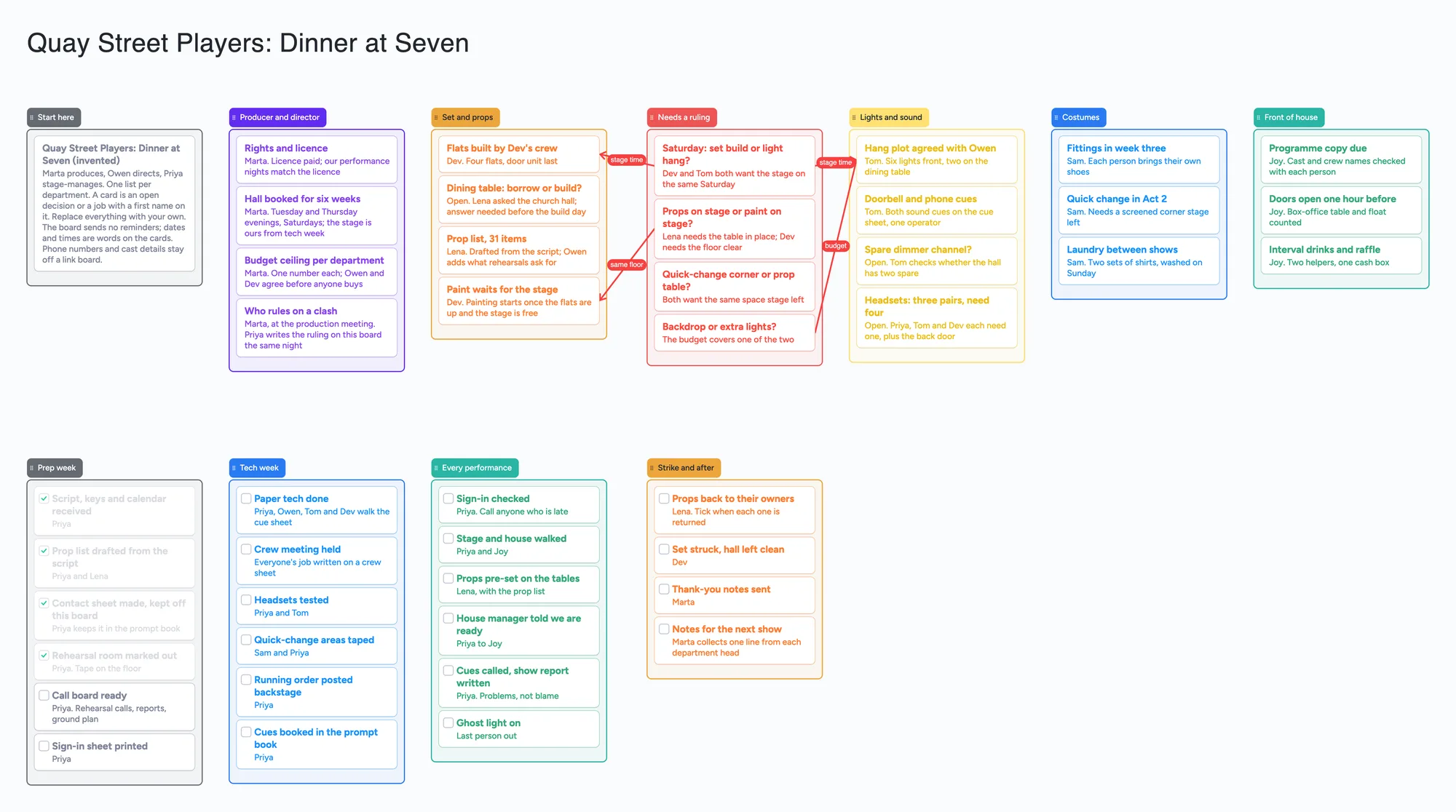
Quay Street Players, list by list
The company is invented: a farce called Dinner at Seven, six weeks in a borrowed hall, a producer (Marta), a director (Owen), a stage manager (Priya), and heads for set (Dev), props (Lena), lights and sound (Tom), costumes (Sam) and front of house (Joy). First names only.
| List | What goes in it | In Quay Street Players |
|---|---|---|
| Start here (grey) | What the board is, who is who, what stays off it | One card |
| Producer and director (purple) | Rights, the hall, the budget ceiling, who rules on a clash | 4 cards |
| Set and props (orange) | Builds, borrowed items, the prop list, what waits for what | 4 cards, one an open question about the dining table |
| Needs a ruling (red) | Two departments want the same thing; one card per clash | 4 cards: stage time, floor, the stage-left corner, a budget choice |
| Lights and sound (yellow) | The hang plot, sound cues, spare channels, headsets | 4 cards, two of them open |
| Costumes (blue) | Fittings, quick changes, laundry | 3 cards |
| Front of house (green) | Programme, doors, interval | 3 cards |
| Prep week, Tech week, Every performance, Strike and after | Tick-box lists, one per phase of the show | 6, 6, 6 and 4 tick-box cards |
Swipe the table sideways to see every column.
The board's own wording. Dates and times are typed text in this example; the board sends no reminders or due-date alerts.
One clash, from card to ruling
This is how the company might use the red list. The order is our example, not a rule.
- Dev and Tom both ask for the same Saturday, so Priya adds one red card, "Saturday: set build or light hang?", with both names on it, and draws a captioned arrow from it to the card that holds each request.
- Marta reads the card before the production meeting. The arrows show which two cards are in conflict, so nobody has to remember the argument.
- At the meeting the ruling is made, and Priya rewrites the red card's second line with the decision, for example "Build first; lights hang Sunday".
- The two department cards change to match, and the red card moves to the Producer and director list under "Who rules on a clash", or Priya deletes it.
Nothing tells Dev or Tom that the card changed; they see it when they open the board. If the ruling matters tonight, say it out loud or send a message as well.
What stage managers and theatre people say about this
Four r/techtheatre, r/Theatre and r/stagemanagement threads, read November 25, 2026. Each reply is one person's view; the page doesn't count how many theatres work any one way.
- "What crew structure do you have?" (u/Socks7711, r/Theatre, posted 2025-02-24; read 20 in an archived copy). The poster's non-profit company has tech, props and set managers with their own teams and kept clashing over setup time and money. u/schonleben wrote "This is why you have a Production Manager". u/RainahReddit wrote that it is "a case by case director call" decided early. u/EntranceFeisty8373 wrote that their small crew is just a director and a tech director who "create a shared schedule for the cast/crew". u/serioushobbit described a production manager on equal footing with the director, production meetings starting before rehearsals and a production schedule "updated frequently". This is the clash list in one thread.
- "Stage Manager's Prep Week" (u/StandbyPlacesPlease, r/techtheatre, posted 2022-11-22; read 7 in an archived copy). u/palacesofparagraphs listed a contact sheet, production calendar, character/scene breakdown, prop list, sign-in sheet and templates for daily calls, rehearsal reports, performance reports, preset list, shift plot and line notes. u/swm1970 wrote "everything". The prep-week list on this board is a short version of that and leaves out every document on it.
- "Stage Manager Apps?" (u/InternalPurpose1252, r/stagemanagement, posted 2024-07-25; read 17 in an archived copy). Replies named stagewrite and Procreate, Goodnotes, Notability, Show Cue System and, from u/SunDanceQT, Trello: "a show template with recurring prep week, first rehearsal, designer run, tech, opening and closing task lists", which they said they'd like the whole production team to use "so I could tag people on tasks and see progress". That is the same shape as the tick lists here. Nobody asked for a shared board by name.
- "Stage Managers: how do you feel about scheduling?" (u/marvel2010, r/techtheatre, posted 2018-10-02; read 24 in an archived copy). Replies named Doodle, Google Calendar and a spreadsheet of conflicts. u/barak181 wrote that the stage manager and producer set the constraints and "it is the job of the director to actually create the nuts and bolts of the rehearsal schedule". Scheduling is a job for those tools; this board doesn't do it.
That is four threads and a few dozen commenters, not a survey. The 2018 thread is old, and the poster was surveying for a scheduling tool they were thinking of building.
Show week: the stage manager's lists
Four of the lists are a stage manager's checklist cut into phases. The wording is ours, from two checklists we read in full on November 25, 2026: Theatre on a Shoestring's "A Stage Manager's Checklist of Tasks" by Laurie Swigart (posted Dec 4, 2020; it mentions a stage manager advisor and faculty, so it reads as written for a school theatre) and Rocky Mountain USITT's "Sample Stage Management Paperwork" (a 2011 conference session page; real production paperwork as PDF or JPEG samples and templates).
- Prep week has six cards: script, keys and calendar; the prop list drafted from the script; a contact sheet kept off the board; the rehearsal room marked out; the call board; the sign-in sheet. Shoestring's list opens with the script, the calendar, keys and the prompt book, then preliminary prop, light, costume and sound lists.
- Tech week has six: paper tech, the crew meeting, headsets, quick-change areas, the running order posted backstage and cues booked in the prompt book. Shoestring describes paper tech as a walk through the show to synchronize every cue, held on the Friday before tech week.
- Every performance has six: sign-in, stage and house walked, props pre-set, the house manager told, the show report and the ghost light. The ghost light is on Shoestring's closing list.
- Strike and after has four: props returned, the set struck, thank-you notes, notes for the next show.
These are tick boxes on cards, live for everyone with edit access. There is no reset-all, so before the next performance you untick the six "Every performance" boxes by hand, or keep one such list per week.
Where other tools do this better
Read November 25, 2026. No ranking: they suit different companies. Every cell is what the vendor's page says, not something we tried.
| Tool | What its page says | Better than a board at | Where a board fits |
|---|---|---|---|
| Propared | Production planning software for arts and events. Pricing page: Propared Complete $299/month with unlimited project timelines, rehearsals, performances, load-ins and crew calls, show reports, live budgets and an inventory catalogue; each administrator or project manager is $45/month; viewers with a share link are free | Schedules, calendars, inventory and live budgets for a company that can pay for them | A volunteer company that needs decisions and checklists on one page, not a scheduling system |
| CuePad | A digital prompt book for directors and stage managers. Pricing page: Core is free with 1 active script, blocking, a ground plan editor and cue management; Teams $19 a month or $199 a year with up to 5 collaborators | Blocking, ground plans, cues and the script itself | No script, no blocking, no cues here |
| A spreadsheet | Named by one commenter (u/Rintransigence) in the scheduling thread as a conflicts sheet | Cast conflicts, a rehearsal schedule, a budget with sums | Cards with owners and a ruling; no sums here |
| Trello | Named by u/SunDanceQT as a show template with a list per phase | Assigning tasks to people and tagging them, if your team uses it | No claim; if your whole production already uses Trello, stay |
| Paper prompt book and printed forms | USITT's sample page lists rehearsal reports, calendars, preset lists and shift plots as samples and templates | The prompt book, the rehearsal report, anything the stage manager hands out | A shared page the whole production can open |
Swipe the table sideways to see every column.
From the Propared and CuePad pages and the threads as read November 25, 2026. Instaboard isn't affiliated with any of these.
What a board can't do for a production
- Collect conflicts or work out a rehearsal schedule. There is no availability poll and nothing that works out calls for you; a calendar or a spreadsheet does that.
- Produce a call sheet, rehearsal report or performance report. Those are documents the stage manager writes.
- Do a budget. Cards hold numbers as words; nothing adds them.
- Remind or alert anyone. No reminders, no due-date alerts, no notice when a card moves.
- Record who ticked or moved a card, or when.
- Hold the script, cues or blocking. It's a plan, not a prompt book.
- Keep a cast's private details. Anyone with the link can read it; keep it to first names and jobs.
Set up your own, in order
- Open the board and replace Quay Street Players' cards with your company's, keeping the lists you use.
- Put one department head's name on each department list. Delete the departments you don't have.
- Move real clashes into "Needs a ruling" and name who rules on each one.
- Share the link with the production team. New boards start view-only; to let them write, tick "Anyone who joins can edit" in Share, and each person signs in free to write.
- Agree who ticks the checklists, since anyone with edit access can tick or untick any box.
- Keep phone numbers and conflicts sheets elsewhere.
Does it fit in 150 items, and what else the free plan limits
Each card and each list is 1 of your 150 free items across all your boards. The title text box counts too. Arrows, sections and pen strokes don't. Our arithmetic:
- As built: 11 lists + 45 cards + the title = 57.
- The same board with a card for every open item in each department: about 10 more cards, so 67.
- Three more departments (hair and makeup, publicity, the band), on top of the 67: 3 lists and about 9 cards, so about 79.
- A second board for the next show, copied after this one: 57 + 57 = 114, and a third passes the limit at 171. Other boards on the account share the same 150.
So on Free one show's board fits comfortably and two shows' boards fit. For a third, either delete the finished show's cards or upgrade. Pro removes the item limit. The rest of the free plan:
- Boards. 5 on the free plan. "Make a copy" takes 1 of them.
- Pictures. 3 per board. The example has none, so a ground plan or a set sketch needs a shared folder.
- Writing needs a sign-in. Anyone with the link can read the board; to change it they sign in free, and the board then counts as 1 of their 5.
Start from the ready board
It opens in your browser in a few seconds, with nothing to install. Sign in for free when you want to save it and share it.
Questions
Can this board make my rehearsal schedule?
No. It has no availability poll and nothing that works out rehearsal calls for you. Use a calendar or a spreadsheet for the schedule and keep this board for the decisions and checklists around it.
Is this a stage manager's prompt book?
No. It holds no script, cues or blocking. The four tick lists are a stage manager's checklist cut into prep week, tech week, each performance and strike, and a prompt book stays on paper or in a prompt-book app.
Can I put my cast list and phone numbers on it?
We wouldn't. Anyone who has the link can read the board, so keep it to first names and jobs, and keep contact details and conflicts sheets in a private document.
How do I reset the checklists for the next show?
There is no reset-all. Untick the boxes by hand. A copy of the board keeps the ticks, so untick them in the copy. A tick shows live to everyone with edit access, and nothing records who ticked it.
Will a department head be told when I put a card on their list?
No. The board sends no reminders, alerts or notices. Tell them in the room or by message; they'll see the card when they next open the board.
How many shows fit on the free plan?
150 items across your account, where each card and each list is one item. One show's board is well under that, so two fit and a third doesn't by our arithmetic. Your other boards share the same 150. Pro removes the item limit.
Sources
- r/Theatre: "What crew structure do you have?" by u/Socks7711 (posted 2025-02-24; read 20 in an archived copy November 25, 2026)
- r/techtheatre: "Stage Manager's Prep Week" by u/StandbyPlacesPlease (posted 2022-11-22; read 7 in an archived copy November 25, 2026)
- r/stagemanagement: "Stage Manager Apps?" by u/InternalPurpose1252 (posted 2024-07-25; read 17 in an archived copy November 25, 2026)
- r/techtheatre: "Stage Managers: how do you feel about scheduling?" by u/marvel2010 (posted 2018-10-02; read 24 in an archived copy November 25, 2026)
- Theatre on a Shoestring: A Stage Manager's Checklist of Tasks, by Laurie Swigart (posted Dec 4, 2020; read in full November 25, 2026)
- Rocky Mountain USITT: Sample Stage Management Paperwork (page names a 2011 USITT conference session; no other date shown; read in full November 25, 2026)
- Propared: Plans & Pricing (read November 25, 2026)
- CuePad: Pricing (read November 25, 2026)