For a cleaning crew lead who sends two or three cleaners to one house
Cleaning crew checklist: one shared job board for who takes which rooms and what is left for next visit
We make Instaboard, an online board. This is a cleaning crew checklist for a lead and two cleaners who share one link, filled in for an invented crew, Brightside Cleaning, where Dana leads, Ravi and Mei clean, and the job is one house on a Tuesday. It is not a job-booking tool and it does not send invoices, take payments, track pay or hours, show who is where, hold photos or store anyone's address or door code, and a tick records no name and no time. If you want any of that, a cleaning business app does it and this board doesn't. If your crew runs on a printed sheet in the van, keep it. What the board gives you is the split for one job: which rooms each person owns, in what order, what to leave for the next visit and the lead's last look, on one link everyone can read from a phone.
Opens in your browser. Anyone can view; a free sign-in lets you edit.
Updated
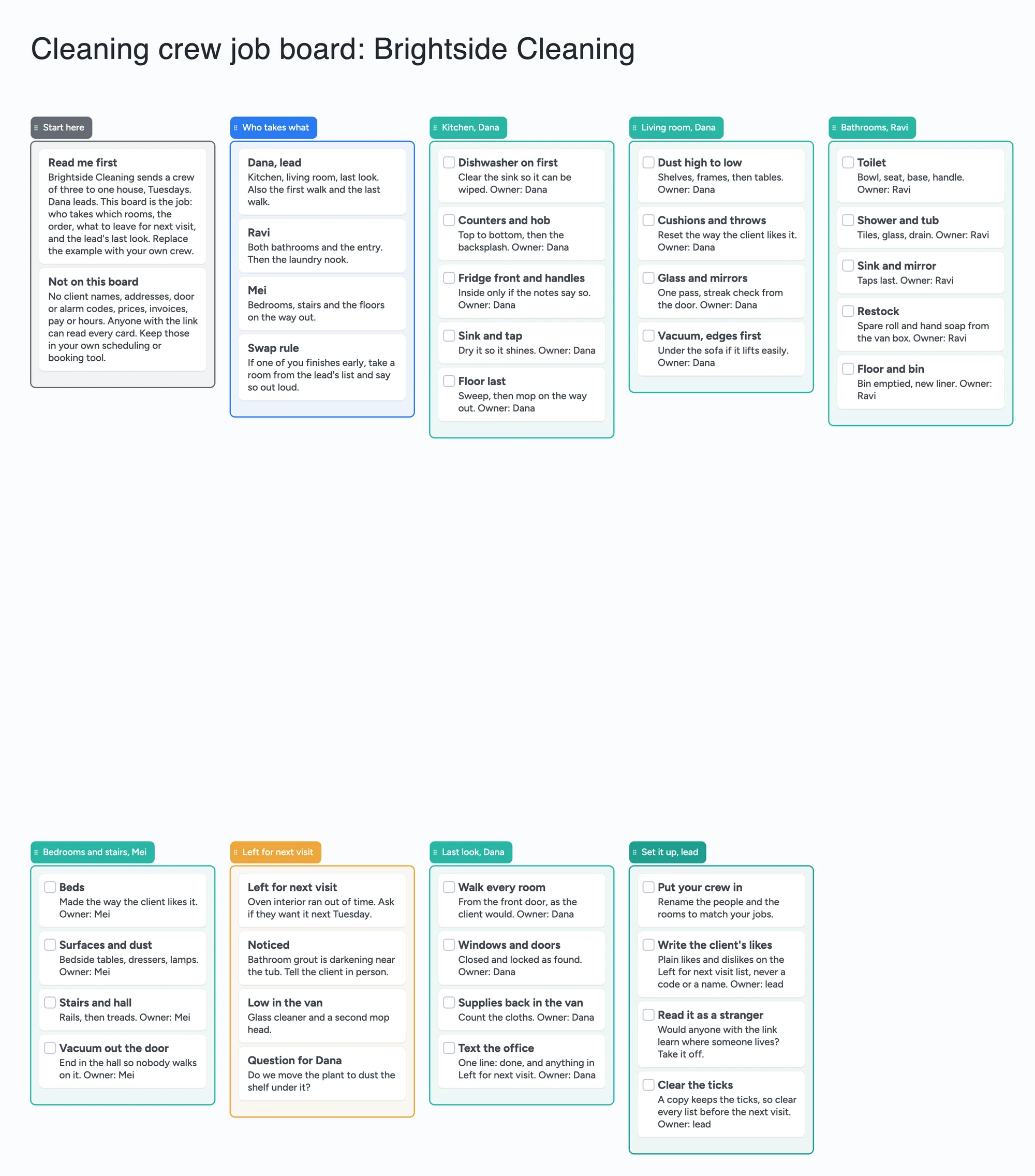
Read this first: what this board does, and what it leaves off on purpose
- What the board is: the part of a cleaning job that passes between a lead and the cleaners: who takes which rooms, a tick list per person in the order of work, a Left for next visit list the crew writes by hand, and the lead's last look before leaving.
- What it isn't: no scheduling, no invoicing or payments, no pay, hours or payroll, no GPS, no photo proof, and no client names, addresses or door and alarm codes. A tick records no name and no time.
- Ticks: tick items together, and everyone with edit access sees it live. Anyone with edit access can un-tick anything, so a tick can't prove a job was done. The lead's last look is the check.
- Free plan: the example is 46 of your 150 free items (36 cards, 9 lists and 1 title text box, our count). Arrows and pen strokes don't count. Writing needs a free sign-in, and a reader can open the link signed out. Pro removes the item limit.
Brightside Cleaning's board, list by list
Brightside sends Dana, Ravi and Mei to one house on Tuesdays. Dana leads, so she keeps the kitchen, the living room and the last look. Everything in the example is invented, with first names only.
- Start here (2 cards). How the board is used, and a "Not on this board" card that keeps client names, addresses, door and alarm codes, prices, invoices and pay off it.
- Who takes what (4 cards). One card per person with their rooms, and a swap rule for when someone finishes early.
- Kitchen, Dana (5 cards, tick boxes). Dishwasher on first, counters and hob, fridge front and handles, sink and tap, floor last.
- Living room, Dana (4 cards, tick boxes). Dust high to low, cushions and throws, glass and mirrors, vacuum with the edges first.
- Bathrooms, Ravi (5 cards, tick boxes). Toilet, shower and tub, sink and mirror, restock, floor and bin.
- Bedrooms and stairs, Mei (4 cards, tick boxes). Beds, surfaces and dust, stairs and hall, vacuum out the door.
- Left for next visit (4 cards). What ran out of time, what was noticed, what is low in the van, and a question for the lead. Written by hand; nothing adds up.
- Last look, Dana (4 cards, tick boxes). Walk every room, windows and doors, supplies back in the van, and a one-line text to the office.
- Set it up, lead (4 cards, tick boxes). Put your crew in, write the client's likes, read it as a stranger, and clear the ticks before the next visit.
There are no arrows on this board. The order of the lists and of the cards in each list does the work.
What cleaning business owners say about running a crew
Four Reddit threads, read November 24, 2026, with the replies. Each reply is one account's view, and none of them asks for a shared board.
- "Cleaning Business - How to train new employees?" (r/sweatystartup, u/Zestyclose_Cycle1205, 2023-12-17). The poster, who is planning a commercial and post-construction cleaning business, asks whether to train in person and whether to use a checklist and ask for pictures. u/FREE-AOL-CDS says to take new people along for a few weeks and show exactly how you want it done. u/BPCodeMonkey says that with contractors you set a scope of work, and that you can't have employees and contractors doing the same work in one company. That is one commenter's claim and isn't checked here; look up your own rules on employees and contractors.
- "How do (commercial) cleaning businesses with 10+ employees manage all those people?" (r/sweatystartup, u/Gregersen12, 2024-11-18). u/Me_Krally says you deploy team leaders or supervisors, who also fill in for sick time. u/sumiflepus says the answer is playbooks and checklists for the common kinds of job, with an on-site lead executing the playbook. The poster's own worry is the flow of information from the owner to the cleaners, such as new keypad pins and keys; that is exactly the kind of thing this board keeps off.
- "Are cleaning checklists actually effective in offices?" (r/smallbusiness, u/Huge_Wedding_1233, 2026-02-28). One commenter, u/Strange_Feedback_442, says checklists work when they are specific, such as "wipe down desk surfaces with disinfectant wipes" instead of "clean desks", and that for deeper cleaning or staff who cut corners, direct supervision works better because a checklist doesn't help if someone just ticks the box. The board has a lead's last look and doesn't treat a tick as a sign-off.
- "Commercial cleaning business owners: what software are you using to run your operation?" (r/cleaningbusiness, u/PristineFM2026, 2026-11-10). The poster says they are building a product for commercial cleaning companies and lists what a growing company juggles: quoting, schedules, assignments, inspections, supplies, invoicing, and profitability by site. Two of the replies promote the writers' own products, and u/EdSelkow, who says he has headed technical solutions for the industry, says company owners are resistant to new tools. We read it as a vendor's research post, not as owners asking for a tool.
The board borrows three ideas, each from a different commenter: an on-site lead who runs the playbook (u/sumiflepus), tasks written specifically (u/Strange_Feedback_442), and a lead's check instead of trusting ticks (the same commenter).
What cleaning business apps cover that this board leaves off
Three pages, read November 24, 2026. All are from vendors, and each point is the vendor's own view.
- Housecall Pro (pricing page; page data modified 2026-11-11) shows Basic at $59 a month billed annually ($79 a month on the page's monthly figure). Its Essentials plan, with 5 users included, lists routes, "Checklist automations" ("Ensure each job is done correctly with custom checklists"), photo reports and employee GPS tracking. It also offers a 14-day free trial.
- ZenMaid (its own compare page against Housecall Pro; no date printed) says it "starts at just $19/month" with scheduling, reminders, mobile access, checklists and cleaner management included. It describes a cleaner app with checklists, client notes, GPS check-ins, PTO tracking and an SOS button. These are ZenMaid's claims about itself and about Housecall Pro.
- Smart Janitorial (a commercial cleaning company; free checklist download page, no date printed) offers a downloadable janitorial checklist to share with your team and tick off.
- What this board leaves to other places: scheduling, invoices and payments, pay and hours, GPS check-in, photo proof, reminders, and anything that holds a client's address or access codes.
- What the board adds: the room split is visible to the whole crew in one view, the owner of each room is typed on its list, and Left for next visit gives the next crew a place to read what this one couldn't finish.
How to set it up for your own crew
- Open the board and replace the example. Swap Brightside's people and rooms for yours. Delete lists you don't need; each card is 1 of your 150 items.
- Give each cleaner a list. Rooms in the order they clean them, one line each, with the cleaner's first name.
- Write specific tasks. "Wipe the hob and backsplash", not "clean kitchen", so the last look has something to check.
- Keep the client's likes to likes. Plain preferences like how the beds are made, never a name, an address or a code.
- Take private details off. Read every card as if a stranger had the link.
- Share it. In Share, new boards start as "Anyone who joins can view". Set it to "Anyone who joins can edit" for the crew; they sign in once, free. Open the link signed out to check a reader sees everything.
- Clear the ticks before each visit. There is no clear-all button and a copy keeps its ticks, so un-tick each list first.
What this board doesn't do, and where other tools do it better
Read on November 24, 2026 from each page.
| Option | What its own page says (November 24, 2026) | Better for | Not what you get |
|---|---|---|---|
| Housecall Pro (vendor) | Basic $59 a month billed annually ($79 a month on the page's monthly figure); Essentials (5 users) lists routes, checklist automations, photo reports and GPS tracking; 14-day free trial | Scheduling, photo reports and GPS for a growing crew | A list with no scheduling or GPS |
| ZenMaid (vendor) | "Starts at just $19/month"; cleaner app with checklists, client notes, GPS check-ins, PTO and SOS | A cleaner app made for maid services | A shared list with no app account |
| Smart Janitorial checklist (vendor download) | A downloadable janitorial checklist to share with your team and check off | A print-ready sheet for commercial sites | A live shared list |
| Playbook or checklist per kind of job | One commenter in the 10+ employees thread: playbooks and checklists for common jobs, run by an on-site lead | A written standard that needs no device | Editing from anywhere, a link |
Swipe the table sideways to see every column.
From each page, read November 24, 2026. Not affiliated with any of them. Jobber's pages could not be read, so it is not in the table. Rules on employees, contractors and pay are not read here; check your own.
Where these win
If you want scheduling, invoices, pay or photo proof, use a cleaning business app. If your crew works from a printed sheet and that works, keep it. Use this board for the job itself: which rooms each person owns, in what order, and what the next crew should know, on a link everyone can open from a phone.
Limits of the free plan for a crew board
- Items. Each card, list and text box is 1 of your 150 free items, across all your boards. The example is 36 cards, 9 lists and 1 title text box, 46 in all. Arrows and pen strokes don't count.
- Copies add up. Our arithmetic: a board per house is another 46 items, 92 for two, 138 for three, and a fourth passes 150 (184). Pro removes the item limit ($5 a month billed yearly, $59.99 a year, or $7.99 monthly). Keep one board and edit it for each visit if you stay on the free plan.
- Boards. The free plan includes 5 boards, and a copy takes 1 of them.
- Photos. 3 images per board. The example has none, and a photo taken inside a home can show a client's belongings, so don't put one on it.
- Not private by default. New boards start with "Anyone who joins can view". Anyone with the link can read every card. Invite-only boards are a Pro feature.
- No schedule, no reminders, no alerts. The board doesn't tell the crew where to be or when.
- No record of who ticked. Anyone with edit access can un-tick any box and nothing records who did, so a tick is not a sign-off.
- Writing needs a free sign-in. A cleaner who joins to tick boxes signs in once; a reader can open the link signed out and can't change anything.
Start from the ready board
It opens in your browser in a few seconds, with nothing to install. Sign in for free when you want to save it and share it.
Questions
Is there a cleaning crew checklist template I can share by link?
Yes. Open the board, replace Brightside's crew and rooms with yours and share the link with your cleaners. It holds who takes which rooms, a tick list per person, a Left for next visit list and a lead's last look, and nothing about scheduling, pay or invoices.
Can it schedule jobs or send invoices?
No. It has no scheduling, invoicing, payments or payroll. Use a cleaning business app for those and use this board for the list the crew follows on the job.
Should client addresses or door codes go on the board?
No. Anyone with the link can read every card, so client names, addresses, door and alarm codes, prices and pay stay in your booking tool or your own notes.
Can I tell who ticked a box?
No. A tick records no name and no time, and anyone with edit access can un-tick it. Treat a tick as a note to the crew, and let the lead's last look be the check.
Can cleaners send photos on it?
No. The example holds no photos, and the free plan allows 3 images per board. Photos of a client's home can show their belongings, so keep them in your own folder.
How many cards fit on the free plan?
Each card, list and text box is one of the 150 items across all your boards. The example is 46, so a fourth copy passes 150 (our arithmetic). Arrows are free, and Pro removes the item limit.
Sources
- Housecall Pro: Pricing & Plans (read November 24, 2026; page data modified 2026-11-11)
- ZenMaid: ZenMaid vs. Housecall Pro (read November 24, 2026; no date printed)
- Smart Janitorial: Free Janitorial Cleaning Checklist (read November 24, 2026; no date printed)
- r/sweatystartup: Cleaning Business - How to train new employees? (2023-12-17; read November 24, 2026; replies are single accounts)
- r/sweatystartup: How do (commercial) cleaning businesses with 10+ employees manage all those people? (2024-11-18; read November 24, 2026; replies are single accounts)
- r/smallbusiness: Are cleaning checklists actually effective in offices? (2026-02-28; read November 24, 2026; replies are single accounts)
- r/cleaningbusiness: Commercial cleaning business owners: what software are you using to run your operation? (2026-11-10; read November 24, 2026; replies are single accounts)
Related
A cafe opening and closing checklist on one shared board
A cafe opening and closing checklist on one shared board: opening, side work, closing, shift notes, weekly jobs. No reminders; Connecteam and Homebase do those.
A shift handoff template for a small shop: one shared board instead of a group chat
A shift handoff template for a small cafe, shop or bar: done today, still to do, low stock, notes and tomorrow on one shared board, with a first name on every card. Free to copy. Not a clinical record.
A market vendor checklist template: one shared board for your stall, your car and your helper
A market vendor checklist for a craft or art stall on one shared board: before, pack the car, at the stall, after. A printable is enough alone; this suits a helper.