For online tutors
An Explain Everything alternative for live lessons, where your student writes too
Explain Everything is a whiteboard built around recording explanations: you draw, add media and record a video your students can watch. Its free plan is small: 3 projects with one slide each, videos up to 3 minutes, and collaboration with one person for up to 15 minutes. If you mostly teach live, one-to-one, here is what each plan costs, what Explain Everything does better than we do, and a free board for the live part.
Updated
The short answer
- Explain Everything Free is limited to 3 projects with one slide each, 3-minute videos and collaboration with one person for 15 minutes. Education Advanced is $69 a year; individual Pro is $7.49 a month billed yearly or $9.99 monthly.
- Explain Everything is stronger at recorded explanations and at multi-slide projects on the paid plans, and Pro allows up to 8 people collaborating with no time limit.
- On Instaboard you start free: 5 boards, the pen never counts toward a limit, and a video call on the board for up to an hour. Pro is $5 a month billed yearly, and your student signs in once, for free, to write.
What a live lesson on the board looks like
The call sits on top of the board: you write and point with the laser, your student writes their answer on the same page in their own colour, and you both see it live.
What Explain Everything costs
Explain Everything's pricing page (checked November 2, 2026) lists separate education and individual plans. The free plans are the same size on both.
| Plan | Price | Projects and slides | Video length | Collaboration |
|---|---|---|---|---|
| Free (education or individual) | $0 | 3 projects, 1 slide per project | Up to 3 minutes | 1 person, up to 15 minutes |
| Education Advanced | $69 a year | Unlimited | No limit | 1 person, up to 30 minutes |
| Individual Pro | $7.49 a month billed yearly, or $9.99 monthly | Unlimited | No limit | Up to 8 people, no time limit |
| Team | $7.49 per user a month billed yearly, or $9.99 monthly | See the pricing page | See the pricing page | See the pricing page |
| School plans | Custom price | See the pricing page | See the pricing page | Up to 8 people at once |
Swipe the table sideways to see every column.
From explaineverything.com/pricing, November 2, 2026. Cloud storage is 500 MB on Free, 7.5 GB on Education Advanced and 20 GB on Pro.
| Over a year | Explain Everything | Instaboard |
|---|---|---|
| Free | $0, with the limits above | $0: 5 boards, calls up to 1 hour |
| Paid, billed yearly | Education Advanced $69; individual Pro $89.88 | Pro $59.99 |
| Paid, billed monthly | Individual Pro $119.88 | Pro $7.99 a month ($95.88) |
Swipe the table sideways to see every column.
Yearly totals for the monthly rows are our arithmetic ($7.49 x 12, $9.99 x 12, $7.99 x 12), not a quote from either company.
Two details from the pricing page that matter to a tutor. A guest can join a collaboration without an account, but someone with an account has to be in the project for them to join, and they can't work on it independently. And if you move from a paid plan back to Free, you have to remove projects and videos over the free limits first (you can download them as a backup).
Explain Everything and Instaboard side by side
| Explain Everything | Instaboard | |
|---|---|---|
| Free plan | 3 projects, 1 slide each; 3-minute videos; 1-person collaboration for 15 minutes; 500 MB | 5 boards; pen strokes don't count toward the 150-item limit; calls up to 1 hour |
| Live lesson with a student | Collaboration with 1 person for 15 minutes on Free, 30 on Education Advanced, unlimited with up to 8 people on Pro | Video call built into the board, free up to 1 hour, no limit on Pro |
| Student access | A guest joins without an account, but an account holder must be in the project | Anyone with the link can view; writing needs a free sign-in |
| Recorded explanations | Record videos of your projects: 3 minutes on Free, no limit on paid plans | None |
| Projects and slides | One slide per project on Free; unlimited on paid plans | An infinite canvas per board, with cards, lists and sections |
| Media | PDFs, documents, images, presentations, audio and video | PDF import (each page becomes a page you write on), images (3 per board on Free), one file per board |
| Classroom activity apps | Promethean engagement apps (Polling, Timer, Spinner) on Education Advanced | A countdown timer widget; no polling |
| Devices | iPad, iPhone, Chromebook, Android and a web app on desktop | Browser on any computer, plus iPad, iPhone and Android apps |
| Pen | Whiteboarding tools on an infinite canvas | Pressure pen, highlighter, hold to straighten, laser pointer; whole-stroke eraser; iPad stylus mode |
Swipe the table sideways to see every column.
Explain Everything facts from explaineverything.com (home and pricing pages), checked November 2, 2026. Instaboard limits from the app.
Where Explain Everything is the better choice
- Recorded explanations. You can record a video of a project for students to watch later. Free is capped at 3 minutes; paid plans have no limit. Instaboard doesn't record anything.
- Multi-slide projects. Paid plans have unlimited projects and slides. An Instaboard board is one canvas, with sections to separate parts.
- Bigger live groups. Pro and school plans allow up to 8 people collaborating, with no time limit on Pro. Instaboard's free call is capped at an hour.
- Classroom activity apps. Education Advanced adds Polling, Timer and Spinner. We have a countdown timer only.
- More cloud storage. 7.5 GB on Education Advanced and 20 GB on Pro, against 500 MB on Free.
- School plans. Custom pricing for a school or district, which Instaboard doesn't offer.
If you teach by recording explanations for students to watch, or run a class where everyone works in one project, Explain Everything is built for that. If your lessons are live and one-to-one, the free plan's 15-minute collaboration is the limit you will hit first.
When Instaboard fits better
- Your lessons are live. Press Call on the board and you both talk and write on the same page for up to an hour on the free plan.
- Your student has to write. They sign in once, then write next to you in their own colour.
- You want more than 3 free boards. Free covers 5, one per student, and the pen never counts toward a limit.
- You hand out worksheets as PDFs. Import one and each page becomes a page you both write on. Each imported PDF uses one of your 5 free boards.
- You keep Zoom or Meet for the call. Open the board next to it and paste the link in the chat.
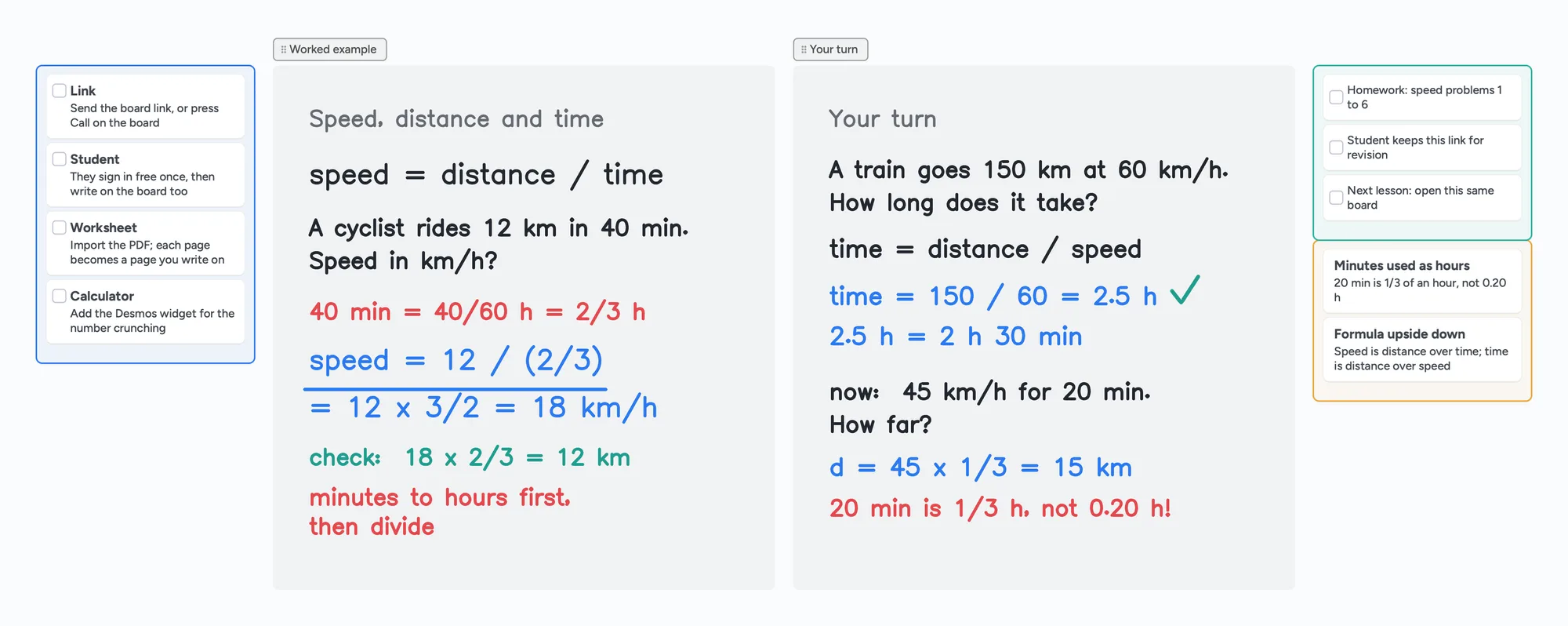
The ready board above is a physics lesson, laid out the way a lesson goes: a checklist before you start, a worked example in ink, your student's turn in blue, homework and the mistakes to redo. Weighing other tutoring rooms? We also compare Lessonspace, Pencil Spaces, Zoom Whiteboard and BitPaper. New to teaching online? Start with how to teach math online.
What Instaboard doesn't do
- No recorded video lessons. There is no recording of any kind.
- No slides. One canvas per board; use sections to separate steps.
- Students sign in to write. Anyone with the link can view, but writing needs a free account with Google, Apple or email.
- Free calls end at 60 minutes. Pro has no limit, or keep using Zoom or Google Meet next to the board.
- No polling or activity apps. There is a countdown timer widget.
- Equation cards, not a LaTeX editor. A Desmos calculator widget is available for graphs.
- The eraser removes whole strokes. Undo is the quickest way to fix the last thing you wrote.
Start from the ready board
It opens in your browser in a few seconds, with nothing to install. Sign in for free when you want to save it and share it.
Questions
Is Explain Everything free?
There is a free plan: 3 projects with one slide each, videos up to 3 minutes, 500 MB of cloud storage and collaboration with one person for up to 15 minutes. Education Advanced is $69 a year, and individual Pro is $7.49 a month billed yearly or $9.99 monthly.
Can my student join an Explain Everything project without an account?
Explain Everything says no account is needed to collaborate, but someone with an account has to be in the project for the guest to join, and the guest can't work on it independently. On Instaboard a student can view without signing in but needs a free account to write.
How long can I collaborate on Explain Everything's free plan?
With one person for up to 15 minutes. Education Advanced raises that to 30 minutes. Individual Pro allows up to 8 people with no time limit.
What happens if I go back from a paid Explain Everything plan to free?
You have to remove projects and videos that are over the free limits first. Explain Everything lets you download projects and videos as a backup.
Can I use Instaboard for the whole lesson, call included?
Yes. Press Call on the board and you both talk on the same link, free for up to an hour. Pro has no limit, and you can keep Zoom or Google Meet open next to the board if you prefer.
Is Instaboard free?
Yes. The free plan includes 5 boards, 150 cards and items across your account (pen strokes, arrows and sections don't count), 3 images and 1 file per board, unlimited collaborators and video calls up to an hour. Pro is $5 a month billed yearly ($59.99 a year), or $7.99 monthly, and the people you invite join free.
Sources
Related
A Lessonspace alternative for tutors who don't want to pay by the hour
Lessonspace has no free plan, only a trial: $9 a month covers 10 hours, then $1.95 an hour. What 10, 20 and 30 hours cost, what Lessonspace does better, and a free board where your student writes too.
A Zoom Whiteboard alternative where your student writes too
Zoom's free whiteboard gives you 3 editable boards, sharing is built around Zoom accounts, and free calls stop at 40 minutes. What tutors use instead, where Zoom is still better, and a ready lesson board.
A Bitpaper alternative for tutors, now that free is join-only
Bitpaper's free plan can only join papers since April 2025, and a lapsed plan turns your papers read-only. What tutors use instead, where Bitpaper is still better, and how to move your lessons over.
How to teach math online: your first lesson, step by step
How to tutor math online as a beginner: what you need, how to run a first lesson on a board your student writes on too, with Zoom, Google Meet or no video app at all, and what to do without a whiteboard.