For writers planning a visual novel or branching story
A visual novel planning board: scenes as cards, choices as arrows
This is for planning a branching story before you build it: a card for each scene, a captioned arrow for each choice, and a list for each chapter. It plans; it doesn't run. There are no variables, conditions or flags, no playtest, and no export to Ren'Py, Twine or Ink. Twine, Ink and Arcweave let you play the story as you write it, and articy:draft is a full production tool. Use the board when you want the whole shape of the story on one screen that a co-writer or artist can open from a link.
Updated
The short answer
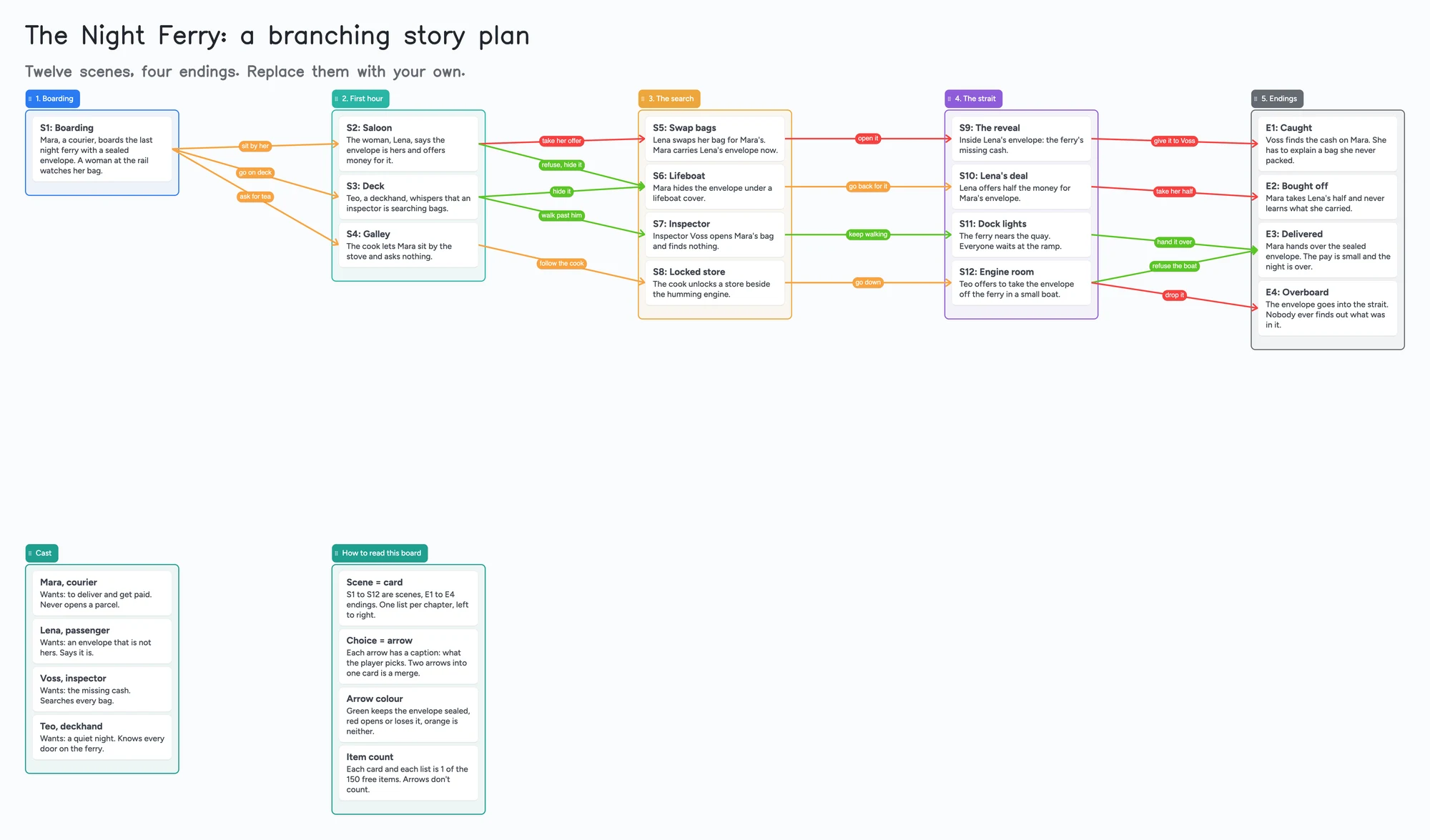
- What it is: one board with a list for each chapter, a card for each scene and an arrow for each choice. The arrow's caption is what the player picks. Two arrows into one card is a merge, where routes come back together.
- What it isn't: no variables, conditions or flags, no playtest, and no export to Ren'Py, Twine or Ink. Twine, Ink, articy:draft and Arcweave are the tools for anything that has to run.
- Arrows: an arrow can join a card in one list to a card in another, takes a caption and its own colour, and stays attached when a card is reordered or a whole list moves. The example uses colour for what happens to the envelope: green keeps it sealed, red opens or loses it.
- Free plan: the example is 31 of your 150 free items (24 cards and 7 lists, our count). Arrows, sections and pen strokes don't count. A long game passes 150 on scenes alone (Pro is $5/mo billed yearly).
What this planning board doesn't do, and where Twine, Ink and Arcweave are better
Read on November 7, 2026 from each tool's own pages. Twine (twinery.org) is open source and free for any use, version 2.12.1 released October 6, 2026; it needs no code for a simple story, offers variables, conditional logic and CSS or JavaScript for more, and publishes to HTML. Ink (inklestudios.com/ink) is a free, MIT-licensed scripting language, and its Inky editor for Mac, Windows and Linux plays and tests the story as you write it and exports JSON or a web page.
Arcweave's pricing page lists a Basic plan at $0 with 200 items per project, 3 projects and unlimited members and guests, and Pro at $15 per member per month billed yearly ($18 monthly) with unlimited items. Its own home page describes real-time collaboration with version control, and playtesting inside the app. articy:draft has a free edition for up to 700 objects per project, listed on its site for Windows and macOS. None of these is what this board is: on ours, a scene is a card and nothing checks that your choices lead anywhere.
Where these tools win
If you want to click through the story to see whether it works, use Twine, Inky or Arcweave. If the board will have hundreds of scenes, variables and a team, look at articy:draft or Arcweave. Plan on this board first if you'd rather argue about the shape of the story with someone before building any of it.
How to plan a visual novel on the board
- Write the endings first. The example has four, E1 to E4, in the last list. Everything else exists to reach one of them.
- One list per chapter. Read left to right. Lists reorder on their own, and a card can be dragged from one list into another when a scene belongs in a different chapter.
- One card per scene. Start the title with a number (S1, S2) so you can talk about it: "S6 should come before S5." Put one line of what happens in the card.
- Draw each choice as an arrow and caption it. Select a card, draw an arrow to the scene it leads to, then type what the player picks ("take her offer"). Colour the arrows that matter, such as the ones that lose the thing you're protecting.
- Merge routes on purpose. Two arrows into one card (S3 and S2 both lead to S6 in the example) means different choices land in the same scene. That keeps the number of scenes you have to write down.
- Keep a Cast list and a how-to-read list on the same board. The example has both underneath the chapters, so a new helper opens the link and understands it without a call.
- Share it. In the share menu set Share to "Anyone with the link can edit". A co-writer or artist signs in free and writes live, and you each see the other's changes within seconds. The 4-digit join code expires after 2 hours of inactivity.
Why branching stories get big, and how to keep the plan small
The VNDev wiki's page on branching describes the basic shapes: routes, simple, early and late branching, and split and merge. It also names the main problem, a combinatorial explosion: four choices that each lead to two branches add up to 16 routes, and five choices to 32. Its advice is about scope, and the same idea works on a board. If every choice splits the story for good, the board gets unreadable quickly. If routes come back together, you write fewer scenes.
Our reading: the board shows the problem early because the arrows are visible. If you can't see the end of an arrow without scrolling, the story is probably wider than you can finish. The example has 17 arrows for 16 cards on purpose, so every choice is on one screen.
How other developers plan a branching story
These are single posts, not surveys. In a 2023 r/gamedev thread (83 votes, 43 comments), someone planning a branching story said Milanote felt "somewhat limited" and asked what to use. The top answer was Twine, and others named articy, Obsidian, Freeplane, Notion, Miro, Ink, Arcweave and Plottr. A 2023 r/RenPy thread had Miro, Obsidian Canvas, sticky notes, and MindMeister with Trello, and one reply advised writing the "golden path" first. A 2020 r/vndevs thread, from someone making a visual novel with friends, got Twine, Google Docs, paper and yarn, Causality and articy.
What these have in common is that people plan on whatever lets them see the story as a map, then move to a tool that can run it. The board is a map to argue over, not the place the story lives.
Planning board vs Twine vs Ink vs Arcweave vs articy:draft
| Tool | Cost (read Nov 7, 2026) | Good at | Not what you get |
|---|---|---|---|
| Instaboard board | Free: 5 boards, 150 items. Pro $5/mo billed yearly | The whole story on one screen; captioned, coloured arrows; a co-writer on the same link after a free sign-in | Variables, conditions, playtest, export to a game tool |
| Twine | Free, open source | Runs the story; variables and logic; publishes HTML | A map you can lay out freely with a partner |
| Ink and Inky | Free, MIT-licensed | A script you can play and test as you write; JSON or web export | A visual map; you write script, not cards |
| Arcweave | Basic $0 (200 items per project, 3 projects); Pro $15 per member per month billed yearly | Collaboration, version control, play mode, engine export | Unlimited items on the free plan |
| articy:draft | Free edition up to 700 objects; paid prices not read | Production-scale flow, variables, game engine export | A quick shared sketch |
Swipe the table sideways to see every column.
From each tool's own pages, read November 7, 2026. Paid articy prices were not read, so none are quoted.
Limits of the free plan for a branching story
- Items. Each card and each list is 1 of your 150 free items, across all your boards. The example is 24 cards and 7 lists, 31 in all. Arrows, sections and pen strokes don't count.
- A real game passes 150. Our arithmetic: with one list per chapter, a game of about 140 scenes reaches 150 before you add a cast list. That is where the free plan runs out; Pro is $5 a month billed yearly.
- Boards. The free plan includes 5 boards. A card that opens its own board uses one of them, so the example keeps everything on one board.
- Photos. 3 images per board. The example has none; a link card with a picture preview takes one of the 3 photo slots.
- Writing needs a free sign-in. A partner who joins by link or code can add cards and arrows, and the board counts as one of their 5.
- Arrows stay on the board. There's no way to check that every choice leads somewhere, and no script view; you check by eye.
Start from the ready board
It opens in your browser in a few seconds, with nothing to install. Sign in for free when you want to save it and share it.
Questions
Is there a free visual novel planning template?
Yes. Open the board, replace the example story with yours and turn on "Anyone with the link can edit" if you want help. It's a board of cards and arrows, not a script template; for something you can play, Twine, Ink and Arcweave have free options.
Can I show a branching story map with it?
Yes. Put each scene on a card, draw an arrow for each choice and caption it. Cards in different lists can be joined, and the arrow stays attached when you move a card or a whole list. It doesn't check the logic.
Is it a replacement for Twine or Ren'Py?
No. It doesn't run the story, track variables or export to either. Use it to plan the shape, then build in a tool made to run it.
Can my artist or co-writer work on it with me?
A person who opens the link and signs in free can write on it live; you each see the other's changes within seconds. The board counts as one of their 5 free boards, and the cards they add count toward their own 150 items.
How many scenes fit on the free plan?
Each scene card and each chapter list is one item of the 150. That's our arithmetic: about 140 scenes plus their chapter lists. Arrows are free.
Sources
- Twine: twinery.org (version 2.12.1, October 6, 2026; read November 7, 2026)
- Ink: inklestudios.com/ink (read November 7, 2026)
- Arcweave: pricing (read November 7, 2026)
- articy:draft: free edition (read November 7, 2026)
- articy:draft: home page, Windows and macOS (read November 7, 2026)
- Arcweave: home page (read November 7, 2026)
- VNDev wiki: Branching (read November 7, 2026)
- r/gamedev: planning a branching story (January 2023, replies are single accounts)
- r/RenPy: planning tools (December 2023, replies are single accounts)
- r/vndevs: planning routes with friends (June 2020, replies are single accounts)
Related
Character relationship map: a filled template two people can edit
A filled character relationship map to copy: factions, a card per character and captioned arrows for who wants what. Edit it together with a co-writer. Free plan limits stated.
Outline a novel or screenplay with index cards, on a board you can share
Outline a novel or screenplay on digital index cards: one list per act, 40 short cards, subplot arrows, a co-writer on the same board. Free to start; TV pilot too.
A mystery novel outline board for suspects, clues and red herrings
Outline a mystery novel on one board: a list per suspect, clues, red herrings and reveal order. A free ready board, and where Plottr and Sheets do more.