For a small contractor, remodeler or handyman who wants to see every job at a glance
Contractor job tracker template: every job on one board, from the quote to done
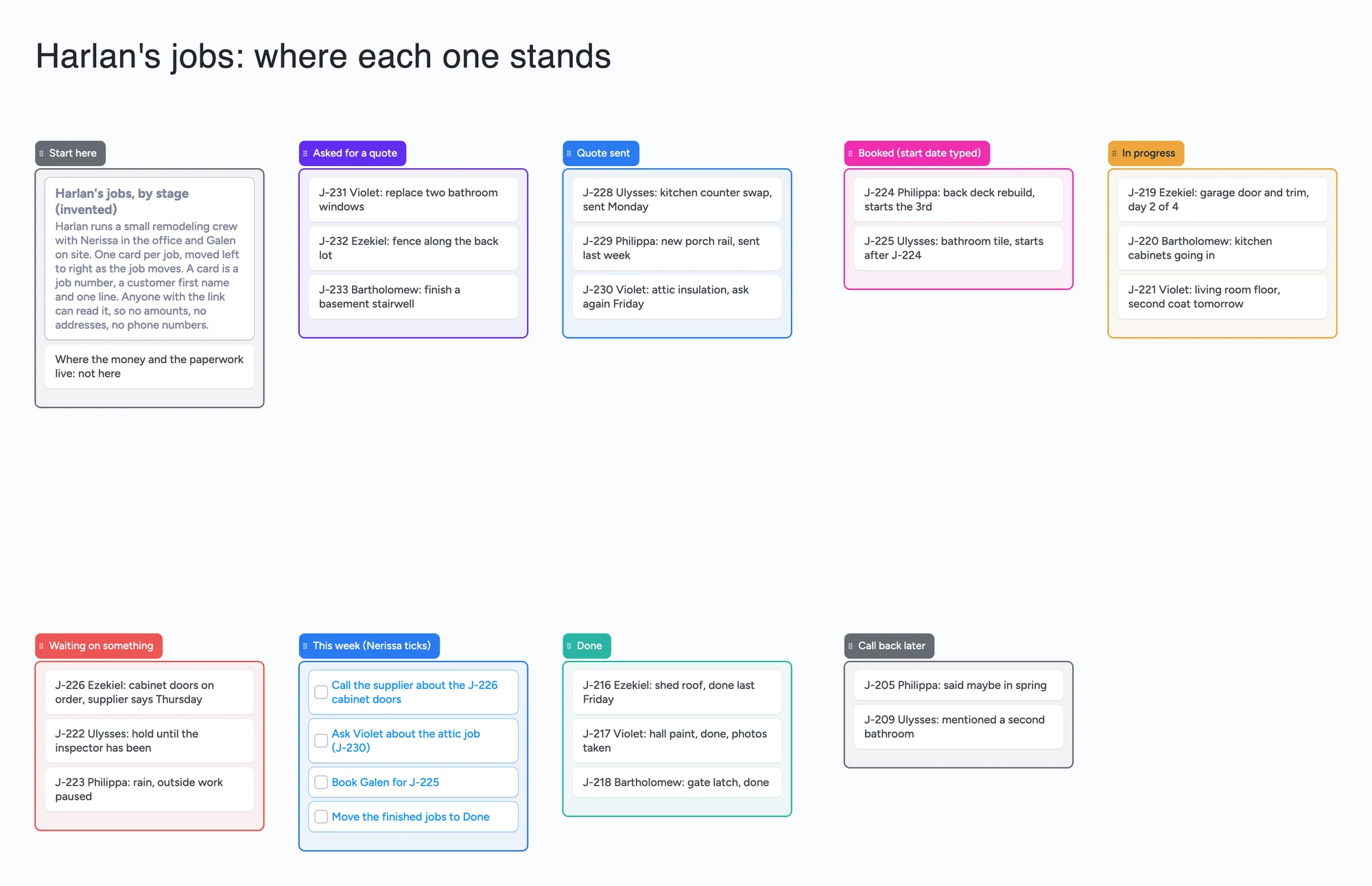
We make Instaboard, an online board. This is a contractor job tracker laid out as a shared board of stage lists and filled in for one invented crew: Harlan, who runs a small remodeling business, Nerissa, who answers the phone and books the work, and Galen, who is on site. It has nine lists: Start here, Asked for a quote, Quote sent, Booked (start date typed), In progress, Waiting on something, This week (Nerissa ticks), Done and Call back later. Each job is one card with a job number, a customer's first name and one line, and it moves one list to the right as the job moves. It is not an estimating tool or an invoicing tool. It has no estimates, invoices, amounts, sums, reminders or customer contact data, and the box headed Read this first right below says what never goes on a board that anyone with the link can read. If you want money, scheduling or signatures, the table below names tools that do them.
Opens in your browser. Anyone can view; a free sign-in lets you edit.
Updated
Read this first: what this board holds, and what it never will
- What it holds: one card per job, in the list that says where the job stands. A card is a job number, a first name and one line. A short list for this week and a list of people to call back sit beside them.
- What it doesn't hold, by design: no estimates, invoices, amounts, sums or profit figures, no reminders or due-date alerts, and no customer contact data: no phone numbers, no emails, no street addresses. Anyone who has the link can read every card, so those stay in your invoicing tool or your own phone.
- What it isn't: not job costing, not scheduling software, no signatures on site, no photo filing. A tick records no name and no time, and anyone with edit access can un-tick it.
- Free plan: the example is 35 of your 150 free items (25 cards, 9 lists and 1 title text box, our count). Arrows and pen strokes don't count. Writing needs a free sign-in, and a reader can open the link signed out.
What small contractors say they use
Three Reddit threads, read in an archived copy November 27, 2026, one in r/smallbusiness, one in r/handyman and one in r/ContractorUK. Each line is one person's view, not a survey.
- A spreadsheet. In r/smallbusiness, u/Greatoutdoors1985 answered "Excel" and said they run about 100 projects a year, one spreadsheet per project plus a master sheet for the active ones. In r/handyman, u/glassWizard60 answered Google Sheets, Docs, Calendar "and an old fashioned paper notebook"; u/Chubbs2005 keeps a paper notebook and planner and photographs it now and then.
- An app for the money side. In r/handyman, replies name Wave and Found (both free versions), Joist, Jobber and Tradify for estimates, invoices and scheduling. In r/ContractorUK, replies name FreeAgent, QuickBooks and Xero for invoices and accounts, and in a reply to the original poster, one commenter says QuickBooks is for invoices and accounts, not for scheduling work.
- One honest split. In r/smallbusiness, u/AutomaticBird9144 says it comes down to field documentation versus accounting, and that almost nothing does both well at a small price. u/Wrong_Election189 says a spreadsheet handles projects, schedules, materials and invoices, but photos and notes are the part that doesn't survive, because months later the question is who did a job and whether they were paid, not what is in row 42. That person says they build something in the photos-and-notes half.
Notion, ClickUp and Basecamp each get a passing mention in these threads, and none of the three is about a shared board of stage lists. This page is a take on the one-line answer to "where does each job stand?". It does not replace the invoicing tool or the notebook.
What to keep off a board anyone with the link can read
- Customer contact data. No phone numbers, emails or street addresses. A first name and a job number are enough for the crew to know which job it is.
- Money. No quotes, amounts, deposits, payments owed or profit. Those belong in your invoicing tool, and sums are one of the things this board can't do.
- Photos of customers' homes. The free plan allows 3 pictures per board, and a photo of a kitchen can show a family's home. The example has none.
- Passwords, gate codes and alarm codes. Never on a link-shared board.
New boards start with "Anyone who joins can view". Invite-only boards are a Pro feature. If your crew can't work without those details on the board, a private app is the right tool and this page isn't for you.
The stages, left to right
Harlan's lists are in the order a job lives. A job is one card and moves one list to the right, never copied into two lists. Everything in the example is invented.
- Start here (2 cards). A card about Harlan's crew and how the stages work, and a card that names the paperwork this board never holds.
- Asked for a quote (3 cards). A job number, a first name and what the customer wants, in one line.
- Quote sent (3 cards). The day the quote went out, typed on the card, and when to ask again.
- Booked (start date typed, 2 cards). The start date typed on the card, and a job that waits behind another job.
- In progress (3 cards). Where the job is: day 2 of 4, cabinets going in, second coat tomorrow.
- Waiting on something (3 cards). A job moves here when it is stuck on a supplier, an inspector or the weather. The card says what it waits for, and the job moves back when the wait ends.
- This week (Nerissa ticks, 4 cards, tick boxes). Nerissa's short list: the calls and bookings that move jobs along. Three are calls or bookings with a job number or first name; the fourth is a housekeeping card.
- Done (3 cards). Finished jobs, kept for a while so the crew can see what went out.
- Call back later (2 cards). People who said maybe in spring. A card here is a note to ask, not a promise to remind.
The board has no arrows; where a card sits tells you where the job stands.
One job, from the first call to done
- Add a card to Asked for a quote. Type a job number, a first name and one line. Nerissa does this on the phone.
- Move it to Quote sent when the quote goes out. Type the day on the card, and in This week add a tick card to ask again.
- Move it to Booked when the customer says yes. Type the start date.
- Move it to In progress on the first day. Galen edits the one line each day.
- If it gets stuck, move its card to Waiting on something and type what it waits for. Move it back when the wait ends.
- Move it to Done at the end. Clear Done each month so the board stays short.
Where a spreadsheet or a job app does it better
Read on November 27, 2026 from each page. Not affiliated with any of them.
| Option | What its own page says | Better than this board for | Not what you get |
|---|---|---|---|
| Spreadsheet (Excel or Google Sheets) | Smartsheet's Excel construction templates page (updated May 28, 2025) says it compiled Excel templates to help you plan, track and manage every phase of a build. u/Greatoutdoors1985's own spreadsheets are one Reddit user's setup | Sums, budgets, a row per cost, sorting | A card per job you move with a finger |
| Jobber | Pricing page: Core is listed at $21/mo for 12 months, then $29/mo, billed annually (list $49/mo); users can be added for $29/mo each; the offer ends November 30. Core lists online scheduling, quotes, invoices and online payments | Quotes, invoices, payments, client reminders and scheduling | A plan with no monthly fee (the pricing page lists a free trial and no free plan, read November 27, 2026) |
| Trello Free | Pricing page: free for up to 10 collaborators per Workspace, unlimited cards, up to 10 boards per Workspace, assignee and due dates, iOS and Android apps | More boards, assignees, due dates and a mobile app | Trello has more plan tiers than are compared here |
| Instaboard board | Free: 5 boards, 150 items, 3 pictures per board. Calls run up to 60 minutes per call, with a warning 10 minutes before the end; calls need a free sign-in; no recording; Pro has no limit | A stage-by-stage picture of every job in one link | Money, signatures, scheduling, reminders |
Swipe the table sideways to see every column.
From each page, read November 27, 2026. The Reddit lines are single replies. Not affiliated with any of them.
Where these win
If you need to bill, take payments or schedule a crew, use an app that does it. If one spreadsheet per job works for you, keep it. Use this board for one view: where each job stands, in one link the whole crew can read.
Set it up for your own jobs
- Open the board and replace the example. Swap Harlan's crew and jobs for yours. Delete cards you don't need; each is 1 of your 150 items.
- Keep one job in one list. A job is one card and sits in exactly one list at a time, so nothing is counted twice.
- Take private details off. Read every card as if a stranger had the link. No amounts, no numbers, no addresses.
- Share it. In Share, new boards start as "Anyone who joins can view". Set it to "Anyone who joins can edit" so Nerissa and Galen can move cards; they sign in once, free. Open the link signed out to check a reader sees everything.
- Copy it only for a second crew. A copy takes 1 of your 5 free boards and keeps its ticks, so un-tick each box first.
Limits of the free plan for a job tracker
- Items. Each card, list and text box is 1 of your 150 free items, across all your boards. The example is 25 cards, 9 lists and 1 title text box, 35 in all. The 9 lists and the title take 10, which leaves 140 for job cards. Arrows and pen strokes don't count.
- Jobs add up. Our arithmetic: at the 100 jobs a year u/Greatoutdoors1985 describes, one card per job would fill 140 cards in about 17 months if nothing were ever deleted, so clear Done each month. Pro removes the item limit ($5 a month billed yearly, $59.99 a year, or $7.99 monthly).
- Copies add up. Four copies of the example are 140 items and a fifth passes 150 (175).
- Boards. The free plan includes 5 boards, and a copy takes 1 of them.
- Photos. 3 images per board. The example has none.
- Not private by default. New boards start with "Anyone who joins can view". Anyone with the link can read every card.
- No reminders or due-date alerts. A card in Call back later is a note, and the board doesn't tell anyone to call.
- No record of who ticked a box. A tick shows a name nowhere, and anyone with edit access can un-tick it.
- Writing needs a free sign-in. A reader can open the link signed out and can't change anything.
Start from the ready board
It opens in your browser in a few seconds, with nothing to install. Sign in for free when you want to save it and share it.
Questions
Is there a free contractor job tracker template I can share by link?
Yes. Open the board, swap Harlan's invented crew and jobs for yours and send the link. It tracks where each job stands, not what it costs.
Can I put quotes, invoices or amounts on it?
No. The board has no estimates, invoices, amounts or sums, and anyone with the link can read every card. Keep money in your invoicing tool.
Can I put my customers' phone numbers or addresses on it?
No. Use a job number and a first name. Contact details and addresses stay in your phone or your invoicing tool.
Does it remind me to call a customer back?
No. It has no reminders or due-date alerts. A card in Call back later is a note for you to look at.
Can I see who ticked a box?
No. A tick records no name and no time. Everyone with edit access sees it live, and anyone with edit access can un-tick it.
How many jobs fit on the free plan?
Each card, list and text box is one of the 150 items across all your boards. The example uses 35, which leaves 140 for job cards (our arithmetic). Pro removes the item limit.
Sources
- Reddit r/smallbusiness 1vwc8ad: What app do you use to keep track of construction projects? (read in an archived copy November 27, 2026)
- Reddit r/handyman 1mdun57: What free software do you use to keep track of jobs and clients? (read in an archived copy November 27, 2026)
- Reddit r/ContractorUK 1o2vz9f: How do you keep track of jobs, clients, invoices etc? (read in an archived copy November 27, 2026)
- Smartsheet: Excel Construction Project Management Templates (updated May 28, 2025; read November 27, 2026)
- Jobber pricing (read November 27, 2026; no date printed)
- Trello pricing (read November 27, 2026; no date printed)