For owners and staff of a small shop with two or three people on the floor
A retail store opening and closing checklist for a small shop: one shared board for the day, the close and the hand-off
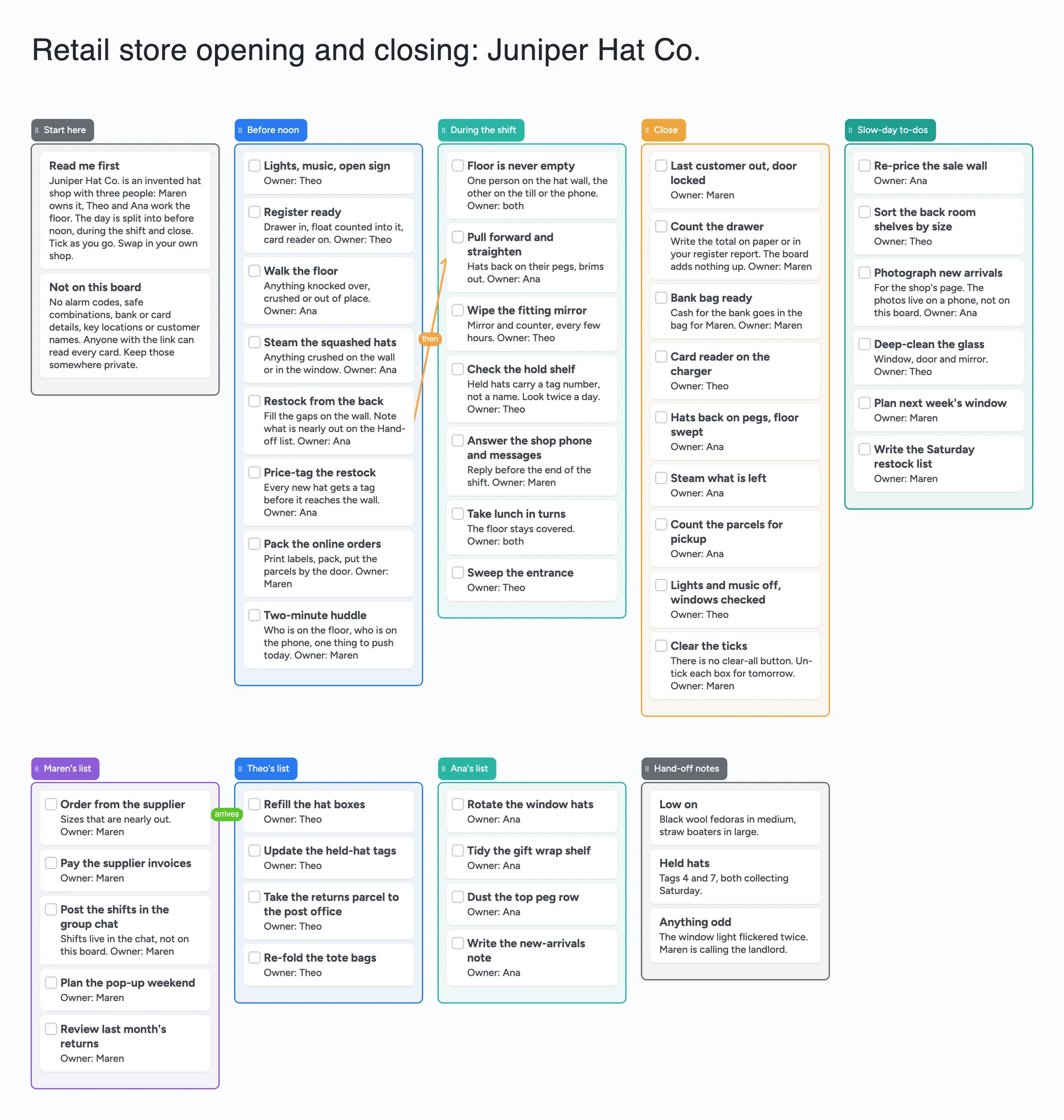
We make Instaboard, an online board. This is a retail store opening and closing checklist laid out as a shared board and filled in for one invented shop: Juniper Hat Co., a hat shop owned by Maren, with Theo and Ana on the floor. The day is cut into three time blocks (Before noon, During the shift, Close), each a list with tick boxes and a first name on every job, plus a Slow-day to-dos list, one list per person and a Hand-off notes list for the next shift. A printed list on the back-room door does the same job for one person on a quiet shop floor, and a POS vendor's checklist covers far more tasks than this one. The board earns its place when two or three people share the day and each needs to see what is done. It sends no reminders, schedules no shifts, adds up no cash and doesn't record who ticked what or when.
Opens in your browser. Anyone can view; a free sign-in lets you edit.
Updated
Read this first: what this board does, and what a POS vendor's checklist does better
- A printed list is enough for one person. If you open and close the shop alone, tape a list to the back-room door. A shared board helps when two or three people split the day and each needs to see what is done and what is left.
- What the board is: the day in three time blocks (Before noon, During the shift, Close), a Slow-day to-dos list, one list for each person, and a Hand-off notes list that holds what the next shift needs to know. Each job ends with an owner's first name. The example is invented.
- What it isn't: no reminders or alerts, no shift schedule, no cash counts or sales sums, no stock levels, no photos of the shop, and no record of who ticked a box or when. Anyone you give edit access can un-tick anything and nothing records it. There is no clear-all button: you un-tick each box for the next day. It isn't a safety, security or compliance log.
- Free plan: the example is 58 of your 150 free items (48 cards, 9 lists and 1 title text box, our count). Arrows and pen strokes don't count. Writing needs a free sign-in. Pro removes the item limit.
When a printed list or a POS checklist is enough, and when a shared board helps
Lightspeed, a retail point-of-sale company, publishes "Retail Store Daily Checklist: Opening, Closing & More" (dated 2026-10-30 on its page; read November 24, 2026). It splits a retail day into an opening, a mid-day and a closing checklist, and its sample lists run from a perimeter check, cleaning and lights to launching the POS, setting cash floats, merchandising and a pre-shift staff meeting, then at close reconciling cash drawers, running final reports, securing the cash and setting the alarm. The page also promotes Lightspeed's own point-of-sale software. As a list of what a shop day contains, it is more complete than this board, and a manager can lift lines from it.
- Use paper if you open and close alone, or the same two people always do the same jobs. Paper needs no sign-in and no battery.
- Use a checklist app if you need a record: who completed a checklist, when, and a report afterwards (Mitti, below, says its digital checklists produce reports from completed checklists).
- Use a board if two or three people split the day and the question is "has the hat wall been restocked yet?" Everyone with the link sees the same ticks live, once Share is set to "Anyone who joins can edit" and they sign in free.
On the board, changes you make with no signal are kept and sync when you're back online. Open it before you leave home, so it is already loaded.
Why the day is cut by time, not by type of task
Most retail checklists group tasks by type: security, housekeeping, electronics, cash, merchandising. In a shop with three people that is a long list to scroll in the middle of a busy morning. Juniper Hat Co. cuts the day by time instead, so each list answers one question: what has to be true before noon, what keeps going during the shift, and what has to happen before the door is locked. A fourth list, Slow-day to-dos, holds the jobs that only get done when the shop is quiet.
- Before noon (8 cards). Lights, music and the open sign; the register ready with the float counted into it; a walk of the floor; steaming crushed hats; restocking from the back and price-tagging the restock; packing the online orders; and a two-minute huddle.
- During the shift (7 cards). The floor is never empty, pulling hats forward and straightening them, wiping the fitting mirror, checking the hold shelf, answering the shop phone and messages, taking lunch in turns, sweeping the entrance.
- Close (9 cards). Last customer out and the door locked, counting the drawer, the bank bag, the card reader on its charger, hats back on pegs, steaming what is left, counting the parcels for pickup, lights and music off, and "Clear the ticks".
- Slow-day to-dos (6 cards). Re-pricing the sale wall, sorting the back room by size, photographing new arrivals on a phone, deep-cleaning the glass, planning next week's window and writing the Saturday restock list.
A hat shop has no fitting rooms to sweep and no alarm code on its cards. A clothing or gift shop swaps in its own jobs. The block structure is the part to keep.
A list for each person, and a hand-off list the next shift reads first
Below the time blocks sit three lists with a person's name: Maren's list (ordering from the supplier, paying invoices, the pop-up weekend, last month's returns), Theo's list (refilling hat boxes, held-hat tags, the returns parcel, re-folding totes) and Ana's list (rotating the window hats, the gift-wrap shelf, dusting the top peg row, the new-arrivals note). These are the jobs with no time of day, so they don't belong in a block.
The last list, Hand-off notes, has three cards: what is low (black wool fedoras in medium, straw boaters in large), which hats are on hold (by tag number: tags 4 and 7), and anything odd (a window light that flickered twice). The closer writes it before leaving and the opener reads it first. Two arrows tie the board together: restocking from the back leads into pulling hats forward, and ordering from the supplier leads into refilling the hat boxes.
- Hold shelf by tag number. Held hats carry a tag number, not a customer's name. Anyone with the link can read every card, so no customer names go on the board.
- Count the drawer on paper. The "Count the drawer" card says to write the total on paper or in the register report. The board adds nothing up.
- Shifts stay in the group chat. Maren's list has a card "Post the shifts in the group chat" because shifts live there, not here (see the next section).
In one thread, the ask was a schedule, not a checklist
One thread in r/smallbusiness shows the gap, read November 24, 2026 ("Best free scheduling app for employees - what actually works long-term?", u/yangwenliebert, February 25, 2026; in the comments we read, a sample of a thread with over 100; every reply is one account's view). The poster runs a small retail shop, uses group chats and printed sheets, says people miss shifts or forget when they are on, has a "very tight budget" and 8-10 people, and wants to set availability and let employees see their hours on their phones. u/rufenputsen answers that they use Homebase for scheduling, clocks, shift swaps and reminders. u/grayfilet uses Connecteam's free version for ten or fewer users and says adding a few test employees counted toward the limit and moved them to a paid plan, which they say is $50 a month. u/alethophobia would pay a little rather than use a free tool, naming Timetastic and Agendrix.
None of the comments we read asks for a checklist board. The need there is shift times, availability and reminders, and this board does none of them. Use a scheduling app for the rota, and use the board for what happens during the shift.
How to set it up with your staff
- Open the board and replace the example. Swap Maren, Theo and Ana for your people and the hat jobs for yours. Delete cards you don't need; each is 1 of your 150 items.
- Keep codes and customer names off it. Alarm codes, safe combinations, bank and card details, key locations and customer names stay somewhere private. The "Not on this board" card says so.
- Give every job a first name. Typed text, not a login: it tells your staff whose job it is, nothing more.
- Share it. In Share, set the board to "Anyone who joins can view" or "Anyone who joins can edit" (new boards start view-only). Staff sign in once, free, to tick. Someone who only needs to read can open the link signed out and can't change anything.
- Tick together. Everyone with edit access sees a tick live. At close, write the Hand-off notes, then un-tick each box for tomorrow. A copy of the board keeps its ticks, so clear a copy too.
A copy of the board takes 1 of your 5 free boards, and a staff member who joins by link counts it as one of theirs. The 4-digit join code expires after 2 hours of inactivity.
What this board doesn't do, and where other tools do it better
Read on November 24, 2026 from each tool's own pages.
| Tool | What its own page says (November 24, 2026) | Better than this board for | Not what you get |
|---|---|---|---|
| Instaboard board | Free: 5 boards, 150 items, 3 pictures per board. Pro $5/mo billed yearly | Two or three people ticking one live day list with a hand-off list beside it | Reminders, shift scheduling, cash counts, stock levels, who/when ticked |
| Lightspeed blog checklist | "Retail Store Daily Checklist: Opening, Closing & More", dated 2026-10-30 on its page; opening, mid-day and closing lists; promotes its POS | A long list of retail tasks to pick from | A shared board you tick together |
| Mitti (SafetyCulture) | "Free Retail Store Opening Checklist", article dated 20 Jul 2026; says its digital checklists are "Free to use for up to 10 users" and produce reports from completed checklists | Records and reports of completed checklists | A card layout with a list for each person |
| Connecteam | Pricing page: Small Business Plan "entirely free for up to 10 users"; its Operations hub (Basic tier) lists basic scheduling, including open shifts, and "Unlimited checklists, forms, and tasks" | Shifts, a time clock and assigned tasks in one app | A board you lay out freely |
| Homebase | Pricing page: Basic $0 per location per month for 1 location, up to 10 employees (basic scheduling, basic time tracking); Task Manager add-on $13/month per location, "Build and assign task lists" and track completion | Scheduling and shift swaps, with assigned tasks as an add-on | A free-layout board |
| Trello | Pricing page: Free is free for up to 10 collaborators per Workspace, unlimited cards, up to 10 boards, assignee and due dates; Standard $5 per user a month billed annually lists advanced checklists | Cards with due dates and assignees | Opening in one tap from a link with live ticks and a hand-off list |
Swipe the table sideways to see every column.
From each tool's own pages, read November 24, 2026. Prices change; check the page. Not affiliated with any of them.
Where these win
If you need a record of who completed what, use a checklist app. If you need shifts and reminders, use a scheduling app. If you open and close alone, print a list. Use this board when two or three people split the day and each needs to see what is done and what the last shift left for them.
Not a safety or compliance log
Mitti's article says its checklist helps businesses with safety checks such as slip, trip and fall prevention, clear exits and fire safety, and that it keeps a record of completed checklists. This board does not. It carries no safety, fire, security or legal items, and a tick records no name and no time. If your shop needs a record for an inspector, an insurer or a landlord, use a tool that keeps one. Cards like "Walk the floor" are a reminder for your staff, not evidence that a check happened.
Limits of the free plan for a shop board
- Items. Each card, list and text box is 1 of your 150 free items, across all your boards. The example is 48 cards, 9 lists and 1 title text box, 58 in all. Arrows and pen strokes don't count.
- Hand-off notes grow. Our arithmetic: if the closer adds one hand-off card for each of 6 trading days and never deletes any, the board gains 6 items a week and passes 150 in week 16 (58 + 96 = 154). Delete the week's cards on Monday.
- A second shop doubles it. A copy for a second shop is another 58 items, 116 for two, and a third passes 150. Pro removes the item limit ($5 a month billed yearly, $59.99 a year, or $7.99 monthly).
- Boards. The free plan includes 5 boards, and a copy takes 1 of them.
- Photos. 3 images per board. The example has none.
- No reminders, no due-date alerts, no counts or sums. "Count the drawer" is text. The board doesn't tell anyone that it is closing time or add up the day's takings.
- No record of who ticked. A first name is typed text. Anyone with edit access can un-tick any box and nothing records who did.
- Writing needs a free sign-in. A staff member who joins by link or code can tick boxes and add cards, and the board counts as one of their 5. A signed-out reader can only look.
Start from the ready board
It opens in your browser in a few seconds, with nothing to install. Sign in for free when you want to save it and share it.
Questions
Is there a retail store opening and closing checklist template?
Yes. Open the board, replace Juniper Hat Co. with your shop and set Share to "Anyone who joins can edit" if your staff need to tick boxes. If you open and close alone, a printed list is just as good and needs no sign-in.
Does it count the cash drawer or run a closing report?
No. It has a card that reminds the closer to count the drawer and write the total on paper or in the register report. The board adds nothing up and holds no sales data.
Is it a safety or security checklist?
No. It holds no fire, safety, security or legal items, and a tick records no name and no time. Keep any record an inspector or insurer needs in a tool that keeps one.
Can it schedule shifts or remind staff?
No. It has no reminders, alerts or schedule. Use a scheduling app for the rota and your phone for reminders. The board only holds what happens during the day.
Can I tell who ticked a box?
No. A tick records no name and no time. Everyone with edit access sees it live, and anyone with edit access can un-tick it. The first name at the end of a card is typed text.
How many cards fit on the free plan?
Each card, list and text box is one of the 150 items across all your boards. The example is 58. Adding one hand-off card for each of 6 trading days and never deleting them passes 150 in week 16 (our arithmetic). Arrows are free.
Sources
- Lightspeed: Retail Store Daily Checklist: Opening, Closing & More (read November 24, 2026; dated 2026-10-30 on its page)
- Mitti: Free Retail Store Opening Checklist (read November 24, 2026; article dated 20 Jul 2026)
- Connecteam: pricing (read November 24, 2026)
- Homebase: pricing (read November 24, 2026)
- Trello: pricing (read November 24, 2026)
- r/smallbusiness: Best free scheduling app for employees (February 25, 2026; replies are single accounts)