For two or three people making a video for a client, with a freelancer or two
A video production planner for a small client job: whose turn it is, round by round
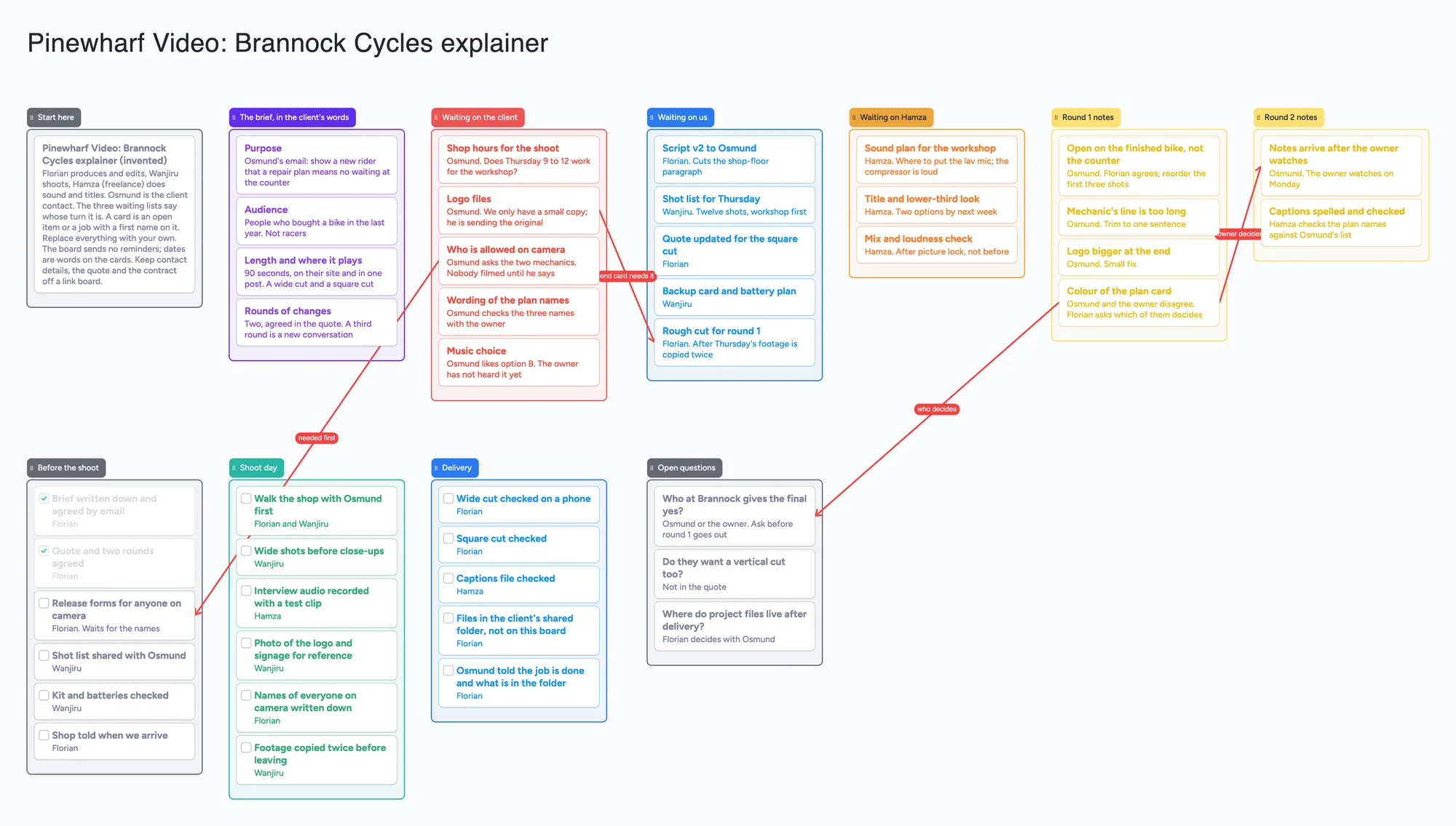
We make Instaboard, an online board. This page is about one kind of job: a client asks two or three of you for a short video, and the question every day is whose turn it is. The board is already filled in for an invented studio, Pinewharf Video, making a 90-second explainer for an invented bike shop, Brannock Cycles. It has the brief in the client's own words, three lists for who is holding things up (the client, us, the sound freelancer), a list of notes for each round of changes, and tick lists for before the shoot, shoot day and delivery. It isn't a review tool (no notes tied to a frame or a time in the video), and it sends no reminder and adds up no quote. Keep footage in a shared folder. Frame.io and similar tools do the review better, and a table below says where.
Opens in your browser. Anyone can view; a free sign-in lets you edit.
Updated
Before you open it
- It tracks whose turn it is, not the video. It isn't a review tool: no notes tied to a frame or a time in the video. Review comments on a cut belong in a review tool; the board holds the decisions and the list of what is still open.
- Keep footage and the client's files in a shared folder. Keep one card here that says where the folder is. The example has no pictures.
- It sends nothing. No reminders, no due-date alerts and no notice when a card moves. Tell the person, or they find out the next time they open it.
- Keep the quote, the contract and anyone's phone number off it. Anyone who has the link can read the board. The example has first names, jobs and the brief only.
- Free plan limits: 5 boards, 150 items across your account and 3 pictures per board. A copy of this board takes 1 of your 5. Pro is $5 a month billed yearly ($59.99 a year), or $7.99 monthly, and removes the item limit and the picture limit.
The job this is for
A producer who also edits, a camera operator and a freelancer for sound and titles, working for one client contact, with a quote that allows two rounds of changes. That is the whole cast. The job runs for a few weeks, nobody shares an office, and most of the delay is waiting: on the client for hours at the shop and a logo file, on the editor for a script, on the freelancer for a sound plan.
It isn't for a crew that runs scripts, schedules and call sheets for a drama; that is a different job, and the table further down says which of our other video boards covers which part. It also isn't for a one-person editor with a pile of short videos, who needs a queue, not a client.
Three lists for whose turn it is
The idea that carries the board is one list for each side that can be holding things up. A card moves into the list of the person who has to act next, and it moves out when they have. In the example:
| List | What goes in it | In the Brannock job |
|---|---|---|
| Start here (grey) | Who is who, what a card means, what stays off the board | One card |
| The brief, in the client's words (purple) | Purpose, audience, length and where it plays, how many rounds the quote allows | 4 cards |
| Waiting on the client (red) | Hours, files, who may be filmed, wording, a choice only they can make | 5 cards |
| Waiting on us (blue) | Our own next steps | 5 cards |
| Waiting on Hamza (orange) | What the sound freelancer owes, and when it is safe for him to start | 3 cards |
| Round 1 notes, Round 2 notes (yellow) | One card per note, with who gave it and who acts on it | 4 and 2 cards |
| Before the shoot, Shoot day, Delivery | Tick lists | 6, 6 and 5 cards, two already ticked |
| Open questions (grey) | Things nobody has decided | 3 cards |
Swipe the table sideways to see every column.
The board's own wording. In the example, dates and times are typed as words on the cards; the board sends no reminders or due-date alerts.
Four red arrows cross lists: the logo file the client owes points at the rough cut that needs it for the end card; the card about who may be on camera points at the release forms we can't send until we have the names; the disagreement over the plan card's colour points at the open question of who gives the final yes; and the same card points at the round 2 note that arrives after the owner has watched.
One round of changes, and setting your own up
Our example of a round, not a rule. The first two steps are the setup, and you can do them before the first round.
- Replace Pinewharf's cards with your job's brief. Copy the client's own words for the purpose, the audience and the length. If they haven't written them, write what you think they said and ask them to correct it.
- Share the link. New boards start view-only; to let the client's contact or the freelancer write, tick "Anyone who joins can edit" in Share. Each person signs in free to write.
- When a cut goes out, add one card per note to the round's list with the name of the person who gave it. Notes sent by email become cards; a note that says two things becomes two cards.
- Move each card to whoever acts next. A note the freelancer owes goes to his list; a note that needs the client to choose goes to the red list.
- Before the next cut goes out, look at the red list. If a card there has been open since round 1, that is probably the delay.
- When the rounds the quote allows are used up, say so on the card in The brief list. A third round is the conversation the Rounds of changes card names.
Nothing tells the client that a card changed. They see it the next time they open the board, so say the important change out loud or in a message too.
Will a job fit in 150 items?
Each card and each list is 1 of your 150 free items across all your boards, and the title text box counts too. Arrows, sections and pen strokes don't. Our arithmetic:
- As built: 11 lists + 44 cards + the title = 56.
- A job with a third list of notes and a card for every shot on the shot list: about 12 more cards and a list, so about 69.
- A second job copied after this one: 56 + 56 = 112. A third passes the limit at 168, and your other boards share the same 150.
So on Free two jobs fit side by side; for a third, delete a finished job's cards or upgrade. Pro removes the item limit. Writing needs a free sign-in, and the board then counts as 1 of that person's 5.
Which of our video boards owns what
We have a few boards for video work, and they are about different jobs. This is how we split them, in our own words:
| Board | What its job is | What it leaves to others |
|---|---|---|
| This one: a small client job | Whose turn it is across client, studio and freelancer, with rounds of changes and a delivery list | Frame-level notes, files, schedules, shot lists |
| Short-film pre-production board | Who owns each pre-production task for a short film, and what a location waits on | The client relationship and rounds of changes |
| Creative brief board | One shared page for a brief and its sign-off | Everything after the brief is signed |
| Shot list board | One card per shot, by scene | Who is waiting on whom |
| Post-production tracker board | Who owns each note and cut on a film | Pre-production and the client |
Swipe the table sideways to see every column.
Our own split of the jobs, in our words.
If you have to pick one for a job like Brannock's, take this one. If the job grows into a short film with its own cast and locations, move to the pre-production board.
What people running small video jobs say
Two r/projectmanagement and r/Filmmakers threads, read November 26, 2026. Each reply is one person's view; this isn't a survey.
- "Best Project Management Tool for a Video Production Company?" (u/daylincooper, r/projectmanagement, posted 2025-02-27 (UTC); Reddit shows 22 comments, an archived copy has 23, 6 removed (17 with text, 2 of them AutoModerator)). The poster and a partner run a video company. They asked for tasks and deadlines, comments, file storage and to "Share boards with clients and freelancers" with limited access, in a tool that stays simple (our paraphrase), and said they had tried Trello and Asana. Replies named Filestage, ClickUp, Wrike, Basecamp, Frame.io, Miro, KROCK and others. u/non_anodized_part wrote that Frame.io is "the best tool for video review", that "almost everyone is using google drive in some form", and that some clients "may prefer just giving you notes in an email". u/gorcbor19 wrote that their team uses Wrike for video projects and was "not really sure what the free version offers". Two accounts named KROCK: u/OneHunt5428 wrote that their team uses krock.io for video projects and that it "lets us manage tasks, share files, and collect feedback all in one place"; u/Tahanchin wrote "KROCK has all these features" and linked a video. KROCK also has a row in the table below; that row is from its own pricing page, not a pick of ours.
- "Is there a comprehensive list of film production software somewhere?" (u/SREStudios, r/Filmmakers, posted 2024-10-28 (UTC); Reddit shows 17 comments, an archived copy has 18, 4 removed (14 with text, one reply posted twice)). The poster wanted smaller tools, because most lists "only list the same 2-3 major competitors". Several replies came from people who make a tool, for example u/WeisDev: "I have built a tool"; u/Sad-Association-188: "This is my new software". None of the replies named a plain shared board.
Two threads. They show that small crews use a mix of a review tool, a folder and a task tool, and that clients sometimes just email. The first poster had already tried Trello and Asana and wanted sharing with clients and freelancers. The threads don't tell us whether anyone runs this job on a plain shared board, so we make no claim either way.
What the vendors say, and where each beats a board
Read November 26, 2026, in a browser. The second column follows each page; the last two are our view. We tried none of these tools.
| Tool | On its page | Where it beats a board | What the board adds |
|---|---|---|---|
| Frame.io | Pricing page, monthly view: Free is $0 with up to 2 members, 2 projects and 2 GB; Pro is $15 per member per month and Team $25 per member per month. Its plan table lists frame-accurate and range-based comments; an Annually toggle shows "SAVE 13%" | Review of a cut, comments pinned to a frame, share links with passphrases | A free page for the decisions and the list of what is still open; not a review tool |
| KROCK | Pricing page: Free is $0 for 1 user with 2 GB, 1 workspace and 2 projects, unlimited reviewers, media review and a storyboard tool; Pro adds unlimited projects, 4K playback and custom branding | Review of a video, picture or PDF, plus storyboards | Not a review tool; the board holds what comes out of the review |
| Filestage | Pricing page: Free has 1 active project, 5 new files a month, 10 team members and unlimited reviewers; Starter adds due dates and reminders | Proofing and sign-off on files, reminders | Not a proofing tool; no reminders here |
| Airtable's digital video production template | Template page: a table to track equipment, media uploaded with a clearance status, and a calendar view of schedule dates and shoot locations | Equipment, clearance and a dated schedule | Equipment and dates are words on cards here; no equipment table or clearance fields |
| Notion's "Video Production Planner" by Lane25 | Notion's marketplace page: $10 to buy; its description mentions a storyboard template for TV and mobile formats; the creator box links the creator's own Gumroad store (lane25.gumroad.com); the page showed "Last updated 2 years ago" when read November 26, 2026 | A document-style plan in Notion; contents not read by us beyond the description | A page the client can open without a workspace |
| A shared folder and email | u/non_anodized_part's view in the r/projectmanagement thread: Google Drive in some form, a file structure copied for each project, and email notes for clients who want them | Files, raw footage, anything the client already uses | The decisions and the open list on one page |
Swipe the table sideways to see every column.
From the vendors' own pages and the thread as read November 26, 2026. Instaboard isn't affiliated with any of these. Prices on those pages can change.
When to skip the board
- You edit alone and one video at a time. A list in a notes app is enough.
- The client already gives notes inside a review tool they like. Don't copy each note onto a card; keep one card that says where the notes are.
- You need to know who ticked a box, or when. The board doesn't record it, and anyone with edit access can tick or untick any card.
- The job has a quote that has to be added up, a schedule or a call sheet. A spreadsheet or production-management tool does that; we don't.
- Under-18 crew. This page is written for adults; if you are under 18, check with a parent or your school before putting a project on a shared link.
Start from the ready board
It opens in your browser in a few seconds, with nothing to install. Sign in for free when you want to save it and share it.
Questions
Can I put the footage or the client's logo on the board?
Not in the example, and we wouldn't. The free plan allows 3 pictures per board and the board isn't the place for footage, so keep footage and logo files in a shared folder and put one card on the board that says where it is.
Can the client comment on a cut here?
No. The board isn't a review tool: no notes tied to a frame or a time in the video. The client can write a note as a card once they have signed in free, or send it by message for you to turn into a card. A review tool is the better place for notes on the picture.
Will the freelancer be told when I move a card to their list?
No. The board sends no reminders, alerts or notices when a card moves. Tell them yourself; they will see the card the next time they open the board.
Does this replace the quote or the contract?
No. Keep them elsewhere. The example has one card that says how many rounds of changes the quote allows, and nothing else about money. Anyone with the link can read the board.
How do I reset the tick lists for the next job?
There is no reset-all. A copy of the board keeps the ticks, so untick them in the copy, by hand. A tick shows live to everyone with edit access, and nothing records who made it.
How many jobs fit on the free plan?
150 items across your account, where each card and each list is one item. One job as built is 56, so two fit and a third doesn't by our arithmetic. Your other boards share the same 150. Pro removes the item limit.
Sources
- r/projectmanagement: "Best Project Management Tool for a Video Production Company?" by u/daylincooper (posted 2025-02-27 UTC; read November 26, 2026: Reddit shows 22 comments, archived copy has 23, 6 removed)
- r/Filmmakers: "Is there a comprehensive list of film production software somewhere?" by u/SREStudios (posted 2024-10-28 UTC; read November 26, 2026: Reddit shows 17 comments, archived copy has 18, 4 removed)
- Frame.io: Pricing (read November 26, 2026, monthly view; Annually toggle shows SAVE 13%)
- KROCK: Pricing (read November 26, 2026)
- Filestage: Pricing (read November 26, 2026)
- Airtable: Digital video production template (read November 26, 2026; no date shown)
- Notion Marketplace: Video Production Planner by Lane25 (read November 26, 2026; page showed "Last updated 2 years ago" when read; creator links lane25.gumroad.com)