For a small team with a mix of Apple, Windows and Android devices
Miro vs Freeform: check every device first, then pick, with a board to do it
If everyone on your team has an Apple device, Freeform needs no subscription per its App Store listing, and the App Store listing says up to 100 collaborators in the same board. If anyone is on Windows or Android, Apple's pages list no way to open a Freeform board there, while Miro works on those devices within its 3-board free cap. We make Instaboard, and this page gives you a board that checks each person's device before you pick.
Opens in your browser. Anyone can view; a free sign-in lets you edit.
Updated
The short answer
- Freeform's devices: Apple's Support page (published September 14, 2026) says you can open Freeform links on iPhone, iPad, Mac and Apple Vision Pro. It lists no Windows, Android or web option. Everyone you share with must be signed in to an Apple Account, to edit or to view.
- Miro's devices: desktop browsers (Chrome, Edge, Firefox, Opera, Yandex), a 64-bit Windows app, Mac apps, and iOS 16+ and Android 7+ apps. Boards in a mobile browser are view-only (Miro Help, read November 24, 2026).
- The cap: Miro Free keeps the 3 most recently created boards editable. Freeform's App Store listing says "up to 100 collaborators in the same board"; the Apple pages we read list no limit on the number of boards, which is not the same as none.
- Price, our arithmetic: Freeform's App Store listing says creating, editing and real-time collaboration need no subscription. Miro Starter is $8 per member a month billed yearly: 4 people is $8 x 4 x 12 = $384 a year.
- Instaboard Free gives you 5 boards, 150 items across your account and 3 pictures per board. It runs in a browser and has iPhone, iPad and Android apps, but no Windows app. Pro removes the item limit.
Start with who has what, not with the tool
A whiteboard only works as a shared one if each person can open it on the device they own. So the first list on the board is not a feature list. It is the people on your team and the phone or laptop each one uses.
- Write one card per person. Name, device, and what they have to do on the board.
- Check each tool against each card. A tool that fails one card fails the shared job.
- Test with the least-equipped person. Send them a link before anyone builds anything.
What Apple's own pages say about opening a Freeform board
- Devices. "You can open Freeform links on iPhone, iPad, Mac, and Apple Vision Pro" (Apple Support, "If a Freeform link isn't working", published September 14, 2026).
- Software. Shared boards need iOS 16.2, iPadOS 16.2, macOS Ventura 13 or visionOS 1 or later. Shared folders need iOS 27, macOS 27 Golden Gate or visionOS 27 (same page).
- Accounts. On Mac, Apple says everyone you share with must be signed in to their Apple Account to edit or view. You choose between people you invite and link access. On iPhone, Apple adds that to use the collaboration features fully, all participants must be online, signed in to their Apple Account, have Freeform turned on in iCloud and have set up two-factor authentication.
- iCloud. The same Apple page says that if you turn off iCloud for Freeform, collaboration features won't be available. On iPhone it adds that boards are stored only in the owner's iCloud and the participants' iCloud storage isn't affected.
- Size. Freeform's App Store listing says "Brainstorm together with up to 100 collaborators in the same board" (Apple App Store listing, read November 24, 2026).
- Live work. Everyone sees the latest changes when they are online and signed in, and on a shared board you can follow another person's view (Apple Support, iPhone guide).
The pages say nothing about a Windows, Android or web version of Freeform. The iCloud.com section of Apple's iCloud User Guide (read November 24, 2026; the page shows no date) lists apps such as Calendar, Contacts, iCloud Drive, Keynote, Notes, Numbers, Pages, Photos and Reminders, and Freeform is not among them. Not listed is not proof that none exists, so check Apple's page on the day you decide.
Our reading, not Apple's wording: because boards live in the owner's iCloud, the owner's iCloud storage is the space that matters. Apple prints a 100-collaborator limit per board in the App Store listing, and the pages we read print no limit on the number of boards.
What Miro's help pages say about each device
- Desktop browsers. Miro officially supports Chrome, MS Edge, Firefox, Opera and Yandex Browser on desktop, and Chrome, Safari and Samsung Internet on mobile (Miro Help, Supported browsers).
- Mobile browser = view only. Miro's help says boards accessed on mobile browsers are view-only, and points to the mobile app for your assigned privileges.
- Apps. A 64-bit Windows app and Mac apps for Apple silicon and Intel (Desktop app page). The mobile app needs iOS 16 or later, or Android 7 or later (Mobile app page).
- Mobile gaps. Miro lists templates, board export, presentation mode, video chat and voting as not supported on mobile, and visitors have no edit access in the mobile app.
- Offline. Miro's system requirements page says an offline mode is currently not on its radar and points to export options.
- Free cap. Only the 3 most recently created boards in the team stay editable on Free; older ones are view-only (Miro Help, Free plan).
Freeform, Miro Free and Instaboard Free side by side
| Freeform | Miro Free | Instaboard Free | |
|---|---|---|---|
| Devices that open it | iPhone, iPad, Mac, Apple Vision Pro (Apple Support, Sep 14, 2026); no Windows, Android or web option listed | Desktop browsers; Windows and Mac apps; iOS 16+ and Android 7+ apps; mobile browsers view only | A browser; iPhone, iPad and Android apps; no Windows app |
| Account to open | An Apple Account for everyone, to view or edit | A Miro account to edit; visitors view only on Free | Viewing a shared board needs no account; editing needs a free sign-in |
| Editable boards | No board count limit listed on the Apple pages read (as of November 24, 2026); App Store listing: up to 100 collaborators in one board | 3 most recently created in the team; older are view-only | 5 in your own list, all editable; a board you open from someone's link counts as 1 of your 5 |
| Content limit | Not listed on the Apple pages read (as of November 24, 2026); the owner's iCloud storage holds the boards | Not listed on its pricing page (as of November 24, 2026) | 150 items across your account (cards, lists, text boxes and pictures count; pen strokes, arrows and sections don't); 3 pictures and 1 file per board |
| Offline | Apple's pages we read don't describe offline use; they say changes are saved in iCloud and everyone sees the latest version when online and signed in | Offline mode not on Miro's radar (system requirements page) | Changes are kept and sync when you are back online; not offline-first |
| Calls | Not listed on the Apple pages read | Video calls from Starter up | Free calls up to 60 minutes per call, sign-in needed, no recording |
| Paid price | No subscription needed to create, edit or collaborate (App Store listing); Apple Creator Studio is an optional subscription for premium content and AI features | Starter $8 per member a month, billed yearly | Pro $5 a month billed yearly ($59.99 a year), or $7.99 monthly |
Swipe the table sideways to see every column.
Facts from Apple Support pages, the Freeform App Store listing and the Freeform User Guide, plus miro.com/pricing and Miro's help center, read November 24, 2026. "Not listed" means the page doesn't state it, not that the tool lacks it.
When Freeform or Miro is the better choice
- Everyone is on Apple devices and signed in to iCloud. Freeform needs no subscription per its listing, and its listing says up to 100 collaborators per board, with no board count limit listed on the pages read. That beats Miro's 3 editable boards and any paid plan.
- Someone is on Windows. Miro opens in their browser or in the 64-bit Windows app. Freeform has no Windows option on Apple's pages.
- Someone is on Android. Miro has an Android app (Android 7 or later), and Instaboard has one too. Apple lists no Android option for Freeform. A phone browser only views Miro boards.
- You need templates, voting or video on the board. Miro lists these on its plans; they are not on its mobile app. Instaboard has no voting.
- The whole team already lives in iCloud. Folder sharing in Freeform lets one top-level folder share many boards at once, but it needs iOS 27 or macOS 27 (Apple Support).
- You want one board that a mixed team can open in a browser. An Instaboard board opens in a browser on Windows, Mac, iPhone and Android, and in the iPhone, iPad and Android apps; viewing needs no account and editing needs a free sign-in. Instaboard Free doesn't limit how many people can join a board, and it has its own limits (5 boards, 150 items), listed above.
The school fair team's board, list by list
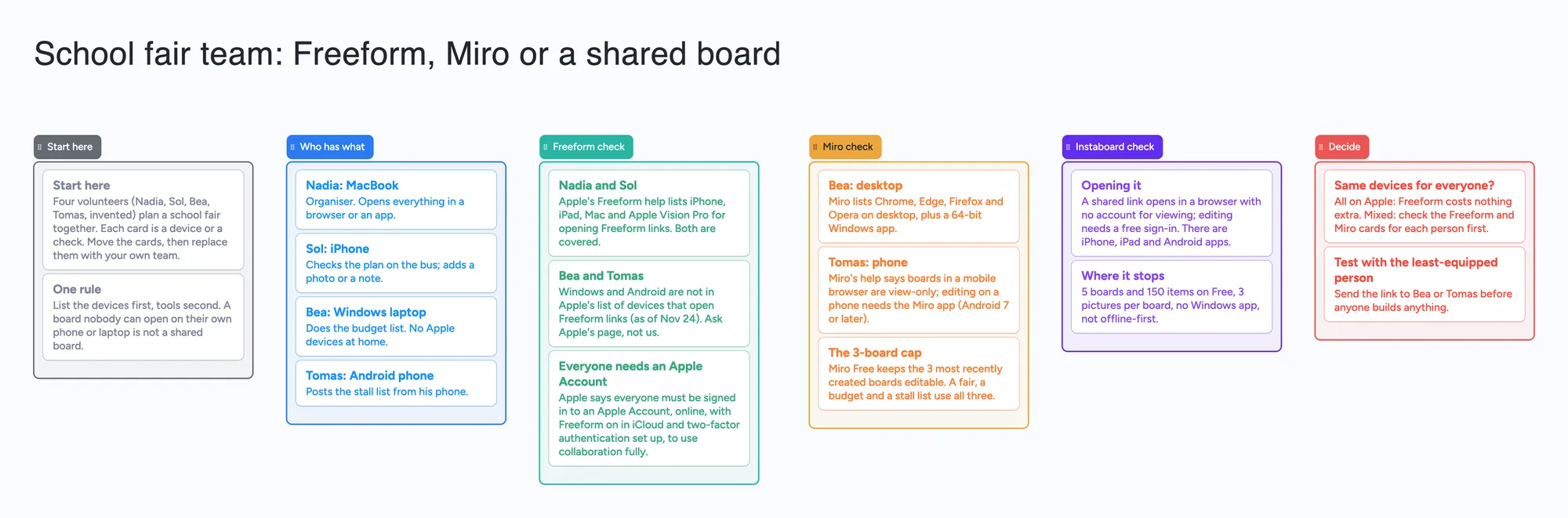
The example is invented. Nadia, Sol, Bea and Tomas plan a school fair. Each card on the board is a person's device or one check, and each list is a question.
| List | What goes in it | In the school fair board, for example |
|---|---|---|
| Start here (grey) | The team and the rule | Four invented volunteers; "List the devices first, tools second" |
| Who has what (blue) | One card per person and device | Nadia: MacBook; Sol: iPhone; Bea: Windows laptop; Tomas: Android phone |
| Freeform check (green) | What Apple's pages say per person | Nadia and Sol are on listed devices; Bea and Tomas are not; everyone needs an Apple Account |
| Miro check (orange) | What Miro's pages say per person | Bea on desktop; Tomas on a phone that only views in a browser; the 3-board cap |
| Instaboard check (purple) | What we do and where we stop | Opens by link; 5 boards and 150 items; no Windows app |
| Decide (red) | The call, with a test | All on Apple versus mixed; test with the least-equipped person |
Swipe the table sideways to see every column.
The board's own wording. Names and devices are made up. A card is a note; it doesn't connect to Freeform or Miro.
The useful move is to fill Who has what first. In this team two of four cards fail the Freeform check before anything else is compared.
Does your team fit in 150 items?
A device check is small. Our arithmetic from the school fair board:
- As built: 6 lists + 16 cards + the title text box = 23.
- A team of 30 people: 30 device cards + 2 start cards + 10 check cards (3 Freeform, 3 Miro, 2 Instaboard, 2 Decide) + 6 lists + the title = 49.
- Room left: 150 minus the 9 fixed items (2 start cards, 6 lists, the title) leaves 141 cards on one board, if it is your only board. With the 10 check cards kept, that is room for 131 people.
If you use Instaboard for other boards too, they share the same 150.
What this board can't do
- Detect devices. It doesn't know what anyone owns or tell you what opens. You type the cards.
- Connect to Apple or Miro. No sync with Freeform or Miro boards.
- Move a board over. There is no Freeform or Miro import. Apple's guide lists Export a board as PDF, and our import takes PDF only: it opens as a page you write on and uses 1 of your 5 boards.
- Remind or count. No reminders, due dates, filters or totals; you read it by eye.
- Keep it private. A board shared by link isn't private; keep names and device details to first names.
Set up your own, in order
- Open the board and replace the four volunteers. Delete their cards as you go.
- Add one card per person in Who has what. Name and device, nothing else.
- Read the pages for each person. Copy only what Apple's and Miro's pages say into the Freeform and Miro lists, with the date you read it.
- Send the link to the least-equipped person. Ask them to open it and write one card.
- Fill Decide. One line: all on Apple, or mixed, then which tool and why.
Start from the ready board
It opens in your browser in a few seconds, with nothing to install. Sign in for free when you want to save it and share it.
Questions
Can someone on Windows open an Apple Freeform board?
Apple's Support page (published September 14, 2026) says you can open Freeform links on iPhone, iPad, Mac and Apple Vision Pro. It lists no Windows, Android or web option. Check Apple's page again before you plan around it.
Is Freeform free?
The Freeform App Store listing shows it as free and says creating, viewing and editing boards, and collaborating in real time, does not require a subscription. Apple Creator Studio is a separate optional subscription for premium content and AI features.
Does everyone need an Apple Account to use a shared Freeform board?
Yes, per Apple's sharing help on Mac: everyone you share with must be signed in to their Apple Account to edit or view the board.
Can I edit a Miro board from a phone on the free plan?
Not in a mobile browser: Miro's help says boards accessed on mobile browsers are view-only, and the mobile app (iOS 16 or later, Android 7 or later) is the way to work with your privileges. Free also keeps only the 3 most recently created boards editable.
Does Miro work offline?
Miro's system requirements page says an offline mode is currently not on its radar and points to its export options instead. Check that page again before you rely on it.
What does Instaboard's free plan give me instead?
Five boards that all stay editable, 150 items across your account and 3 pictures per board. Anyone can view a shared board by link, and writing needs a free sign-in. It runs in a browser and has iPhone, iPad and Android apps, but no Windows app. Pro removes the item limit.
Sources
- Apple Support: If a Freeform link isn't working (devices that open Freeform links, software versions; published September 14, 2026; read November 24, 2026)
- Apple Support: Share a Freeform board or folder on Mac (Apple Account needed to edit or view; read November 24, 2026)
- Apple Support: Collaborate in Freeform boards and folders on iPhone (boards stored in the owner's iCloud; follow along; read November 24, 2026)
- Apple Support: Freeform User Guide for Mac (table of contents, Apple Creator Studio; read November 24, 2026)
- Apple Support: Sign in and use iCloud.com (iCloud User Guide; list of iCloud.com apps; read November 24, 2026; page shows no date)
- Apple App Store: Freeform (listing text on subscriptions and up to 100 collaborators in one board; read November 24, 2026)
- Miro Help: Supported browsers and browser restrictions (desktop and mobile browsers; mobile browsers view-only; read November 24, 2026)
- Miro Help: Desktop app (Windows 64-bit, Mac; read November 24, 2026)
- Miro Help: Mobile app (iOS 16+, Android 7+, features not supported on mobile; read November 24, 2026)
- Miro Help: System requirements (offline mode; read November 24, 2026)
- Miro Help: Free plan (3 most recently created boards editable; read November 24, 2026; page shows no date)
- Miro: pricing (Starter $8 per member a month billed yearly; read November 24, 2026)