For small groups whose ClickUp Free Forever plan hit its limits
Used up ClickUp's 60 uses? Plan a weekend on a shared board
ClickUp's pricing page lists its Free Forever plan with unlimited tasks and unlimited free members, and a help page says some features count "uses": after 60 Custom Field uses you can no longer add values to any Custom Field. For tasks with subtasks, dependencies, docs and time tracking, ClickUp is the better tool. We make Instaboard, a shared board of lists and cards; for a small group planning one weekend event it is another route, filled in below for five makers on an open-studio trail.
Opens in your browser. Anyone can view; a free sign-in lets you edit.
Updated
The short answer
- The cap: ClickUp's Custom Fields help page says that once you reach 60 uses on a Free Forever Plan Workspace you "Can't add values to any Custom Fields". A use is each value added to a Custom Field on a task, and ClickUp's FAQ says uses "do not reset or count down".
- Other counted features: ClickUp's views table lists Gantt 60 uses, Timeline 60, Workload 60 and Embed 40 on Free Forever, while the pricing page's table marks some of these Trial. The pages differ.
- Stay on ClickUp if you run tasks with subtasks and dependencies, need docs, sprints or time tracking beside them, or want automation. ClickUp is built for tasks; Instaboard is not.
- A shared board suits one plan everyone writes on: studios, signs, a day-of list. Anyone with the link can read it, and writing takes a free sign-in. A new board starts as "Anyone with the link can view"; the owner ticks "Anyone who joins can edit" before the others can write.
- Instaboard's limits: 5 boards, 150 items across your account and 3 pictures per board, no custom fields, no workflows, no automation and no reminders or due-date alerts. Pro removes the item limit.
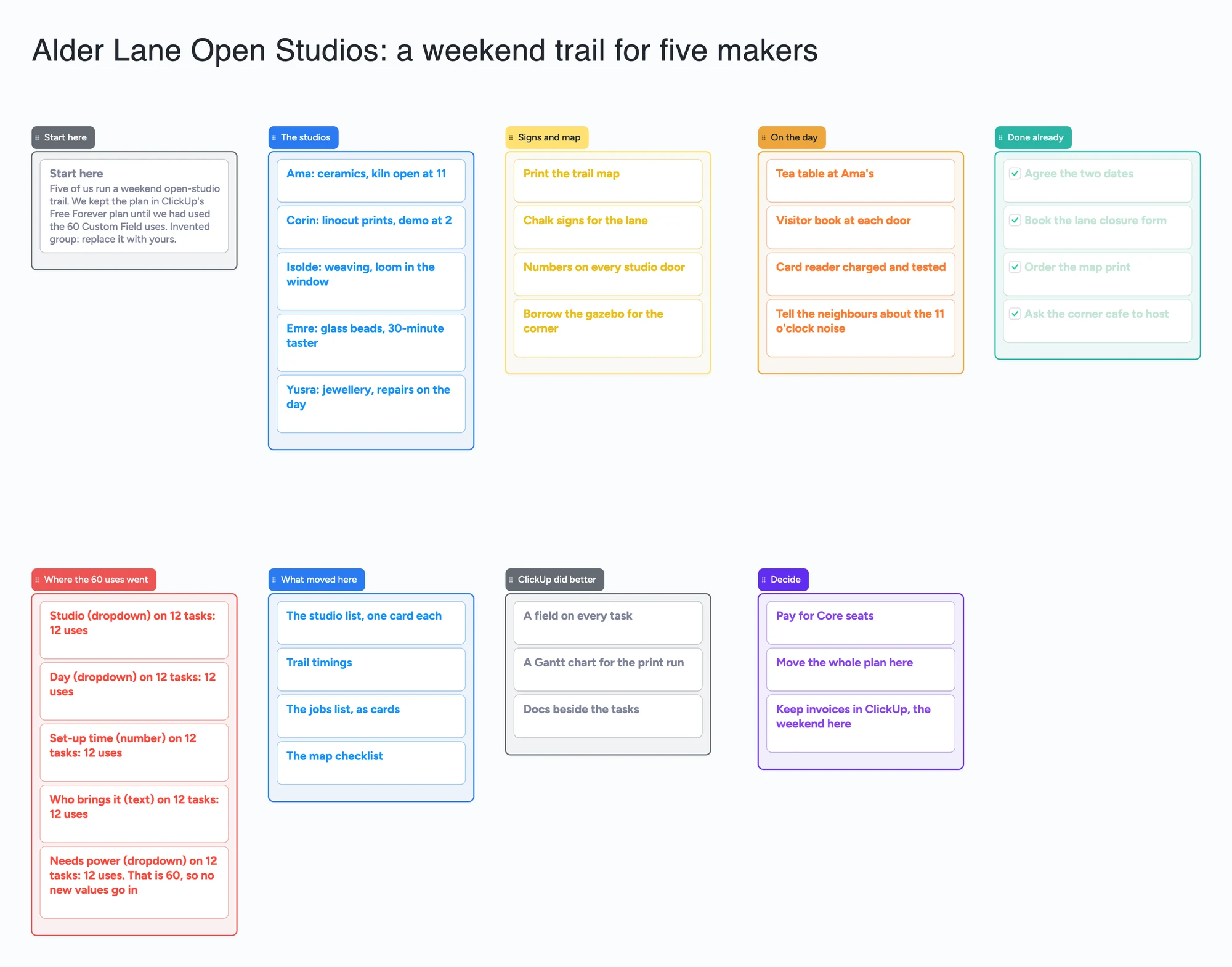
Alder Lane Open Studios: where the 60 uses went
The example is invented. Ama, Corin, Isolde, Emre and Yusra run a weekend open-studio trail for five studios. They ran the plan in ClickUp's Free Forever plan with five Custom Fields (studio, day, set-up time, who brings it, needs power) on 12 tasks. By the help page's counting, 5 fields x 12 tasks = 60 uses, the cap (our arithmetic). We did not count statuses or priorities: the pricing table lists Custom Statuses and Priorities as Included on Free.
| List | Cards | What it holds |
|---|---|---|
| Start here | 1 | Why the board exists and that the group is invented |
| The studios | 5 | One card per maker, with the open time |
| Signs and map | 4 | Trail map, chalk signs, door numbers, the gazebo |
| On the day | 4 | Tea table, visitor book, card reader, a neighbours' note |
| Done already | 4 | Ticked: dates, lane form, map print, corner cafe |
| Where the 60 uses went | 5 | One card per field: 12 uses each, 60 in all |
| What moved here | 4 | The studio list, trail timings, the jobs list, the map checklist |
| ClickUp did better | 3 | The group's own list: a field on every task, Gantt for the print run, docs beside tasks |
| Decide | 3 | Pay for Core seats, move the plan here, or keep invoices in ClickUp and the weekend here |
Swipe the table sideways to see every column.
Names, studios and jobs are made up. The "ClickUp did better" cards are the group's opinions, not a check of what ClickUp Free does; nothing on the board connects to ClickUp.
The useful order is the bottom row first: count the uses, move only the lists the group still opens, then decide. The "What moved here" list is short on purpose; the group did not retype its old tasks.
How ClickUp counts a "use" on the Free plan
Three ClickUp pages were read in a browser on November 25, 2026: the pricing page, "Views feature availability and limits" and "Custom Fields uses". None shows an update date. The Free Forever card on the pricing page lists "Unlimited Tasks & Subtasks", "Unlimited Free Members", "60 MB Storage" and "1 Form", and its "Compare all features" table marks Custom Fields as Trial on Free.
The Custom Fields help page says: "A use is counted each time you add a value to a Custom Field on a task." One Dropdown value is one use, and two labels in a Label field are two. Adding a new Custom Field or an option to one does not count. It then says: "Once you reach 60 uses on a Free Forever Plan Workspace, you: Can't add values to any Custom Fields including Relationships and Tasks Custom Fields." You can still add and remove Custom Fields, and "Can clear existing Custom Field values on tasks, but you can't re-add values."
Does the 60 reset? ClickUp's pricing-page FAQ, "What is a 'use' in context of ClickUp's plans?", says: "Uses are cumulative throughout a Workspace and they do not reset or count down. When you reach a use limit, you won't lose any data, but you won't be able to edit or create new items with that feature." We read that answer in a browser on November 25, 2026; it shows no date. One commenter (u/ShaDe-r9, below) wrote that they would have accepted limits "IF they reset each month"; that is one account's view, and the FAQ says the count does not reset. We did not read how Core treats uses already spent.
Three r/clickup threads, one person's view each
r/clickup, July 15, 2025 (UTC) (OP u/haronclv; Reddit shows 26 comments, and we read 25 in an archived copy, 1 more removed). The title calls it an "Unlimited" free tier; the OP wrote that they hit the limit "just with one day" and was unhappy with ClickUp "saying it has no limits". The thread mixes the Free Forever plan with a paid plan named Unlimited: the numbers u/ShaDe-r9 gave (100 uses, Map 5, Mind map 40) match the Unlimited column in ClickUp's views help table, not Free, and their line "Luckily gantt charts aren't limited" does not fit the Free column of that table, which gives Gantt 60 uses, so read their list as describing the Unlimited plan only, and we did not read where "Tasks in multiple lists only 30" comes from. u/gibsonjsh wrote that ClickUp does have "a very detailed chart of all features" on its pricing page, but that calling a plan "Unlimited" is "not the wisest choice". u/bomphcheese tried Timeline on a large list, moved two tasks and "got hit with an upgrade screen" (plan not stated); ClickUp's u/JamieClickUp listed what counts as a Timeline use, including "Creating or moving a task".
r/clickup, March 22, 2025 (UTC) (OP u/CCC_Cam, a team of four who had been using Trello; Reddit shows 10 comments, we read 10 in an archived copy). u/agua_marina wrote that custom phases would need Custom Fields, "a paid feature as the free plan has a small maximum number of uses". u/TashaClickUp, who writes as ClickUp ("our pricing page"), said subtasks, custom statuses and tags are unlimited on all plans and suggested tags or extra statuses for phases, but wrote "Custom Fields have 100 uses" where the help page we read says 60. u/inspiredsoftware wrote that ClickUp keeps "removing features and moving them into higher paid plans".
r/clickup, September 11, 2025 (UTC) (OP u/PiscesEbony; Reddit shows 10 comments, we read 10 in an archived copy). Setting up a team, the OP wrote "Only 1 membership left" when inviting. u/TashaClickUp replied that on Free Forever "there isn't a limit on how many members you can invite to the Workspace", and the OP wrote the next day (UTC) that "this limit had been lifted" an hour or two later; the thread gives no cause. u/MuffinMan_Jr wrote that ClickUp "as a software is actually solid despite the hate it gets" but that features moved behind paid plans (on the Unlimited plan, not Free). u/kris_tuh_fer wrote "I am not a fan of the limited amount of guest with comments available." Each reply is one person's view.
What else the Free Forever column caps
| Item | What ClickUp's pages say | Why a small group notices |
|---|---|---|
| Custom Fields | "60 uses" (help page); Trial in the pricing table. | Five fields on 12 tasks is the whole allowance. |
| Storage | "60 MB Storage" on the Free Forever card; Unlimited on Core. | Photos of finished pieces fill 60 MB faster than tasks do. |
| Spaces, Folders, Lists | 5 Spaces; 100 Folders and 40 Lists per Space on Free. | A group with one event rarely reaches these. |
| Views | Help table, Free Forever: Gantt 60 uses, Timeline 60, Workload 60, Embed 40, Whiteboard 3, Form 1; Map, Mind map and Team view No. | Opening a Gantt chart a few times uses the allowance. |
| Automation | 100 actions per workspace per month and 5 active rules on Free. | A rule that creates a weekly task shares one pool. |
| Guests | Guest Accounts Included on Free; Limited Access for Guests not included. | Our inference: Limited Access for Guests is not on Free, and ClickUp's pricing FAQ says Free Forever guests have full create and edit permissions that cannot be modified, so a neighbour who only needs to read would get edit rights. |
| Export | List View Exports not included on Free; the views help page says No for exporting List and Table views. | A move out is by hand. |
Swipe the table sideways to see every column.
Pricing page and two help pages, read in a browser November 25, 2026. The pricing table marks Gantt, Dashboards, Timeline, Workload and Embed as Trial where the help table gives 60 uses, Yes, 60, 60 and 40: the pages differ and we do not know why.
What five people pay on Core
Core is the next plan on the pricing page. With Yearly selected the page showed $9 per user a month billed yearly, with a "Regular price" of $12 beside it; with Monthly selected it showed $12 per user a month billed monthly. We did not read seat minimums, or how Core treats the uses already spent. The sums are our arithmetic.
| Plan | What the pricing page showed | Our arithmetic for five people |
|---|---|---|
| ClickUp Free Forever | $0, 60 MB storage, 5 Spaces | $0, with 60 Custom Field uses in all |
| ClickUp Core, Yearly selected | $9 per user a month, billed yearly (regular price $12) | 5 x $9 = $45 a month, $540 a year |
| ClickUp Core, Monthly selected | $12 per user a month, billed monthly | 5 x $12 = $60 a month, $720 over 12 months |
Swipe the table sideways to see every column.
ClickUp's pricing page, read in a browser November 25, 2026, with the Yearly and then the Monthly toggle selected.
On Instaboard, the board's owner pays for Pro if they want it, and people you invite join free. The FAQ below has the plan and price.
When ClickUp is the better choice
- You run tasks, not a list. ClickUp's Free card lists unlimited tasks and subtasks, and its table lists Relationships and Dependencies, statuses, priorities and List, Board, Calendar and Table views as Included. We have lists and cards on one canvas, with arrows between cards, and no dependency that blocks or schedules a task.
- You need fields. Custom Fields are what the 60 uses count. We have no custom fields.
- You want docs, sprints or time tracking beside the tasks. ClickUp's Free card lists Collaborative Docs, Sprint Management and Time Tracking (Trial). We have none of these.
- You want automation. ClickUp Free has 100 actions per workspace per month and 5 active rules. We have no automation: no rules that move or create cards.
- You expect to grow. Core lists unlimited storage and Spaces and unlimited Forms, and its card shows Custom Fields & Task Types.
How much of the free plan the board uses
The board is 43 items: 33 cards, 9 lists and 1 text box. Instaboard Free allows 150 items across all your boards, so one copy uses 43, a second 86 and a third 129; a fourth would make 172, past 150 (our arithmetic). A copy takes 1 of the 5 free boards. Pen strokes, arrows and sections don't count. Pro removes the item limit.
There is no ClickUp import on Instaboard (the only import is a PDF), so a move is retyped by hand. For one event list that is a short job; for a long task history it is not, and ClickUp is the better place to stay.
Start from the ready board
It opens in your browser in a few seconds, with nothing to install. Sign in for free when you want to save it and share it.
Questions
Does ClickUp's Free plan limit users?
ClickUp's pricing page lists "Unlimited Free Members" on the Free Forever card, and a ClickUp account wrote on r/clickup in September 2025 that there is no member limit. One user there reported seeing "Only 1 membership left" when inviting and wrote that it was lifted within hours, so check your own Workspace before you plan around it.
What happens when the 60 Custom Field uses run out?
ClickUp's Custom Fields help page says you can no longer add values to any Custom Fields, can still add and remove the fields themselves, and can clear existing values but not re-add them. ClickUp's pricing-page FAQ (read November 25, 2026) says uses are cumulative and do not reset or count down, so a group that has used up 60 stays at the cap on Free.
Does Instaboard replace ClickUp?
No. ClickUp has subtasks, dependencies, docs, sprints, time tracking, custom fields and automation. Instaboard has lists and cards on one canvas that a group edits together, so it suits one shared plan or event list, not task tracking.
How many people can write on one Instaboard board?
Anyone with the link can read a board, and writing takes a free sign-in. The Free plan has no limit on how many people can join a board. A new board starts as "Anyone with the link can view", so the owner ticks "Anyone who joins can edit" first. A board opened from someone's link counts as one of that person's 5 free boards.
Can we move our ClickUp tasks across?
There is no ClickUp import; the only import is a PDF. A move is retyped by hand. ClickUp's own tables list exports from List and Table views as not included on Free; we did not read ClickUp's other export routes.
Is Instaboard free?
There is a free plan: 5 boards, 150 cards and items across your account (pen strokes, arrows and sections don't count), and 3 pictures and 1 file per board. Anyone with the link can read a board; writing on it takes a free sign-in. Pro removes the item limit and adds invite-only boards: $5 a month billed yearly ($59.99 a year), or $7.99 monthly.
Sources
- ClickUp: Pricing (page shows no update date; read in a browser November 25, 2026, "Compare all features" opened, FAQ answers on uses and guests read, Core price read with Yearly and with Monthly selected)
- ClickUp Help Center: Views feature availability and limits (page shows no update date; read in a browser November 25, 2026)
- ClickUp Help Center: Custom Fields uses (page shows no update date; read in a browser November 25, 2026)
- r/clickup: "Unlimited" free tier with hidden limits (OP u/haronclv, July 15, 2025 UTC; replies are single accounts; Reddit shows 26 comments, 25 read in an archived copy, 1 more removed; read November 25, 2026)
- r/clickup: "Real" limitations of the Free Plan for basic use? (OP u/CCC_Cam, March 22, 2025 UTC; replies are single accounts; Reddit shows 10 comments, 10 read in an archived copy; read November 25, 2026)
- r/clickup: Free Forever Plan- User Limit (OP u/PiscesEbony, September 11, 2025 UTC; replies are single accounts; Reddit shows 10 comments, 10 read in an archived copy; read November 25, 2026)