For the volunteer committee behind a church event
A church event committee board: one lead for each team
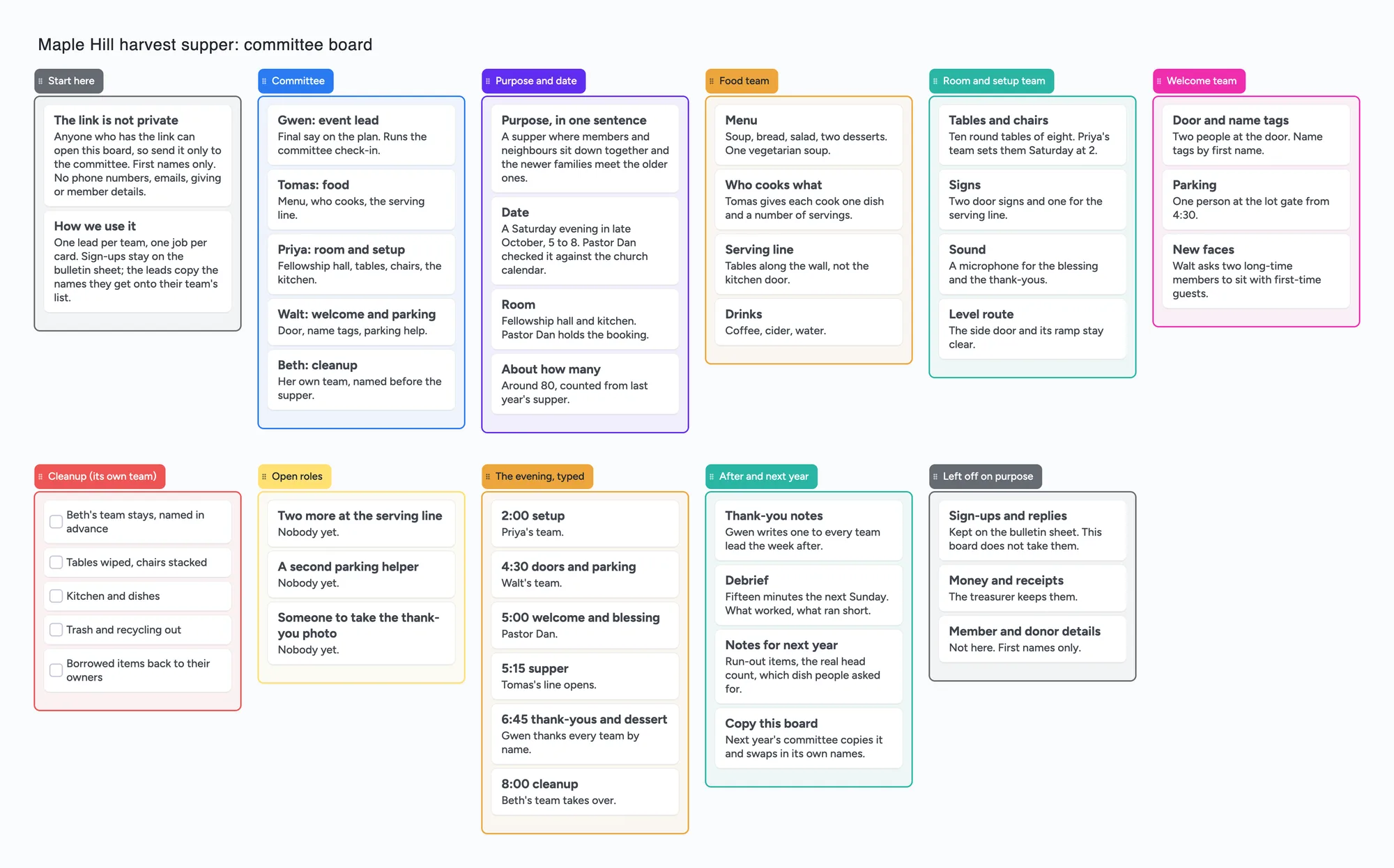
We make Instaboard, an online board. This page is for the volunteers who plan a church supper, picnic or fellowship night and want the teams written down in one place. The board is filled in for an invented event: the Maple Hill harvest supper, about 80 people on a Saturday evening in the fellowship hall, run by a committee of Gwen, Tomas, Priya, Walt and Beth with Pastor Dan. It holds the committee, the purpose, a list for each team, cleanup as a team of its own, open roles, the evening in typed times and notes for next year's committee. Sign-ups and replies stay on your bulletin sheet; it holds no money and no member or donor details.
Opens in your browser. Anyone can view; a free sign-in lets you edit.
Updated
Read this first: what this board does and doesn't do
- It holds the plan the committee types. Teams, leads, the evening's times and notes are cards. Nothing takes sign-ups, counts replies, schedules a volunteer or sends a reminder, and the times are words in the card titles.
- Sign-ups stay where your church already collects them. The board's last list says so on purpose. The leads copy the names they get onto their own team's list.
- No member, donor or money details. First names only, no phone numbers or emails, no giving, no receipts. The treasurer keeps those where the church keeps them.
- A link is not private. Anyone who has the link can open the board. New boards start as "Anyone who joins can view". Send it only to the committee. To let the leads add or move cards, switch Share to "Anyone who joins can edit"; each person signs in free to write, and the board then counts as 1 of their 5 free boards.
- Free plan limits: 5 boards, 150 items across your account and 3 pictures per board. A copy of this board takes 1 of your 5. Pro removes the item limit and costs $5 a month billed yearly ($59.99 a year), or $7.99 monthly.
- Everyone with edit access can tick or untick any card. Agree who ticks the Cleanup list.
Why the sign-ups stay on the bulletin sheet
A volunteer committee does not need a second place to sign up, and one pastor's thread is an example. Read November 25, 2026; it is one person's story and the replies, not a count of churches.
In r/pastors (thread 1kf9wn5, posted May 5, 2025, 18 of the 26 comments in an archived copy read), u/Rev-DC wrote that people at their church "absolutely refuse to use signup sheets": two people had signed up to help with a Mother's Day breakfast, while at least ten had said in passing that they would. In an update on the same thread u/Rev-DC wrote that "The Mother's Day Breakfast had 20 volunteers show up (and, ironically, 12 standing around with nothing to do because signups also help cap the amount of help you need)". Replies split: u/newBreed wrote that only people who sign up by a cutoff should be allowed to volunteer; u/spresley1116 wrote "Roll with it", that the pastor was outvoted on a preference; u/AshenRex suggested a pre-planning gathering of volunteers to assign tasks.
So the board does not try to change that culture. Its "How we use it" card says one lead per team, one job per card, sign-ups on the bulletin sheet, and the leads copy the names they get onto their team's list. The board is for the people who already said yes.
If your church already has church software, use that first
Read November 25, 2026. Every line is what a page or a commenter says; we have not used any of these tools.
- r/churchtech, "APP to manage volunteers" (1qpfn3h, u/Chance_Ad4322, posted January 28, 2026 (UTC), 12 of the 17 comments in an archived copy read). The poster's church has three services and about 30 ushers and greeters per service and wanted check-in on arrival; the poster said in a comment that they use Planning Center for scheduling. Several commenters said Planning Center; u/YetAnotherAaron wrote it lets you "schedule your volunteers ahead of time, and it sends automatic reminder emails and notifications". A commenter, u/Puzzleheaded-Phase70, suggested a Google Calendar and a Google Form. A board does none of that.
- r/churchtech, "Church Management System - Increasing Congregational Usage and Involvement" (1t5fw4j, u/COR_Values, posted May 6, 2026, 11 of the 14 comments in an archived copy read). The poster's church uses ChurchSuite and struggles to get members to use it. u/Fickle-Friendship-31 wrote that at their church using Breeze "Our church leaders (committee chairs, etc.) do - but that's it". The part of that thread that matches this board is the leaders using one shared place, not the whole congregation.
- SameTeam (a company that sells sign-up software; its church event checklist prints "By SameTeam July 9, 2026") says that its tool gives one shareable link for RSVPs and sign-ups "so guests do not need an account, app, or login". A board needs a sign-in to write; SameTeam is the better fit if volunteers should sign up with no account.
- Better Impact (a company that sells volunteer software; its church volunteer management post prints no date in the page text) defines church volunteer management as recruiting, engaging and coordinating volunteers, and has a section on choosing it. We did not read its product pages or pricing, and a board does none of that coordinating for you.
Where a board fits: the committee leads, a handful of people, one event, a plan that is written once and moved around. If your church runs a planner already, the board can still be the one page the committee opens to see who owns what.
How many items does it take?
Each card and each list is 1 of the 150 free items across your account. The example is 55: 11 lists, 43 cards and the title. Arrows, sections and pen strokes don't count. Our arithmetic: if every cook gets a card of their own on the Food team (20 cooks) and 10 more helpers get a card on the Open roles list, that is 55 + 30 = 85. Your other boards count toward the same 150.
One team, one lead: list by list
Eleven lists in two rows, the plan on top and the day below.
- Start here (2 cards): that the link is not private, and how the committee uses the board.
- Committee (5 cards): one card per lead with the job in a line. Gwen is event lead, with the final say and the committee check-in; Tomas leads food; Priya, room and setup; Walt, welcome and parking; Beth, cleanup.
- Purpose and date (4 cards): the purpose in one sentence, the date, the room and about how many.
- Food team, Room and setup team, Welcome team (4, 4 and 3 cards): what each team does, in the team's own words.
SameTeam's checklist says to define the purpose of the event first and suggests writing it as one sentence, and its team list has an event lead, food lead, setup lead and hospitality lead. The example mirrors those roles because they are the ones SameTeam lists; the part we added is the next section.
Cleanup is its own team, named before the supper
SameTeam's checklist lists a "Cleanup lead" who "Makes sure cleanup has its own team, not just whoever is left", and says to "Assign cleanup before the event begins". MosesTab's guide (prints "Published on 2026-02-03"; a church software company's blog) is about event ownership in general; it lists "Unclear Ownership" as a common mistake: "'Everyone's responsible' means no one's responsible."
On the board, Beth's list has five tick boxes: her team stays, tables wiped and chairs stacked, kitchen and dishes, trash and recycling out, borrowed items back to their owners. The board does not remind anyone and a tick records no name or time. A copy keeps its ticks, so untick the list when you reuse the board.
A serving line, not a kitchen door
A food team's board usually starts with the menu. In the thread above, u/MWoolf71 described a different problem: "For years food was served in the kitchen, and the line would bottleneck as people went through and then stopped to chat". The commenter wrote that serving from tables set up in the fellowship hall "helped the situation".
So the example's Serving line card says tables along the wall, not the kitchen door, and Priya's Tables and chairs card has ten round tables of eight. This is one commenter's church, not a rule. What the board adds is a place to write the fix down for next year, which the last list does.
The evening, typed
SameTeam's page gives a simple day-of timeline as a sample, from setup at 3:00 to a final walkthrough at 8:00, and says to send it to team leaders before the event so the event lead is not answering questions all day. The example runs six lines: 2:00 setup (Priya's team), 4:30 doors and parking (Walt's team), 5:00 welcome and blessing (Pastor Dan), 5:15 supper (Tomas's line opens), 6:45 thank-yous and dessert (Gwen thanks every team by name) and 8:00 cleanup (Beth's team takes over). The times are card titles and the board does not move them; drag a card if the plan changes.
An "Open roles" list sits beside it for the jobs nobody has yet: two more at the serving line, a second parking helper, someone to take the thank-you photo. It is a list of cards that say "Nobody yet", so a lead can see a gap and write a name in when someone says yes on the bulletin sheet.
After the supper: the debrief and the notes for next year
MosesTab's guide lists "Skipping the Debrief" among its common mistakes ("The event ends and everyone moves on without discussing what worked and what didn't. Then the same mistakes repeat.") and says to "Document for next time". SameTeam's checklist says to send a thank-you message to volunteers and anyone who donated food or supplies.
The last-but-one list has four cards: thank-you notes (Gwen writes one to every team lead the week after), a fifteen-minute debrief the next Sunday, notes for next year (run-out items, the real head count, which dish people asked for) and a card that says next year's committee copies the board and swaps in its own names. A copy takes 1 of that person's 5 free boards.
What the board leaves off on purpose
- Sign-ups and replies. Kept on the bulletin sheet. The board does not take them.
- Money and receipts. The treasurer keeps them. SameTeam's page says to keep receipts and track reimbursements; that belongs in the church's own books, not on a link-shared board.
- Member and donor details. No giving, no addresses, no phone numbers. First names only.
- Children's events. The example has no childcare and no children's names; a board that lists children belongs behind your church's own safeguarding rules, not on a link.
Set it up in six steps
- Write the purpose in one sentence and the date, then put them in the third list.
- Open the board and make your copy. "Make a copy" takes 1 of your 5 free boards; replace Gwen, Tomas, Priya, Walt, Beth, Pastor Dan and the rest with your own people.
- Write one card per lead with their job.
- Name the cleanup team before anything else is booked.
- Type the evening's times as card titles and move them when a time changes.
- Share the link with the leads only. To let them write, tick "Anyone who joins can edit" in Share; each signs in free to add or move cards.
Limits of the free plan for this board
- Items. 150 across your account; the example is 55.
- Boards. 5 on the free plan. "Make a copy" takes 1 of them.
- Pictures. 3 per board. The example has none; photos of the supper belong in an album you share.
- Writing needs a sign-in. Anyone who has the link can read the board; to change it they sign in free, and the board then counts as 1 of their 5.
- No reminders or due-date alerts. The board will not tell Beth her team is up.
Start from the ready board
It opens in your browser in a few seconds, with nothing to install. Sign in for free when you want to save it and share it.
Questions
Can the board take volunteer sign-ups?
No. It has no forms for volunteers, no replies, polls or reminders. Keep the sign-ups where your church already collects them and have each lead copy the names onto their team's list.
Is it safe to put names of church members on it?
Anyone who has the link can open the board and see every card, so the example uses first names only and leaves off phone numbers, emails, giving and member details. Send the link only to the committee.
Do my team leads need an account to edit?
To write on the board, yes: they open the link and sign in free, and you tick "Anyone who joins can edit" in Share. The board then counts as 1 of their 5 free boards. Someone who only wants to read can open the link without signing in.
Can I use it if my church already has volunteer software?
Yes. The software schedules and reminds; the board is one page of who leads which team and what the evening looks like. If the software already covers all of that for your committee, you do not need the board.
How many cards fit on the free plan?
150 items across your account, where each card and each list is one item. This board is 55. With a card for each of 20 cooks and 10 more helpers it is 85. That is our arithmetic, and your other boards share the same 150.
Is this for a church event with children?
The example has no children and no childcare. A board that lists children should follow your church's own safeguarding rules, and a link-shared board is not the place for it.
Sources
- r/pastors: "If there is a mandatory sign-up sheet to get into heaven...." by u/Rev-DC (posted 2025-05-05; 18 of the 26 comments in an archived copy read November 25, 2026)
- r/churchtech: "APP to manage volunteers" by u/Chance_Ad4322 (posted 2026-01-28 UTC; 12 of the 17 comments in an archived copy read November 25, 2026)
- r/churchtech: "Church Management System - Increasing Congregational Usage and Involvement" by u/COR_Values (posted 2026-05-06; 11 of the 14 comments in an archived copy read November 25, 2026)
- SameTeam: Church Event Planning Checklist (a company that sells sign-up software; prints "By SameTeam July 9, 2026"; read November 25, 2026)
- MosesTab: Church Event Planning, The Complete Checklist (a church software company's blog; prints "Published on 2026-02-03"; read November 25, 2026)
- Better Impact: Church Volunteer Management Strategies (a company that sells volunteer software; no date in the page text; read November 25, 2026)