For teachers planning a unit with a co-teacher or a mentor, not for student work
A backward design unit plan template on one board
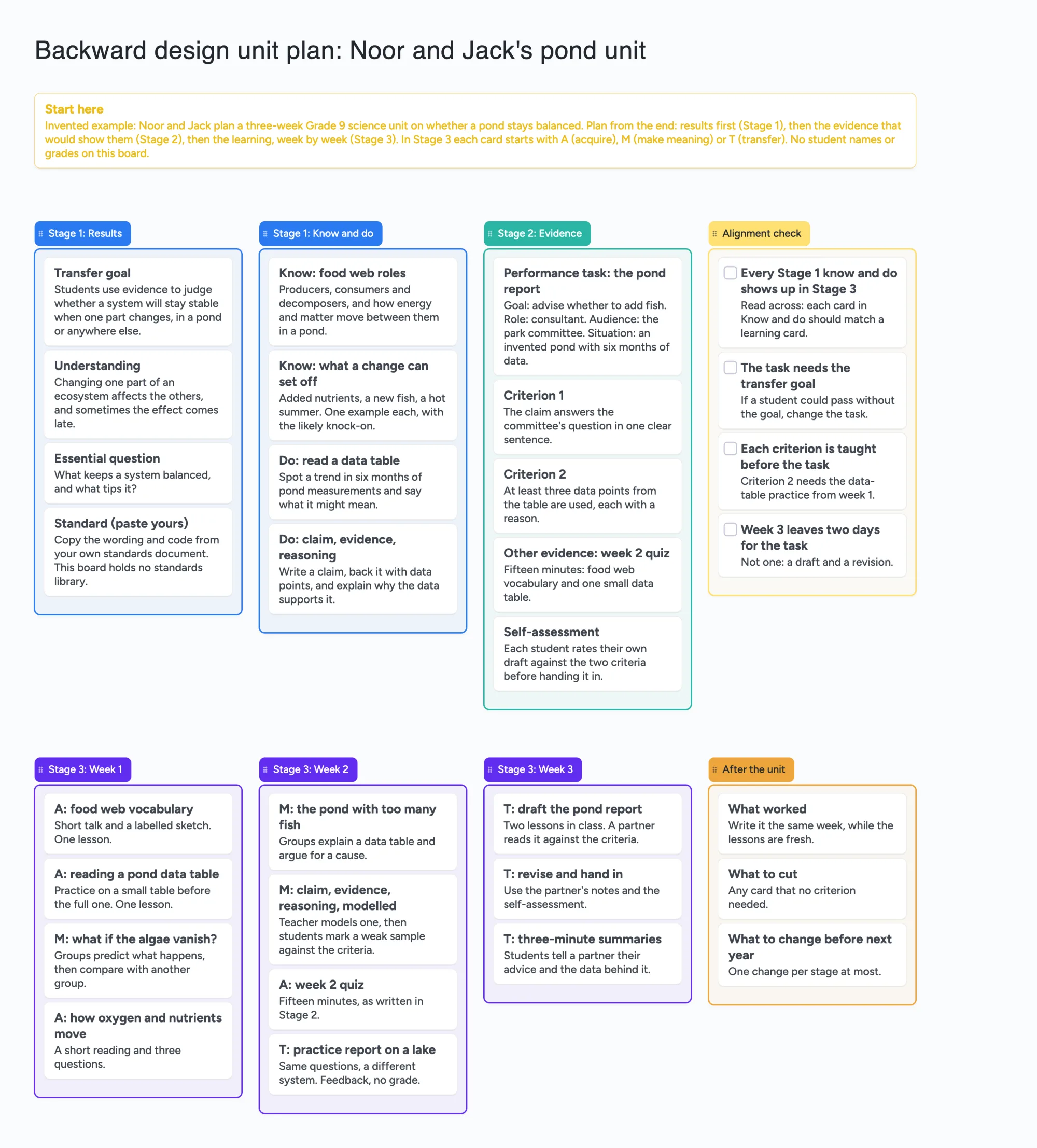
We make Instaboard, a free online board. This page gives you a unit plan already laid out on it the backward way, filled in for one invented pair of teachers, Noor and Jack, and a three-week Grade 9 science unit on whether a pond stays balanced. The top row is the end of the unit: the results you want, what students should know and do, the evidence that would show it, and an alignment check. The bottom row is the plan to get there, week by week, then notes for next time. Open it, replace the pond with your unit, and send the link to the colleague who plans with you. It is a place to lay a plan out and read it across, not a standards library or a gradebook: it adds nothing up, checks nothing for you and holds no student names or grades. Backward design is a planning method; we are not affiliated with or endorsed by ASCD, Grant Wiggins, Jay McTighe or Cult of Pedagogy.
Opens in your browser. Anyone can view; a free sign-in lets you edit.
Updated
Read this first: what the board does and doesn't do
- What it is: a whole unit on one screen in backward order. Stage 1 says what you want, Stage 2 says what evidence you will accept, Stage 3 plans the weeks. Each answer is a card with a title and a line or two. The example uses 41 of your 150 free items.
- What it isn't: no standards library (you paste the wording from your own document), no calendar or pacing, no gradebook, no rubric scoring, and no check that your stages line up. The Alignment check list is four tick boxes you read and tick yourself.
- Where the method comes from: the board is a layout. For the method itself, use the pages named below (Cult of Pedagogy, ASCD's framework paper); this page says what each covers in our own words. "Understanding by Design" is the book's name and ASCD owns it as a trademark, so we use it only as a source.
- No student data: a free board is shared by link. Put no student names, grades, accommodations or notes about a child on it.
- Free plan: 5 boards, 150 items, 3 pictures per board. Copying the board takes 1 of your 5 boards. Writing on it needs a free sign-in. New boards start with "Anyone who joins can view". Pro adds invite-only boards: $5 a month billed yearly ($59.99 a year), or $7.99 monthly.
Noor and Jack's pond unit, stage by stage
The unit is invented, including the pond data. Noor and Jack share a Grade 9 science class and have three weeks. Read the board from the top-left, then across, then down.
- Stage 1: Results. Four cards: a transfer goal (students use evidence to judge whether a system will stay stable when one part changes), an understanding, an essential question (what keeps a system balanced, and what tips it?) and a Standard card that says to paste your own standard's wording and code, because the board holds no library.
- Stage 1: Know and do. Two cards of what students should know (food web roles, what a change can set off) and two of what they should do (read a data table, write a claim with evidence and reasoning). The do cards are things you can watch a student do.
- Stage 2: Evidence. A performance task, the pond report, written as goal, role, audience and situation (advise the park committee whether to add fish), two criteria, a short week 2 quiz as other evidence, and a self-assessment card. The task is written before any lesson.
- Alignment check. Four tick-box cards: every Stage 1 know and do shows up in Stage 3, the task needs the transfer goal, each criterion is taught before the task, week 3 leaves two days for the task. Noor and Jack tick them together once they have read across.
- Stage 3: Weeks 1 to 3. Eleven cards, each starting with A (acquire), M (make meaning) or T (transfer), the coding ASCD's paper suggests for each learning event. Week 1 is mostly A, week 2 is mostly M with a practice report, week 3 is T: draft, revise, then three-minute summaries.
- After the unit. Three cards written the same week: what worked, what to cut (any card that no criterion needed), and one change per stage at most.
Nothing on the board is dated or timed except what Noor and Jack write in a card's words. The board has no calendar, so "week 2" is a list title, not a schedule.
The method, in two sources' words
Each page below was read in full on November 22, 2026. The summaries are ours; neither author reviewed the board.
| Source | What it says (our summary) | What the board takes |
|---|---|---|
| Cult of Pedagogy, "Backward Design: The Basics" (page shows no date) | Traditional planning picks a topic, plans lessons, then writes an assessment. Backward design starts with what students should know and do, writes the assessment second, and plans lessons third, so only lessons that help the assessment stay. The author calls her version the most basic one, and says the fuller version in Wiggins and McTighe's book is more complex and time-consuming. A worked moon-phases example replaces a unit test with a student-made model plus a presentation, scored with a rubric. | The Stage 1, 2, 3 order and the rubric criteria as cards. Stage 3 asks you to drop a lesson that doesn't help the task. |
| Cult of Pedagogy, "How to Plan a Unit of Instruction" (page shows no date) | A three-step process: set measurable objectives (what a student does that you can see), design the assessment, plan the lessons. A title and an essential question are optional but keep the unit on a purpose. The author says it is her own process and credits Wiggins and McTighe. The example is a short food-safety unit. | Objectives as cards that start with a doing word; the essential question as its own card. |
| ASCD, "Understanding by Design Framework" by Jay McTighe and Grant Wiggins (white paper, © 2012) | A three-stage process (Desired Results, Evidence, Learning Plan) with alignment between all three; performance tasks as culminating work for a unit, not for daily lessons; learning events coded T, M and A; and a note that it does not recommend lesson planning separate from the unit. | The stage names, the alignment list, and the T, M, A letters on Stage 3 cards. We do not use ASCD's own template or its six facets of understanding. |
Swipe the table sideways to see every column.
Pages read November 22, 2026: cultofpedagogy.com/backward-design-basics, cultofpedagogy.com/how-to-plan-a-unit-of-instruction, files.ascd.org UbD_WhitePaper0312.pdf. Understanding by Design and UbD are trademarks owned by ASCD (their paper says so), so this page names them only as sources.
The two Cult of Pedagogy pages are written around a classroom teacher doing one unit. The ASCD paper adds transfer, understandings and essential questions, and a view that the unit, not the lesson, is the unit of design. Our board uses the shared order and leaves out the rest.
Reading across: the alignment check
ASCD's paper puts alignment at the centre: what Stage 1 names must be what Stage 2 assesses and what Stage 3 teaches. The board makes that a reading habit, not a feature. The four cards on the example:
- Every Stage 1 know and do shows up in Stage 3. Put the two lists side by side and look for a card with no match.
- The task needs the transfer goal. If a student could pass without it, change the task.
- Each criterion is taught before the task. The example's second criterion, three data points each with a reason, needs the data-table practice from week 1.
- Week 3 leaves two days for the task, not one: a draft and a revision.
The board will not warn you when a card is missing. Two people reading across is the check.
How many units fit in 150 items?
Each card and each list is 1 of your 150 free items, across all your boards. The title text box counts too. Arrows, sections and pen strokes don't. Our arithmetic from the example:
- As built: 8 lists + 31 answer cards + the Start here card + 1 title = 41 (one unit is 39 items).
- Three units on one board: 3 x 39 + the Start here card and the title = 119.
- Four units on one board: 4 x 39 + 2 = 158, over 150.
- One unit per board: 3 boards x 41 = 123, and 3 of your 5 free boards; a fourth is 164, over 150.
- Next year: copy the board and edit it. The copy takes 1 of your 5 boards and its items count against the same 150.
What a board can't do
- No standards library or alignment check. You paste the wording from your own standards document, and nothing tells you a standard is missing.
- No calendar, pacing or due dates. Week lists are plain lists. A school calendar or a planner holds the dates.
- No gradebook, rubric scoring or student data. The criteria are cards you write; nothing totals them. Don't put student names, grades or notes about a child on it.
- No reminders. Nothing tells Jack a card is waiting for him.
- No lesson plans inside. A Stage 3 card is a line. If you need timings, materials and differentiation per lesson, keep the lesson plans in your planner and link or paste a title here.
- It is not private by default. New boards start with "Anyone who joins can view". Anyone you give the link to can read; sign-in is only needed to write. Set it to "Anyone who joins can edit" only if your co-planner should write on it.
- A copy takes 1 of your 5 free boards, and writing needs a free sign-in. A copy keeps its ticks, so untick the Alignment check cards when you reuse it.
- 3 pictures per board. The example has none.
Where other tools do this better
Read on November 22, 2026; plans and pages change, so check the page. A source date is printed only where the page shows one.
| Tool | What the page says | Better for |
|---|---|---|
| EMStudio's backward design template (page shows "Last Updated: October 2026") | A three-page unit plan template in three stages, free as PDF, Google Docs or Word, and "no sign-up needed to download"; Stage 3 is a day-by-day table with T, M and A coding | A printable or typed document in the shape the method's authors use, with room to write long answers |
| Common Planner (pricing page, no date; help article dated September 30, 2026) | Basic is free and lists daily, weekly and monthly lesson planning and searching standards. Unit planning is listed under Pro, which the page shows as $5.59/month and "one payment of $71.88" beside a Yearly/Monthly switch (our arithmetic: $71.88 over 12 months is $5.99, so check the page for the current figure); Pro also lists automatic standards tracking and edit and comment with up to 5 collaborators; card payment only, individual teachers only. The help article describes a Unit Timeline with dates, standards and cards | Dates, standards tracking and a unit timeline inside a planbook; unit planning is not listed on its Basic plan (as of November 22, 2026) |
| Planboard (App Store listing, no date) | Free; "100% free for teachers"; lesson plans, timetable, subjects and semesters, curriculum standards, photos and files; the listing says over 250,000 teachers use it. The listing text doesn't mention unit plans; reviews on the same listing describe a unit planner in its web version, and one says the mobile app lacks it | A day-to-day lesson plan book on your phone or the web, tied to a timetable |
| Google Docs or Word | Not read: a Google Docs UbD template result showed only the Docs interface on 11-22, so we cite none | Long, formatted answers, comments and a document your school may already require |
| Instaboard board | Free: 5 boards, 150 items, 3 pictures per board. Pro $5 a month billed yearly ($59.99 a year), or $7.99 monthly | A whole unit on one screen, read across by two people, with one link |
Swipe the table sideways to see every column.
From each page, read November 22, 2026: emstudio.pro/resources/templates/unit-plans/understanding-by-design-ubd-template, commonplanner.com/p/pricing and its help article create-and-edit-a-unit-plan, apps.apple.com Planboard id704514651. Our wording, not theirs.
Where these win
If your school wants a document, or you need dates and standards tracked, use EMStudio's template, a Docs file or a planbook such as Common Planner. If you want lesson plans on a timetable, Planboard is free. Use this board when two teachers want to plan a unit together and read it across on one screen, in short cards, with one link.
What teachers say about planning backward
From r/teaching, "Am I Missing Something? How do you create units?" (OP u/elenad, May 18, 2020, a second-year middle school ELA teacher whose school has no curriculum; the page showed 25 of its 45 comments, and each reply is one person's view). u/cockrockprincess said to try backwards design: start with what students should be able to do, pick the project that shows it, then work back. u/nrs1010 described their own order (the pacing guide, then a summative, then formative quizzes, then daily lessons, plus a pretest) and said unit planning is messy work with a lot of adjusting. u/Kenesaw_Mt_Landis wrote that there is no shame in modifying an existing curriculum. u/thecolorblue2 said they plan with the Understanding by Design method and offered to send a template.
From r/Teachers, "Is this backward design??" (OP u/Blueathena623, September 9, 2026; 24 of 26 comments shown). The OP's district calls its units backward designed because the slides and notes were pulled from a test bank. u/KindParfait282 replied that backward design starts with what you want students to know, understand or do, and that this sounds like teaching to the test. u/Maggie05 said it begins with an essential question. u/CaterpillarIcy1056 wrote that it is about designing high-quality standards-aligned assessments and is worthless without strong ones.
From r/CanadianTeachers, "How to write a unit plan?" (OP's account deleted, August 14, 2024; 25 of 51 comments shown). u/newlandarcher7 answered "Backward design" and listed standards, then a summative, then lessons. u/barelylocal wrote that they were taught it in school and don't use it any more, and described numbering the lessons down a page from the first lesson to the end goal. u/McR4wr said their unit plan was a three-column chart. u/Short_Concentrate365 linked a McGill UbD template; we did not open that file.
Two lessons for this board: people disagree on what the method means once it meets a district's test, so the Stage 2 cards spell out the task and its criteria, and a unit plan can be as light as a three-column chart, so the cards stay short.
How to use it, in about an hour
- Open the board and sign in free when it asks you to write. Replace the pond with your unit; delete any list you don't need.
- Fill Stage 1 first, before any lesson. Paste your standard's wording on the Standard card, write one transfer goal and one essential question, then two things students should know and two they should do.
- Write Stage 2 next. Say what the student will make or do at the end, who it is for, and two criteria. Add one other piece of evidence, such as a short quiz.
- Plan Stage 3 last. Start each card with A, M or T. If a card helps no criterion, it does not belong.
- Read across with your co-planner and tick the Alignment check cards you both agree on.
- To share it, set Share to "Anyone who joins can edit" if one other person should write on it, or leave it on view if they should only read. Each person who writes signs in free.
- After the unit, fill the three After the unit cards the same week. Next year, copy the board and start from the top row. The copy takes 1 of your 5 boards.
Start from the ready board
It opens in your browser in a few seconds, with nothing to install. Sign in for free when you want to save it and share it.
Questions
What is backward design?
It is a way of planning a unit by starting from the end: first what students should know and do, then the evidence that would show it, and only then the lessons. Grant Wiggins and Jay McTighe set it out in their book, and teachers such as the author of Cult of Pedagogy describe a simpler three-step version. Here it is a shared board laid out in that order.
Is there a free backward design unit plan template I can use online?
Yes. Open the board, replace the example unit with yours and write on it after a free sign-in. It is a layout to copy, not a document or a standards library. EMStudio also offers a free three-page template as a PDF, Google Docs or Word file if your school wants a document.
Can my co-teacher and I plan on the same board?
Yes. New boards start with "Anyone who joins can view", so anyone with the link can read it. Set it to "Anyone who joins can edit" if your co-teacher should write too; each person who writes signs in free. Put no student names or grades on it.
Does the board check that my stages line up?
No. The Alignment check list is four tick boxes you read across and tick yourself. The board has no standards library, no calendar and no gradebook, so it can't tell you a standard is missing.
How many units fit on the free plan?
The example is one unit and 41 of your 150 free items. Three units on one board is about 119 and four is about 158, over the limit; one unit per board is 123 for three and 164 for four (our arithmetic). Copying a unit takes 1 of your 5 free boards.
Is Instaboard free?
Yes. The free plan includes 5 boards, 150 cards and items across your account (pen strokes, arrows and sections don't count), 3 images and 1 file per board, unlimited collaborators and video calls up to an hour. Pro is $5 a month billed yearly ($59.99 a year), or $7.99 monthly, and the people you invite join free.
Sources
- Cult of Pedagogy: Backward Design: The Basics (page shows no date; read November 22, 2026)
- Cult of Pedagogy: How to Plan a Unit of Instruction (page shows no date; read November 22, 2026)
- ASCD: Understanding by Design Framework, McTighe and Wiggins (white paper, © 2012; read November 22, 2026)
- EMStudio: backward design unit plan template (page shows Last Updated October 2026; read November 22, 2026)
- Common Planner: Pricing (page shows no date; read November 22, 2026)
- Common Planner help: Create and Edit a Unit Plan (page shows September 30, 2026; read November 22, 2026)
- Planboard, App Store listing (shows no date; read November 22, 2026)
- r/teaching: Am I Missing Something? How do you create units? (OP u/elenad, May 18, 2020; replies are single accounts, 25 of 45 comments loaded, read November 22, 2026)
- r/Teachers: Is this backward design?? (OP u/Blueathena623, September 9, 2026; replies are single accounts, 24 of 26 comments loaded, read November 22, 2026)
- r/CanadianTeachers: How to write a unit plan? (OP account deleted, August 14, 2024; replies are single accounts, 25 of 51 comments loaded, read November 22, 2026)
Related
A jigsaw activity on one shared board: expert groups first, then home groups
A jigsaw activity template on one shared board: a section per expert group, then a list per home group. What the jigsaw guides say, and where a board stops.
An online course outline on one shared board: outcomes, then a list per module
An online course outline on one shared board: outcomes first, then a list per module with its lessons, activity, quiz and resource. Open it, swap in your course and share the link.