For college and nursing students
How to study from lecture slides: your notes beside each slide
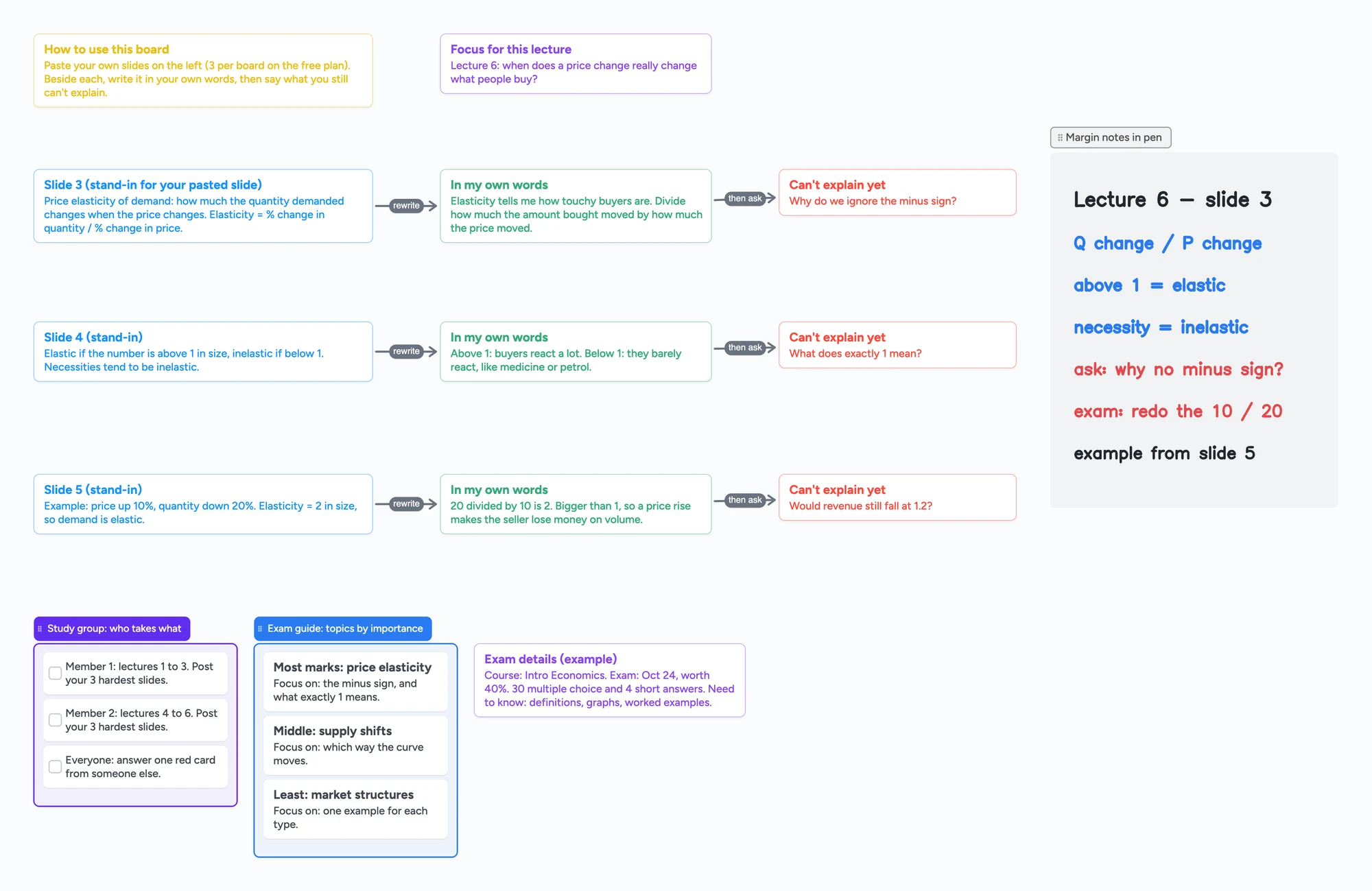
Students keep asking the same thing in r/GetStudying, r/PAstudent, r/NoteTaking and r/StudentNurse: reading the slides again doesn't make them stick. What the replies share is a loop: look at a slide, say it in your own words, then write down what you still can't explain. This page is a board laid out for that loop, with one row per slide and a card for the question you can't answer yet. You put the slides on it yourself. Instaboard does not read, summarize or search them, and the free plan holds 3 images per board.
Updated
The short answer
- One row per slide: the slide, a card with it in your own words, and a red card for what you can't explain yet. Arrows link them, so the red cards are easy to find before an exam.
- 3 images per board on the free plan. That is 3 slides as pictures. For more, type the slide's key line on a card, or give each lecture its own board (every board counts toward your 5 free boards).
- We don't read, summarize or search your slides. Nothing reads the text on them, and there is no handwriting search. The notes are the ones you write.
- Pen margin notes go in a grey section beside the rows. Pen strokes, sections and arrows don't count toward the 150-item free limit.
- For the exam, rank the topics by importance, add a "focus on" line for each and an exam details card (steps below, paraphrased from a university learning-strategies page).
- For a study group, share the link; each person adds their own rows. Viewing needs no sign-in, adding does, and it is free.
What students say works with slides (one person's view each)
These are replies from four Reddit threads, read in full on November 5, 2026. Each is one person's experience, not research, and they disagree with each other. The board fits the part they agree on: don't just reread.
- Say it, then check it. In r/PAstudent (2022), a top reply goes through the topic list out loud in simple terms, then looks at the slide, and writes down anything missed or wrong. That list becomes a study guide of what didn't stick. That is the own-words card and the red card.
- Don't just summarize. In r/NoteTaking (2025), the poster says summarizing slides in a notebook never produced useful exam notes. One reply says they now rephrase key points in their own words and add examples or questions. Another says slides are part of a bigger picture and suggests drawing coloured arrows between two ideas.
- Rewrite, don't copy. In r/StudentNurse (2022), one reply says to handwrite notes and another says you are rephrasing into shorthand, not copying every slide. A third says to understand the material instead of memorizing it.
- Divide a slide into subsections. In r/GetStudying (2024), a reply splits each slide into subsections such as characteristics, clinical findings and management, and fits 10 or more slides onto one A4 page of mind map.
Others in the same threads prefer flashcards, practice questions or reading the slides several times. The board doesn't replace any of that; it is a place to do the rewrite-and-question step.
How to use the board
- Open the board and sign in free to edit. Set the focus card at the top to the lecture's question.
- Put a slide in each blue card's place. Paste or add a picture of the slide, or type its key line. Remember the limit: 3 images per board on the free plan.
- Write the slide in your own words on the green card. Not a copy of the slide: what you would say to someone who missed the lecture.
- Write what you can't explain yet on the red card. If it is empty, you may be done with that slide.
- Add margin notes with the pen in the grey section: a mnemonic, the page of the textbook, what to ask the lecturer.
- Before the exam, scan the red cards. They are the part of the slides you haven't got yet.
The board is a layout, not a tool that checks your answers. The elasticity example on the ready board is a typed stand-in so you can see the pattern.
The 3-image limit, and what to do about it
The free plan allows 3 images per board and 1 file per board. Slides are usually pictures, so this is the main limit for this use.
- Pick the 3 slides you struggle with and type the key line of the others onto cards. A typed card counts toward the 150-item account limit; an image counts as one too.
- One board per lecture. Each board counts toward your 5 free boards, so this works for a few lectures, not a whole course.
- Pro has no image limit. Pro is $5 a month billed yearly ($59.99), or $7.99 monthly.
- Import PDF is not the way to bring in a slide deck right now. Don't plan around it.
From slides to an exam study guide
Once you have your own-words cards, the same board can become an exam study guide. These steps paraphrase the University of Toronto Scarborough's "Create an Exam Study Guide" page (read November 5, 2026), which suggests working from the syllabus, lecture slide titles and chapter titles, and from what your professor repeated or emphasized.
- Make an exam-details card. Course, exam date, how much it is worth, the question types, and what you need to know (definitions, graphs, worked examples). The board has an example in purple. Ask your professor if you can't tell.
- List the topics and rank them by importance. UTSC suggests judging this by how long your "focus on" list is and which topics your professor spent the most time on; you can also ask which topics are worth more marks. On the board this is the blue list: most marks first.
- Write one "focus on" line per topic. This is the part you don't yet understand well, so it comes straight from your red cards.
- Check yourself by explaining it. UTSC says that if you can't explain a topic to someone else concisely, it needs more time. A study group is one place to do that.
- Cross topics off as you get confident, and start with the most important ones.
The Rutgers Learning Centers' "Tips for Using Study Guides" (May 19, 2023; read November 5, 2026) says to make your own guide before looking at the one your professor gives you, then compare the two. Anything in theirs that is missing from yours, or that you don't understand, is a topic to review.
A different view
In r/StudentNurse (2021), one reply says that for nursing classes doing practice questions will probably help more than rewriting things over and over. That is one person's view, and it fits the board's limit: it organizes what you write, and does not test you. Use the practice questions your course provides alongside it.
Study groups: one board for the group
The UNC Learning Center's study group handout (read November 5, 2026) says students find groups help them "externalize their thoughts", keep sessions stimulating and keep each other accountable. It adds that groups work best small enough for everyone to ask and answer questions, and suggests a facilitator, ground rules such as taking turns asking and answering, and meeting about once a week for 60 to 90 minutes. For groups that meet online it names Zoom, Microsoft Teams and GroupMe, and suggests looking for online versions of what you miss, such as a whiteboard.
- Split the lectures. The study group list on the board has a task per person: lectures 1 to 3, lectures 4 to 6. Each posts their 3 hardest slides as new rows.
- Answer each other's red cards. The last task on the list is to answer one red card from someone else. That is the group's active-study step.
- Share the link, or use the code for a live session. A new board starts view-only for people with the link; choose "Anyone with the link can edit" in Share to let the group write. A 4-digit join code expires after 2 hours of inactivity.
- Each member signs in free to write. Each member's board count includes boards opened from a link, so a member at 5 boards can still open it but the app says it won't be added to their boards.
- Call on the board. Free calls run up to 60 minutes per call, with a warning 10 minutes before the end. Everyone needs a free sign-in; calls aren't recorded.
Ask members to put their first name on their cards. There is no roster, per-person view or grading.
When something else is the better choice
- You want a summary written for you. AI summarizers and study-guide makers read your slides and produce notes. We don't. If that is what you want, you will be disappointed here.
- You want to annotate the PDF itself. Notes apps built for marking up PDFs let you write directly on the slide pages; one r/PAstudent reply imports the slides into Notability and takes notes on them. Instaboard doesn't import PDFs as a working path right now.
- You need spaced repetition. Anki and Quizlet schedule cards for you. The board has no flashcards or scheduling.
- You need practice questions. Several replies stress them. Use the ones your lecturer or a question bank provides.
What this board doesn't do
- It doesn't read, summarize, search or grade slides. No text recognition, no handwriting search.
- Writing needs a free sign-in. Viewing a shared board doesn't.
- The free plan is 5 boards and 150 items per account (cards, lists, images, text boxes; pen strokes, sections and arrows don't count), with 3 images and 1 file per board.
- Written for adult learners and students 13 and older. Instaboard's terms say users are not minors.
Start from the ready board
It opens in your browser in a few seconds, with nothing to install. Sign in for free when you want to save it and share it.
Questions
How do I study from lecture slides?
Students in the threads we read go through a slide, say it in their own words, then note what they still can't explain, instead of rereading. Each is one person's method, and others prefer flashcards or practice questions. The board lays that loop out as a row per slide.
Can I put my lecture slides on a board?
Yes, as pictures: paste or add an image. The free plan allows 3 images per board. For more, type the key line of a slide onto a card or use a board per lecture. Importing a PDF is not a working path right now.
Does Instaboard summarize my slides?
No. It doesn't read, summarize or search them, and it has no text recognition. The notes are the ones you write.
Can a study group use one board?
Yes. Share the link with edit turned on, or a 4-digit join code for a live session. Each person signs in free to write. The free plan has no limit on collaborators.
Is Instaboard free?
Yes. The free plan includes 5 boards, 150 cards and items across your account (pen strokes, arrows and sections don't count), 3 images and 1 file per board, unlimited collaborators and video calls up to an hour. Pro is $5 a month billed yearly ($59.99 a year), or $7.99 monthly, and the people you invite join free.
Sources
- Reddit r/GetStudying: Studying using lecture slides (2024-09-18; read in full, Nov 5, 2026)
- Reddit r/PAstudent: What's your method of studying directly from powerpoints? (2022-09-29; read in full, Nov 5, 2026)
- Reddit r/NoteTaking: How to best retain information from slides? (2025-01-24; read in full, Nov 5, 2026)
- Reddit r/StudentNurse: How to study 100+ worth of slides for med surg? (2022-08-19; read, Nov 5, 2026)
- University of Toronto Scarborough: Create an Exam Study Guide (read in full, Nov 5, 2026)
- Rutgers Learning Centers: Tips for Using Study Guides (2023-05-19; read in full, Nov 5, 2026)
- Reddit r/StudentNurse: How do you all create your study material / take notes effectively? (2021-09-28; read in full, Nov 5, 2026)
- UNC Learning Center: Study Groups (read in full, Nov 5, 2026)
Related
How to take anatomy & physiology notes (with a filled example board)
How to take anatomy and physiology notes on a board you can edit: draw the feedback loop first, then terms, examples and a self-quiz. A filled homeostasis example built from OpenStax A&P 2e, for college and nursing students.
Cornell notes, digital: cue cards that stay linked to your notes
How to take Cornell notes on a screen: a filled example (glycolysis) with cue cards joined to note cards by arrows, a self-quiz checklist and a summary. What a board does that a printable can't, and where a printable is better.
Build an immune system concept map: innate vs adaptive, step by step
Build an immune system concept map: innate and adaptive clusters, then one infection traced to memory. An editable board, sourced from OpenStax. No AI.
Whiteboard for Google Classroom: share one board with your class
Post one shared Instaboard board in Google Classroom or on a Google Sites page as a link. Set it so the class can write; students 13+ sign in free. No grading.