For co-teachers in middle school, high school and college
A co-teaching planning board you both edit, not a form you print
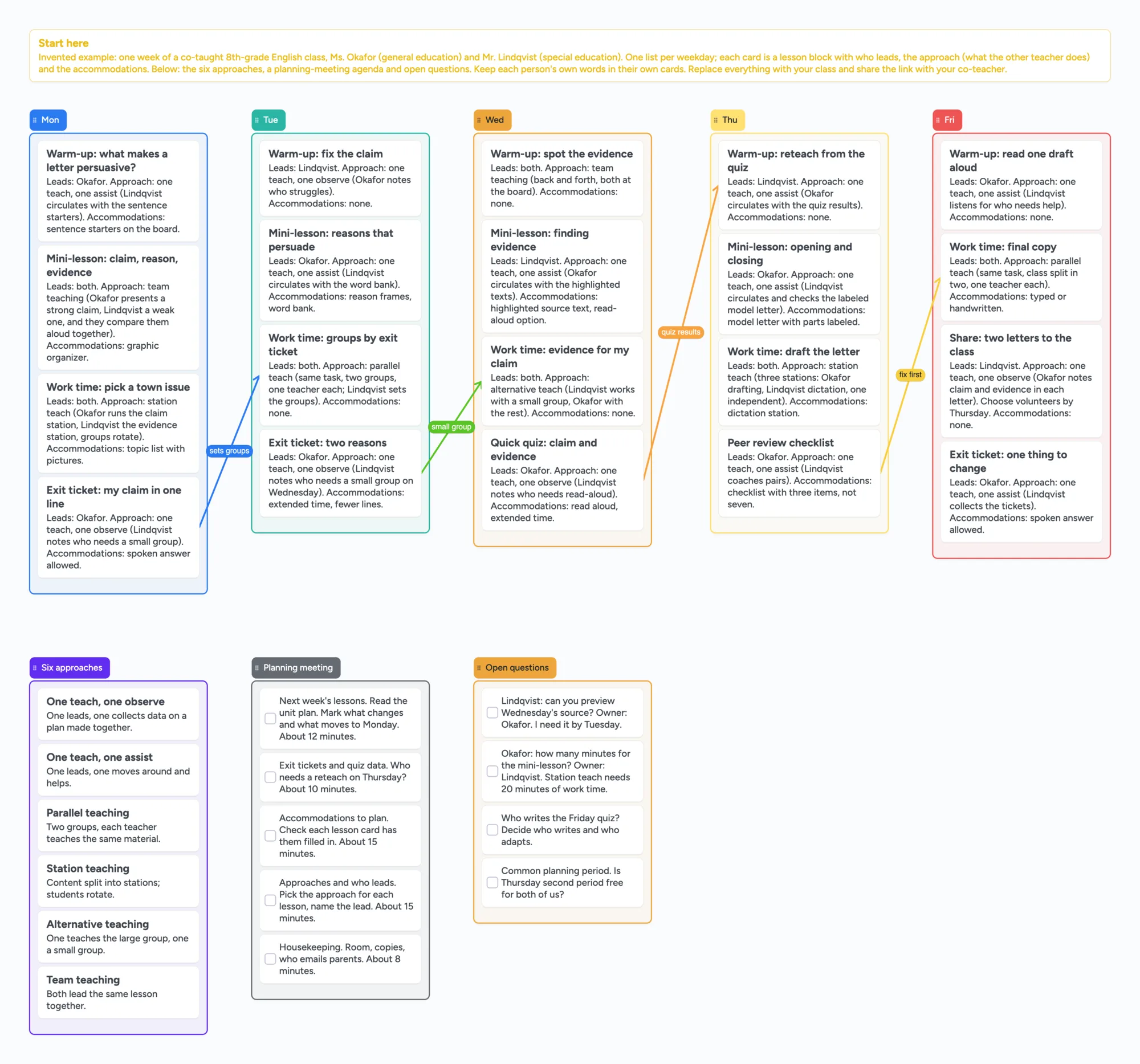
Most co-teaching planning templates we found are PDFs: a form for the planning meeting, a form for the lesson, a weekly grid. This is a board two teachers edit at once. Each weekday is a list, each lesson block is a card that says who leads, which co-teaching approach it uses (which also says what the other teacher does) and what accommodations it needs, and a list of open questions holds what you each still need from the other. The example is an invented week for a co-taught 8th-grade English class, with two invented teachers and no students named. It has no print layout and no full PDF export, no calendar or reminders, and it is not a place for student records. If your district gives you a required form, fill that in, and use this board for the weekly planning between meetings.
Updated
The short answer
- A list per weekday, a card per lesson block. Each card has a title and one line each for who leads, the approach (with what the other teacher does) and the accommodations, for example "Leads: both. Approach: station teach (Okafor runs the claim station, Lindqvist the evidence station)." Rename the lists to your own schedule.
- Both teachers edit the same board. Share it with "Anyone with the link can edit" (new boards start view-only), and your co-teacher signs in free to write. It is live: the other person's cards and arrows appear within seconds.
- The six approaches sit on the board. A list names them in a line each, so the card for Tuesday can say "parallel teach" and everyone knows what that means. They come from Friend and Cook's co-teaching approaches.
- Open questions go to the other teacher. A checkbox list holds what you need from each other, each with an owner, so it doesn't get lost in a hallway conversation.
- It is not a printable form. The board has no print layout and no full PDF export. If you need paper for a meeting, use your district's form, or copy the cards out.
- The free plan covers one class. The ready board is 44 of your 150 free items (our count: 8 lists and 36 cards; arrows and pen strokes don't count) and uses no images. Each class needs its own board, so 5 free boards cover 5 classes, and opening the link adds the board as 1 of your co-teacher's 5 free boards.
How the board is laid out
Everything on the board is an editable card or list, and nothing on it is a photo.
- A start-here card says the week is invented and names the two example teachers.
- Five weekday lists (Mon to Fri) with four lesson blocks each: a warm-up, a mini-lesson, work time and a closing check on most days, with the quiz on Wednesday, a peer-review checklist on Thursday and a class share on Friday. Every card has the lead, the approach (with what the other teacher does) and the accommodations, or "Accommodations: none" where there are none.
- Four captioned arrows run between days: Monday's exit ticket sets Tuesday's groups, Tuesday's exit ticket decides who meets in a small group on Wednesday, Wednesday's quiz feeds Thursday's reteach, and Thursday's peer-review checklist is fixed before Friday's final copy. They stay attached when you move a card.
- Six approaches (six cards): one teach one observe, one teach one assist, parallel, station, alternative and team teaching, each in one line.
- Planning meeting (five checkbox cards) is an agenda you tick through, with minutes per item. Its five items and minutes are adapted, in our own words, from Marilyn Friend's planning-meeting template in Appendix A of the Texas Education Agency guide (reprinted there with permission).
- Open questions (four checkbox cards) are the things the other teacher needs to answer, each with an owner.
Using it with a co-teacher
Set Share to "Anyone with the link can edit", send the link and ask your co-teacher to sign in free to write. Anyone who only wants to read can open the link without an account. The board counts as 1 of their 5 free boards, and cards they add count toward their own 150 items.
- Give each teacher their own cards. Two people typing in the same card merge keystroke by keystroke with no lock, so one person per card keeps each person's words apart. Put the owner's name on the card.
- Name the approach on every block, not only the lead. The TEA guide's "Roles Co-Teachers May Not Play" lists three: "teachers simply splitting subjects, serving as the lead on those they are responsible for"; "teachers dividing a lesson, with each leading part (e.g., I will lead the warm-up; you teach the mini lesson)"; and "one teacher teaching while the other makes materials, grades student work, or writes Individualized Education Programs (IEPs)". A card with only a lead name can read like the second one. The approach line on each card, such as "one teach, one assist" or "parallel teach", is what shows the other teacher's role.
- Use the open-questions list for the weekly meeting. Tick what you settled and move what you didn't to next week's list.
- Copy the board each unit. Making a copy takes 1 of your free boards, so delete or archive a finished unit first.
- Keep student names and IEP details off it. Anyone with the link can read the board, so use initials or group names for students, or keep student-specific notes in the places your school requires.
The six approaches, from sources
These were read in full on November 11, 2026, and are descriptions of the approaches, not our advice.
- The SERC page "Six Approaches to Co-Teaching" (the Connecticut State Education Resource Center, drawing on Friend and Cook; year of publication 2004) lists one teach one observe, one teach one assist, parallel, station, alternative and team teaching, and defines co-teaching as two or more certified professionals sharing instructional responsibility for a single group.
- Understood's "6 models of co-teaching" names the same six with benefits and challenges for each and says co-teachers need shared planning time.
- The Texas Education Agency's "Guidelines for Co-Teaching in Texas: Teachers" (updated January 2026) uses the Friend (2019) framework. It says co-teachers may supplement planning time with written or electronic options such as "online tools with shared edit options", and includes a planning-meeting template by Marilyn Friend with five agenda items (12, 10, 15, 15 and 8 minutes), reprinted with permission.
- Edutopia's "Teacher Collaboration That Supports All Students" suggests a shared online template both teachers contribute to, and protecting weekly co-planning time.
A caution on the word: the NYSED technology-tools brief we read uses "co-teaching" for integrated English as a new language classes, which is a different arrangement from general plus special education teachers.
When something else is the better choice
These lines come from each source's own page, read on November 11, 2026.
- Your district or state gives you a form. The TEA guide has three templates (a planning-meeting agenda, a lesson planner for turning one teacher's lesson into a co-taught one and a co-teaching lesson planner with columns for the model and for specially designed instruction), and many districts have their own. Use the required form, and treat our board as the working copy between meetings.
- You want a document or a spreadsheet. Google Drive lets you share a file with Viewer, Commenter or Editor access, with up to 600 email addresses per file, and says a file can be actively edited on up to 100 open tabs or devices at once. A Google Doc is better for a written lesson plan and a Sheet is better for a schedule grid that sorts. Our board has no text formatting, no formulas and no sorting.
- You want the Friend weekly lesson plan. The Council for Exceptional Children offers "Weekly Lesson Plan for Co-Teaching" by Marilyn Friend (listed January 6, 2022) among its teacher resources, with member access. We could read only the listing, and our board is not a copy of it.
- You need an official record. IEP goals, specially designed instruction and student data belong in your school's system. Our board is for planning, not records.
What this board doesn't do
- No print layout and no full-board PDF export. You can copy selected cards as an image, not a form for a meeting binder.
- No calendar, reminders or notifications. Typing @ on a card assigns a person but sends no notification. Dates go in your own calendar.
- No student records. Keep names and IEP details off a board that is shared by link.
- One board per class. The free plan is 5 boards and 150 items per account (cards, lists, images and text boxes count; pen strokes and arrows don't), 3 images and 1 file per board. The ready board leaves 106 items free, so a second class on the same account is a second board, and a full year of weeks passes 150 across boards. Work in units and copy only what you need.
- Pro ($5 a month billed yearly, $59.99, or $7.99 monthly) has no image limit.
- Writing needs a free sign-in. Anyone with the link can view.
- Written for adults. Instaboard's terms say users are not minors, so this board is for teachers' planning, not for students to edit.
Start from the ready board
It opens in your browser in a few seconds, with nothing to install. Sign in for free when you want to save it and share it.
Questions
Is there a co-teaching planning template I can edit online?
This board is one: a list per weekday with cards for who leads, the approach and the accommodations, a list of the six approaches, a planning-meeting agenda and open questions. The example week is invented. Making your own copy takes 1 of your 5 free boards.
Can my co-teacher edit the same board?
Yes. Set Share to "Anyone with the link can edit"; new boards start view-only. Your co-teacher signs in free to write, and edits show up for both of you within seconds. Two people typing in the same card merge with no lock, so give each person their own cards. Opening the link adds the board as 1 of their 5 free boards.
Can I print it?
Not as a form. The board has no print layout and no full PDF export. Copy selected cards as an image, or use your district's printable form for meetings.
Does it work for special education co-teaching?
It works for planning who leads and what accommodations each lesson needs, using the six approaches from Friend and Cook. Keep IEP details and student names off it, because anyone with the link can read the board.
Do I need a board for each class?
Yes, one board per class or unit is simplest. The free plan has 5 boards and 150 items, and opening the link adds the board as 1 of your co-teacher's 5 free boards.
Is Instaboard free?
Yes. The free plan includes 5 boards, 150 cards and items across your account (pen strokes, arrows and sections don't count), 3 images and 1 file per board, unlimited collaborators and video calls up to an hour. Pro is $5 a month billed yearly ($59.99 a year), or $7.99 monthly, and the people you invite join free.
Sources
- SERC (Connecticut): Six Approaches to Co-Teaching (year of publication 2004; read in full, Nov 11, 2026)
- Understood: 6 models of co-teaching (read in full, Nov 11, 2026)
- Texas Education Agency: Guidelines for Co-Teaching in Texas: Teachers (updated January 2026; read in full, Nov 11, 2026)
- NYSED: Topic Brief 7, Technology Tools to Support Collaborative Planning (integrated ENL co-teaching; read in full, Nov 11, 2026)
- Edutopia: Teacher Collaboration That Supports All Students (general and special education teachers; read in full, Nov 11, 2026)
- Google Drive Help: Share and manage access to files and folders (read in full, Nov 11, 2026)
- Council for Exceptional Children: Weekly Lesson Plan for Co-Teaching (listing read Nov 11, 2026; member access)
Related
Whiteboard for Google Classroom: share one board with your class
Post one shared Instaboard board in Google Classroom or on a Google Sites page as a link. Set it so the class can write; students 13+ sign in free. No grading.
A whiteboard for Zoom and Teams breakout rooms: one board, one section per group
How to use one whiteboard in Zoom or Teams breakout rooms: one board, one section per group, and how to get the link into every room. What Zoom and Microsoft say.
Whiteboard in Canvas LMS: Lucid if you have it, a link to a board if you don't
Canvas LMS has Lucid (Whiteboard) if your school enabled it. If not, link a shared Instaboard board from a module or page. Students 13+ sign in free to write.
Jamboard alternatives for teachers, and how to get your old Jams back
Free Jamboard alternatives for teachers: share one board with your class by link, plus how to find your old Jams as PDFs in Google Drive (type:Jam).