For an author and a helper or editor getting a book ready to upload
A self-publishing production checklist for two people
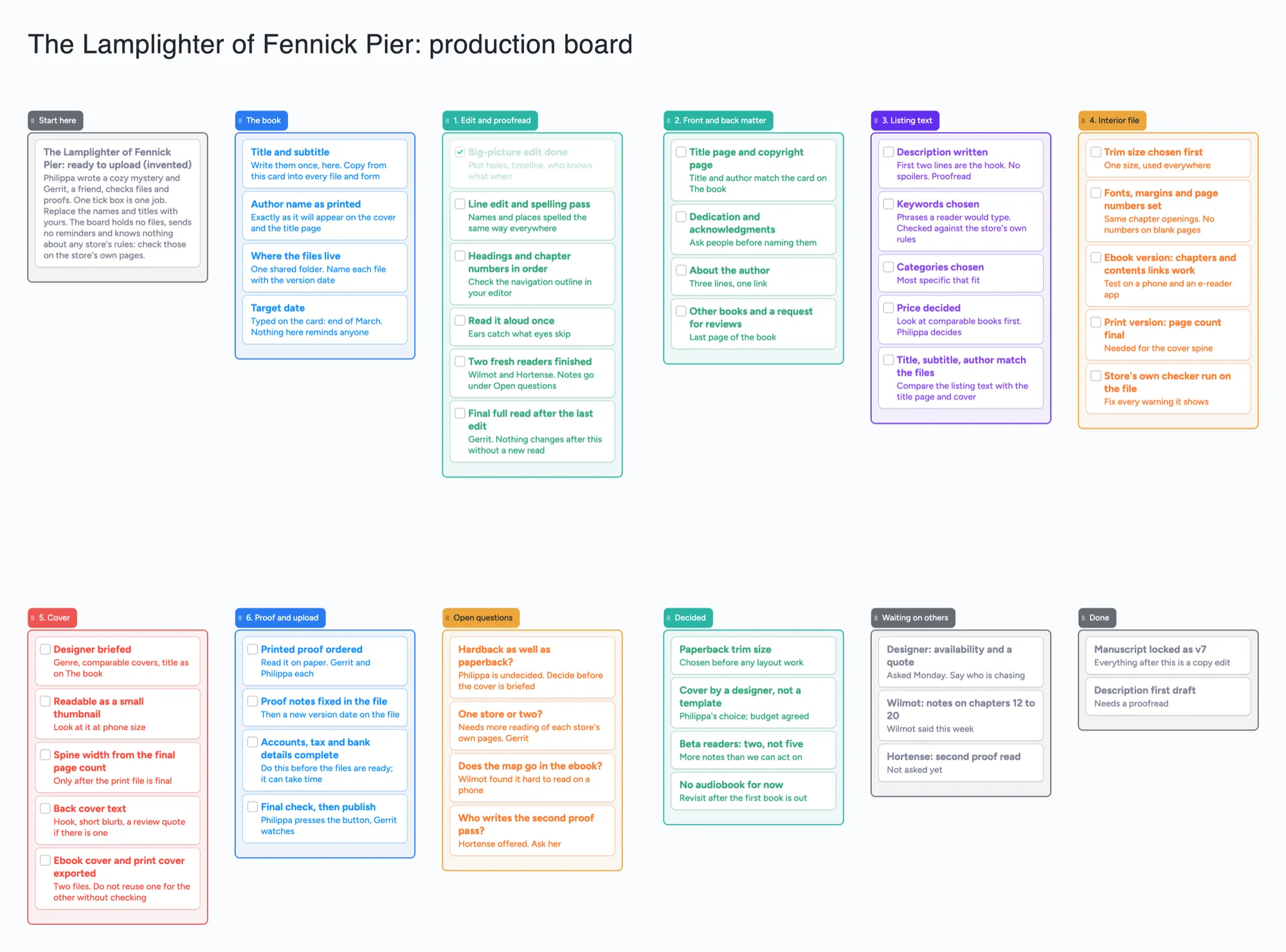
We make Instaboard, an online board. This one is the production side of self-publishing: six stages with a tick box for each job (edit and proofread, front and back matter, listing text, interior file, cover, proof and upload), plus lists for open questions, decisions, who is waiting on whom, and what is done. It is filled in for an invented cozy mystery, The Lamplighter of Fennick Pier, by Philippa, with Gerrit checking files and proofs. It is not a launch plan, holds no files, sends no reminders, and knows nothing about any store's rules or fees, so a store's own pages, a downloadable checklist or a project tool do parts of this better, and we say where below. What a board adds is one place where two people see which job is ticked, what is undecided and who is waiting on whom.
Opens in your browser. Anyone can view; a free sign-in lets you edit.
Updated
What this board is for, and where it stops
- Jobs, not rules. No store's file sizes, fees, royalties, ISBN rules or review times appear on the board or on this page as fact; each card sends you to the store's own pages.
- It is a production checklist, not a launch plan. Marketing, ads, review copies and launch week are not on it. Our book launch plan board is a different job.
- No reminders or due-date alerts. "End of March" is words on a card here. Nothing alerts anyone.
- No manuscript or cover set. A free board takes 3 pictures and 1 file (10 MB). Keep the manuscript, covers and proofs in a shared folder and write the file name on the card.
- What the free plan allows. Five boards, 150 items shared by everything you make, three pictures on any one board. Copying this board uses one of the five. Pro lifts both the picture limit and the item limit.
- Ticks belong to nobody. Whoever can edit may tick or clear any card, so settle between you who handles which.
When a printed checklist, a download or a template is the better pick
If you publish alone and want one list to print, a downloadable checklist is simpler: Reedsy's page (last updated October 15, 2025) offers its self-publishing checklist as an email sign-up download, and we have not seen the file. If you want a database and a calendar for due dates, the Notion template read below lists both; this board has no database and sends no due-date alerts. If your question is "what do I need to do, and in what order", a long checklist written by someone who has done it answers that better than a blank board does. A board fits after that: two people, one book, and a need to see in one glance what is ticked, what is undecided and who is waiting.
The Lamplighter of Fennick Pier, list by list
The book is invented: a cozy mystery, with the author, Philippa, a friend, Gerrit, who checks files and proofs, and two readers, Wilmot and Hortense. The stages follow one writer's checklist (see "Where the stages come from"); the order is not a rule.
| List | What goes in it | In the example |
|---|---|---|
| Start here (grey) | What the board is and isn't | One card |
| The book (blue) | Title, author name as printed, where the files live, target date | 4 cards; the title and name are typed once here and copied everywhere else |
| 1. Edit and proofread (green) | The editing jobs, each a tick box | 6 tick-box cards, the first one ticked |
| 2. Front and back matter (green) | Title page, dedication, about the author, review request | 4 tick-box cards |
| 3. Listing text (purple) | Description, keywords, categories, price, a match check | 5 tick-box cards |
| 4. Interior file (orange) | Trim size, fonts and margins, ebook links, page count, the store's own checker | 5 tick-box cards |
| 5. Cover (red) | Brief, thumbnail test, spine, back cover, export | 5 tick-box cards |
| 6. Proof and upload (blue) | Printed proof, fixes, accounts, final check | 4 tick-box cards |
| Open questions (orange) | What isn't decided and who is looking into it | 4 cards: hardback, one store or two, the map in the ebook, the second proof pass |
| Decided (green) | What is settled, so it isn't reopened | 4 cards |
| Waiting on others (grey) | Who owes what, and who is chasing | 3 cards |
| Done (grey) | Finished jobs, moved out of the stages | 2 cards |
Swipe the table sideways to see every column.
The board's own wording. Dates are typed text; the board sends no reminders or due-date alerts.
The one job a board does well here: saying a thing once
Production mistakes are often mismatches: the title on the cover isn't spelled like the title in the listing, or the author name differs by an initial. That is why "The book" is the first list after "Start here". The title, subtitle and author name are typed once on a card. The listing-text, interior and cover stages each have a tick box that says to compare against that card, such as "Title, subtitle, author match the files". The board can't compare anything for you; it makes the comparison a named job that someone ticks. The r/selfpublish post read below lists the same check, between the files and what you enter on the store.
- Type the title and name once on the "The book" list and change them only there.
- Copy from the card into the manuscript, the cover brief and the listing text.
- Tick the match box in each stage only after someone has looked at both.
- If either changes, untick the match boxes by hand. The board won't do it for you.
In the six numbered stages a tick appears on your helper's screen within seconds. The board keeps no trace of who made it or when, and offers no button that clears every box at once.
Where the stages come from, and what the board leaves out
Sources read November 24, 2026. Each is one person's or one company's view, not a rule.
- r/selfpublish, "The checklist I use before publishing a book on KDP and IngramSpark" (u/LocalPoet8286, posted November 5, 2026; Reddit shows 70 comments, archive 58, none removed). The poster's order is edit and proofread, choose where to publish, metadata, format the interior, create the cover, choose a price, then upload, check and publish. The stages on this board follow that order loosely: front and back matter is split out of the editing step and a printed proof is added, which are our choices, and the choice of store is left out; "Price decided" is a card for your decision, and the board gives no pricing advice. The poster writes: "Whatever your budget, don't skip proofreading." and, on formatting, that hiring a formatter is the most reliable way to pass both platforms on the first upload. The poster says to open store accounts before the files are ready, because tax and bank checks can delay publishing; the "Accounts, tax and bank details complete" card is that. We did not check any store's own pages for these points, so treat them as the poster's experience.
- r/selfpublish, "Checklist for Self-Publishing" (u/Temporary_Airport_66, posted May 17, 2024; Reddit shows 23 comments, archive 24, none removed). The poster wanted "a guide of some kind" that says when to do things. u/Monpressive replied that the only things you absolutely need are a great cover, title, blurb and first pages, and that timing "isn't actually as big a thing in publishing as people make it out to be" (the line is in the "ETA" paragraph of the live comment; the archived copy of that comment does not include the paragraph). That is why this board has stages and a target date typed on a card, not a schedule with dates.
Left out on purpose: marketing, ads, advance readers, pricing advice, which stores to use, store file rules and fees, royalties, ISBNs and copyright. Those depend on the store, change, and in some cases are legal questions. A board is not legal or publishing advice; read each store's own pages and ask a professional where it matters.
One stage across the board: the cover
This is how Philippa and Gerrit might move through stage 5. The order is our example.
- The "Hardback as well as paperback?" card in "Open questions" is answered first, because it decides how many cover files the designer needs. It moves to "Decided".
- "Designer briefed" is ticked once the brief has gone out, with the title and name copied from "The book". A card in "Waiting on others" records what the designer was asked and who is chasing the reply.
- "Readable as a small thumbnail" is ticked after both of them have looked at it at phone size.
- "Spine width from the final page count" waits until "Print version: page count final" in stage 4 is ticked. A card in "Waiting on others" says so.
- "Ebook cover and print cover exported" is ticked last. The card says to check, not reuse one cover file for another without looking.
What a download, a Notion template and a spreadsheet do that a board does not
These rows are the pages as they read on November 24, 2026, and they may have changed since. They suit different people, so there is no ranking. Each row is what a page says, not something we tried, and Instaboard isn't affiliated with any of them.
| Option | What we read | Where it wins | Where a board still helps |
|---|---|---|---|
| Reedsy's self-publishing checklist | The page (last updated October 15, 2025, by Martin Cavannagh) offers the checklist as an infographic download after an email sign-up. The sign-up box is labelled "Book Launch Checklist", so it appears to cover launch as well as production. We did not see the file | A long, ordered list written for authors, to keep or print | A shared list two people tick together |
| Notion template "Self-Publishing Guided Checklist" by Speculative Pages | The listing page prints "Last updated last year" and "Purchase template for $7.50". It describes 13 steps, a database, a calendar to track due dates, a downloadable PDF and links to further research, and says the template is for personal use only. We did not open the template | A calendar, a database and per-step guidance in one workspace | A visual board with no setup; no database, no reminders or due-date alerts, and no per-step guidance |
| A spreadsheet or a document | Not read for this page | Many rows, sorting, a printed copy, a long list of every small job | A card per open question and a glance at who is waiting |
| A project tool with due dates | Not read for this page | Due dates, owners and alerts | No due-date alerts; just who is waiting |
| Each store's own file checker and help pages | We did not read any store's pages for this page | What a store accepts, its current rules and fees, and what it flags in your file | Recording what you decided after reading them |
Swipe the table sideways to see every column.
From the Reedsy page, the Notion listing and the threads named in Sources, as read November 24, 2026.
Counting one book against your 150 items
A card is 1 item, a list is 1 item and the title text box is 1. Arrows, sections and pen strokes are not counted. The count runs across every board on your account. Our arithmetic:
- This example: 12 lists, 47 cards and the title come to 60.
- A second book on its own board brings the total to 120; a third reaches 180 and passes the limit.
- Reusing one board for the next book keeps you near 60, but the old record is gone and you untick the ticked boxes and rewrite the cards by hand. Make a copy first; a copy takes 1 of your 5 boards.
- A leaner version without Decided, Done and Waiting on others drops 3 lists and 9 cards, leaving 48.
- Your other boards draw on the same 150, and a helper's cards count toward the helper's own 150.
Pro ($5 a month billed yearly, $59.99 a year, or $7.99 monthly) removes the item limit.
Jobs this board leaves to you and to the stores
- Checking a file. It cannot open your manuscript, cover or interior, or see that a margin is off.
- Knowing a store's rules. File sizes, fees, review times and royalty terms are not here; each store's own pages are the source.
- Storing the book. The free plan allows 1 file (10 MB) and 3 pictures per board, so no manuscript, cover and proof set.
- Reminding anyone. No reminders or due-date alerts, and nobody is told when a card is ticked.
- Watching the target date. The date is typed on a card. Nothing happens when it passes, and the board has no timeline.
- Naming whoever ticked a box, or when. Any editor can clear any card, and the board keeps no log.
- Keeping the book private. Anyone who joins can view it, and edit it if you tick the edit box in Share. Leave unpublished text off; a title and the stage names are enough. Pro has invite-only boards.
Making it about your book
- Start with the title and author name, typed once on "The book", and write the folder location next to them.
- Open the board and swap the example's cards for yours, keeping the stages you use and deleting the rest.
- Tick what is already finished and move done jobs to "Done".
- Give every undecided thing a card in "Open questions" with a name beside it.
- Send your helper the link. New boards start view-only; tick "Anyone who joins can edit" in Share to let them write, and each person signs in free to do so.
- Decide together who ticks what. The board lets any editor change any box.
- Use first names only and keep unpublished text off the board.
What the free plan means for a book board
- Items. 150 free items across your account, each card and list counting as 1; the example uses 60. Arrows, sections and pen strokes don't count.
- Boards. The free plan has 5. "Make a copy" uses 1.
- Pictures. Three per board; the example uses none.
- Writing needs a sign-in. Anyone who joins can view; to change the board a person signs in free, and the board counts as 1 of their 5.
- Sensitive details. Contracts, tax and bank details don't belong on a link-shared board.
Start from the ready board
It opens in your browser in a few seconds, with nothing to install. Sign in for free when you want to save it and share it.
Questions
Does this board tell me what a store requires for my files?
No. It holds jobs to tick and cards to move, and it knows nothing about any store's file rules, fees or review times. Read each store's own pages, and use its own file checker.
Is this a book launch plan?
No. It covers production: editing, front and back matter, listing text, the interior file, the cover, a proof and the upload. Marketing, advance readers and launch week are not on it.
How do I reset the checklist for the next book?
No button clears every box. Copy the board first if you want to keep the record of the last book, then clear the ticked boxes by hand and rewrite the cards. Nothing logs who ticked a box.
Can I put my manuscript or cover on the board?
Not as files. The free plan holds 1 file (10 MB) and 3 pictures per board, and anyone who joins can view the board. Keep the files in a shared folder and write the file name on the card.
How many books fit on the free plan?
150 items in total across your account, with every card and every list counting once. The example takes 60, so two books on separate boards come to 120 and a third goes over, by our arithmetic. Other boards you own draw on the same pool.
Is this legal or publishing advice?
No. A board is not legal or publishing advice. Questions about copyright, ISBNs, contracts, tax or royalties belong with the store's own pages or a professional.
Sources
- r/selfpublish: "The checklist I use before publishing a book on KDP and IngramSpark" by u/LocalPoet8286 (posted 2026-11-05; Reddit shows 70 comments, archive 58, none removed; read November 24, 2026)
- r/selfpublish: "Checklist for Self-Publishing" by u/Temporary_Airport_66 (posted 2024-05-17; Reddit shows 23 comments, archive 24, none removed; read November 24, 2026)
- Reedsy: Download the World's Most Essential Self-Publishing Checklist (page heading; last updated October 15, 2025; the download itself was not seen; read November 24, 2026)
- Notion Marketplace: Self-Publishing Guided Checklist by Speculative Pages (listing shows "Last updated last year"; read November 24, 2026)