For a team of four to eight that wants a short meeting without a set agenda
A Lean Coffee table on one shared board
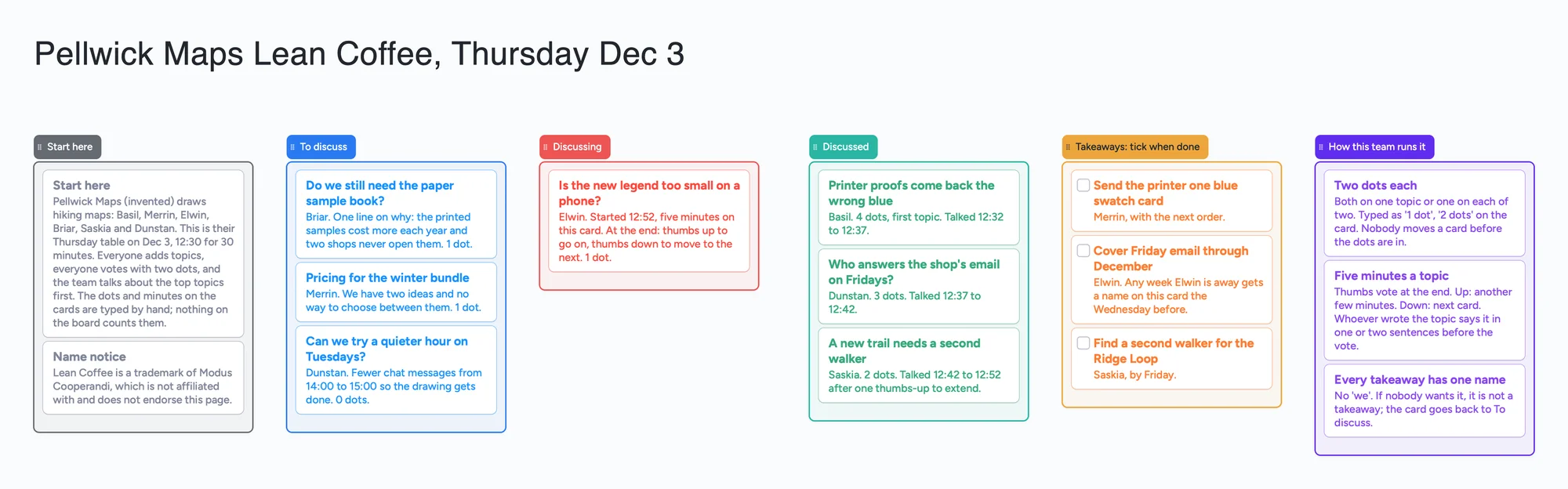
We make Instaboard, an online board. This page gives you a Lean Coffee table already laid out on it, filled in for an invented six-person team: Pellwick Maps draws hiking maps and is half way through a Thursday 30-minute table on December 3. Three of its seven topics are discussed, one is being discussed and three are waiting. The board holds the topics and the takeaways; the dots and the minutes are text you type, because nothing on it counts them. Dedicated tools count and time for you, and a section below says when to use one.
Opens in your browser. Anyone can view; a free sign-in lets you edit.
Updated
Before you copy it: what is typed and what is counted
- What it is: three lists for the meeting (To discuss, Discussing, Discussed) and a fourth for what people agreed to do. A topic is a card, and you move it across with a drag. The example holds 15 cards in 6 lists and uses 22 of your 150 free items.
- What it is not: no vote counter, no hidden votes, no invite and no meeting minutes, and nothing on it times a topic. A dot is the text '1 dot' on a card, and anyone with edit access can change it.
- What it leaves to you: counting the dots, keeping the time, and saying out loud when to move on. Someone has to move the cards as the table goes.
- Keep off it: names of customers, money, and personal matters about a colleague. A board shared by link is not private.
- When to use something else: a tool built for Lean Coffee when you want hidden votes, a timer everyone can see or meeting minutes written for you. A section below lists four tools and what each page says.
What this board does not run for you
The method has a few moving parts that a board of cards doesn't handle, so here they are before anything else.
- Voting. Votes are typed. Each topic card carries '1 dot', '2 dots' or '0 dots' in its text, and a person changes the number by editing the card. Nothing checks that anyone used only two, and the board doesn't show who added which.
- Secret votes and private ideas. Cards appear on everyone's screen within seconds. Miro's page suggests hidden voting so people don't follow the leader, and Retrium's page asks people to keep ideas to themselves while they write. This board can do neither.
- The clock. The minutes on the example cards are text. The app has a countdown timer widget, and we haven't put one on this board or tested one for this page. Nothing on the three lists times a topic, and nothing alerts you when a topic's time is up.
- Reminders and invites. The 12:30 and the Thursday are text. There are no reminders or due-date alerts.
- Meeting minutes. Nobody is recorded and nothing is written down for you. The takeaways list is typed by whoever holds the keyboard.
- Who ticked a takeaway. Anyone with edit access can tick or untick a box, and the board doesn't show who or when.
If your team wants any of those, skip ahead to the section on other tools. If it wants the topics, the order and the takeaways on one page in front of everyone, read on.
Three lists and two dots: the method in our words
leancoffee.org describes a meeting with no agenda written beforehand. We read that page on November 26, 2026; it prints no date. It names Jim Benson and Jeremy Lightsmith as the people who started it in Seattle in 2009, wanting a regular group that needed nobody but the people who showed up; its footer carries Modus Cooperandi's trademark line. Here is the shape in our own words, with the example's numbers beside it.
- Set up three lists. One for topics waiting, one for the topic being talked about now, one for topics finished. leancoffee.org builds them as a Personal Kanban: Ready, Doing, Done. The board's lists are To discuss, Discussing and Discussed.
- Everyone writes topics. One card per topic, and the person who wrote it gives a sentence or two so the others know what they are voting for. Pellwick's six people wrote seven topics.
- Everyone votes. On leancoffee.org each person has two votes, which can go on one topic or on two. Six people means 12 dots. The example gives them out as 4, 3, 2, 1, 1, 1 and 0 across the seven topics, which adds to 12.
- Talk in vote order. Atlassian's and Miro's pages move the most-voted topic to the discussing list first; leancoffee.org says only that you tally the dots and then talk. When a topic is done it moves to Discussed and the next one comes up.
- Write down what people agree to do. This is the fourth list. leancoffee.org's page doesn't mention one; Miro's page puts an owner and a next step on every discussed topic, and the board follows that.
Our view: that is the whole method. The rest is judgment about how many votes, how many minutes and what to do with leftovers, which is where the guides disagree (below).
Pellwick's Thursday table, list by list
All names, topics and numbers on the board are invented. The state shown is 12:52 on Thursday, December 3, with one topic being talked about and five minutes to go on it.
- Start here (2 cards). Who the team is, the 30 minutes, and the two-dot rule in plain words. The second card is the name notice for this page's format.
- To discuss (3 cards). The paper sample book (Briar, 1 dot), pricing for the winter bundle (Merrin, 1 dot) and a quieter hour on Tuesdays (Dunstan, 0 dots). Each card starts with the person's name and one line on why.
- Discussing (1 card). Is the legend too small on a phone? (Elwin, 1 dot). Started 12:52 and five minutes on this card.
- Discussed (3 cards). The wrong blue on printer proofs (Basil, 4 dots, 12:32 to 12:37), who answers the shop's email on Fridays (Dunstan, 3 dots, 12:37 to 12:42) and a second walker for a new trail (Saskia, 2 dots, 12:42 to 12:52, with one thumbs-up to carry on).
- Takeaways: tick when done (3 cards). Send the printer a blue swatch card (Merrin), cover Friday's email through December (Elwin, with a name added the Wednesday before any week Elwin is away) and find a second walker for the Ridge Loop (Saskia, by Friday). Each has one name and a tick box, and none is ticked yet.
- How this team runs it (3 cards). Two dots each, five minutes a topic with a thumbs vote, and one name on every takeaway.
The topic cards in To discuss are in vote order, with the 1-dot cards above the 0-dot one. Dots are typed text and none of a list's sort options is by them, so when a vote changes someone drags the card.
A 30-minute session, minute by minute
Our arithmetic from the cards, not a recommendation. The pages we read give different lengths, and the next section sets them side by side.
| Clock | What happens | Minutes |
|---|---|---|
| 12:30 | Everyone adds topics; each person says a sentence or two about theirs | 2 |
| 12:32 | Wrong blue on printer proofs, 4 dots | 5 |
| 12:37 | Friday email, 3 dots | 5 |
| 12:42 | A second walker for a new trail, 2 dots; one thumbs-up to carry on | 10 |
| 12:52 | Legend on a phone, 1 dot, still in Discussing | 5 |
| 12:57 | Takeaways read out and a name put on each | 3 |
Swipe the table sideways to see every column.
2 + 5 + 5 + 10 + 5 + 3 = 30. The two-minute start is the team's own choice, not a number from any page. Three topics (1, 1 and 0 dots) don't get a turn this week; the guides we read don't say what to do with them, so the board leaves it to the team.
In this example four of the seven topics get a turn in the half hour, which is why the dots matter: the 0-dot card waits.
Where the guides disagree on votes and minutes
Read November 26, 2026. No page prints a date. Quoted numbers are each page's own; the Pellwick column is the example's choice, labelled as such.
| Source | Votes each | Minutes a topic | Other steps it names |
|---|---|---|---|
| leancoffee.org | Two, on one topic or two | Not stated on the page | A sentence or two to introduce each topic; no grouping step |
| Retrium's Lean Coffee page | Three, if the team uses dot voting at all | 5 to 10, or 20 to 40 for the whole discussion | Ideas kept private while writing; a 5-minute grouping step; every action item written down |
| Atlassian's Confluence template | At most 5, by stamps | 7, then a vote to extend or end | Similar topics grouped before voting; the most-voted moved up |
| Miro's Lean Coffee page | 2 to 3 dots | 5, then a thumbs vote; each extension half the last | A 2-minute writing round; a 15-second pitch per card; an owner and next step on every discussed topic |
| Pellwick (example) | Two | 5, with one thumbs-up extension | No grouping step; takeaways with one name each |
Swipe the table sideways to see every column.
Our view: the pages agree on three lists and a vote, and disagree on the numbers. The example takes leancoffee.org's two votes and the five minutes Miro and Retrium both give, without claiming either is the method. A different team's numbers are the team's own call.
How to vote when the board can't count
Four ways to do it on this board, from lightest to heaviest. Our suggestions, not a source's.
- Type it on the card. The example does this: the last line of the card says '1 dot' or '3 dots'. One person edits as people call out their votes. Fast, and fine when the team trusts the person typing.
- Vote out loud, then type. Everyone says their two topics on the call and one person types the totals. Nobody edits anyone's card.
- Each person adds a mark. Each voter adds their initial to the cards they vote for, so you can see who voted for what. It also shows how people voted, which a hidden vote would not, and is the opposite of what Miro's page suggests.
- Use another tool for the vote. If the vote must be private, take it elsewhere and paste the totals onto the cards.
Whichever you pick, set the rule on the Start here card before the first topic, and don't change it mid-session.
Set up your own table, in order
- Open the board and overwrite Pellwick's cards one at a time, so no card is left half Pellwick and half yours.
- Rewrite the Start here card with your team, the length of the session, how many votes each person gets and how long a topic lasts.
- Clear To discuss, Discussing and Discussed before the first session. Keep the three How this team runs it cards, and change the numbers.
- Share it with edit rights. Pick the setting that reads "Anyone who joins can edit"; a new board starts view-only, and each person signs in to write.
- On the call, one person drives the cards. Everyone else adds their own topics, then calls out votes. If you run it on a call, the app's built-in calls need a free sign-in, and free calls run up to 60 minutes per call with a warning 10 minutes before the end.
- Move cards across as the table goes. To discuss, then Discussing, then Discussed. Each takeaway is a tick-box card with one name on it.
- At the end, read the takeaways out. Anything nobody wants goes back to To discuss, not onto the takeaways list.
When a tool built for Lean Coffee is better
Read on November 26, 2026. Where a line says a limit isn't listed, it wasn't on the page we read, which doesn't mean the tool has none. They suit different teams, so there is no ranking, and Instaboard isn't affiliated with any of them.
| Tool | What its page says | What it does that this board doesn't | Why you might still use the board |
|---|---|---|---|
| Miro's Lean Coffee page | Lists 16 templates, one of them Miro's own, plus advice to use hidden voting, a visible countdown clock and a speaker queue. Miro plan limits are not listed on that page (as of November 26, 2026). | Hidden votes, a clock people can see, a speaker queue | One page with the topics and takeaways, no canvas to learn |
| Atlassian's Confluence template | A whiteboard template: topics on sticky notes, votes by stamp (at most 5 each), 7 minutes a topic, then move to a Discussed section. Confluence plan limits are not listed on that page (as of November 26, 2026). | Stamp voting with a cap of five each, and living inside Confluence | A copy that needs no Confluence |
| Retrium's Lean Coffee page | A retrospective technique, three columns (To Do, Doing, Done), a facilitator picks it from a toolbox; offers all retrospective templates for 30 days. Prices are not listed on that page (as of November 26, 2026). | Guided facilitation and action plans, which its menu lists, for a retrospective | A table that isn't a retrospective |
| Lean Coffee Table | Built for the format: attendees create topics and vote, simple timers keep the topic, and attendees need no account (its Tour page). Its Subscribe page, read November 26, 2026, prints three paid plans per facilitator per month: Standard $10 (5 action boards, 3 retrospective boards, 20 guests a meeting), Premium $20 (15 and 10 boards, 100 guests) and Corporate $85 (50 and 50 boards, 200 guests), "save up to 5%" for annual pricing, and a 30-day trial marked "No credit card required!". Its Guide page (/Tutorials) is not read. leancoffee.org describes it as free to use; the Subscribe page lists no free plan. | Timers, meeting summaries, guests who need no account | No subscription; the cost here is the board's limits |
| Sticky notes on a wall | Nothing to read; leancoffee.org's own setup uses a pad of sticky notes and a pen | In the room, no screens, no sign-in | When the team is not in one room |
Swipe the table sideways to see every column.
From each page as read November 26, 2026. Vendor content. leancoffee.org says it has no financial relationship with the tools it lists.
How many tables fit in 150 items, and the free plan's limits
Your 150 free items are shared by every board you have. A list is one item, a card is one, and the title text box is one; arrows, sections and pen strokes are not counted. Counting Pellwick's board:
- As built: 6 lists + 15 cards + the title = 22. Of those cards, 2 are Start here, 3 are To discuss, 1 is Discussing, 3 are Discussed, 3 are Takeaways and 3 are How this team runs it.
- Room left: 150 - 22 = 128 items.
- One board for every Thursday, nothing deleted: add about 10 cards a week (seven topics and three takeaways). Week 1 is 22, week 13 is 142 and week 14 is 152, over the limit. Clearing Discussed slows that but doesn't stop it: if four of the seven topics get discussed each week and are cleared, the three leftover topics and three takeaways still add 6 a week, which is 148 at week 22 and 154 at week 23 (our arithmetic). Clear takeaways once they're done, too, to stay under.
- A fresh copy for each table: 5 copies = 110 items, and the board limit stops you there: each copy takes 1 of your 5 free boards, so the sixth needs a board you don't have.
- Five boards. Making a copy uses one of your five free boards.
- Three pictures a board. The example has none.
- Signing in to write. A person who opens the link can read it; to add or move a card they sign in free, and the board then counts toward their five.
- Nothing private. Personal or client matters shouldn't sit on a link board; invite-only boards are a Pro feature.
Pro lifts the item limit; it costs $5 a month billed yearly ($59.99 a year) or $7.99 a month. A weekly table kept on one board for a year is the case where it would matter; copying a fresh board each week runs into the 5-board limit first.
Whose name this is
leancoffee.org writes the name with (tm) in its first heading and says in its footer that it is a trademark of Modus Cooperandi. We read that page on November 26, 2026 and searched no trademark register. We use the name here only to describe the format and the page we cite, and we have copied none of that page's text.
Lean Coffee is a trademark of Modus Cooperandi, which is not affiliated with and does not endorse this page.
Start from the ready board
It opens in your browser in a few seconds, with nothing to install. Sign in for free when you want to save it and share it.
Questions
What is a Lean Coffee?
A short meeting with no agenda written beforehand. People write topics, vote on them, and talk about the most-voted topic first. leancoffee.org describes it as a Seattle group that began in 2009; the four pages we read that describe the steps agree on three lists, one for topics waiting, one for the topic in hand and one for topics finished.
Can I use the name Lean Coffee for my own meeting?
That isn't ours to say. leancoffee.org marks the name with (tm) and says it is a trademark of Modus Cooperandi; we didn't search a register and aren't giving legal advice. If you run one under that name in public or sell something under it, read their page and ask them.
How many votes does each person get?
The pages differ: two on leancoffee.org, three on Retrium's page, two or three on Miro's and at most five on Atlassian's. The example uses two, which for six people comes to 12 dots. Pick a number before the first topic and don't change it mid-session.
How long should a topic get?
Retrium's page says 5 to 10 minutes a topic or 20 to 40 for the whole discussion, Miro's says 5 with each extension half the last, Atlassian's says 7, and leancoffee.org doesn't state a length. The example uses 5 minutes and one extension to 10, which is our choice, not a rule.
What happens to topics nobody reaches?
The parts of the five pages we read don't say. Atlassian's steps repeat until the time or the topics run out. On the example board the three left in To discuss stay there; carry them to next week, drop them, or give them first place, and write the rule on the Start here card.
How much of the free plan does it use?
The example is 6 lists, 15 cards and the title, 22 of your 150 free items, and a copy takes 1 of your 5 free boards. Five fresh copies are 110 items, and the 5-board limit comes first. That is our arithmetic, and your other boards share the 150. Pro removes the item limit.
Sources
- leancoffee.org: Lean Coffee home page (one page, no date printed; the name is marked (tm) and the footer says it is a trademark of Modus Cooperandi; read in full in a browser November 26, 2026; it names Jim Benson and Jeremy Lightsmith as the starters and says it has no financial relationship with the tools it lists)
- Miro: Lean Coffee templates and examples, Miroverse (no page date printed; read in full November 26, 2026; vendor content)
- Atlassian: Lean Coffee template for Confluence (no page date printed; read in full November 26, 2026; vendor content)
- Retrium: Lean Coffee retrospective technique (no page date printed; read in full November 26, 2026; vendor content)
- Lean Coffee Table: home, Take the Tour and Subscribe pages (no dates printed; prices read on the Subscribe page November 26, 2026; its Guide page /Tutorials not read; vendor content)