For the few adults who bring new volunteers into a small group
A volunteer onboarding board for coordinators: where each new person is, the first shift and a shadow-then-lead month
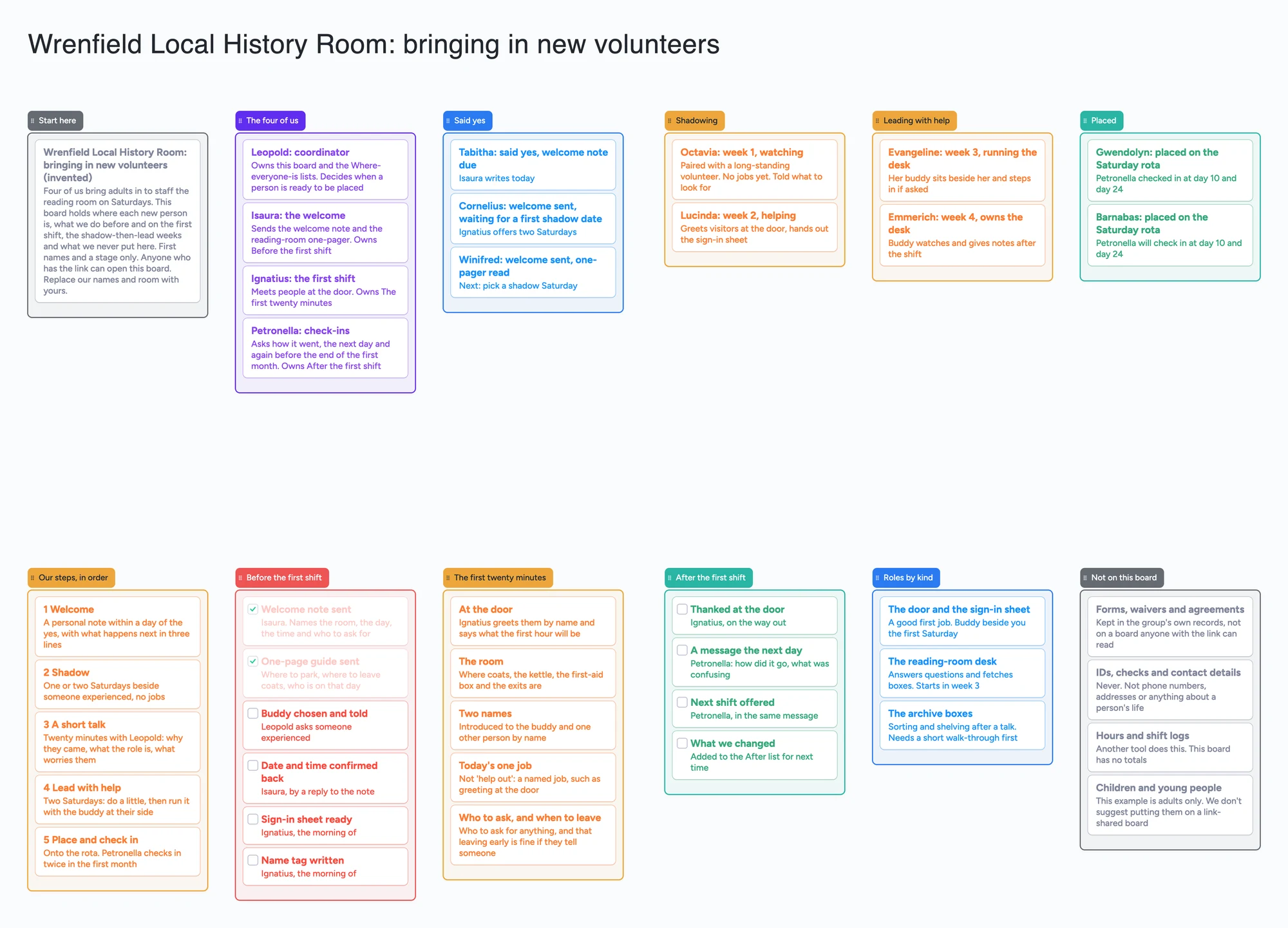
We make Instaboard, an online board. This page is for a handful of adults who bring new volunteers into a small group, a local history room, a library friends' group, a small museum, and who keep losing track of who has been welcomed, who is shadowing and who is ready. The board is filled in for four invented coordinators, Leopold, Isaura, Ignatius and Petronella, at the Wrenfield Local History Room, and for a handful of invented new volunteers who each sit in one stage list. It is about the process only. It holds a first name and a stage per person and nothing else: no forms, waivers, IDs, background checks, contact details or hours. Training platforms and volunteer-management tools do those jobs, and the first section says when to use one instead.
Opens in your browser. Anyone can view; a free sign-in lets you edit.
Updated
Who this is for, and who should use something else
- It suits a group with a few coordinators and a trickle of new people. If one person welcomes everyone, a single shared document or a printed checklist is quicker and nobody has to sign in. The board earns its place when three or four people each hold one step and nobody can see the whole.
- It holds a first name and a stage. The example has no forms, waivers, IDs, background checks, contact details, hours or ages. Anyone who has the link can open the board, so keep all of that in your group's own records.
- It does not do the platform jobs. It sends no reminders or due-date alerts, collects no signatures, logs no hours and runs no training course. A card can carry a due date and the app has a calendar view, but nothing nudges anyone.
- Adults only. The example is adult volunteers at a reading room. We don't suggest putting children or young people on a board that anyone with the link can read.
- Your co-coordinators sign in to write. New boards start as "Anyone who joins can view". Switch Share to "Anyone who joins can edit" and each coordinator signs in for free; the board then counts as 1 of their 5 free boards.
- Limits on the free plan: 5 boards, 150 items across your account and 3 pictures per board. The example is 54 items and a copy takes 1 of your 5 boards. Pro removes the item limit and costs $5 a month billed yearly ($59.99 a year), or $7.99 monthly.
When a document, a training platform or a volunteer tool does it better
Every guide we read was written by someone who sells software, a training platform or a book, so each one promotes its product. That does not make the advice wrong, but it tells you where the board stops. If you need volunteers to sign waivers, pass checks, log hours, take a short course or get reminders, you need one of those tools, not a board. Galaxy Digital's guide says it plainly: "With volunteer onboarding software, everything the volunteer needs to onboard is conveniently stored in one centralized, online platform." Volunteer Shift Manager's checklist page goes the other way for small groups and says to keep the checklist "as a shared document (Google Doc, Notion page, wherever your team lives) that anyone on your team can access and update".
Our edge is narrow. It is a view where four people can see, at once, who is waiting for a welcome, who is shadowing and who is ready to be placed, with the first-shift steps beside it. Nick Blevins, a church-ministry writer, tells coordinators to "Build a simple tracking sheet so you always know where each new volunteer is in the process." The board is that sheet, with the steps beside the people. If a plain document already does this for your group, use it.
- One coordinator, one door: a printed one-pager and a document. No board needed.
- Forms, checks, signatures, hours, scheduling or reminders: a volunteer-management tool. The guides name them; we did not test any.
- Videos, quizzes or a course people complete on their own time: a training platform, such as the LMS one r/nonprofit commenter says their group added.
- Three or four coordinators sharing the welcome, the shadow weeks and the check-ins: this board is a fair fit.
Where each new person sits: four lists, one card per person
The top row of the board holds the people, spread over four stage lists. Each new volunteer is one card, first name and a line saying what happens next, and the card moves by hand from list to list. Nothing moves it for you, and nothing tells Isaura that someone has gone quiet.
| Stage list | Who is in it in the example | What moves a card on |
|---|---|---|
| Said yes (blue) | Tabitha, Cornelius, Winifred: one needs a welcome note, two are waiting for a shadow date | The welcome note goes out and a shadow Saturday is picked |
| Shadowing (orange) | Octavia in week 1, watching; Lucinda in week 2, helping at the door | Leopold sees the person is comfortable with the room |
| Leading with help (orange) | Evangeline in week 3, running the desk with her buddy beside her; Emmerich in week 4, owning it | The buddy gives notes after the shift and Leopold agrees |
| Placed (green) | Gwendolyn and Barnabas, on the Saturday rota | Petronella's check-ins at about day 10 and day 24 |
Swipe the table sideways to see every column.
Counted from the board: 3 + 2 + 2 + 2 = 9 people-cards across four lists, plus the start card, four coordinator cards, five steps, six before-shift cards, five twenty-minute cards, four after-shift cards, three role cards and four "Not on this board" cards: 41 cards in all.
The board is partway through a month: one person has not had a welcome note yet and two have not picked a shadow date. A placed person's card can stay in Placed as a record or be deleted when you need the room; the item-count section says how far that goes.
Shadow, then lead: borrowing a four-week pattern
The four stage weeks in the example follow a pattern from Nick Blevins's post on church volunteer onboarding (a page with no date shown; he sells a book, The Volunteer Playbook). His apprenticeship runs four weeks: "Week 1: I do, you watch." "Week 2: I do, you help." "Week 3: You do, I help." "Week 4: You do, I watch." His reason is that the person goes from understanding the role to doing it with support. He puts "Within the first 30 days after placement, check in at least twice", which is where Petronella's day-10 and day-24 check-ins come from.
We took the pattern and left the rest. His process begins with observation and includes a vetting step (background checks, references, conversations) that he says every volunteer who works with children or students needs. Our board has no vetting step and no children, and it should not be used to run one. If your volunteers need checks, run them in a tool or a record built for that and keep them off a link-shared board.
The example also keeps each person to one named job, which is Niche Academy's first practice ("Define the Role Upfront") and Shift Manager's "Explain specifically what they're doing today." The fifth list in the bottom row, Roles by kind, holds three: the door and the sign-in sheet (a good first job), the reading-room desk (week 3 onward) and the archive boxes (after a short walk-through).
The first twenty minutes, checked against five guides' lists
Two lists carry tick boxes: Before the first shift (6 cards, two ticked) and After the first shift (4 cards, none ticked). A third list, The first twenty minutes, is plain steps for whoever meets people at the door. Each card is something one of the guides lists, in the example's own words.
- Before: a welcome note, a one-page guide, a buddy chosen and told, the date and time confirmed, the sign-in sheet and a written name tag. Galaxy Digital's "Before First Shift" list has "Send Initial Outreach Email", "Distribute Volunteer Manual" and "Ready Arrival Plan and Check-in Stations"; its guide says to connect "within 24 to 36 hours after registration", and VolunteerMatters says to "Send a personalized message within 24 hours of a volunteer signing up". The example writes "within a day".
- Name tags: Volgistics's orientation guide has a section called "Use Name Tags" and suggests different colours so new volunteers know whom to ask. The example has only the one card, a name tag written the morning of.
- At the door: by name, the room, two names, one job, who to ask. Shift Manager's checklist lists where to check in and out, "Introduce them to at least one other volunteer or staff member by name", the first-aid kit and the exits. Volgistics says new volunteers may not know "where the bathrooms are, where they can park, or whom they can ask for help".
- After: thanked at the door, a message the next day, the next shift offered, what we changed. Shift Manager writes that "The check-in after their first shift is the step most coordinators skip" and Niche Academy says "Always follow up after the first shift."
What the board leaves off these lists is what the guides print and platforms do: hours logging (Galaxy Digital's "Demonstrate Hours Logging"), attendance, waivers and checks. The "Not on this board" list names them.
What two r/nonprofit threads say about starting a volunteer onboarding
Neither thread is about a shared board, and each reply is one person's view, credited per account. In "All Volunteer Org - How Do Your Share Info?" (posted 2020-07-04 UTC by u/bluba313; Reddit shows 10 comments, the archived copy has 10, all with text, and we read all 10), the poster is on the board of a grassroots, almost all-volunteer group with no office. u/askmw wrote that their group "started using a learning management system to drip feed information and get confirmation that volunteers have signed off on/learned/will be using information", which they describe as "a separate system for more in-depth training". u/saillavee uses Asana and wrote that their philosophy is to adapt to the volunteer's style "rather than forcing them to adapt to mine", and that some volunteers take to it and some don't. u/bluba313 replied that the group is "re-working our entire volunteer onboarding process right now". u/isabelVL wrote that they work with VolunteerLocal and recommended it, so that account's advice is a vendor's view.
The second, "Onboarding Templates/Tips" (posted 2025-09-10 UTC by u/remo6899; Reddit shows 4 comments; the archived copy has 5, 2 of them removed (3 with text), and we read all 3), is a nonprofit that has never had a formal onboarding process and thinks that is behind its burnout. u/OneIntroduction5475 suggested "Informal meet and greets to get to know people in the team and build camaraderie". u/advancementtalent asked whether the poster means board members and volunteers or new employees, and wrote that for volunteers "it can be as simple as a welcome packet plus a short orientation call". u/Desi_bmtl wrote "Keep it simple, start with a checklist."
Read together: the first thread is about where to keep files and messages, and its answers name several tools (G Suite, Slack, Dropbox, Asana, a learning management system, VolunteerLocal); the second wants something small: a checklist, a welcome packet, a call, a meet and greet. A board is one place to keep a small thing like that when several people share it; none of the commenters names a board.
What each guide asks coordinators to do, and what its seller adds
Read November 26, 2026, each in a browser except where noted. Every row is what the page says, not something we tried, and the guides are written by sellers, so "what its seller adds" is the sales line.
| Guide and who writes it | What it tells coordinators to do | What its seller adds | What the board takes from it |
|---|---|---|---|
| Galaxy Digital, "Volunteer Onboarding Process: How to Prepare Volunteers for Success" by Addison Waters ("Published on July 25, 2022"; volunteer-management software) | Separates orientation, a one-time event, from onboarding, a multi-step process that "encompasses the vetting, placement, orientation, and training of new volunteers"; lists Connect, Prepare, Activate, Support and Evaluate (the page says four steps and names five); before, during and after first-shift checklists | Software that automates registration, scheduling, hours tracking and vetting | Its before-shift and after-shift checklists, shortened to what a few people can do by hand |
| Volgistics, "Volunteer Orientation Success Tips (Template)" (no date shown on the page; its markup carries 05/08/2024; volunteer-management software) | An orientation agenda from welcome and tour through policies, positions, leaders, benefits and a Q&A; "volunteer orientation and training are different"; name tags; a short follow-up survey by email | Says to keep the checklist "in your volunteer management software" | Name tag, the room, a named job, a follow-up question |
| Nick Blevins, "Church Volunteer Onboarding Process" (no date shown on the page; ministry writer) | Five steps from observation to placement, a four-week apprenticeship, two check-ins in 30 days and a tracking sheet; vetting for roles with children | A book, The Volunteer Playbook, and Ministry Boost, a training site | The four weeks and the tracking sheet; not the vetting |
| Niche Academy, "Better Onboarding: How to Set Volunteers Up for Success" by Margaret Helthaler ("Jun 9, 2025, last updated Oct 20, 2026"; training platform) | "You can't just repurpose your staff orientation"; five practices: define the role, an engaging orientation, role-specific training, one go-to channel ("This is where updates live.") and recognition | A training platform for volunteer videos, checklists and quizzes | One named job and one place for updates |
| VolunteerMatters, "Volunteer Onboarding: Best Practices to Build a Smooth Process" (7/31/2025; volunteer-management software) | A personal message within 24 hours; clear role expectations; a go-to contact; a visual progress tracker; measures such as completion rate, time to first shift and 30/90 day retention | Automated forms, background checks, training assignments and reminders | The go-to contact (the buddy) and the progress view (the stage lists) |
| Volunteer Shift Manager, "How to Build a Volunteer Onboarding Checklist" (no date shown; scheduling software) | A before-first-shift, first-day and first-week checklist; "Assign clear ownership: who is responsible for each step?"; keep it as a shared document | A scheduling tool it says was built for small nonprofits | Owners on every card and the shared-document idea |
Swipe the table sideways to see every column.
None of these pages gave a number we rely on: the 24-hour and 24-to-36-hour windows are what the pages recommend, not something we measured, and VolunteerMatters's 30/90-day measures are its own list. The board records no times, so it cannot report any of them.
Kept off the board on purpose
The last list, Not on this board, names what is left out, because anyone with the link can read a board.
- Forms, waivers and agreements. Keep them in your group's own records. The board does not collect or store a signature.
- IDs, checks and contact details. Never: no phone numbers, addresses, dates of birth or anything about a person's life. A first name and a stage is enough.
- Hours and shift logs. The board has no totals. A volunteer-management tool or a plain sheet does that.
- Why someone left or was not placed. A card says where a person is, never a judgement about them.
- Children and young people. The example is adults only. Roles with children need checks and a process this board does not run.
Counting items as new volunteers arrive
- The people-cards are the part that grows. The example is 54 items, so 96 more cards fit before 150, our arithmetic. A new volunteer is one card, so a group that welcomes ten people a month fills a board in about ten months if no card is ever deleted; deleting placed people's cards keeps it near 54.
- Boards. 5 on the free plan. A copy takes 1, and so does a board you open from someone's link.
- Other boards share the same 150. Pro removes the item limit.
- Pictures. 3 per board. The example has none, so a group photo of the team is possible but not needed.
- A tick is only a mark. It carries no name or time, anyone who can edit can clear it, and a copy keeps the ticks it had.
Set up your own in five steps
- Open the board and make your copy. "Make a copy" takes 1 of your 5 free boards. Replace the room, the four coordinators and the people-cards with yours, and clear the ticks.
- Give each coordinator one step in The four of us: the welcome, the first shift, the check-ins and who decides when someone is ready.
- Write your own steps in Our steps, in order, and change the weeks to match your group. Shorten the shadowing if your role is simple.
- Add one card per new person in Said yes and move it by hand. Put what happens next on the card.
- Share the link. To let the other coordinators write, switch Share to "Anyone who joins can edit"; each signs in for free. Keep forms, checks, contact details and hours out.
Start from the ready board
It opens in your browser in a few seconds, with nothing to install. Sign in for free when you want to save it and share it.
Questions
Can I put volunteers' contact details or forms on it?
No. Anyone who has the link can open the board, so the example holds a first name and a stage and nothing else. Keep forms, waivers, IDs and contact details in your group's own records.
Does it run background checks or log volunteer hours?
No. It has no checks, no hours and no totals. The guides we read describe volunteer-management software that does those jobs, and the board does not replace it.
Will it remind a volunteer or a coordinator?
No. It sends no reminders or due-date alerts. A card can carry a due date and the app has a calendar view, but nothing nudges anyone, so a coordinator has to look at the board.
Do the other coordinators need an account?
To write on the board, yes: they open the link, sign in for free, and you switch Share to "Anyone who joins can edit". The board then counts as 1 of their 5 free boards. Someone who only wants to look can open the link without signing in.
Is a board better than a shared document?
Not always. For one coordinator a document or a printed checklist is quicker, and Volunteer Shift Manager's checklist page suggests a shared document. A board helps when several people hold different steps and want to see who is where.
How many new volunteers fit on the free plan?
The example is 54 of your 150 items and each new person is one card, so about 96 more people fit if you keep every card, our arithmetic. Deleting placed people's cards keeps it smaller. Your other boards share the same 150, and Pro removes the item limit.
Sources
- Galaxy Digital: Volunteer Onboarding Process: How to Prepare Volunteers for Success, by Addison Waters ("Published on July 25, 2022"; a volunteer-management software vendor; read in a browser and from its HTML November 26, 2026)
- Volgistics: Volunteer Orientation Success Tips (Template) (no date shown on the page; its markup carries 05/08/2024; a volunteer-management software vendor; read in a browser November 26, 2026)
- Nick Blevins: Church Volunteer Onboarding Process: From "Yes" to Fully Serving (no date shown on the page; sells a book and promotes Ministry Boost, a training site; read in a browser November 26, 2026)
- Niche Academy: Better Onboarding: How to Set Volunteers Up for Success, by Margaret Helthaler ("Jun 9, 2025, last updated Oct 20, 2026"; a training-platform vendor; read November 26, 2026)
- VolunteerMatters: Volunteer Onboarding: Best Practices to Build a Smooth Process (7/31/2025; a volunteer-management software vendor; read November 26, 2026)
- Volunteer Shift Manager: How to Build a Volunteer Onboarding Checklist (no date shown; a scheduling-software vendor; read in a browser November 26, 2026)
- r/nonprofit: "All Volunteer Org - How Do Your Share Info?" by u/bluba313 (posted 2020-07-04 UTC; Reddit shows 10 comments, the archived copy has 10, all read; read November 26, 2026)
- r/nonprofit: "Onboarding Templates/Tips" by u/remo6899 (posted 2025-09-10 UTC; Reddit shows 4 comments; the archived copy has 5, 2 of them removed (3 with text), all 3 read; read November 26, 2026)