For a new Etsy shop run by a maker with one or two helpers
An Etsy shop launch checklist: one shared board for the plan around your listings
A new Etsy shop with a maker, a packer and a photographer needs one place to see who is making, shooting and writing what for each listing. This board is that place, filled in for one invented shop, Quillmoor Paper, which sells handmade paper goods. We make Instaboard, an online board; Etsy's own Shop Manager does the listing, the fees and the orders, and this board does none of that.
Opens in your browser. Anyone can view; a free sign-in lets you edit.
Updated
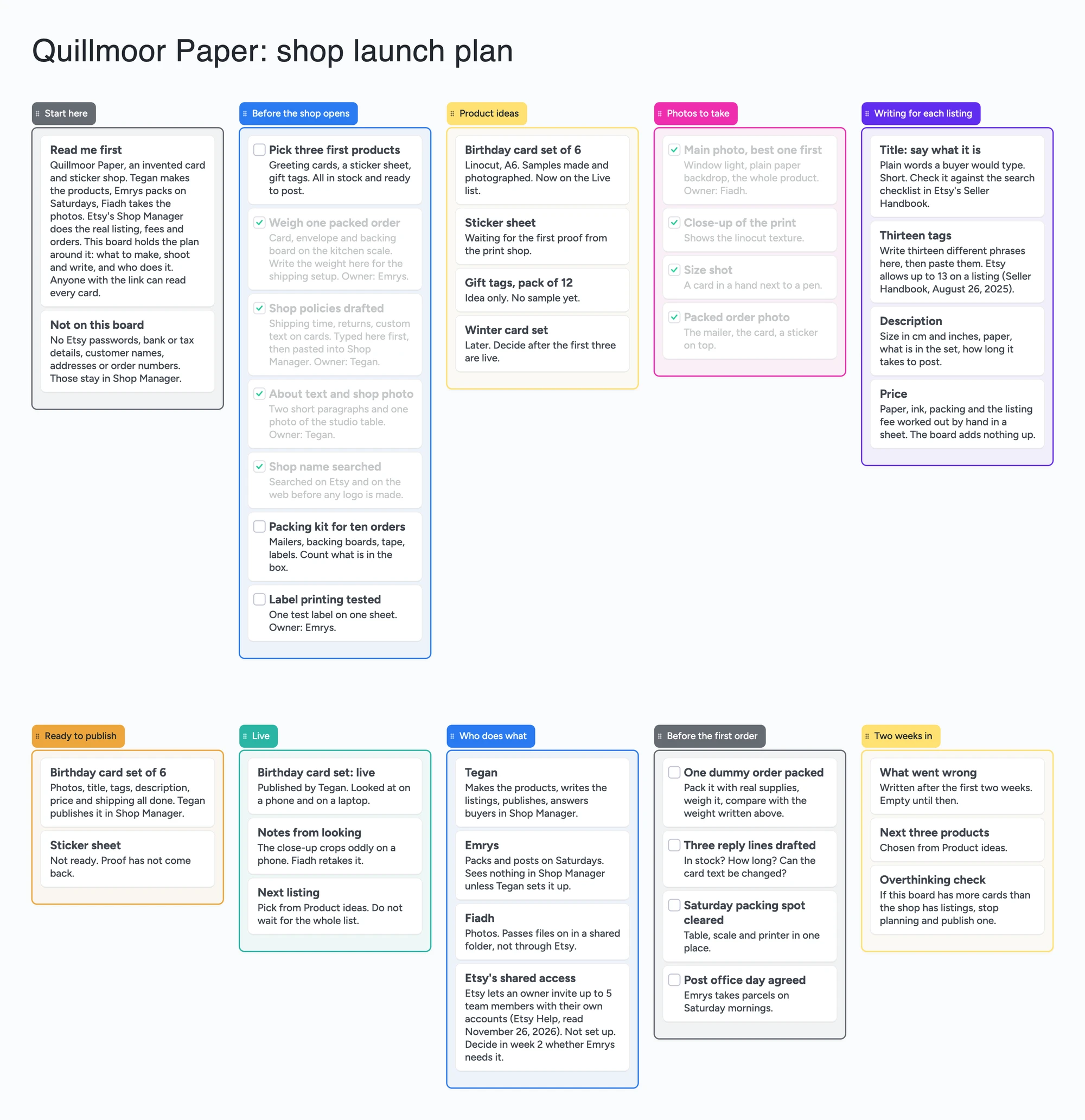
Etsy does the listing; this board is the plan around it
- It does not list, price or ship anything. Etsy's Shop Manager does that. Nothing on the board adds up fees, counts tags, tracks stock or orders, shows stats or sends a reminder. A shop with one product and one person can run on Etsy's own pages alone, and one r/EtsySellers reply to "what must I have before opening" was "JUST START".
- What the board is: a Before the shop opens tick list, product ideas, photos to take, the four things to write for each listing, a Ready to publish list, a Live list, who does what, a Before the first order tick list and a Two weeks in list. Quillmoor Paper, its three people and everything they say are made up for the example.
- What it isn't: no listing fees, no sales or stats, no inventory, no customer details, no files beyond 3 images and 1 file. Nothing here is advice on what will sell.
- Free plan: Quillmoor's board uses 48 of the 150 items the free plan allows (37 cards, 10 lists and the title text box, by our count). Drawing strokes and arrows are not counted. To change anything you must be signed in with a free account.
What Etsy's own pages already do
Start with where Etsy wins, because a board only helps with what Etsy doesn't hold. Etsy's Seller Handbook has a checklist, "Checklist: Optimize Your Shop for Etsy Search" (byline August 26, 2025), with ten steps: the search visibility page in Shop Manager, customer service standards, use all 13 tags, shipping prices, attributes, short titles, the best photo first, shop policies, titles and tags in your shop language, and experiments. It is about being found, not about the order of a launch.
Etsy's Help page on fees says it costs $0.20 to create or renew a listing, nothing to edit one, and that a listing expires after 4 months (read November 25, 2026; the page shows no date). Fees beyond that one are not on this page of ours: Etsy changes them, and Etsy's pages are the place to read them.
If two people work the shop, Etsy has its own feature for that. Shared access, described on Etsy Help (read November 26, 2026; the page shows no date), lets the owner invite up to 5 team members, each with their own Etsy account. They can manage orders, create, edit and publish listings, and reply to buyer messages. They can't cancel or refund orders, delete or deactivate listings, or see finances, marketing, stats, settings, apps or performance. This board has no equivalent: anyone you let edit can change any card.
When a launch board becomes the thing you do instead of selling
One thread, read in full on November 26, 2026 (r/EtsySellers "vtega2", posted July 7, 2022; Reddit now shows 25 comments, 24 of them rendered, with the post's author and u/MooingTurtle shown as deleted; the archived copy we read has 25, one removed, and the account names below come from it), asks what a new seller must have before opening. Each reply below is one person's view, credited to the account.
u/MooingTurtle's top-level reply (18 points when read) is "JUST START", and says you'll find out what you need as you go. u/bigblued calls a new shop "planting an orchard, not an herb garden". u/mullicamanufactory advises listing only items you have in stock and ready to ship at first, so you don't get overwhelmed. u/wartortlechortle, replying to u/MooingTurtle, writes that too many people spend too much time and money prepping, and says a first product, something to ship it in and an ordinary printer is enough. u/lovistocreative says they spent far too long on whether they had everything, and that the shipping supplies they planned for changed anyway. u/Klutzy-Bag-9206 says you will need a decent scale, and u/lolkatiekat, replying, says a scale and a printer, "100%".
The board takes two things from that thread and ignores the rest. It starts with three products in stock, not thirty. And it ends with a card called "Overthinking check": if the board has more cards than the shop has listings, publish one.
Quillmoor Paper, list by list
Quillmoor Paper is an invented shop selling cards and stickers. Tegan makes the products and publishes, Emrys packs on Saturdays, Fiadh takes the photos. Cards say "Owner:" and a first name where a person is responsible. No customer, address, price or order is on it.
- Start here (2 cards). What the board holds, and a "Not on this board" card: no Etsy passwords, bank or tax details, customer names, addresses or order numbers.
- Before the shop opens (7 tick-box cards). Three first products, one packed order weighed, shop policies drafted, about text and shop photo, the shop name searched, a packing kit for ten orders, a label printed as a test. In the example the weighing, policies, about text and name search are ticked; the other three are not yet.
- Product ideas (4 cards). A card set that has samples, a sticker sheet waiting for a proof, gift tags that are only an idea, a winter set for later.
- Photos to take (4 tick-box cards). The best photo first, a close-up of the print, a size shot, a packed-order photo. All four are ticked for the birthday card set.
- Writing for each listing (4 cards). Title, thirteen tags, description, price. The price card says the working-out is done by hand in a sheet, because the board adds nothing up.
- Ready to publish (2 cards) and Live (3 cards). A card moves right when the photos, title, tags, description, price and shipping are all done, and Tegan publishes it in Shop Manager. The Live list keeps notes from looking at the listing on a phone and a laptop.
- Who does what (4 cards). One card per person and one on Etsy's shared access, marked as not set up yet.
- Before the first order (4 tick-box cards) and Two weeks in (3 cards). A dummy order packed with real supplies, three reply lines drafted, a packing spot cleared, a post office day agreed; then what went wrong, the next three products, and the overthinking check.
One listing from idea to live
The birthday card set shows the path. It starts as a card in Product ideas, which in the example now reads "Samples made and photographed. Now on the Live list.", because the idea card stays behind when the product moves on. Fiadh ticks the four photo cards. Tegan fills the four writing cards, with the thirteen tags typed on the card first and pasted into Shop Manager after. The card then moves to Ready to publish, and after Tegan publishes it a card on the Live list says so, with a note that the close-up crops oddly on a phone and Fiadh retakes it.
The sticker sheet is the other way round: it has a card in Product ideas and a second card in Ready to publish that says "Not ready. Proof has not come back." It is waiting for a proof from the print shop, and the board says so instead of hiding it. A launch with one listing live and one waiting is a normal state, and the example shows it.
Long checklists and paid templates, and where each fits
Etsy launch lists come in three shapes: Etsy's own handbook checklist, a vendor's long list, and Notion templates sold by their makers. All cells are from each page as read on November 25 and 26, 2026, not a review of the products. The last column is our own view, not something a page says.
| Option | What it gives you | Price on its page | Our view: where it wins |
|---|---|---|---|
| Etsy Seller Handbook checklist (August 26, 2025) | Ten steps for search visibility in Shop Manager | Not a product; a handbook page | Etsy's own wording of what its search looks at |
| Printful, "How to Succeed on Etsy: Your Complete 30-Step Checklist" (Dec 4, 2024) | Thirty steps in five groups, from picking a product to analysing results; numbered in order, with no owner per step | Not a product; a blog post by a print-on-demand vendor whose service several steps point to | Wide coverage from niche to marketing in one read |
| Notion template "Etsy Shop Launch" by Jasmin | An 8-step roadmap, audience and name worksheets, a competitor section and a products database; the page links the creator's own Etsy shop | $5.00; page says "Last updated last year"; 4.0 from 1 rating | Worksheets and a database for product ideas |
| Notion template "Etsy Shop Launch & Operations Planner" by Nebula | Eight modules, including inventory, orders and fulfilment, content, and finance and fees | $14.95; page says "Last updated 5 months ago"; no rating shown | Inventory, orders and money in one workspace |
| Etsy Shop Manager | The real listing, fees, orders and shared access | $0.20 to create or renew a listing, per its Help page | Everything that actually happens in the shop |
| This board | A shared plan: who makes, shoots, writes and publishes what | 48 of the 150 items on the free plan; Pro removes the item limit | Two or three people seeing one plan, with no paid template |
Swipe the table sideways to see every column.
Our reading of pages on two days. Prices and ratings change; check each page.
Make it yours before the first listing
- Start from a copy and swap the example for your shop. Put your products and names where Quillmoor's are, and delete the lists you don't need; each card is 1 of your 150 items.
- Start with three products, not thirty. Put only items you can make and post now in Product ideas.
- Weigh one packed order before anything else. Write the weight on its card; you'll need it for shipping in Shop Manager.
- Decide how your helper joins. To let them move cards, pick "Anyone who joins can edit" under Share; they sign in with a free account first. Etsy's shared access is a separate thing and is how they would get into the shop itself.
- Move a card, then publish. A product moves to Ready to publish only when its photos, title, tags, description, price and shipping are done. The listing itself is made in Shop Manager.
What a board can't do for a shop
- No fees, profit or price working: the board adds nothing up. Our example says to do it by hand in a sheet.
- No tag counter, no search-ranking help, no stats and no link to your shop.
- No stock, orders or customer messages. Those stay in Shop Manager.
- No reminders or due-date alerts. A card can carry a due date and Instaboard has a calendar view, but nothing sends a message when something is late.
- A tick shows to everyone with edit access, records no name and no time, and anyone with edit access can un-tick it. There is no reset-all for ticks.
- Whoever has the link can read all the cards, and the link to a ready board opens a copy of it. Leave passwords, bank and tax details, customer names and addresses, and order numbers off it.
- Etsy is a trademark of Etsy, Inc. This page and board are not affiliated with or endorsed by Etsy.
How many products fit in 150 items?
Every card, list and text box is one of your 150 free items, counted across all your boards; pen strokes and arrows are not counted. Quillmoor's example uses 48 of them: 37 cards, 10 lists and the title text box.
- Three cards per product, nothing deleted: an idea card, a Ready card and a Live card. 34 products take the board to exactly 150 (48 + 3 x 34), and a 35th goes over (our arithmetic).
- Delete the idea and Ready cards when a product goes live: each product then keeps 1 card and the board stays small for much longer.
- A second shop on its own copy: every copy uses up one of your 5 free boards, and Quillmoor-sized boards add up to 96 items for two, 144 for three and 192 for four.
Pro removes the item limit; it costs $5 a month billed yearly ($59.99 a year), or $7.99 monthly.
Start from the ready board
It opens in your browser in a few seconds, with nothing to install. Sign in for free when you want to save it and share it.
Questions
Is there an Etsy shop launch checklist I can share with a helper?
Yes. Copy the board, put your own products and people in place of Quillmoor Paper's, and choose "Anyone who joins can edit" under Share so a helper can move cards. A helper has to sign in with a free account before they can change anything. Getting a helper into the shop itself is a different job, and Etsy handles it with shared access in Shop Manager.
Can it list products, work out fees or track orders?
No. Listings, fees and orders are in Etsy's Shop Manager. The board holds the plan around them: what to make, shoot and write, and who does it. Nothing on it adds up fees or shows stats.
Can I put customer names, addresses or order numbers on it?
Please don't. The example board even has a card saying so. Whoever holds the link can read all of its cards, and the link to a ready board leads to a copy of it. Customer details, passwords, bank and tax information belong in Shop Manager, not here.
Is this better than a paid Notion template for an Etsy shop?
It depends on what you need. The two Notion templates we read are $5.00 and $14.95 on their pages and include worksheets, a products database, or inventory, orders and finance modules. This board has none of those; it is a shared plan for two or three people to see at once.
Do I need a launch board to open an Etsy shop?
No. In the r/EtsySellers thread we read, the top-level reply with the most points (18 when read) was "JUST START". If you are one person with one product, Etsy's own pages may be all you need.
How many products fit on the free plan?
Cards, lists and text boxes each use one of the 150 items the free plan gives you across every board. Quillmoor's example uses 48. A product that keeps an idea card, a ready card and a live card costs 3 items, so 34 products bring you to 150. Deleting the idea and ready cards once a product is live keeps the board much smaller.
Sources
- Etsy Seller Handbook: Checklist: Optimize Your Shop for Etsy Search (byline August 26, 2025; read November 25, 2026)
- Etsy Help: Fees and Listing Multiple Quantities (read November 25, 2026; the page shows no date)
- Etsy Help: Shared Access for Etsy Shop Owners (read November 26, 2026; the page shows no date)
- Printful: How to Succeed on Etsy, Your Complete 30-Step Checklist (Dec 4, 2024; read November 26, 2026; a print-on-demand vendor)
- Notion Marketplace: Etsy Shop Launch by Jasmin ($5.00, "Last updated last year"; read November 26, 2026)
- Notion Marketplace: Etsy Shop Launch & Operations Planner by Nebula ($14.95, "Last updated 5 months ago"; read November 26, 2026)
- r/EtsySellers: what are the main things you MUST have before opening an Etsy shop (July 7, 2022; Reddit shows 25 comments; the archived copy read on November 26, 2026 has 25, one removed; replies are single accounts)