For a solo interior designer and a client on one project
Interior design project phases: one shared board for the designer and the client
A designer and a client who both need to see where a job stands can do it on one plain board, as long as the job fits on words. This one holds no more than three pictures on the free plan, adds up nothing, charts no schedule and sends no invoice. For image boards there is Milanote, for schedules, expenses and a client dashboard there is Houzz Pro, and the first table says what their pages offer. The example job is invented: Hexley Fold Interiors, where Wynne is the designer, Percival and Sabine are the clients, Hartley paints, and the work is a living room and a hall. Its lists, left to right and top to bottom, are Start here; Brief and rooms; Concept; Waiting on the client; Selections; Orders and delivery; Install day; Handover; Not for this board; and Set it up for your project.
Opens in your browser. Anyone can view; a free sign-in lets you edit.
Updated
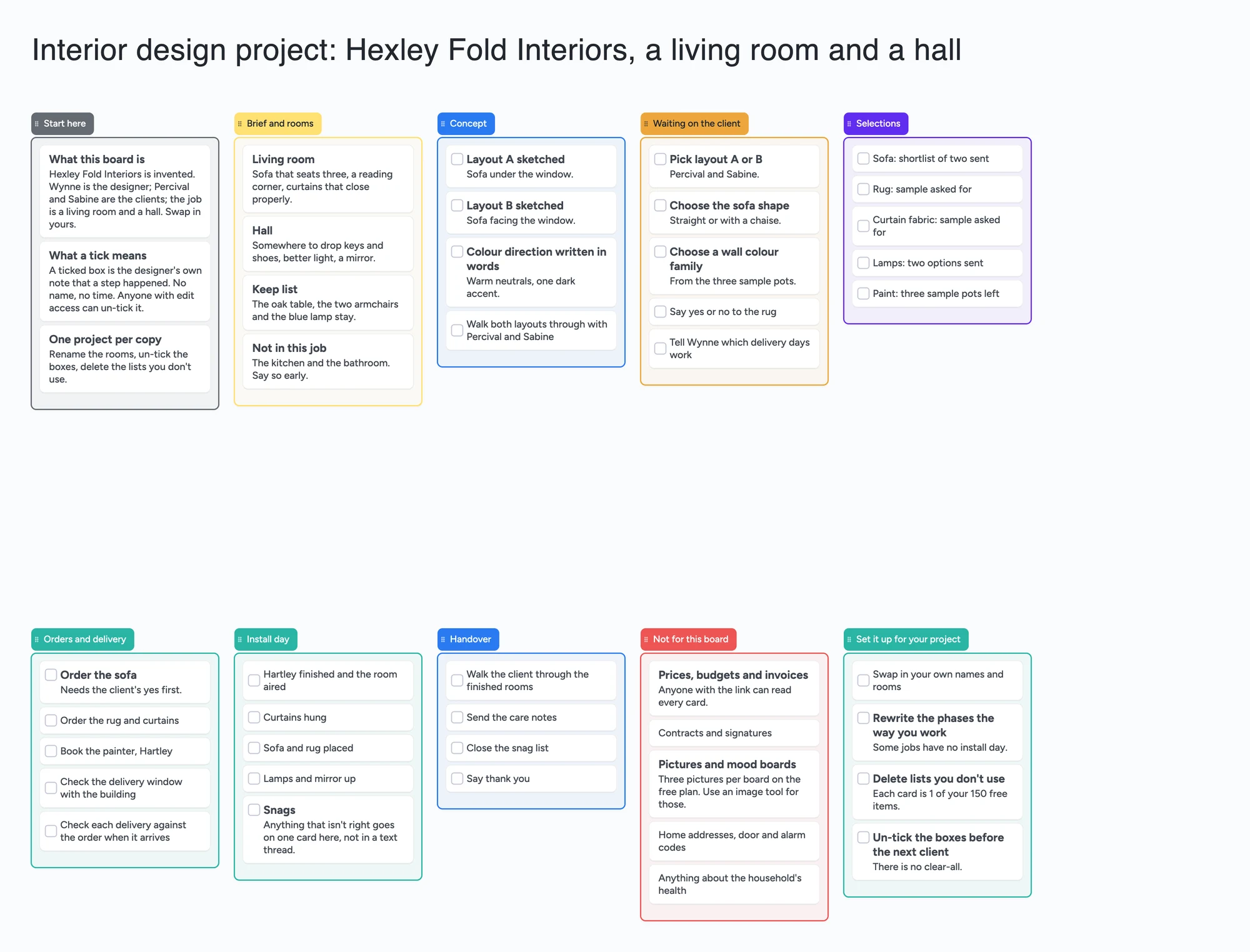
Phases and the client's decisions, side by side
- Built for: one designer working with one client household. It follows a job in an order close to the sources', with the client's open decisions in a list of their own. The firm and the people are invented; every name is a first name.
- Stays elsewhere: pictures and mood boards, budgets and prices, invoices, contracts and signatures, schedules with dates and dependencies.
- Pictures: a free board holds 3 pictures, and the board has none. A designer who works from images needs an image tool, and the first table below names two.
- Plan limits: the example is 55 of your 150 free items (44 cards, 10 lists and 1 title text box, our count). Arrows and pen strokes don't count. A copy takes 1 of your 5 boards. A client who opens the link signed out can read everything and change nothing.
What a plain board leaves to other tools
Three pages explain how an interior design job runs, and each is worth reading before you copy anything here. We read them in a browser on November 26, 2026, and they may have changed since. Instaboard is ours; none of the three is a partner.
| Tool or guide | What the page lists | It suits you if | What the board holds |
|---|---|---|---|
| Milanote, "Interior Design Project Plan Template" (no date shown on the page; an image-board product) | The template "includes boards and placeholders to help you organize the brief, moodboards and product shopping list in one place", and the page says "Start by searching Milanote's built-in image library. It has millions of beautiful photos that you can drag straight onto your moodboard." | Your client conversation runs on pictures, mood boards and a visual shopping list | Words only; no pictures, and no shopping list with links to products |
| Houzz Pro Learn, "Free Template: Interior Design Schedule & Guide" (by Kyle Clapham; the page shows "MARCH 5, 2026" and says it was "originally published May 9, 2022, but was reviewed March 5, 2026"; Houzz sells design software) | A free schedule template to download, and 13 milestones from discovery call to "Request payment", each with a timeline such as "6 to 12 weeks" for procurement. It says Houzz Pro's software can "easily create a visual project timeline, track time and expenses, keep your client updated via the client dashboard, and much more". | You need dated schedules, tracked time and expenses, or a client dashboard | Phases as lists; the example sets no dates, durations or totals |
| Clare Le Roy, The Little Design Corner, "My 7 step workflow and interior design process with clients" (no date shown on the page; a designer's own site that sells templates and courses) | Seven stages, from a paid initial consultation to project completion, each with a "What" and a "How". She writes that "Some projects would include all these steps. Some would only involve some." | You want one designer's complete method, with her emails and templates | The stages as lists, with none of her scripts or templates |
Swipe the table sideways to see every column.
Quotes are exact. Two of the pages sell something (an image-board product, design software) and the third is a designer's own shop; none of them sets a standard for how a job must run.
Pictures and items: what the free plan allows
A free board holds up to 3 pictures, and your free account holds 150 items across all your boards. Each card, list and text box is an item; arrows and pen strokes aren't counted. Pro removes the item limit and the picture limit ($5 a month billed yearly, $59.99 a year, or $7.99 monthly). The example board uses no pictures, so a designer who needs more than three for a client has two choices: pay for Pro, or keep the pictures in an image tool and keep only the decisions here.
Fifty-five items is a short job: two rooms, one painter and a handful of orders. A bigger house multiplies it. Two copies of the example come to 110 items and a third passes 150 (our arithmetic), and each copy takes 1 of your 5 free boards. One board reused from job to job, with the boxes un-ticked, stays under the limit.
Six steps, seven stages or thirteen milestones
The three pages above do not cut a job the same way. Milanote's how-to has six numbered steps, from opening the template to the product shopping list. Clare Le Roy's workflow has seven stages. Houzz's guide has 13 milestones. They start in different places too: Houzz's list opens with a discovery call, a questionnaire and a consultation, while Milanote's starts with a brief. The board makes its own cut, and it is not a standard.
Seven of its ten lists are phases: Brief and rooms, Concept, Waiting on the client, Selections, Orders and delivery, Install day and Handover. Some jobs have no install day; the setup list says to rewrite the phases the way you work. Houzz's guide says to "Label and name all segments clearly along with the projected timeline for each". The board does the first half, since its list names are the labels, and sets no timelines.
The list the client is waiting on, and the list waiting on the client
Waiting on the client has five tick cards: pick layout A or B, choose the sofa shape, choose a wall colour family, say yes or no to the rug, and tell Wynne which delivery days work. Each one blocks something else. Order the sofa carries a note that it needs the client's yes first, and the rug and curtain orders wait on the same list. A board shows that chain only as far as you keep it up to date: no reminder or alert fires when a card is waiting on Percival and Sabine, so it has to be said in a message or a visit.
In r/interiordesignsindia's "What project management software are you using for your interior design projects?" (posted 2025-06-20 UTC; Reddit shows 29; the archived copy has 26, 8 removed or deleted, none of them quoted), the post asks about "tracking timelines, budgets, client communications, product sourcing, and team coordination". Most of the replies that remain name a product, and four come from accounts that say they built one, so the thread is not a survey of how designers work. In a reply to blackwolf451, the poster, Jupiter-junior, says the team is 5 and that Notion is in use for tasks: "it's bit hard to add whole project task revision and Selection details". Jupiter-junior adds that they want "to track the site progress and status of material delivery, drawing issued etc". The board does not track site progress or drawings.
One reply, from blackwolf451, argues for plain tools: "the less opinionated the tool, the more flexible it'll be", and "I would choose something that also allows you to invite external collaborators, which helps with client transparency". That is one person's view. On this board the client is an external collaborator in the simple sense that they open the same link.
Selections and orders without a price on any card
Houzz's guide says of procurement: "Furniture, window treatments, decor, and other custom design items will all vary in how long it takes for your vendors to create and/or ship." Its example gives 6 to 12 weeks; the board gives none, because delivery times belong to the vendor and the room. The Selections list holds five asks and sends, such as a shortlist of two sofas and a sample of the curtain fabric. The Orders and delivery list holds five steps, ending with a card to check each delivery against the order when it arrives.
In r/femalelivingspace's "How do you juggle 5-7 projects as a beginner interior designer? Need advice!" (posted 2024-10-26 UTC; Reddit shows 7; the archived copy has 7), Sissy63 writes of managing clients with "Lots of driving, excel spreadsheets (how I organized and managed clients)". In our view a spreadsheet is the place for sums and order numbers; this board is the list of what has happened and what has not, one job at a time.
Install day, the snag card and handover
Install day has five cards: Hartley finished and the room aired, curtains hung, sofa and rug placed, lamps and mirror up, and Snags. Snags is a single card where anything that is not right goes, so it is not scattered across messages. Handover follows with four: walk the client through the finished rooms, send the care notes, close the snag list, and say thank you. In Clare Le Roy's stage 6, Install/Styling, one task reads "Hand project over to clients and prepare a client handover pack"; the board has no pack, only a Send the care notes card.
Nothing in the board schedules a visit or sends a reminder.
What belongs in your own files
Whoever holds the link sees every card, and a board can be limited to invited people only on Pro. The board's Not for this board list carries these five:
- Prices, budgets and invoices. The board adds up nothing and records no payment.
- Contracts and signatures. Use the tool you sign with.
- Pictures and mood boards. Three per board on the free plan, and an image tool does them better.
- Home addresses and door or alarm codes. Keep them in a message to the one person who needs them.
- Anything about the household's health. A client's health is theirs to share.
Setting it up for your own job
- Boxes. The example has 32 tick boxes on seven lists. A tick is the designer's own note and carries no name or time; anyone with edit access can un-tick it, there is no clear-all button, and a copy keeps its ticks, so un-tick before the next client.
- Nothing nudges. The Waiting on the client list sets no reminder and no due-date alert.
- Letting the client write. A client who opens the link signed out sees the whole board and can't change it. For the client to tick their own decisions, switch on "Anyone who joins can edit" in Share; writing needs a free sign-in.
- Replace the people and the rooms. Put in your own client, your own trades and your own rooms.
- Rewrite the phases the way you work. Delete Install day if you do not install, and add a list if you tender.
- Move the client's open decisions to Waiting on the client. One decision per card.
- Look at the link signed out before you send it. Take off any card you wouldn't hand a stranger, because the link shows all of them.
Start from the ready board
It opens in your browser in a few seconds, with nothing to install. Sign in for free when you want to save it and share it.
Questions
Can this board hold my mood board?
Only if it is three pictures or fewer. A free board holds 3, and the example holds none. Use an image tool for mood boards and keep the decisions on the board.
Does it work out a budget or keep track of what has been paid?
No. The board has no sums, no prices and no payments. A spreadsheet or your accounting tool does those, and Houzz Pro's pages describe software that tracks expenses.
Will the client be told when something is waiting on them?
No reminder or alert fires when a card is waiting on them. You have to tell the client, and the list is what you point them to.
How many phases should a project have?
The sources do not agree: six steps on Milanote's page, seven stages in one designer's workflow and 13 milestones in Houzz's guide. The example has seven phase lists, and you can cut it to fit your own work.
Who can edit a shared board?
Anyone with the link can read it. To let people tick and write, switch on "Anyone who joins can edit" in Share; writing needs a free sign-in, and a reader who opens the link signed out can't change anything.
How many jobs fit on the free plan?
The example is 55 items, so two copies are 110 and a third passes the 150 free items (our arithmetic). Reuse one board and un-tick it between clients to stay inside the limit.
Sources
- Milanote: Interior Design Project Plan Template (no date shown on the page; read November 26, 2026; an image-board product)
- Houzz Pro Learn: Free Template: Interior Design Schedule & Guide (by Kyle Clapham, "MARCH 5, 2026", "originally published May 9, 2022, but was reviewed March 5, 2026"; read November 26, 2026; Houzz sells design software)
- The Little Design Corner: My 7 step workflow and interior design process with clients (by Clare Le Roy; no date shown on the page; read November 26, 2026; a designer's own site that sells templates and courses)
- r/interiordesignsindia: What project management software are you using for your interior design projects? (2025-06-20 UTC; read November 26, 2026; Reddit shows 29; the archived copy has 26, 8 removed or deleted; replies are single accounts, four of them from people who say they built their own tool)
- r/femalelivingspace: How do you juggle 5-7 projects as a beginner interior designer? Need advice! (2024-10-26 UTC; read November 26, 2026; Reddit shows 7; the archived copy has 7; replies are single accounts)