For two hosts, or a host and a producer, planning a season
A podcast episode and season planner for two people
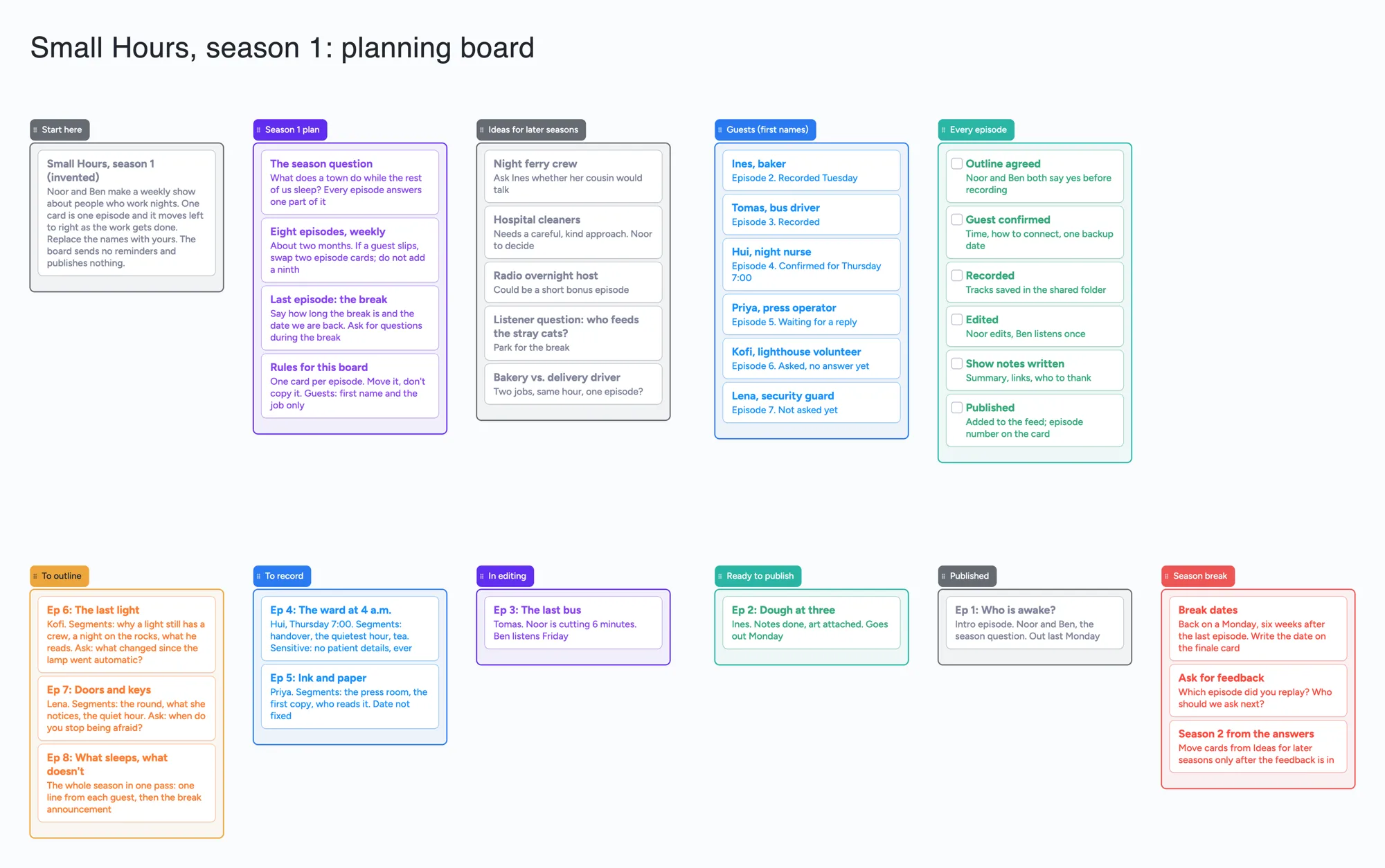
We make Instaboard, an online board. This one holds a season plan and one card per episode, and you move each card along as the work gets done: to outline, to record, in editing, ready to publish, published. It is filled in for an invented show, Small Hours, made by Noor and Ben. It holds no audio, publishes nothing, sends no reminders or due-date alerts, so a podcast host's own tools and a plain document do some of this job better, and we say where below. What a board adds is one place where two people see every episode's stage at a glance.
Opens in your browser. Anyone can view; a free sign-in lets you edit.
Updated
What this board does and doesn't do
- It plans; it doesn't produce. No audio, no scripts as files, no publishing. A card is text you type. Where an episode is in the work is where you dragged its card.
- No reminders or due-date alerts. "Hui, Thursday 7:00" is words on a card here. Nothing alerts anyone.
- Pictures and recordings don't belong here. Free boards take 3 pictures each. If you collect clips, covers or photos for every episode, a shared folder does that.
- Free plan limits: 5 boards, 150 items across your account and 3 pictures per board. A copy of this board takes 1 of your 5. Pro is $5 a month billed yearly ($59.99 a year), or $7.99 monthly, and removes the 3-picture limit and the item limit.
- Everyone with edit access can move any card. Agree who moves which.
When a document, a sheet or your host's tools are the better pick
In r/podcasting threads we read, many of the answers were a document or a sheet, and one said "No need for a program really". If you are one person who plans as you go, a notes app is enough. If your plan is mostly long episode outlines, a shared document is easier to write in than a card. If you need a publishing calendar with dates that remind you, a calendar or a project tool does that and a board doesn't. A board fits between those: two or three people who need to see, in one glance, which episodes are at which stage, and who want a card per episode they can drag.
The table further down names what the tools say about themselves, read November 24, 2026.
Small Hours, list by list
The show is invented: a weekly interview series about people who work nights, eight episodes in the first season (our choice for the example), two hosts. Guests are first names and a job.
| List | What goes in it | In Small Hours |
|---|---|---|
| Start here (grey) | What the board is and how to read it | One card |
| Season 1 plan (purple) | The season question, how many episodes, the closing episode, the rules | 4 cards |
| Ideas for later seasons (grey) | Topics that don't fit this season | 5 cards: ferry crew, hospital cleaners, a radio host, a listener question, bakery against delivery driver |
| Guests (blue) | First name, job and which episode | 6 cards: Ines, Tomas, Hui, Priya, Kofi, Lena |
| Every episode (green) | The steps that repeat, with a tick box each | 6 tick-box cards: outline agreed, guest confirmed, recorded, edited, show notes written, published |
| To outline, To record, In editing, Ready to publish, Published | One card per episode, moved along as the work happens | 8 episode cards in all: 3, 2, 1, 1 and 1 |
| Season break (red) | The break date, the feedback you ask for, how season 2 starts | 3 cards |
Swipe the table sideways to see every column.
The board's own wording. Dates and times are typed text; nothing sends a reminder or due-date alert.
One episode across the board: episode 4
This is how Noor and Ben might move one card. The order is our example, not a rule.
- Ep 4 starts in "To outline" as a card with the guest's first name and three segments. Noor and Ben both say yes to the outline, so the first tick box in "Every episode" is ticked for it.
- The guest card (Hui, night nurse) says "Confirmed for Thursday 7:00" once Hui has replied. Until then it said "Waiting for a reply".
- The episode card moves to "To record" once there is a time. The card carries one safety line: no patient details, ever.
- After recording it moves to "In editing"; Noor cuts, Ben listens once, and the card says when.
- Show notes get written before it moves to "Ready to publish"; the card says what day it goes out.
- On publish day it moves to "Published" and the episode number goes on the card.
"Every episode" is a checklist list: tick items together and everyone with edit access sees a tick live. Nothing records who ticked or when, and there is no reset-all, so before the next episode you untick the six boxes by hand (or keep one such list per episode).
How long a season is, and the break
A board doesn't decide this, but the plan list should hold what you decide. Three sources, read November 24, 2026:
- The Podcast Host, "Podcasting in Seasons" (by Colin Gray; the page shows "Last update on" December 6, 2023). Its framework says to pick a topic your audience asks about, break it into about 8 bullets for a first season ("1.5 to 2 months of weekly content"), and sketch 5 to 10 sub-bullets for each. It also says a season "should be as long as you need it to be", with its own examples running 5 or 6 episodes and 20 episodes. It names news and current affairs as the kind of show seasons suit least.
- The same page on the break: tell listeners in the finale how long you'll be away and when you'll be back, with an example episode title, "End of Season 5! We Return on May 29th", and ask for feedback during the break to feed the next season. That is the Small Hours "Season break" list.
- Buzzsprout's guide, "How to Start a Podcast" (page says "Last updated on January 02, 2026"). It recommends "publishing once a week" and prints Buzzsprout's own platform statistics for how often shows publish: 3 to 7 days 36%, 8 to 14 days 39%. These are Buzzsprout's figures for its own platform, not a rule.
Not every show wants seasons. In the "raw content/topic ideas" thread, the poster (u/PennyboxPodcast) asked u/DeepBlueDiariesPod whether they organise episodes by season or theme and wrote "we don't want to do “seasons”"; DeepBlueDiariesPod replied "I have a monthly content calendar and it’s organized by my content buckets", for an ocean-themed show with four buckets. Small Hours uses a season; if you don't, rename the lists and keep one card per episode.
What podcasters say about planning
Two r/podcasting threads, read November 24, 2026. Each reply is one person's view; we read every comment the page loaded.
- "How do you plan your episodes?" (poster deleted, posted October 11, 2023; 10 comments, all loaded). The poster said they used Google Docs and Trello and wished for software "in more of a streamlined workflow" for working with a co-host and guests. u/paulywauly99 wrote that they keep a folder per upcoming subject with a Word show script and added "No need for a program really." u/PartyMoses wrote that they share one Google document of outlines with their producer, who comments on them, and that they hold recording until both are satisfied. u/AdmirableTurnip2245 wrote that their sheet has a tab with every episode and "the stage of production it is in: recorded, audio edit, video edit, published", which is the stage-by-stage idea on this board. u/andrewTvJW wrote that a Trello board "Comes in handy for long term threads and stuff currently worked on". Two commenters, u/Ancient_Phone5126 and u/strohmkatigbak, said they use Notion. u/DannyBrownCaptivate said they work at Captivate and described its episode planning feature; read that as a vendor's own comment.
- "Where do you put all your raw content/topic ideas?" (u/PennyboxPodcast, posted November 24, 2024; Reddit shows 27 comments; our archived copy has 27, none removed). The poster used spreadsheets, Google Docs and Trello, and wrote that Notion "doesn't look like it stores photos/videos". u/DeepBlueDiariesPod wrote that each episode is organised "as if I'm doing a presentation" in slides, with a monthly content calendar and a running ideas list. u/crxssrazr93 wrote "honestly? whichever is the least hassle for you". u/SickCycling wrote Trello ("Boards, Cards, Items, Checklists"). u/ShowShaper wrote that they were building a tool for this, so that comment is promotion.
That is a handful of commenters, not a count of how podcasters plan. No commenter in either thread asked for a shared board, though the first poster did want software for working with a co-host and guests. The media point is real: this board holds 3 pictures at most and no audio.
Where other tools do this better
Read November 24, 2026. Prices and features change, so check the page. No ranking: they suit different people. Every row is what a page or a commenter says; nothing is from using the tool.
| Tool | What its page or commenters say | Better than a board at | Where a board fits |
|---|---|---|---|
| Asana's podcast planning template page | The page (title carries [2026]; no other date shown) lists episode planning, calendar, script, workflow and guest-coordination templates, and says to look for one that lets you "assign owners to tasks, set due dates, and add attachments" | Due dates, owners and attachments on tasks in one tool built for tasks | A glance at which episode is at which stage; no due-date alerts and no attachments beyond 3 pictures |
| Google Docs and Sheets | Named by many commenters in the two threads, as outlines, a sheet of episode stages and a content calendar. Not read for a plan or price | Long outlines, sorting, sums, a calendar-style sheet | Cards you drag, one per episode |
| Trello | Named by commenters (u/andrewTvJW, u/SickCycling). We did not read Trello's page for this | A task board many podcasters already use | No claim; if you already live in Trello, stay |
| Notion | Named by commenters, with one poster saying it doesn't look like it stores photos or video. We did not read Notion's page for this | A notes and table workspace in one place | A visual stage board with no setup |
| Your podcast host's own planning tools | u/DannyBrownCaptivate (who says they work at Captivate) described episode planning and research links in Captivate. We did not read any host's pages | Turning a plan straight into the episode you publish | A plan that isn't tied to one host |
Swipe the table sideways to see every column.
From the Asana page and the two r/podcasting threads as read November 24, 2026. Instaboard isn't affiliated with any of these.
Set up your own, in order
- Decide the season question and the number of episodes first, and put both on the plan list.
- Open the board and replace Small Hours' cards, keeping the lists you use.
- Make one card per episode and put it in the list that matches where it is today.
- Share the link with your co-host or producer. New boards start view-only; to let them write, tick "Anyone who joins can edit" in Share, and each person signs in free to write.
- Agree who moves which cards, since anyone with edit access can move any of them.
- Keep guests to a first name and a job.
What the free plan allows for this board
- Item pool. Cards and lists use up the 150 free items you share across every board; Small Hours uses 45. Arrows, sections and pen strokes are free.
- Board slots. You get 5. Copying this board takes one slot, and so does any board you join.
- Pictures. Up to 3 on a board; Small Hours has none.
- Who can write. Anyone with the link can look. To add or move a card, a co-host or producer signs in free first.
- Guest details. The link is readable by anyone who has it, so keep guests to a first name and a job.
What a board can't do for a podcast
- Store or play sound. Recordings and clips stay in your own folder; put the file name on the card.
- Publish or schedule an episode. "Published" is a list you drag a card into after you have published somewhere else. This page makes no claim about any host's features or about RSS.
- Remind or alert. No reminders, no due-date alerts, no notice when a card moves.
- Remind you of a publish day. The card's date is words on the card; nothing alerts anyone when the day arrives.
- Record who moved or ticked a card, or when. Anyone with edit access can untick or move any card.
- Carry artwork for every episode. A board takes 3 pictures on the free plan.
- Protect a guest's private details. Whoever holds the link can read everything, so a first name and a job is the most a guest card should carry.
Does it fit in 150 items?
Count the cards, the lists and the title text box; arrows, sections and pen strokes are not counted. The free plan allows 150 of those across all your boards together. Our arithmetic:
- As built (one card per episode, one list for every stage): 11 lists + 33 cards + the title = 45.
- A 12-episode season in the same layout: 4 more episode cards and 4 more guest cards = 53.
- Season 2 on the same board, with season 1's published cards left in place: about 8 more episode cards and 6 more guest cards, so 59. Each further season adds about 14, so the 150 would pass at about the ninth season, if the account has nothing else on it.
- A different layout, one list per episode with five cards each (outline, guest, recording, edit, notes): 8 episodes = 8 lists + 40 cards = 48, plus the plan, ideas and break lists (4 lists, 13 cards), plus the title = 66. A second season in that layout is 48 more = 114, and a third passes the limit at 162.
- Your other boards eat into the same 150. A guest who writes on the board spends their own 150, not yours.
So on Free the one-card-per-episode layout holds several seasons and the one-list-per-episode layout holds two. If you pick the second and stay on Free, save each finished season as a picture or a document before starting the next. Pro removes the item limit.
Start from the ready board
It opens in your browser in a few seconds, with nothing to install. Sign in for free when you want to save it and share it.
Questions
Can this board publish or schedule my episodes?
No. It holds a plan and a card per episode that you move by hand. It has no audio and no publishing, and it sends no reminders or due-date alerts.
Do I have to plan in seasons?
No. The example uses a season of eight episodes because one source we read says to aim for about eight bullets for a first season, which it puts at 1.5 to 2 months of weekly content (the eight episodes in our invented show are our choice), but you can rename the lists and keep one card per episode for a show without seasons.
How do I reset the checklist for the next episode?
There is no reset-all. Untick the six boxes by hand, or keep a separate checklist list for each episode. A tick shows live to everyone with edit access, and nothing records who ticked it.
Can my guest see the board?
Anyone who has the link can open it, so keep it to a first name and a job for each guest. A guest who wants to add a card signs in free first, and the board then counts as 1 of their 5 free boards.
How many episodes fit on the free plan?
150 items across your account, where each card and each list is one item. The example is 45. One card per episode holds roughly eight seasons by our arithmetic; one list per episode with five cards each holds two. Your other boards share the same 150.
Where can I keep recordings and cover art?
Not on this board, which holds 3 pictures at most on the free plan and no audio. Write the file name or folder on the episode card and keep the files in a shared folder.
Sources
- The Podcast Host: Podcasting in Seasons, by Colin Gray (last updated December 6, 2023; read in full November 24, 2026)
- Buzzsprout: How to Start a Podcast, Complete Step-by-Step Guide (last updated January 02, 2026; read November 24, 2026)
- Asana: Podcast Planning Template for Production, Episodes & Scripts (title carries [2026]; no other date shown; read November 24, 2026)
- r/podcasting: "How do you plan your episodes?" (posted 2023-10-11; 10 of 10 comments loaded; read November 24, 2026)
- r/podcasting: "Where do you put all your raw content/topic ideas?" by u/PennyboxPodcast (posted 2024-11-24; archived copy 27 of 27, none removed; read November 24, 2026)