For a small lawn care or landscape maintenance crew
Lawn care crew checklist: one shared board for a working day
A lawn crew's day runs in a repeating order: the yard, the first property, the walk before pulling out, the next property, the yard again. This board is that order as lists, filled in for an invented crew, Tansy Row Lawn Care: Odell leads, Hattie runs the mower, Ephraim trims and blows, and Bertrand owns the business. It has ten lists: Start here, Before the truck leaves the yard, Pulling up to a property, The walk before pulling out, Tell the office, Property notes, End of the day, Not for this board, Done today and Set it up for your crew. It holds no routes, no prices, no addresses and no time sheet. A tick shows no name and no time, anyone with edit access can un-tick it, and nothing on the board reminds anyone of anything.
Opens in your browser. Anyone can view; a free sign-in lets you edit.
Updated
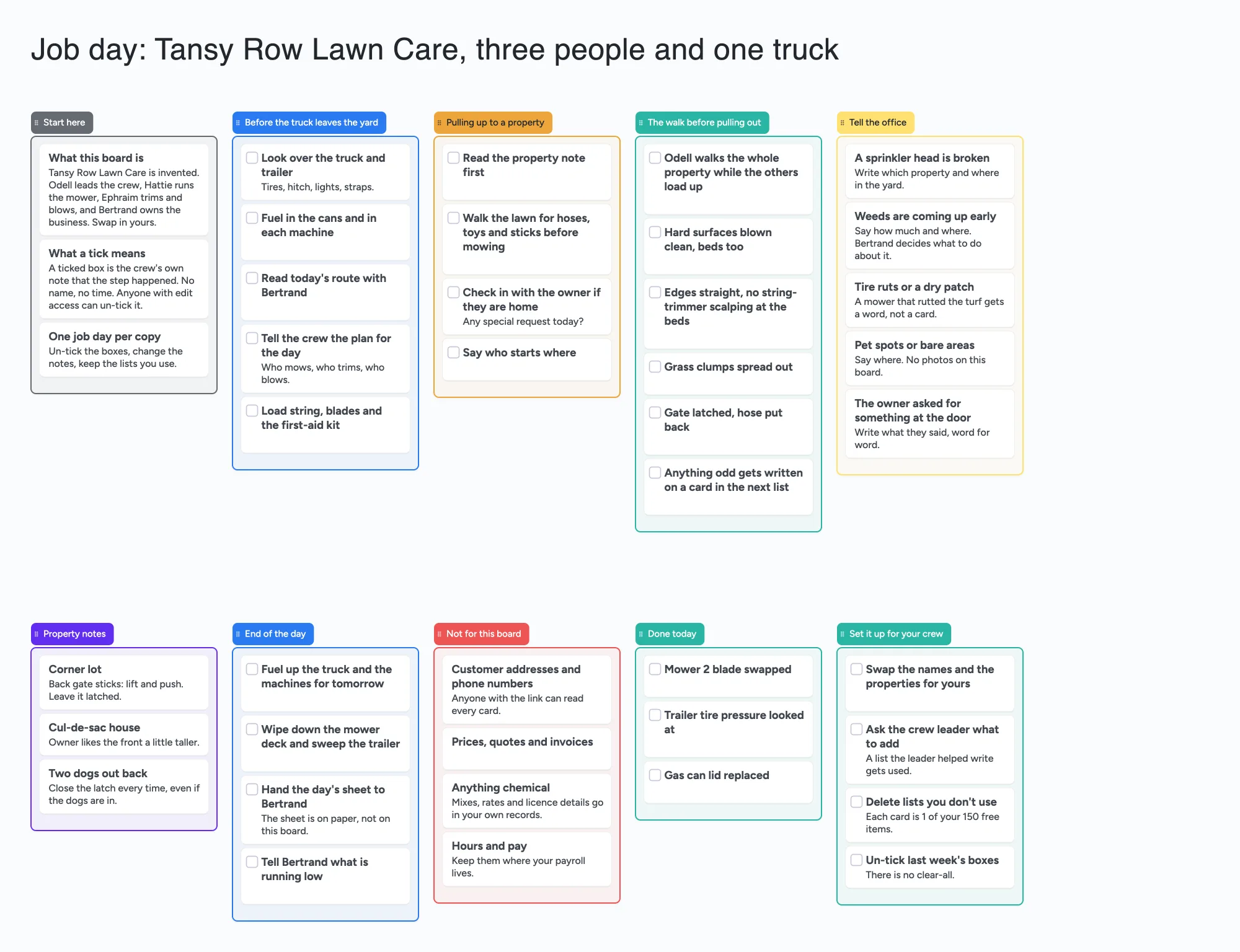
One working day, in order
- What it covers: a crew leader's day in order: the yard before leaving, arriving at a property, the walk before pulling out, what to pass to the office, short notes per property, and the end of the day. The crew is invented and every name is a first name.
- What it leaves out: routes, quotes, invoices, customer addresses, chemical mixes or rates, licence details, hours and pay. Nothing on it times a visit or records who finished one.
- What a tick means: the crew's own note that a step happened. No name, no time; anyone with edit access can un-tick it, and nothing records that.
- Your plan: the example is 52 of your 150 free items (41 cards, 10 lists and 1 title text box, our count). Arrows and pen strokes don't count. A copy takes 1 of your 5 boards. Writing needs a free sign-in; a reader can open the link signed out and can't change anything.
Where a printed route sheet or a crew app does the job better
A shared board does one thing here: it keeps the order of the day and a few notes where the whole crew can read them. It does not hold a route, a customer list or a record of what was done at each house. Crews have long handled that part on paper. On LawnSite, in a thread started December 26, 2000 (the page shows 13 replies), JimLewis, whose signature reads Lewis Landscape Services, Oregon, writes "I make each crew a notebook" with "One page per customer on that days route." Another poster suggests a 3-ring binder, and JimLewis replies that they use 3-ring binders. The crew leader fills in the date and the work done on each visit, so "in less than a minute, you can look back on the page and get a very good idea of the level of service that was done at each house each week." The same thread has Turfdoctor, who says they bought Clip route-sheet software after three years of spreadsheets and writes that it "does not allow you to forget things or details". Those are two forum accounts from December 2000, and the software names are theirs.
Put plainly: if you need a route, a visit history or a record of who did what, a notebook, a spreadsheet or a crew app does it and this board does not. In a LawnSite thread from June 12 to 16, 2014 (the page shows 6 replies), gcbailey says "I just keep a printed copy on a clipboard in the truck" for the customers cut on different heights or patterns, and Greenboy24 says "Providing client specific documentation for each property is very smart rather than relying on someone's memory." The board's Property notes list keeps three short notes of that kind (a gate that sticks, a taller front lawn, a latch with dogs behind it) and nothing more.
The day in the order a crew leader lives it
A Lawn & Landscape Q&A, "Checklists and specializing vs. diversifying" (published January 30, 2013, answered by Rich Wilbert, signed "Landscape Industry Certified Manager, SiteSource, Inc."), lists what a crew leader checks each day. Among its 16 lines: "Conduct a safety check of trucks and trailers before leaving the yard.", "Check fuel levels in cans and equipment.", "Check on route for the day with account manager or supervisor.", "Check in with the customer at each job site, especially to see if there are any special requests." and "Fuel up the equipment and truck for next day." It also says "keep in mind that the idea is for the checklist to be simple and something that is easy for the crew leaders to follow."
The board follows that order with its own wording and fewer lines. Before the truck leaves the yard has five tick cards, Pulling up to a property has four, and End of the day has four. It takes no step from the Q&A that the board cannot show: no route is on the board, so the route card says only to read today's route with Bertrand. The Q&A also suggests asking crew leaders to help build the list. The board has a card in Set it up for your crew that says the same.
The walk before pulling out
Green Industry Pros ran an article, "7 Things Great Crew Leaders Do Every Property Visit" (Apr 9, 2013, quoting two landscape companies). It says Reinhart Grounds Maintenance crew leaders "are trained to always perform a complete walk-around before leaving a property. They do this while the rest of the crew is loading up the equipment." It then lists what the two companies' crew leaders look for: trimming, beds and hard surfaces blown off, grass clumping, tire ruts, pet spots, weeds, dry turf and damaged sprinkler heads. A second company in the article, The Yard Barbours, says its installation crews are given spreadsheets of what is to be done on each project, and crew leaders "are not to leave a property until everything on that spreadsheet is checked off."
The board's walk list has six cards that follow that idea in the crew's own words: Odell walks the property while the others load, hard surfaces and beds are blown clean, edges are straight, clumps are spread, the gate is latched, and anything odd goes on a card in the next list. The board has no photo of a good finish and no standard for one; the standard is the crew's own.
Four things the crew keeps off the board
Anyone you give the link to can read every card, and a board only closes to invited people on Pro, so the Not for this board list names four things to leave off:
- Customer addresses and phone numbers. Anyone with the link can read every card; use property nicknames such as "Corner lot".
- Prices, quotes and invoices. The board never works out what is owed.
- Anything chemical. Mixes, rates and licence details belong in your own records, not on a card.
- Hours and pay. Keep them where your payroll lives. The Q&A above has crew leaders turn in daily time sheets; this board holds none, and the End of the day list says the day's sheet stays on paper.
What the crew passes up to the office
The same Green Industry Pros article closes with a seventh point, communicating up the chain. It says Reinhart was testing mobile devices with some crew leaders, that "Some crews continue to utilize printed checklists/note sheets, which also prove very reliable", and that "Nothing is beyond a text message in this day and age". The article calls the software it names, Boss LM, web-based business management software; it is a trade publication's 2013 piece, not a review.
The board's Tell the office list holds five cards: a broken sprinkler head, weeds coming up early, tire ruts or a dry patch, pet spots or bare areas, and a request the owner made at the door. Most say what to write down. Nothing on the board sends it to anyone. Bertrand reads the list, or the crew texts him; the board does not do either.
Where else a crew's day gets written down
The rows below come from three pages read on November 26, 2026, one row each. We make Instaboard and are not affiliated with any of them; pages and plans can change.
| Source | What the page says | It wins when | On the board |
|---|---|---|---|
| SimplySub, Landscaping Job Checklist (a software company's page, "Updated 2026-07-04") | says the checklist is free to print, copy or check off on the page; covers site prep, safety, planting, hardscape and cleanup, with a Documentation Needed section of photos, work logs and customer sign-off; a Reset Checklist button | Install jobs (planting, grading, hardscape), a printed copy, a built-in reset, photos and sign-off lines | Maintenance-day order only; no install steps, no photos, no sign-off, no reset |
| Green Industry Pros article (Apr 9, 2013; a trade publication) | Crew leaders walk the property before leaving; some crews use mobile devices, some printed note sheets | Notes entered into business software in the field | A list the crew reads and writes; no link to any software |
| LawnSite thread, JimLewis (December 2000; a forum post) | A notebook with a page per customer and a dated line per visit | A visit history per house | No history; Property notes are short and undated |
Swipe the table sideways to see every column.
From each page, read November 26, 2026. SimplySub sells construction software; the other two are articles and forum posts, not product pages.
When a printed sheet or an app does more
If you need a route, a record of each visit, photos of the finished work or a customer sign-off, use a notebook, a spreadsheet or a crew app built for it. Use this board when a small crew just wants one shared list of the day's order and a few notes that anyone with edit access can update.
Setting it up for your crew
A Reddit comment on r/landscaping makes the case for writing the roles down: in "Business Owners: How did you grow past 1 man mowing setup?" (posted 2025-08-31 UTC; the archived copy we read has 33 comments, none removed), u/AbbreviationsFit8962 writes "Having clear expectations of each role on paper is helpful because it makes a more generic training routine for each role possible for faster training." It is one account's view in a thread mostly about growing a business, not about checklists.
- Items. Each card, list and text box is 1 of your 150 free items, across all your boards. The example is 52. Arrows and pen strokes don't count. Pro removes the item limit ($5 a month billed yearly, $59.99 a year, or $7.99 monthly).
- Un-ticking. There is no clear-all button, and a copy keeps its ticks. The example has 26 tick boxes; un-tick them at the start of the next job day.
- No reminders or due-date alerts. Nothing on the board tells anyone to start, to finish or to come back.
- Who can write. A new board starts as "Anyone who joins can view". To let the crew tick items, tick "Anyone who joins can edit" in Share; writing needs a free sign-in, and a reader who opens the link signed out can't change anything.
- Open the board and swap the names. Replace Tansy Row Lawn Care and the crew with yours.
- Rewrite the walk and the day lists with your crew leader. Keep each card to one step.
- Delete the lists you don't use. A crew with no property notes can lose that list.
- Read it as a stranger would, then open the link signed out. No addresses, no prices, no chemicals.
Start from the ready board
It opens in your browser in a few seconds, with nothing to install. Sign in for free when you want to save it and share it.
Questions
Is there a lawn care crew checklist a small crew can share?
Yes. Open the board, replace Tansy Row Lawn Care and the invented crew with yours and share the link. It follows a working day: the yard before leaving, arriving at a property, the walk before pulling out, what to tell the office, property notes and the end of the day.
Does it hold routes, customers or prices?
No. The board has no route, no customer list, no address, no quote and no invoice. Keep those in your own records and use first names or nicknames on the cards.
Can it show who finished a job or when?
No. A tick shows no name and no time, and anyone with edit access can un-tick it. It is the crew's own note that a step happened, not a record of a visit.
Can it remind the crew or the owner of anything?
No. Nothing on the board sends a reminder or a due-date alert.
Is it for installs as well as mowing?
It is written for a maintenance day of mowing, trimming and blowing. Planting, grading and hardscape jobs have their own steps; a checklist built for installs fits those better.
How many job days fit on the free plan?
Keep one board and reuse it. The example is 52 items, so two copies are 104 and a third passes the 150 free items (our arithmetic), and each copy takes 1 of your 5 boards.
Sources
- LawnSite: Crew Checklist (started Dec 26, 2000, last post Jan 3, 2001; read November 26, 2026; the page shows 13 replies; forum posts are single accounts)
- LawnSite: Crew job Descriptions and checklists (June 12-16, 2014; read November 26, 2026; the page shows 6 replies; forum posts are single accounts)
- Lawn & Landscape: Checklists and specializing vs. diversifying (published January 30, 2013; read November 26, 2026; a trade publication's Q&A)
- Green Industry Pros: 7 Things Great Crew Leaders Do Every Property Visit (Apr 9, 2013; read November 26, 2026; the page asks for a free account to continue reading and showed the full text; a trade publication)
- SimplySub: Landscaping Job Checklist ("Updated 2026-07-04"; read November 26, 2026; a construction software company's page)
- r/landscaping: Business Owners: How did you grow past 1 man mowing setup? (2025-08-31 UTC; read November 26, 2026; the archived copy has 33 comments, none removed; replies are single accounts)