For two or more people renovating one home
Home renovation planner: a shared board for the decisions
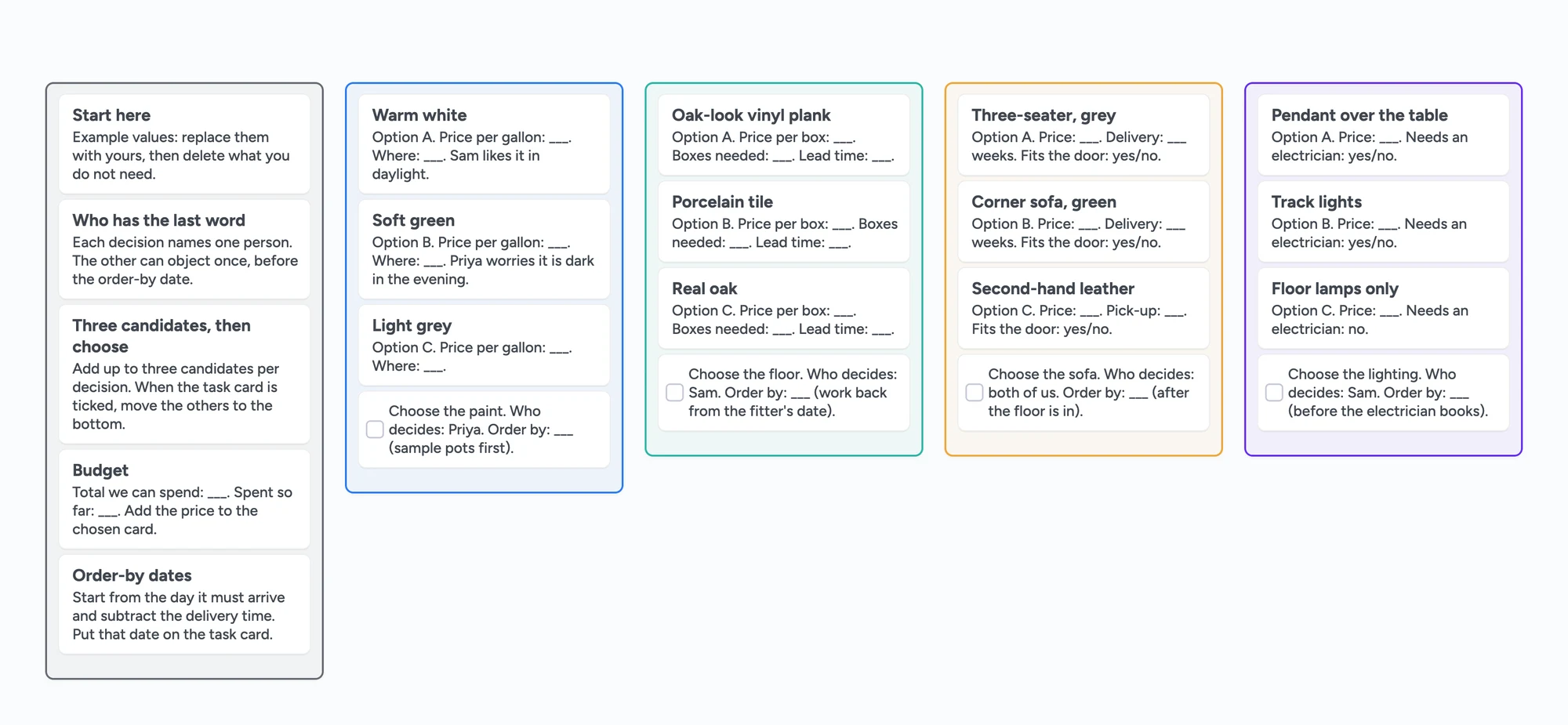
A renovation is a long run of small decisions: which paint, which floor, which sofa, which lights. This page is about that one job, keeping the candidates, the person who decides and the order-by date in one place that everyone can open. The ready board has a list per decision, three candidates in each, and a task card with an owner and a date. It is not a floor-plan, 3D or budget tool, and the sections below say where those are better.
Updated
The short answer
- One board, one list per decision. Paint, floor, sofa, lighting. Each list holds two or three candidate cards and one task card.
- The task card carries the decision: assign it to the person who has the last word, and put the order-by date on it.
- Set Share to "Anyone with the link can edit" before you send the link. A new board starts as view-only for people with the link.
- Free plan limits, up front: 5 boards, 150 items across all your boards, 3 pictures per board; a link card that shows a picture preview counts as one of the 3. Each partner who opens your link uses one of their own 5 boards. Keep every decision on this one board.
- Not a floor-plan, 3D or budget tool. Plan the room in Planner 5D or Floorplanner, track costs in a sheet, and use this board to choose.
The free-plan limits, before you build
Instaboard's free plan allows 5 boards and 150 items per account (cards, lists, images, text boxes; pen strokes, sections and arrows don't count), with 3 pictures and 1 file per board. Pro is $5 a month billed yearly ($59.99), or $7.99 monthly. A board someone opens from your link takes one of their 5 free board slots too. The ready board below is 5 lists and 21 cards, so it fits with room to add more decisions.
Put all your decisions on one board. A card can open into its own board, but that board counts toward the creator's 5, so six decisions as six child boards won't fit on the free plan. Lists on one board do.
How to set it up
- Open the ready board above, or start a blank one. Replace the example rooms and prices with yours.
- Open Share and choose "Anyone with the link can edit". A new board starts as "Anyone with the link can view", so your partner could look but not write.
- Send the link. Whoever opens it signs in free with Google, Apple or email to add or move cards. Without signing in they see the board view-only.
- Add one list per decision. Name it for the thing you are choosing: Paint, Floor, Sofa, Lighting, Tile.
- Add two or three candidate cards to each list. Put the price, the lead time and one line on why in the card text. A card can carry one link attachment, so give each candidate its own card.
- Finish each list with a task card. Assign it to the person who decides and give it the order-by date: the day it must arrive minus the delivery time. Tick it when the choice is made.
Keep a grey Rules list at the left, as the ready board does: who has the last word on each decision, the total you can spend, and the order-by dates. It gives an argument one place to end.
Pictures: three per board on the free plan
The free plan allows 3 pictures per board. That is why the ready board has none: the candidates are text cards with a price and a lead time. For a look at a colour or a floor, keep the photos in another tool and put the product name in the card. A link card that shows a picture preview counts as one of the 3. If you want more than 3 pictures on one board, that is what Pro is for.
What people say they use today
The tools are scattered, and people say so. The first post in the Houzz thread "How does everyone plan and organize for a renovation?" (February 27, 2021, read in full November 7, 2026) describes "a million things spread across houzz, pinterest, google docs/sheets, and in emails". The nine replies are each one person's view and name a binder, Excel or spreadsheets, a general contractor's to-do list, Trello and Pinterest. The thread is five years old, so it shows the problem, not what people do now.
A shared board doesn't replace any of those. It is the place where the choice between candidates gets made and written down, so that the person who orders the floor sees the same board as the person who picked it.
When something else is the better choice
- You need a floor plan, measurements or a 3D view. Planner 5D's remodeling page (read November 7, 2026) describes drawing walls, placing furniture from a library and exporting a 3D render. Floorplanner's personal page says it is free for personal use, with 5 free projects. We have neither.
- You want a pretty mood board. Canva has a mood board maker (canva.com/create/mood-boards, read November 7, 2026). Our free plan allows 3 pictures per board.
- You need costs added up, sorted or compared. A spreadsheet or Notion adds up and sorts; Instaboard has no formulas and no budget total. Notion's "Home Renovation Quote & Contractor Budget Planner" template lists contractor quotes, a Decision Log and a Materials and Finishes database (read November 7, 2026).
- You want budget, bids and receipts in one app. HomeZada's own page describes budgets, bids, receipts and saved product options by brand, model and price (homezada.com, read November 7, 2026).
- You need reminders. Due dates on cards show in the app only. We don't send alerts.
What the board doesn't do
- No floor plan, measurements or 3D.
- No budget total or sorting. Type the price on the card and add it up elsewhere.
- No reminders or alerts for order-by dates.
- Writing needs a free sign-in. Viewing doesn't.
- 3 pictures per board, 5 boards and 150 items on the free plan.
- It doesn't connect to any store or contractor. The link you send is a board link.
Start from the ready board
It opens in your browser in a few seconds, with nothing to install. Sign in for free when you want to save it and share it.
Questions
How do you organize a home renovation with a partner?
Put every decision on one shared board: a list per decision (paint, floor, sofa), two or three candidate cards in each, and a task card that names who decides and the order-by date. Set Share to "Anyone with the link can edit" so your partner can write.
Can my partner edit the board too?
Yes. Choose "Anyone with the link can edit" in Share and send the link. They sign in free with Google, Apple or email to write. Without signing in they see the board view-only.
Does my partner use up one of their free boards?
Yes. A board opened from a link takes one of that person's 5 free board slots. At 5, the link still opens but the app says the board won't be added to their boards.
Can I add a floor plan or 3D view?
No. Instaboard has no floor-plan or 3D tool. Plan the room in a tool like Planner 5D or Floorplanner and use this board to choose between the options.
Does it add up the costs?
No. There are no formulas or budget totals. Type the price on each card and add it up in a spreadsheet.
Does it remind us when to order?
No. Due dates show in the app, but we don't send reminders or alerts.
Is Instaboard free?
Yes. The free plan includes 5 boards, 150 cards and items across your account (pen strokes, arrows and sections don't count), 3 images and 1 file per board, unlimited collaborators and video calls up to an hour. Pro is $5 a month billed yearly ($59.99 a year), or $7.99 monthly, and the people you invite join free.
Sources
- Houzz: How does everyone plan and organize for a renovation? (Feb 27, 2021; read in full Nov 7, 2026)
- Planner 5D: Free home remodeling software (read Nov 7, 2026)
- Floorplanner: for personal use (read Nov 7, 2026)
- Canva: mood board creator (read Nov 7, 2026)
- Notion Marketplace: Home Renovation Quote & Contractor Budget Planner (read in full Nov 7, 2026)
- HomeZada: Home improvement project planner and budgeting app (read in full Nov 7, 2026)
Related
A wedding planning board you and your partner can actually share
A free, ready-made wedding planning board: the basics, a month-by-month checklist, vendors with deposits and balances, and a day-of timeline. Plan together with your partner in real time.
A Notion alternative for planning with other people
Notion is unlimited for one person, but a free workspace with 2 or more members gets 1,000 blocks in total. An honest comparison and a visual, shared alternative with drawing and calls.
A Trello alternative for families, classes and groups bigger than 10
Trello's free plan stops at 10 collaborators per Workspace, and boards go view-only past it. An honest comparison, plus a free alternative with unlimited collaborators, drawing and calls.