For middle and high school teachers who need a plan a substitute can read in five minutes
Emergency sub plans template: one shared board for the day, the lesson and where things are
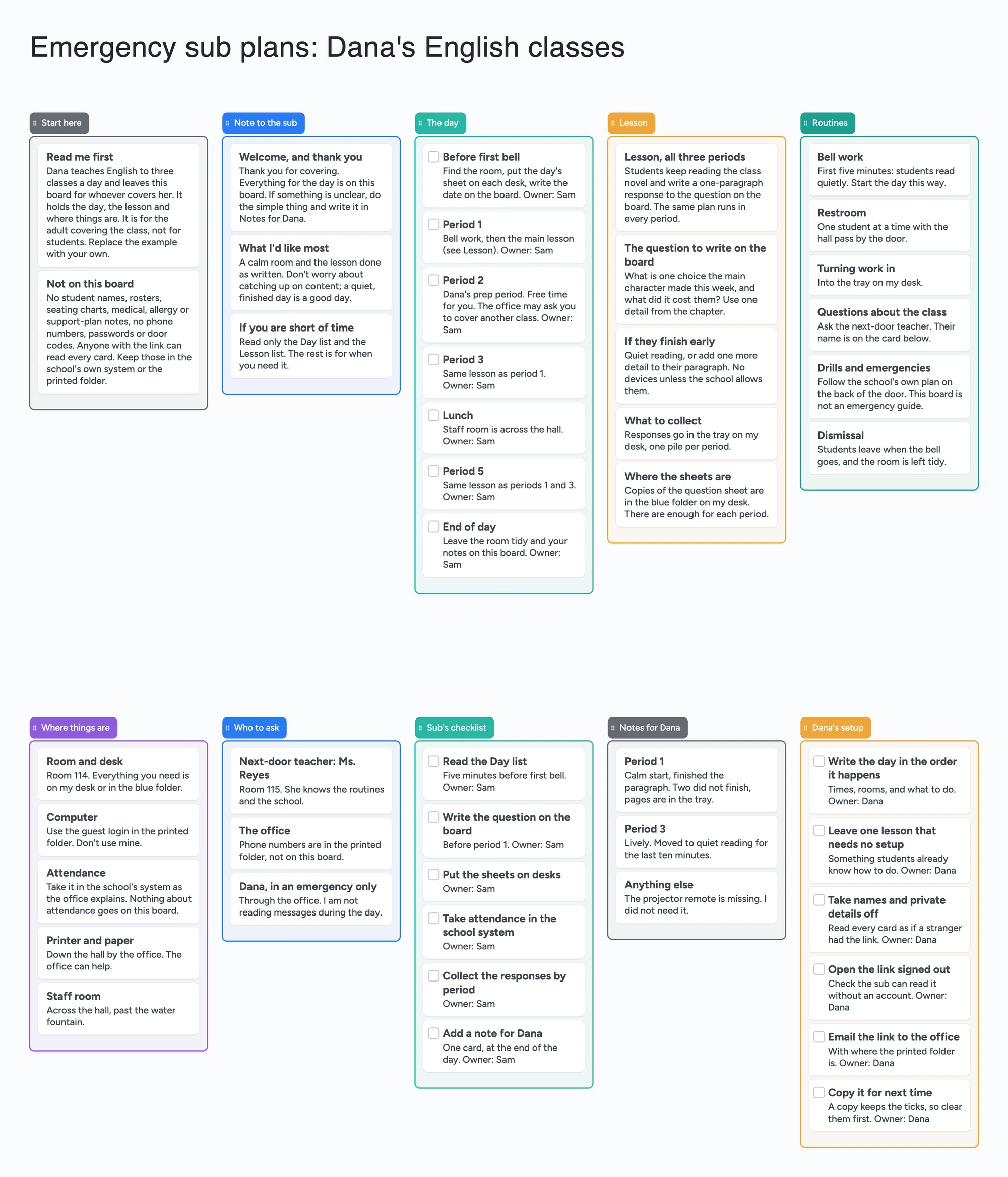
We make Instaboard, an online board. This is an emergency sub plan laid out as a shared board and filled in for one invented teacher: Dana, who teaches English to three classes a day and leaves it for Sam, the adult covering them. It has ten lists: Start here, Note to the sub, The day, Lesson, Routines, Where things are, Who to ask, Sub's checklist, Notes for Dana and Dana's setup. It is built for two adults only, the teacher and the substitute. It holds no student names, rosters, seating charts or support-plan notes, and the first section below says what to keep off a link-shared board. A printed folder and your school's own system are better for anything private, and most sub plans need some of that. This board earns its place as the part the sub reads first: what the day is, what the lesson is and where things are. It sends no reminders, schedules no cover, takes no attendance and doesn't record who ticked what or when.
Opens in your browser. Anyone can view; a free sign-in lets you edit.
Updated
Read this first: what stays off a link-shared board, and what this board does
- The link is not private. Anyone who has it can read every card. So there are no student names, rosters, seating charts, medical or allergy notes, support plans, phone numbers, passwords or door codes on this board, and no student uses it. Those belong in the printed folder or your school's own system. Check your school's or district's rules on outside tools first; we don't know them.
- What the board is: the part of a sub plan a substitute reads first: a note, the day in order, one lesson, routines, where things are, who to ask, a short checklist for the sub and a place for the sub's notes. Dana's lesson needs no setup. The example is invented.
- What it isn't: no reminders or alerts, no cover scheduling, no attendance, no grades, no emergency procedures and no record of who ticked a box or when. Anyone you give edit access can un-tick anything and nothing records it. There is no clear-all button, so you un-tick each box before you copy it.
- Free plan: the example is 57 of your 150 free items (46 cards, 10 lists and 1 title text box, our count). Arrows and pen strokes don't count. Writing needs a free sign-in, and a sub who only needs to read can open the link signed out. Pro removes the item limit.
What a sub plan usually holds, and what to keep off a board
Four guides, read November 24, 2026 (three from teacher-run sites or an arts-education group, one from a software vendor), list what a substitute needs. The two binder guides list student information. The Sassy Math Teacher's "The Best Sub Binder for Middle School" (published 2022-11-11 per its page data) lists a note for the substitute, a schedule, a lesson plan for each prep, a class roster, a seating chart, helpful students, space for the sub's feedback, procedures and emergency information. Maneuvering the Middle's "Organizing a Substitute Binder" (published 2021-09-21, modified 2023-07-05) adds contact information for the office, bell schedules, drills, computer logins and "random information like how to turn on the projector", and also lists students who may need additional support.
- On this board: the note to the sub, the day in order, one lesson, routines, where things are kept, who to ask (by role or room, not a number) and a place for the sub's notes.
- Off this board, on purpose: rosters, seating charts, lists of students who need support or have allergies, accommodations, phone numbers, passwords and door codes. Anyone with the link can read every card, so those stay in the printed folder or the school's system.
- Also off: emergency procedures. The Drills card says to follow the school's own plan. A board is not an emergency guide.
If your plan is mostly about the students (who sits where, who needs what), a printed folder is the right tool and this page isn't for you.
Dana's day, in the order a sub meets it
Dana teaches three classes of English, and Sam covers them. The lists are ordered by what the sub meets first, not by type of information. Each job in the tick lists ends with an owner's first name. Everything in the example is invented.
- Start here (2 cards). "Read me first" says who the board is for. "Not on this board" lists what is kept off it.
- Note to the sub (3 cards). A thank-you, what Dana most wants (a calm room and the lesson done as written) and a short path for a sub short of time: read The day and Lesson only.
- The day (7 cards, tick boxes). Before first bell, periods 1, 2, 3 and 5, lunch and the end of the day, each with one line. Period 2 is Dana's prep period, with a note that the office may ask the sub to cover another class.
- Lesson (5 cards). One lesson for all three periods: students keep reading the class novel and write a one-paragraph response to a question that goes on the board, with an early-finisher line, where the copies are and where to collect the responses.
- Routines (6 cards). Bell work, restroom, turning work in, questions about the class, drills and dismissal.
- Where things are (5 cards). The room, the guest login in the printed folder (not Dana's), attendance (taken in the school's system, nothing about it on the board), printer and paper, and the staff room.
- Who to ask (3 cards). The next-door teacher by room, the office, and Dana through the office for emergencies only.
- Sub's checklist (6 cards, tick boxes). Read The day, write the question on the board, put the sheets on desks, take attendance in the school system, collect the responses by period, and add a note for Dana.
- Notes for Dana (3 cards). Where the sub writes how each period went, in plain sentences with no student names.
- Dana's setup (6 cards, tick boxes). Dana's own steps before she leaves the link: write the day in order, leave a lesson that needs no setup, take names and private details off, open the link signed out, email it to the office, copy it for next time.
There are no arrows on this board; the order of the lists does the work.
What the guides say to leave, and where this board differs
The guides overlap on a few things the board follows; each point names who says it, and each is one author's view.
- Keep it short. Maneuvering the Middle says "stick with the essentials and keep things brief" and that bullet points and essential information are key. The Sassy Math Teacher says most substitutes don't have time to read a lot.
- Leave a lesson that needs no setup. The Institute for Arts Integration's guide (updated June 12, 2025) says to leave a lesson that is easy to follow and doesn't need a lot of setup, and two lessons per class so you are covered if you are out longer. Maneuvering the Middle suggests students review skills already taught for a short absence.
- Give the sub a way to say how it went. The IAS guide has a feedback form; The Sassy Math Teacher keeps a class notes section; Progress Learning's template ends with wrap-up and reflection prompts. The board's Notes for Dana list is that, without names.
- Guest logins, not personal ones. Maneuvering the Middle prefers guest logins over personal passwords, and IAS says to leave a generic login. The board points to the printed folder for it and puts no login on the card.
- Where this board differs. The two binder guides include rosters and seating charts; this board doesn't. It is a link, so a sub can read it from the email before first bell, and you can edit it from home when you wake up sick. Nobody needs a sign-in to read it.
How to set it up before you need it
- Open the board and replace the example. Swap Dana's classes and room for yours. Delete cards you don't need; each is 1 of your 150 items.
- Write the day in time order. Times, rooms and one line each. The sub should be able to read The day and Lesson alone in five minutes.
- Leave one lesson that needs no setup. Something your students already know how to do. Put the question or task on a card and where the copies are on another.
- Take private details off. Read every card as if a stranger had the link. No student names, numbers or logins.
- Share it. In Share, new boards start as "Anyone who joins can view", which is what a sub needs. Set it to "Anyone who joins can edit" only if the sub should tick boxes or add notes; then they sign in once, free. Open the link signed out to check a reader sees everything.
- Email the link to the office. Say where the printed folder is. Tell the sub that nothing private is on the board.
- Copy it for next time. A copy of the board takes 1 of your 5 free boards and keeps its ticks, so un-tick each box first.
What this board doesn't do, and where a printed folder or a form pack does it better
Read on November 24, 2026 from each page.
| Option | What its own page says (November 24, 2026) | Better than this board for | Not what you get |
|---|---|---|---|
| Instaboard board | Free: 5 boards, 150 items, 3 pictures per board. Pro removes the item limit ($5/mo billed yearly) | A link the sub reads from an email, editable from home | Rosters, private notes, reminders, cover scheduling, who/when ticked |
| Printed sub binder or folder | The Sassy Math Teacher (published 2022-11-11): five sections separated by tab dividers, sheet protectors optional; Maneuvering the Middle: "it needs to be a binder that is clearly labeled and huge" | Student information, seating charts and anything private | Editing from home; a link |
| Form pack (Institute for Arts Integration) | Free PDF of three forms: class overview, substitute lesson, feedback (page updated June 12, 2025) | Fill-in forms to print | A shared layout you edit live |
| Digital folder or Google Site (same IAS guide) | Says to put everything on a thumb drive or a free Google Site with links to lessons, forms and contacts | A folder of files with links | A single card layout |
| Progress Learning template | Free sub plan template with a quick overview, daily routine, lesson, independent practice and wrap-up (published 2025-09-03); promotes its own platform | Teachers who already use that platform | Anything outside it |
Swipe the table sideways to see every column.
From each page, read November 24, 2026. Not affiliated with any of them. Your school's own sub system and rules are not read here; check them.
Where these win
If the plan is mostly about students, use a printed folder or your school's system. If you want fill-in forms, use a form pack. Use this board for the part a sub reads first: the day, the lesson and where things are, in one link that you can fix from home.
Limits of the free plan for a sub board
- Items. Each card, list and text box is 1 of your 150 free items, across all your boards. The example is 46 cards, 10 lists and 1 title text box, 57 in all. Arrows and pen strokes don't count.
- Copies add up. Our arithmetic: each copy for a different class or teacher is another 57 items, 114 for two, and a third passes 150 (171). Delete old copies, or keep one board and edit it. Pro removes the item limit ($5 a month billed yearly, $59.99 a year, or $7.99 monthly).
- Boards. The free plan includes 5 boards, and a copy takes 1 of them.
- Photos. 3 images per board. The example has none, and a photo of a classroom can show students, so don't put one on it.
- Not private by default. New boards start with "Anyone who joins can view". Anyone with the link can read every card. Invite-only boards are a Pro feature.
- No reminders or due-date alerts, no cover scheduler, no attendance. The board doesn't tell a sub the bell is about to ring.
- No record of who ticked. Anyone with edit access can un-tick any box and nothing records who did.
- Writing needs a free sign-in. A sub who joins to tick boxes signs in once; a reader can open the link signed out and can't change anything.
Start from the ready board
It opens in your browser in a few seconds, with nothing to install. Sign in for free when you want to save it and share it.
Questions
Is there an emergency sub plans template for a shared link?
Yes. Open the board, replace Dana's day and lesson with yours and send the link to the office. It holds the day, one lesson, routines and where things are, and nothing about individual students.
Can I put my class roster or seating chart on it?
No. Anyone with the link can read every card, so rosters, seating charts, support-plan notes, allergy information, phone numbers and passwords stay in the printed folder or your school's own system.
Can students use this board?
No. It is written for two adults, the teacher and the substitute. Students don't use it, and the board asks nothing of them.
Does it take attendance or send reminders?
No. It has no attendance, reminders, alerts or cover scheduling. The Where things are list tells the sub to take attendance in the school's own system.
Can I tell who ticked a box?
No. A tick records no name and no time. Everyone with edit access sees it live, and anyone with edit access can un-tick it.
How many cards fit on the free plan?
Each card, list and text box is one of the 150 items across all your boards. The example is 57, so a third copy passes 150 (our arithmetic). Arrows are free, and Pro removes the item limit.
Sources
- The Sassy Math Teacher: The Best Sub Binder for Middle School (read November 24, 2026; published 2022-11-11 per its page data)
- Maneuvering the Middle: Organizing a Substitute Binder (read November 24, 2026; published 2021-09-21, modified 2023-07-05 per its page data)
- The Institute for Arts Integration: The Essential Substitute Teacher Folder (read November 24, 2026; updated June 12, 2025)
- Progress Learning: Emergency Sub Plans for Teachers (read November 24, 2026; published 2025-09-03)